Google Data

  • Home
  • Everything Google
    • Gmail (Google Mail)
    • Google Adsense
    • Google Adsense Feeds
    • Google Adwords
    • Google Adwords API
    • Google Affiliate Network
    • Google Ajax API
    • Google Analytics
    • Google Android
    • Google App Engine
    • Google Apps
    • Google Blog
    • Google Blogger Buzz
    • Google Books
    • Google Checkout
    • Google Chrome
    • Google Code
    • Google Conversions
    • Google CPG
    • Google Custom Search
    • Google Desktop
    • Google Desktop API
    • Google Docs
    • Google DoubleClick
    • Google Earth
    • Google Enterprise
    • Google Finance
    • Google Gadgets
    • Google Gears
    • Google Grants
    • Google Mac Blog
    • Google Maps
    • Google Merchant
    • Google Mobile
    • Google News
    • Google Notebook
    • Google Online Security
    • Google Open Source
    • Google OpenSocial
    • Google Orkut
    • Google Photos (Picasa)
    • Google Product Ideas
    • Google Public Policy
    • Google Reader
    • Google RechargeIT
    • Google Research
    • Google SketchUp
    • Google Student Blog
    • Google Talk
    • Google Testing
    • Google Translate
    • Google TV Ads Blog
    • Google Video
    • Google Voice
    • Google Wave
    • Google Webmaster Central
    • Google Website Optimizer
    • Google.org
    • iGoogle
    • Uncategorized
    • Youtube
    • Youtube API
  • Resources
    • Google Products & Services
    • Google Twitter Directory
    • Google Trademarks
    • Google Data Site Map
  • About
  • Contact
  • Subscribe via RSS

Google Summer of Code 2016 blog post round-up

November 8th, 2016  |  Published in Google Open Source

We’re publishing guest posts from Google Summer of Code (GSoC) students, mentors and organizations every week and more are coming. Many have already written GSoC wrap-up posts on their own blogs, so we’ve rounded them up for you to explore.


“Static types in Python, oh my(py)!” by Tim Abbott, org admin for Zulip
“We posted mypy annotations as one of our project ideas for Google Summer of Code (GSoC). We found an incredible student, Eklavya Sharma, for the project. Eklavya did the vast majority of the hard work of annotating Zulip. Amazingly, he also found the time during the summer to migrate Zulip to use virtualenvs and then upgrade Zulip to Python 3!”


“A road from Google Summer of Code student to organization administrator” by Araz Abishov, org admin for HISP
“Google has created unprecedented opportunity both for young developers and open source communities, which I think everyone should take advantage of. GSoC is more than just a three months internship, and I hope that this post will be a good example of how it can change anyone’s life.”


“Summer of Code 2016: Wrapping it up” by Martin Braun, org admin for GNU Radio
“This summer was a great summer in terms of student participation. All three students will be presenting their work (either in person, or via poster) at this year’s GNU Radio Conference in Boulder, Colorado.”


“2016 Google Summer of Code Wrap-Up” by Ed Cable, org admin for Mifos Initiative
“Each year GSoC continues to unite and grow our community in different ways. Once again, we received incredibly valuable contributions to our Mifos X web and mobile clients this summer; most importantly we have cultivated numerous passionate contributors that will be a part of our community long into the future.”


“Road to GSoC 2016” by Minh Chu, student who worked on Neverland for KDE
“I was nervous about choosing a project. So many projects and requirements! After many hours, I finally decided to write a proposal for KDE’s Neverland Theme Builder and was accepted.”


“Git Rev News” by Christian Couder, mentor for Git
“Such performance improvements as well as the code consolidations around the sequencer are of course very nice. It is interesting and satisfying to see that they are the result of building on top of previous work over the years by GSoC students, mentors and reviewers.”


“Google Summer of Code 2016 Conclusion” by Amine Khaldi, org admin for ReactOS
“Students stumble upon many of the same difficulties ReactOS' own senior developers encountered during their early days, including that ever painful but necessary step to using a proper debugger instead of relying on printf statements in the code.”


“My Journey in Open Source / How to Get Started Contributing” by Nelson Liu, student who worked on scikit-learn for PSF
“The best way to get started is to simply jump in! There are a myriad of ways to contribute to an open source project. Obviously, writing code to fix bugs, add new features, or enhance existing ones are useful. However, you don't have to write code to help out!”


“Lasp and the Google Summer of Code” by Borja o’Cook, student who worked on Lasp for BEAM Community
“All in all, it's been an amazing experience. I've received a lot of support from my mentors and teammates; the Lasp team is full of incredible people.”


“GSoC 2016 Students in TEAMMATES” by Damith C. Rajapakse, org admin for TEAMMATES
“We had our biggest batch of students (7 students) in GSoC 2016, selected from 93 proposals, and representing 4 countries and 4 universities, working on TEAMMATES (an online feedback management system for education) and related sub projects.”


“User-friendly encryption now in Drupal 8!” by Colan Schwartz, mentor for Drupal
“There were several students interested in the topic, and wrote proposals to match. Talha Paracha's excellent proposal was accepted, and he began in earnest. With Adam Bergstein (nerdstein) and I mentoring him, Talha successfully worked through all phases of the project.”


“GSoC with Shogun” by Sanuj Sharma, student who worked on Shogun
“This was an excellent learning experience for me and I got to work with people from different countries (UK, Russia, Singapore, Germany) and cultures. I highly recommend students to participate in Google Summer of Code by looking for projects that interest them because having open source experience is highly beneficial, especially for programmers.”


We have wrap-up posts coming out every week so stay tuned for more. If you’re interested in participating in Google Summer of Code 2017, you can find details here.

By Josh Simmons, Open Source Programs Office

CMake and ndk-build support in Android Studio 2.2

November 7th, 2016  |  Published in Google Android

Posted by Kathryn Shih, Android Product Manager

In addition to supporting the experimental Gradle plugin, Android Studio 2.2 enables you to build C/C++ components of Android projects using CMake and ndk-build.

The Android Studio team plans to continue to support the experimental Gradle plugin. This will eventually replace the current Gradle plugin, providing additional tightly-integrated benefits to C/C++ developers such as smarter dependency management. So if you're interested in someday having the smartest possible interface between your IDE and your build system, you shouldn't ignore the experimental plugin.

CMake and ndk-build are useful alternatives to Gradle in several cases:

  • Projects that are already using CMake or ndk-build, such as legacy Eclipse ndk projects
  • Projects that are unable to assume the risk of using an experimental plugin for their C/C++ builds
  • Projects that will share a C/C++ build system across multiple platforms
  • C/C++ projects that need to use advanced features currently unavailable in experimental Gradle such as NEON support

For new projects, we recommend using CMake or experimental Gradle. For new Android projects with limited C++, we recommend trying the experimental Gradle plugin. For projects with substantial amounts of C++, or where you want the maximally stable build configuration, we recommend using a CMake build. Android Studio intends CMake to be a permanently supported solution.

While we think that there are substantial advantages to having a single build system able to handle all parts of an Android application, stabilizing the experimental plugin is not an option for us because it relies on Gradle APIs that are still a work in progress. Until the Gradle APIs are stabilized, the experimental plugin will keep changing, particularly in its Domain Specific Language, and will be strictly tied to a very specific version of Gradle itself.

Note that the the old, undocumented ndkCompile integration is deprecated. If you are using it, you need to move away from it as we'll remove it completely in the near future. We recommend migrating to gradle+cmake via our migration guide.

Migrating from Eclipse to Android Studio

We no longer support the Eclipse ADT. To get started migrating, download and install Android Studio. For most projects, migration is as simple as importing your existing Eclipse ADT projects in Android Studio with the File → New→ Import Project menu option. For more details on the migration process, check out the migration guide.

Feedback and Open Source Contributions

We're dedicated to making Android Studio the best possible integrated development environment for building Android apps, so if there are missing features or other challenges preventing you from using Android Studio, we want to hear about it [please take our survey]. You can also file bugs or feature requests directly with the team, and let us know via our Twitter or Google+ accounts.

Android Studio is an open source project, available to all at no cost. Check out our Open Source project page if you're interested in contributing or learning more.

Gmail and Google Calendar get a whole lot better on iOS

November 7th, 2016  |  Published in Google Apps

(Cross posted from the Gmail blog) 

Posted by Matthew Izatt, Product Manager

Today we're making some changes to the Gmail and Google Calendar apps on iOS.

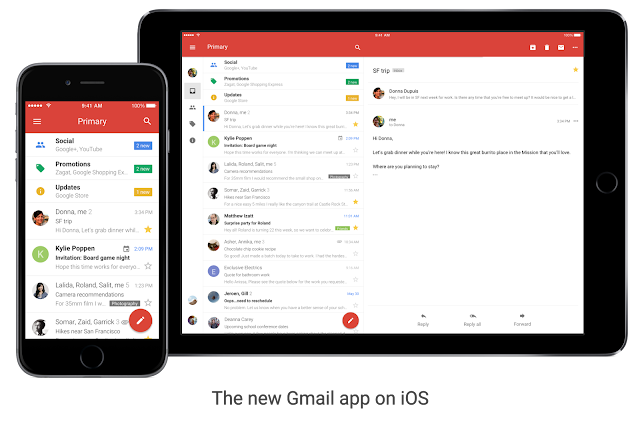
The new Gmail app for iOS

When you get the next Gmail iOS app update, you'll notice some exciting changes: The biggest overhaul of the app in nearly four years. It's the Gmail you know and love, with a fresh new look, sleeker transitions and some highly-requested features. It's a lot faster, too.

With the new app, getting things done on the go is a lot easier — whether you're trying to find a message your colleague sent you last month, or trying to get through your work inbox on a Monday morning.
Starting today, you'll be able to:
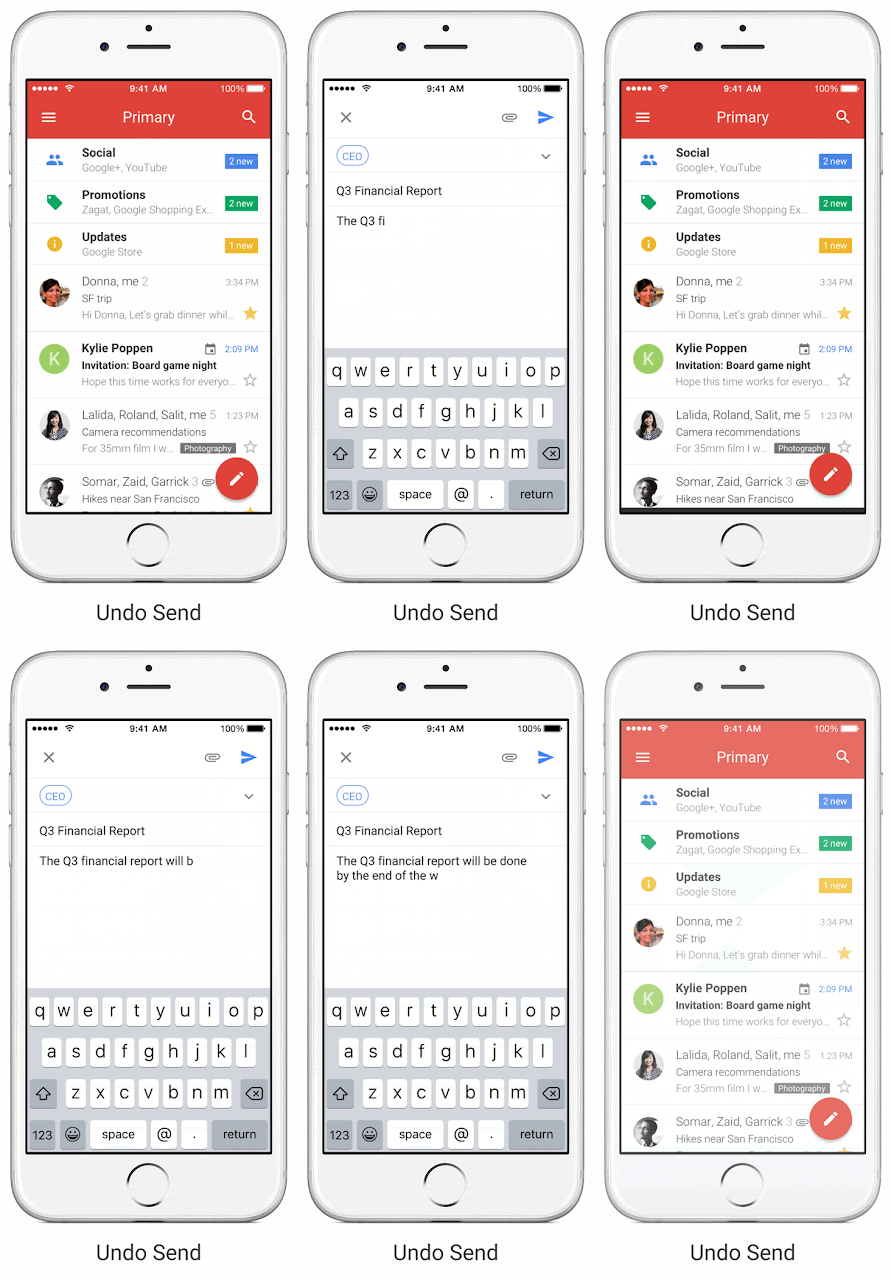
  • Undo Send, just like you do on the desktop, to prevent embarrassing email mistakes
  • Search faster with instant results and spelling suggestions (like when you type "flighht," but you really meant "flight")
  • Swipe to archive or delete, to quickly clear items out of your inbox


Google Calendar: Updated for you

Based on your feedback (thank you!), the Calendar app on iOS has some shiny, new features:
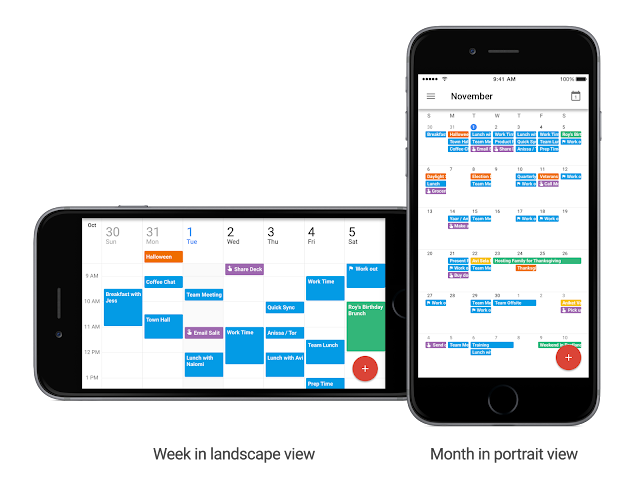
  • Month view and week in landscape view, so you have even more ways to see your schedule at a glance.
  • Spotlight Search support, so you can search for events, Reminders and Goals in Apple's Spotlight Search and find what you're looking for faster.
  • Alternate calendars. If you often look up dates in a non-Gregorian calendar — like Lunar, Islamic, or Hindu — you can now add that calendar to easily see those dates alongside your current calendar.


We'll continue to improve both Gmailand Calendarfor iOS so you can be more productive on the go.


Launch Details
Release track:
Launching to both Rapid release and Scheduled release

Rollout pace:
Gradual rollout (potentially longer than 3 days for feature visibility)

Editions:
Available to all G Suite editions

Impact:
All end users

Action:
Change management suggested/FYI

More Information
Gmail app on iOS change management guide (pdf)
  • Translations coming soon to the What's New site

Launch release calendar
Launch detail categories
Get these product update alerts by email
Subscribe to the RSS feed of these updates

Announcing the Google Code-in 2016 mentor organizations

November 7th, 2016  |  Published in Google Open Source

We’re excited to introduce the 17 open source organizations that are participating as mentor organizations for Google Code-in 2016. The contest, now in its seventh year, gives 13-17 year old pre-university students the opportunity to learn under the guidance of mentors by using their skills on real world applications, that is, open source projects.

Google Code-in officially starts for students on November 28, but students are encouraged to learn about the mentor organizations ahead of time and can get started by clicking on the links below.


  • Apertium - rule-based machine translation platform
  • BRL-CAD - computer graphics, 2D and 3D geometry modeling, and computer-aided design (CAD)
  • CCExtractor - open source tools for subtitle generation
  • Copyleft Games - building game development platforms for tomorrow
  • Drupal - content management platform
  • FOSSASIA - developing communities across all ages and borders to form a better future with Open Technologies and ICT
  • Haiku - operating system specifically targeting personal computing
  • KDE - team that creates Free Software for desktop and portable computing
  • MetaBrainz - builds community maintained databases
  • Mifos Initiative - transforming the delivery of financial services to the poor and the unbanked
  • MovingBlocks - like an open source Minecraft
  • OpenMRS - open source medical records system for the world
  • SCoRe - research lab that seeks sustainable solutions for problems faced by developing countries
  • Sugar Labs - learning platform and activities for elementary education
  • Systers - community for women involved in the technical aspects of computing
  • Wikimedia - non-profit foundation dedicated to bringing free content to the world, operating Wikipedia
  • Zulip - powerful, threaded open source group chat with apps for every major platform
Mentor organizations are currently creating thousands of tasks for students covering code, documentation, user interface, quality assurance, outreach, research and training. The contest officially starts for students on Monday, November 28th at 9:00am PST.

You can learn more about Google Code-in on the contest site where you’ll find Contest Rules, Frequently Asked Questions and Important Dates. There you’ll also find flyers and other helpful information including the Getting Started Guide. Our discussion mailing list is a great way to talk with other students, mentors and organization administrators about the contest. For questions about eligibility or other general questions, you can contact us at .

By Josh Simmons, Open Source Programs Office

Podcast to YouTube: an open source story

November 4th, 2016  |  Published in Google Open Source, Youtube

Almost a year ago Mark Mandel and I started the Google Cloud Platform Podcast, a weekly podcast that covers topics related to Google Cloud Platform, among other things. It's been a pretty successful podcast, but that’s not what I want to write about today.

After a while we started receiving emails from listeners that wanted to access our podcast on YouTube. Even though this might seem strange for those that love podcasts and have their favorite app on their phones, we decided that the customer is always right: we should post every episode to YouTube.

Specifications

Ok, so … how? Well, to create a video I need to merge the mp3 audio from an episode with a static image. Let's include the title of the episode and the Google Cloud Platform Podcast logo.


But once we post the video to YouTube we're going to need more than that! We need a description, some tags, and probably a link to the episode (SEO FTW!).

Where can we get that information from? Let's think about this for a minute. Where are others getting this information from? The RSS feed! Would it be possible to create a tool to which I could say "post the video for episode 46" and a couple minutes later the video appeared on YouTube? That'd be awesome! Let's do that!

Architecture

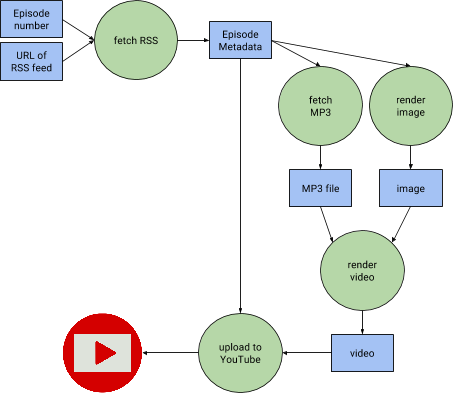
The application I wrote parses an RSS feed and given the episodes to publish it downloads the metadata and audio for an episode, generates the corresponding videos, and pushes them to YouTube.
Diagram of the flow of data in podcast-to-youtube
The hardest parts here are the creation of the image and the video. The rest is sending HTTP requests right and left.

Image Maker: rendering images in pure Go

After trying a couple of different tools I decided that the easiest was to create the image from scratch in Go using the image package from the standard library and a freetype library available on GitHub.

Probably the most fun part was to be able to choose a font that would make the title fit the image correctly regardless of the length in characters. I ended up creating a loop that:
  • chooses a font and measures the width of the resulting text
  • if it's too wide, decreases the font size by one and repeats.
Surprisingly, for me, this is actually a pretty common practice!

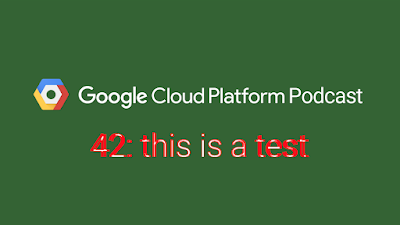
It is also worth mentioning the way I test the package: Using a standard image that I compare to the one generated by the package, then showing a "diff" image where all the pixels that differ are highlighted in red.
Diff image generated when using a wrong DPI.
The code for this package is available here.

Video maker: ffmpeg is awesome

From the beginning I knew I would end up using ffmpeg to create my video. Why? Well, because it is as simple as running this command:

$ ffmpeg -i image.png -i audio.mp3 video.mp4

Easy right? Well, this is once ffmpeg has been installed and correctly configured, which is actually not that simple and would make this tool hard to install on any machine.

That's why the whole tool runs on Docker. Docker is a pretty widespread technology, and thanks to Makefile I'm able to provide a tool that can be run like this:

$ make run

Conclusion

It took me a couple of days to write the tool and get it to a point where I could open source it, but it was totally worth it. I know that others will be able to easily reuse it, or even extend it. Who knows, maybe this should be exposed as a web application so anyone can use it, no Docker or Makefile needed!

I am currently using this tool weekly to upload the Google Cloud Platform Podcast episodes to this playlist, and you can find the whole code on this GitHub repository.

Any questions? I'm @francesc on Twitter.

By Francesc Campoy, Developer Advocate

Here’s to more HTTPS on the web!

November 3rd, 2016  |  Published in Google Online Security

Posted by Adrienne Porter Felt and Emily Schechter, Chrome Security Team
Security has always been critical to the web, but challenges involved in site migration have inhibited HTTPS adoption for several years. In the interest of a safer web for all, at Google we’ve worked alongside many others across the online ecosystem to better understand and address these challenges, resulting in real change. A web with ubiquitous HTTPS is not the distant future. It’s happening now, with secure browsing becoming standard for users of Chrome.

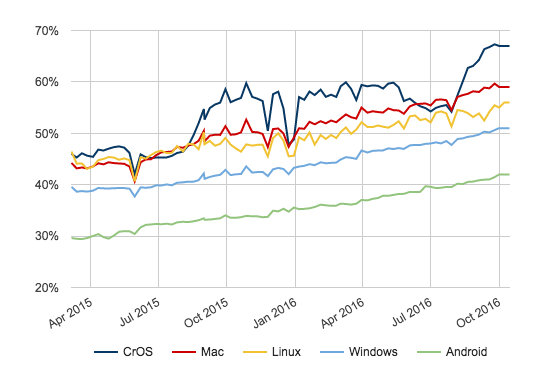
Today, we’re adding a new section to the HTTPS Report Card in our Transparency Report that includes data about how HTTPS usage has been increasing over time. More than half of pages loaded and two-thirds of total time spent by Chrome desktop users occur via HTTPS, and we expect these metrics to continue their strong upward trajectory.
Percentage of pages loaded over HTTPS in Chrome


As the remainder of the web transitions to HTTPS, we’ll continue working to ensure that migrating to HTTPS is a no-brainer, providing business benefit beyond increased security. HTTPS currently enables the best performance the web offers and powerful features that benefit site conversions, including both new features such as service workers for offline support and web push notifications, and existing features such as credit card autofill and the HTML5 geolocation API that are too powerful to be used over non-secure HTTP. As with all major site migrations, there are certain steps webmasters should take to ensure that search ranking transitions are smooth when moving to HTTPS. To help with this, we’ve posted two FAQs to help sites transition correctly, and will continue to improve our web fundamentals guidance.


We’ve seen many sites successfully transition with negligible effect on their search ranking and traffic. Brian Wood, Director of Marketing SEO at Wayfair, a large retail site, commented: “We were able to migrate Wayfair.com to HTTPS with no meaningful impact to Google rankings or Google organic search traffic. We are very pleased to say that all Wayfair sites are now fully HTTPS.” CNET, a large tech news site, had a similar experience: “We successfully completed our move of CNET.com to HTTPS last month,” said John Sherwood, Vice President of Engineering & Technology at CNET. “Since then, there has been no change in our Google rankings or Google organic search traffic.”


Webmasters that include ads on their sites also should carefully monitor ad performance and revenue during large site migrations. The portion of Google ad traffic served over HTTPS has increased dramatically over the past 3 years. All ads that come from any Google source always support HTTPS, including AdWords, AdSense, or DoubleClick Ad Exchange; ads sold directly, such as those through DoubleClick for Publishers, still need to be designed to be HTTPS-friendly. This means there will be no change to the Google-sourced ads that appear on a site after migrating to HTTPS. Many publishing partners have seen this in practice after a successful HTTPS transition. Jason Tollestrup, Director of Programmatic Advertising for the Washington Post, “saw no material impact to AdX revenue with the transition to SSL.”


As migrating to HTTPS becomes even easier, we’ll continue working towards a web that’s secure by default. Don’t hesitate to start planning your HTTPS migration today!

Test on Android 7.1 Developer Preview in Firebase Test Lab

November 3rd, 2016  |  Published in Google Android

By Ahmed Mounir Gad, Product Manager, Firebase Test Lab

To deliver the best user experience right out of the gate, Firebase Test Lab for Android allows you to test your apps and ensure their compatibility with multiple device configurations, across OS versions, screen orientations, and locales. With a single click, you can run your tests on hundreds of device configurations in Google Cloud and receive your results quickly.

Today, we’re excited to announce the availability of the Android 7.1 Developer Preview on Firebase Test Lab virtual devices. In addition to testing the Android 7.1 Developer Preview on your physical Android Device with the Android Beta program, or on your local Android Emulator, you can use the Firebase Test Lab to scale your app testing to hundreds of Android virtual devices.

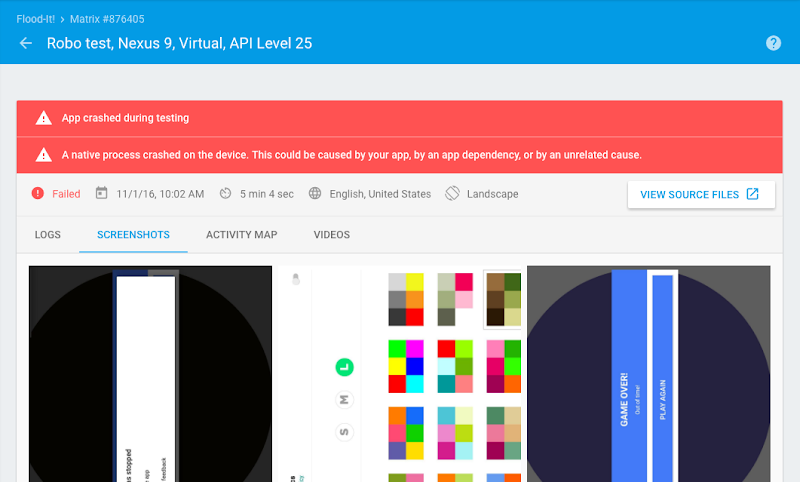
You can also use Firebase Test Lab to perform your own testing. If you don’t have any test scripts, Robo test is ideal for doing your basic compatibility testing on the new platform. It crawls your app in an attempt to find crashes. You can also use the Espresso Test Recorder in Android Studio to record your own instrumentation tests without writing any code.

From now until the end of December (12/31/2016), Firebase Test Lab will be offered at no charge on the Firebase Blaze plan for all virtual devices, to help you ensure the compatibility of your app with the Android 7.1 Developer Preview release, as well as with other Android releases.

Prepare your app for API level 25, then go to the Firebase Test Lab console to run your first test.

Happy testing!

Robo tests uncovering a crash on Android 7.1 Developer Preview for the Flood-It! app.

Welcome to Playtime!

November 3rd, 2016  |  Published in Google Android

Posted by Larissa Fontaine, Director, Global Head of Apps Business Development, Google Play

Almost three years ago, we started the first of an ongoing series of developer events, called Playtime, dedicated to educating partners on best practices and tools available to improve their apps and games and grow successful businesses on Google Play. It was originally a modest gathering that was held on our campus in Mountain View, CA, but it has quickly grown to become one our premier developer events of the year (outside of Google I/O) with a huge global footprint. We've already been in London, Paris, Berlin, San Paulo, New Delhi, Moscow, Tel Aviv, Tokyo, Seoul and more, just to meet directly with developers.

Today, Playtime is back in San Francisco after a long international run! On stage, we'll recap some of our recent efforts to invest in new areas that go beyond the smartphone, as well as announce new tools and highlight the major progress of recently launched features that help developers increase user engagement and make more money.

Extending beyond mobile devices

We live in a multiscreen world and people want to enjoy Android apps on the their phones, and many other devices. That's why we have been extending Google Play to go beyond the smartphone, enabling new app and gaming experiences while on the go, on a chromebook, in the living room and immersed in virtual reality.

The new Daydream device platform is going to be available soon and will come with a Google Play Store filled with high quality VR apps. Android Apps are now available in beta on a few Chromebook devices (same Android apps that currently run on phones and tablets). And we recently announced a developer preview of Android Wear 2.0 which introduced Google Play for Wear. This makes it easier for users to discover and install great apps that work directly on the watch.

Enhanced developer tools and programs

We continue to deliver the best tools for developers in the Play Developer Console to drive user engagement and increase revenue.

Offer new subscription promos

We know how important subscriptions are in helping you monetize and we're continuing to invest in features to support your subscription business. Subscriptions are the fastest growing business model on Play, with consumer spending in subscription apps increasing 10x over the last 3 years. Coming soon, you'll be able to create an introductory price for new subscribers for a set period of time. For example, you can offer a subscription for $1 per month for the first three months before the normal subscription price kicks in. Along with local/custom pricing and free trials already offered, introductory pricing will help you acquire more subscribers and grow your subscription business.

Build anticipation with pre-registration

Earlier this year, we started working with select developer to let users pre-register for major upcoming Android titles, such as Clash Royale (Supercell), and Candy Crush Jelly Saga (King), which has driven more than 30 million installs so far. With pre-registration, users simply tap the 'pre-register' icon to show their interest. The process automatically sets up an alert that prompts a user once the app is available. The program is limited at this time.

Get feedback early with Early Access

In only a few short months, more developers have been leveraging the "Early Access" open beta program to build a user base, interact with early-adopter users and get invaluable feedback before an official launch. It has been an immediate hit! Since the collection became available to all users, open beta titles have been installed over 4 million times (up from 1 million in September) and demand is growing. If you are a developer getting ready to launch on Google Play, you can nominate your app or game to be part of Early Access. Learn more here.

Recognizing art and innovation from Indies

To build awareness of the awesome innovation and art that indie game developers are bringing to users on Google Play, we have invested heavily over the past year in programs like Indie Corner, as well as industry events like the Google Play Indie Games Festival in North America. The new Indie Corner collection, in particular, has already helped million of gamers discover the latest and most innovative releases on Google Play. Developer can nominate indie game for inclusion at g.co/indiecornersubmission. We'll pick the best games to showcase based on the quality of the experience and exemplary use of Google Play game services.

Ensuring fair play for everyone

Our goal is always to do the right thing for both users and developers. As game economies have become more complex, developers are looking for more tools to ensure that all users play fairly to make gameplay fun for everyone. Today, we are announcing a new API (in beta) that helps developers identify users who have requested refunds so they can better manage their economies. This program is currently in early beta and interested developers can sign up to learn more here.

It has been another great year for Google Play thanks to the continued feedback and support from the developer community.

Introducing the AdWords Marketing Goals Website

November 3rd, 2016  |  Published in Google Adwords

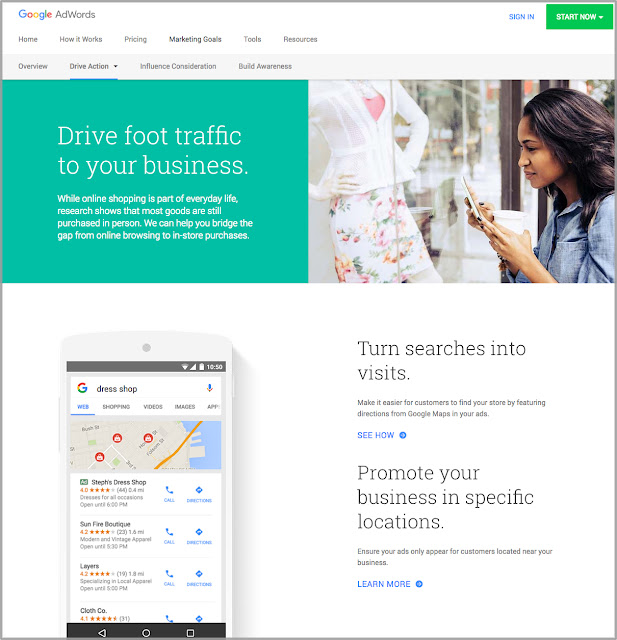
As marketers, you’re always looking for more effective ways to achieve business goals - from getting customers to discover your brand to encouraging them to buy something from your site, and everything in between. Today, we are introducing a new AdWords website that puts your goals front and center, and shows you which ads work best to accomplish those goals. You can also use this site to find info on our latest ad innovations, success stories from other marketers and best practices guides.

For example, if you’re a multi-channel retailer driving foot traffic into your store, learn about Google solutions like ads with store directions that can help people find your nearest business location.


Or if you just launched a new app and want to make sure the right people discover it, you can find best practices to get more high-value users to engage with your app. You can also draw inspiration from businesses like GrubHub that ran ads to connect with customers the moment they're searching for new apps in the Google Play store.


Check back in on the site regularly as we'll continue to add content. Also, help us ensure that the site is as useful as possible by sharing your feedback. We look forward to hearing your ideas and suggestions.


Posted by Anthony Chavez, Product Management Director, Advertiser Platform, Google

Global Spotlight: Converting pageviews into revenue

November 3rd, 2016  |  Published in Google Adsense

Welcome back to our Global Spotlight on India, a nation with a population of over 1 billion people and 22 official languages (not including English) which for current AdSense publishers, this presents an opportunity to grow your audience globally.

The Global Spotlight is a series of blog posts that can help educate, inspire, and provide you with insights into how you can grow your business and share your content in emerging markets.


Our last spotlight shared insights on why you should cater to mobile first users.  Now that you have a site optimized for mobile users and with  high quality, relevant content, here’s how you can convert your traffic into revenue and turn your #PassionIntoProfit.


First, deliver more viewable impressions to get your ads seen. Measuring viewability is extremely important, because if an ad isn't seen, it can't have an impact, change perception, or build brand trust. Here’s a few ways to boost ad viewability on mobile devices:


  1. Replace 320x50 ad units with 320x100 
  2. Move ads at least 150 pixels away from content to cut accidental clicks
  3. Use page-level ads designed for mobile devices. More on page levels below

Learn more tips on boosting mobile ad viewability in this blog post.

Second, choose the right mobile ad sizes: medium rectangle (300x250), large rectangle (336x280), large mobile banner (320x100), and rectangular responsive ad units. They tend to get the best results.

Third, use page-level ads. You’ve heard this from us before haven’t you? Page-level ads are a family of ad formats that offer a new and innovative way to help you earn money from your mobile content. They’re designed to automatically show the right mobile ad format at the right time - potentially increasing your earnings without interfering with your users’ mobile experience.
 
There you have it, our 3-step strategy to help you expand, or start, your site in India. 
  1. Do your research
    1. Use Google’s research tools
    2. Understand the users in India
    3. Apply your micro-moments strategy
  2. Go mobile or don’t go at all. And make it fast. 
    1. Understand how mobile devices are used
    2. Increase your page speed
    3. Leverage Google’s mobile resources
  3. Convert page views into revenue 
    1. Optimizing for viewability
    2. Use the right ad sizes
    3. Try Page-level ads
Do you want to hear more from us about successfully monetizing your content in India? We regularly host live Hangout on Air sessions to talk through best practices and ways to grow your business. Be sure to register for our next live session on November 17th.

If you’re new to AdSense, turn your #PassionIntoProfit today and sign up for Google AdSense.

 
Be sure to follow AdSense on Twitter to learn more tips on optimizing your account and stay tuned for more posts from our Global Spotlight series in the future!

Posted by Jay Castro, from the AdSense Team

Programmatic native ads in DoubleClick Bid Manager help San Francisco Travel Association drive 16x more bookings

November 3rd, 2016  |  Published in Google DoubleClick

Native advertising is fast becoming the chosen method for advertisers looking to reach mobile consumers. Native ads allow advertisers to build better brand experiences, particularly on mobile, by matching the ad to the form and function of the surrounding publisher content. According to eMarketer, native advertising is already a $16B business and is expected to more than double to $33.5B by 2020.1

However, while users find this type of ad format useful, the process of building and scaling native ads is largely still manual, with varying standards and formats across publishers.

Over the past year, Google has been working with publishers like the New York Times and Washington Post to help them adopt native ads. And in July, we announced an expanded offering for both publishers and advertisers to help accelerate adoption of this user-friendly format with programmatic. Advertisers can now easily build and buy native ads that run scalably across all publishers with Doubleclick Bid Manager.

The results are starting to come in...

Since launch, we’ve seen a lot of excitement amongst advertisers who want to get started with the solution, and initial campaigns are seeing success. For example, San Francisco Travel Association and their performance marketing platform, Sojern, used programmatic native in DoubleClick to easily create a campaign that successfully converted interested consumers into San Francisco-bound travellers.


See SF Travel’s components come to life as various native ad formats

The component-based nature of the ads allowed SF Travel to test different headlines and optimize the campaign to the best performers. Sojern was also able to integrate their own travel-based marketing platform with DoubleClick Bid Manager to help deliver a campaign that exceeded SF Travel’s goals.

The two-month campaign drove:
  • A 1662% rise in hotel bookings: 16X their previous campaign
  • A remarkable 92% drop in cost per acquisition

"Thanks to our work with the San Francisco Travel team and Google, programmatic native ads in DoubleClick are now a proven method for driving direct bookings," says Jackie Lamping, VP of Marketing at Sojern. "We’ve since expanded this opportunity and made it available to all of Sojern’s clients."

Read the full case study to learn more about San Francisco Travel’s campaign. If you’re interested in building a programmatic native campaign with DoubleClick, reach out to your DoubleClick sales rep for more information.

Posted by Jason Bigler
Product Management Director, DoubleClick

1 eMarketer, “US Native Advertising Update: Focus on Video,” July 16, 2016

Support Ended for Eclipse Android Developer Tools

November 2nd, 2016  |  Published in Google Android

By Jamal Eason, Product Manager, Android

With the release of Android Studio 2.2, the time has now come to say goodbye to the Eclipse Android Developer Tools. We have formally ended their support and development. There's never been a better time to switch to Android Studio and experience the improvements we've made to the Android development workflow.

Android Studio

Android Studio, the official IDE for Android, features powerful code editing with advanced code-completion and refactoring. It includes robust static analysis, bringing the intelligence of the Android engineering team to you to help you easily apply Android coding best practices, and includes simultaneous debugging in both Java and C++ to help fix any bugs that slip through. When you combine this with performance tooling, a fast, flexible build system, code templates, GitHub integration, and its high-performance, feature-rich emulator, you get a deeply Android-tailored development environment for the many form factors of the OS. It's the development environment used by 92% of the top 125 Google Play apps and games, and we're constantly innovating it to handle every Android development need.

What's New in Android Studio 2.2

Android Studio 2.2 builds on the great features from Android Studio 2.0. There are over twenty new features that improve development whether you are designing, iterating, or testing. Notable changes include:

  • Instant Run - The super-fast iteration engine now is both more reliable and available for more types of changes
  • Layout Editor - The new user interface designer that makes it easier than ever to create beautiful app experiences
  • Constraint Layout - A new flexible layout engine for building dynamic user interfaces - designed to work with the new layout editor
  • C++ Support - CMake and ndk-build are now supported alongside improved editing and debug experiences
  • APK Analyzer - Inspects APKs to help you streamline your APK and debug multi-dex issues
  • GPU Debugger (beta) - Captures a stream of OpenGL ES commands and replays them with GPU state inspection
  • Espresso Test Recorder (beta) - Records interactions with your app and outputs UI test code
Top Developers Love Android Studio

For our ADT Fans

All of your favorite ADT tools are now part of Android Studio, including DDMS, Trace Viewer, Network Monitor, and CPU Monitor. We've also improved Android Studio's accessibility, including keyboard navigation enhancements and screen reader support.

We announced that we were ending development and official support for the Android Developer Tools (ADT) in Eclipse at the end of 2015, including the Eclipse ADT plugin and Android Ant build system. With the latest updates to Studio, we've completed the transition.

Migrating to Android Studio

To get started, download and install Android Studio. For most developers, including those with C/C++ projects, migration is as simple as importing your existing Eclipse ADT projects in Android Studio with the File > New > Import Project menu option. For more details on the migration process, check out the migration guide.

Feedback and Open Source Contributions

We're dedicated to making Android Studio the best possible integrated development environment for building Android apps, so if there are missing features or other challenges preventing you from switching to Android Studio, we want to hear about it [survey] ! You can also file bugs or feature requests directly with the team, and let us know via our Twitter or Google+ accounts.

Android Studio is an open source project, available to all at no cost. Check out our Open Source project page if you're interested in contributing or learning more.

Cilium: Networking and security for containers with BPF and XDP

November 2nd, 2016  |  Published in Google Open Source

This is a guest post by Daniel Borkmann who was recently recognized through the Google Open Source Peer Bonus program for his work on the Cilium project. We invited Daniel to share his project on our blog.

Our open source project, called Cilium, started as an experiment for Linux container networking tackling four requirements:

  • Scale: How can we scale in terms of addressing and with regards to network policy?
  • Extensibility: Can we be as extensible as user space networking in the Linux kernel itself?
  • Simplicity: What is an appropriate abstraction away from traditional networking?
  • Performance: Do we sacrifice performance in the process of implementing the aforementioned aspects?

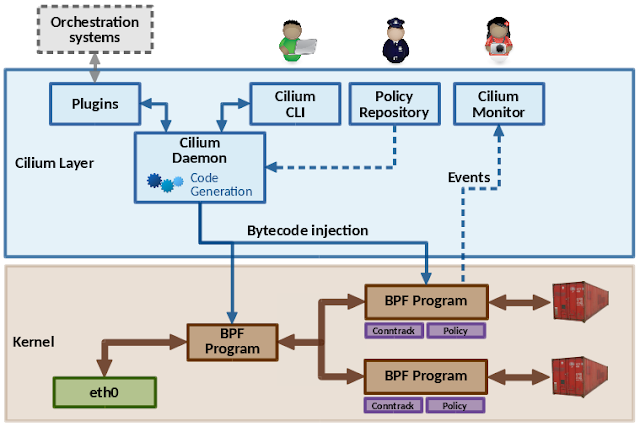
We realize these goals in Cilium with the help of eBPF. eBPF is an efficient and generic in-kernel bytecode engine, that allows for full programmability. There are many subsystems in the Linux kernel that utilize eBPF, mainly in the areas of networking, tracing and security.

eBPF can be attached to key ingress and egress points of the kernel's networking data path for every network device. As input, eBPF operates on the kernel's network packet representation and can thus access and mangle various kinds of data, redirect the packet to other devices, perform encapsulations, etc.

This is a typical workflow: eBPF is programmed in a subset of C, compiled with LLVM which contains an eBPF back-end. LLVM then generates an ELF file containing program code, specification for maps and related relocation data. In eBPF, maps are efficient key/value stores in the kernel that can be shared between various eBPF programs, but also between user space. Given the ELF file, tools like tc (traffic control) can parse its content and load the program into the kernel. Before the program is executed, the kernel verifies the eBPF bytecode in order to make sure that it cannot affect the kernel's stability (e.g. crash the kernel and out of bounds access) and always terminates, which requires programs to be free of loops. Once it passed verification, the program is JIT (just-in-time) compiled.

Today, architectures such as x86_64, arm64, ppc64 and s390 have the ability to compile a native opcode image out of an eBPF program, so that instead of an execution through an in-kernel eBPF interpreter, the resulting image can run natively like any other kernel code. tc then installs the program into the kernel's networking data path, and with a capable NIC, the program can also be offloaded entirely into the hardware.


Cilium acts as a middle layer, plugs into container runtimes and orchestrators such as Kubernetes, Docker or CNI, and can generate and atomically update eBPF programs on the fly without requiring a container to restart. Thus, unlike connection proxies, an update of the datapath does not cause connections to be dropped. These programs are specifically tailored and optimized for each container, for example, a feature that a particular container does not need can just be compiled out and the majority of configuration becomes constant, allowing LLVM for further optimizations.

We have many implemented building blocks in Cilium using eBPF, such as NAT64, L3/L4 load balancing with direct server return, a connection tracker, port mapping, access control, NDisc and ARP responder and integration with various encapsulations like VXLAN, Geneve and GRE, just to name a few. Since all these building blocks run in the Linux kernel and have a stable API, there is of course no need to cross kernel/user space boundary, which makes eBPF a perfectly suited and flexible technology for container networking.

One step further in that direction is XDP, which was recently merged into the Linux kernel and allows for DPDK-like performance for the kernel itself. The basic idea is that XDP is tightly coupled with eBPF and hooks into a very early ingress path at the driver layer, where it operates with direct access to the packet's DMA buffer.

This is effectively as low-level as it can get to reach near-optimal performance, which mainly allows for tailoring high-performance load balancers or routers with commodity hardware. One advantage that comes with XDP is also that it reuses the kernel's security model for accessing the device as opposed to user space based mechanisms. It doesn't require any third party modules and works in concert with the Linux kernel. Both XDP and tc with eBPF are complementary to each other, and constitute a bigger piece of the puzzle for Cilium itself.

If you’re curious, check out the Cilium code or demos on GitHub.


By Daniel Borkmann, Cilium contributor

Google Video Ads Shift to HTML5 by mid-2017

November 2nd, 2016  |  Published in Google DoubleClick

In the coming quarters, all major browsers, including Chrome, are phasing out the use of Flash technologies in favor of HTML5. HTML5 is not only available on more devices, but also offers improved security, reduced power consumption and faster page load times for users.

We began our transition to HTML5 with display ads across Google and DoubleClick back in 2015. We are now continuing that transition by shifting video ads in DoubleClick Digital Marketing, DoubleClick for Publishers, DoubleClick Ad Exchange and the Google Display Network to HTML5 over the next few quarters as follows:

  • Starting April 3rd, 2017, new Flash video ads will no longer be able to be uploaded into DoubleClick Studio, DoubleClick Campaign Manager, DoubleClick Bid Manager, DoubleClick for Publishers or AdWords.
  • Starting July 3rd, 2017, Flash video ads will no longer be able to run through DoubleClick Campaign Manager, DoubleClick Bid Manager, DoubleClick Ad Exchange, DoubleClick for Publishers or AdWords. Additionally, our Active View and Verification tools for video will no longer use Flash.

Transition timeline for HTML5 Video


It’s important to begin updating your ads and websites to HTML5 technologies in preparation for these dates. We fully support HTML5 Video across DoubleClick and AdWords and provide the tools to ensure advertisers and publishers can easily migrate all video ads to HTML5.

For guidance and best practices to help your team with this transition, see Chrome one-sheeter, visit the DoubleClick help center or contact your DoubleClick sales representative.

Posted by Peentoo Patel and Sunil Gupta

Google Video Ads Shift to HTML5 by mid-2017

November 2nd, 2016  |  Published in Google DoubleClick

In the coming quarters, all major browsers, including Chrome, are phasing out the use of Flash technologies in favor of HTML5. HTML5 is not only available on more devices, but also offers improved security, reduced power consumption and faster page load times for users.

We began our transition to HTML5 with display ads across Google and DoubleClick back in 2015. We are now continuing that transition by shifting video ads in DoubleClick Digital Marketing, DoubleClick for Publishers, DoubleClick Ad Exchange and the Google Display Network to HTML5 over the next few quarters as follows:

  • Starting April 3rd, 2017, new Flash video ads will no longer be able to be uploaded into DoubleClick Studio, DoubleClick Campaign Manager, DoubleClick Bid Manager, DoubleClick for Publishers or AdWords.
  • Starting July 3rd, 2017, Flash video ads will no longer be able to run through DoubleClick Campaign Manager, DoubleClick Bid Manager, DoubleClick Ad Exchange, DoubleClick for Publishers or AdWords. Additionally, our Active View and Verification tools for video will no longer use Flash.

Transition timeline for HTML5 Video


It’s important to begin updating your ads and websites to HTML5 technologies in preparation for these dates. We fully support HTML5 Video across DoubleClick and AdWords and provide the tools to ensure advertisers and publishers can easily migrate all video ads to HTML5.

For guidance and best practices to help your team with this transition, see this Chrome one-sheeter, visit the DoubleClick help center or contact your DoubleClick sales representative.

Posted by Peentoo Patel and Sunil Gupta

Previously


Dec 28, 2016
Open source down under: Linux.conf.au 2017

by Open Source Programs Office | Read | No Comments

It’s a new year and open source enthusiasts from around the globe are preparing to gather at the edge of the world for Linux.conf.au 2017. Among those preparing are Googlers, including some of us from the Open Source Programs Office.

This year Linux.conf.au is returning to Hobart, the riverside capital of Tasmania, home of Australia’s famous Tasmanian devils, running five days between January 16 and 20.

Circle_DevilTuz.png
Tuz, a Tasmanian devil sporting a penguin beak, is the Linux.conf.au mascot.
(Artwork by Tania Walker licensed under CC BY-SA.)

The conference, which began in 1999 and is community organized, is well equipped to explore the theme, “the Future of Open Source,” which is reflected in the program schedule and miniconfs.

You’ll find Googlers speaking throughout the week (listed below), as well as participating in the hallway track. Don’t miss our Birds of a Feather session if you’re a student, educator, project maintainer, or otherwise interested in talking about outreach and student programs like Google Summer of Code and Google Code-in.

Monday, January 16th
12:20pm The Sound of Silencing by Julien Goodwin
4:35pm   Year of the Linux Desktop? by Jessica Frazelle

Tuesday, January 17th
All day    Community Leadership Summit X at LCA

Wednesday, January 18th
2:15pm   Community Building Beyond the Black Stump by Josh Simmons
4:35pm   Contributing to and Maintaining Large Scale Open Source Projects by Jessica Frazelle

Thursday, January 19th
4:35pm   Using Python for creating hardware to record FOSS conferences! by Tim Ansell

Friday, January 20th
1:20pm   Linux meets Kubernetes by Vishnu Kannan

Not able to make it to the conference? Keynotes and sessions will be livestreamed, and you can always find the session recordings online after the event.

We’ll see you there!

By Josh Simmons, Open Source Programs Office


Dec 23, 2016
Taking the pulse of Google Code-in 2016

by Open Source Programs Office | Read | No Comments

GCI official horizontal_1372x448dp.png

Today is the official midpoint of this year’s Google Code-in contest and we are delighted to announce this is our most popular year ever! 930 teenagers from 60 countries have completed 3,503 tasks with 17 open source organizations. The number of students successfully completing tasks has almost met the total number of students from the 2015 contest already.

Tasks that the students have completed include:

  • writing test suites
  • improving mobile UI 
  • writing documentation and creating videos to help new users 
  • working on internationalization efforts
  • fixing and finding bugs in the organization’s’ software 

Participants from all over the world
In total, over 2,800 students from 87 countries have registered for the contest and we look forward to seeing great work from these (and more!) students over the next few weeks. 2016 has also seen a huge increase in student participation in places such as Indonesia, Vietnam and the Philippines.

Google Code-in participants by country
Please welcome two new countries to the GCI family: Mauritius and Moldova! Mauritius made a very strong debut to the contest and currently has 13 registered students who have completed 31 tasks.

The top five countries with the most completed tasks are:

  1. India: 982
  2. United States: 801
  3. Singapore: 202
  4. Vietnam: 119
  5. Canada: 117

Students, there is still plenty of time to get started with Google Code-in. New tasks are being added daily to the contest site — there are over 1,500 tasks available for students to choose from right now! If you don’t see something that interests you today, check back again every couple of days for new tasks.

The last day to register for the contest and claim a task is Friday, January 13, 2017 with all work being due on Monday, January 16, 2017 at 9:00 am PT.

Good luck to all of the students participating this year in Google Code-in!

By Stephanie Taylor, Google Code-in Program Manager

All numbers reported as of 8:00 PM Pacific Time, December 22, 2016.


Dec 21, 2016
Introducing the ExifInterface Support Library

by Android Developers | Read | No Comments

With the release of the 25.1.0 Support Library, there’s a new entry in the family: the ExifInterface Support Library. With significant improvements introduced in Android 7.1 to the framework’s ExifInterface, it only made sense to make those available t…


Dec 21, 2016
Geolocation and Firebase for the Internet of Things

by Maps Devel | Read | No Comments

Posted by Ken Nevarez, Industry Solutions Lead at Google

GPS is the workhorse of location based services, but there are use cases where you may want to avoid the cost and power consumption of GPS hardware or locate devices in places where GPS lacks accuracy, such as in urban environments or buildings.

We’ve seen recent growth in Internet of Things (IoT) applications using the Google Maps Geolocation API instead of GPS for asset tracking, theft prevention, usage optimization, asset servicing, and more. As part of my 20 percent project at Industry Solutions, I created a prototype IoT device that can locate itself using surrounding WiFi networks and the Google Maps Geolocation API. In this post, I’ll discuss some interesting implementation features and outline how you can create the prototype yourself.

I built a device that scans for local WiFi and writes results (WiFi hotspots and their signal strength) to a Firebase Realtime Database. A back-end service then reads this data and uses the Google Maps Geolocation API to turn this into a real-world location, which can be plotted on a map.


Set up the Device & Write Locally

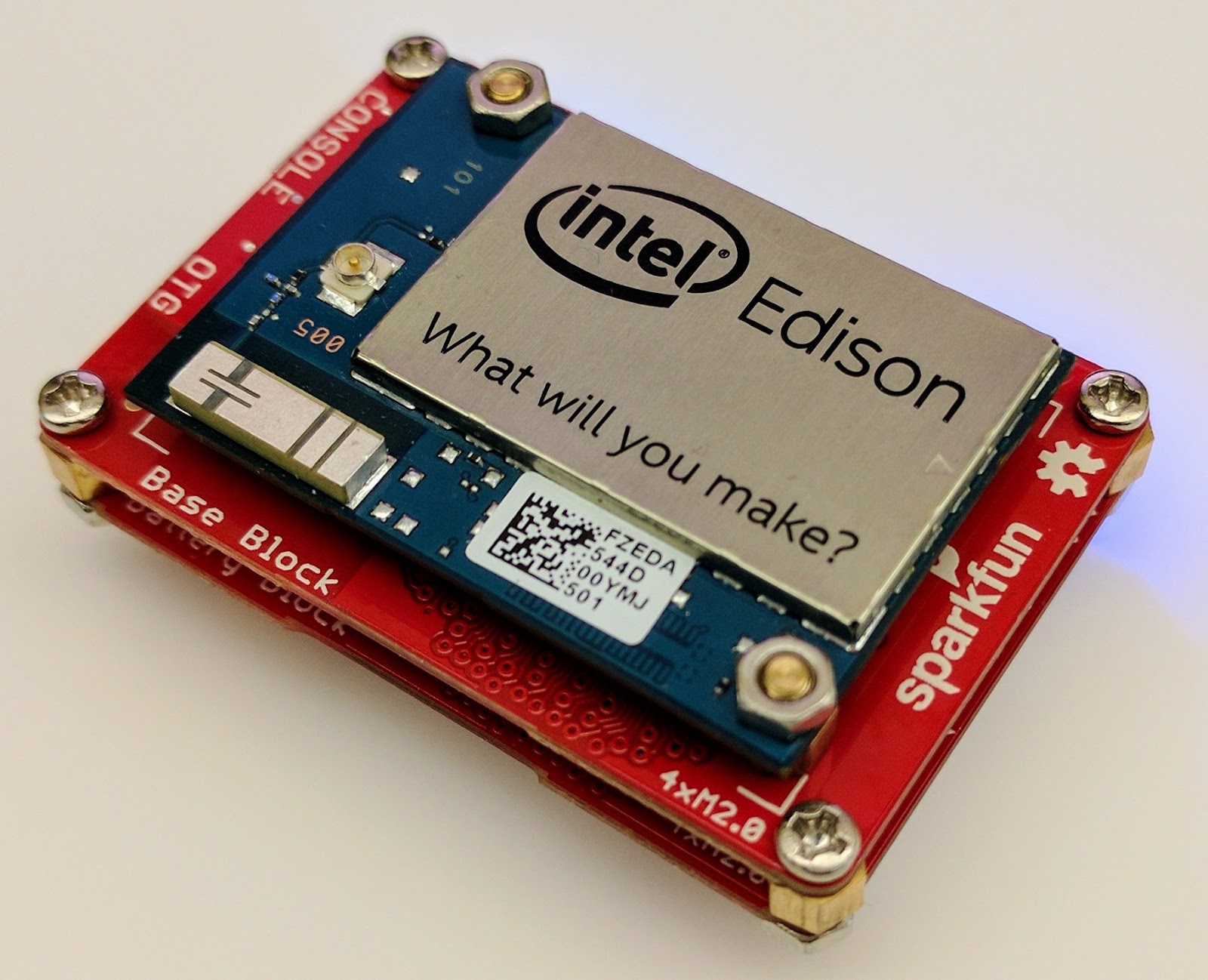
For this proof of concept, I used the Intel Edison as a Linux-based computing platform and augmented it with Sparkfun’s Edison Blocks. To build the device, you will need an Intel Edison, a Base Block, a Battery Block and a Hardware pack.


Developing for the Edison is straightforward using the Intel XDK IDE. We will be creating a simple Node.js application in JavaScript. I relied on 3 libraries: Firebase for the database connection, wireless-tools/iwlist to capture WiFi networks, and macaddress to capture the device MAC. Installation instructions can be found on the linked pages.

Step 1: get the device MAC address and connect to Firebase:

function initialize() {
    macaddress.one('wlan0', function (err, mac) {
        mac_address = mac;
        if (mac === null) {
            console.log('exiting due to null mac Address');
            process.exit(1);
        }
        firebase.initializeApp({
            serviceAccount: '/node_app_slot/.json',
            databaseURL: 'https://.firebaseio.com/'
        });
        var db = firebase.database();
        ref_samples = db.ref('/samples');
        locationSample();
    });
}

The above code contains two placeholders:

  1. The service-account-key is a private key you create in the Firebase Console. Follow the gear icon in the upper left of console, select “settings”, and click Generate New Private Key. Place this key on your Edison in the directory /node_app_slot/. See this Firebase documentation for more information.
  2. The project-id in the database URL is found in the Firebase console database page after you have linked your Google project with Firebase.

Step 2: scan for WiFi networks every 10 seconds and write locally:

function locationSample() {
    var t = new Date();
    iwlist.scan('wlan0', function(err, networks) {
        if(err === null) {
            ref_samples.push({
                mac: mac_address,
                t_usec: t.getTime(),
                t_locale_string: t.toLocaleString(),
                networks: networks,
            });
        } else {
            console.log(err);
        }        
    });
    setTimeout(locationSample, 10000);
}

Write to the cloud

The locationSample() function above writes detectable WiFi networks to a Firebase database that syncs to the cloud when connected to a network.

Caveat: To configure access rights and authentication to Firebase, I set up the device as a “server”. Instructions for this configuration are on the Firebase website. For this proof of concept, I made the assumption that the device was secure enough to house our credentials. If this is not the case for your implementation you should instead follow the instructions for setting up the client JavaScript SDK.

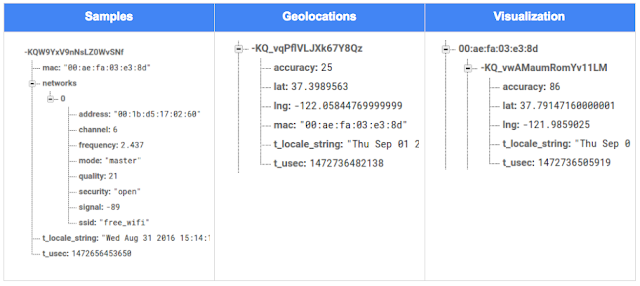
The database uses 3 queues to manage workload: a WiFi samples queue, a geolocation results queue and a visualization data queue. The workflow will be: samples from the device go into a samples queue, which gets consumed to produce geolocations that are put into a geolocations queue. Geolocations are consumed and formatted for presentation, organized by device, and the output is stored in a visualizations bucket for use by our front end website.

Below is an example of a sample, a geolocation, and our visualization data written by the device and seen in the Firebase Database Console.

Processing the Data with Google App Engine

To execute the processing of the sample data I used a long running Google App Engine Backend Module and a custom version of the Java Client for Google Maps Services.

Caveat: To use Firebase with App Engine, you must use manual scaling. Firebase uses background threads to listen for changes and App Engine only allows long-lived background threads on manually scaled backend instances.

The Java Client for Google Maps Services takes care of a lot of the communications code required to use the Maps APIs and follows our published best practices for error handling and retry strategies that respect rate limits. The GeolocateWifiSample() function below is registered as an event listener with Firebase. It loops over each network reported by the device and incorporates it into the geolocation request.

private void GeolocateWifiSample(DataSnapshot sample,  Firebase db_geolocations, Firebase db_errors) {
    // initalize the context and request
    GeoApiContext context = new GeoApiContext(new GaeRequestHandler()).setApiKey("");
    GeolocationApiRequest request = GeolocationApi.newRequest(context)
            .ConsiderIp(false);
    // for every network that was reported in this sample...
    for (DataSnapshot wap : sample.child("networks").getChildren()) {
        // extract the network data from the database so it’s easier to work with
        String wapMac = wap.child("address").getValue(String.class);
        int wapSignalToNoise = wap.child("quality").getValue(int.class);
        int wapStrength = wap.child("signal").getValue(int.class);
        // include this network in our request
        request.AddWifiAccessPoint(new WifiAccessPoint.WifiAccessPointBuilder()
                .MacAddress(wapMac)
                .SignalStrength(wapStrength)
                .SignalToNoiseRatio(wapSignalToNoise)
                .createWifiAccessPoint());
    }
    ...
    try {
        // call the api
        GeolocationResult result = request.CreatePayload().await();
        ...
        // write results to the database and remove the original sample
    } catch (final NotFoundException e) {
        ...
    } catch (final Throwable e) {
        ...
    }
}

Register the GeolocateWifiSample() function as an event handler. The other listeners that process geolocation results and create the visualization data are built in a similar pattern.

ChildEventListener samplesListener = new ChildEventListener() {
    @Override
    public void onChildAdded(DataSnapshot dataSnapshot, String previousChildName) {
        // geolocate and write to new location
        GeolocateWifiSample(dataSnapshot, db_geolocations, db_errors);
    }
    ...
};
db_samples.addChildEventListener(samplesListener);

Visualize the Data

To visualize the device locations I used Google App Engine to serve stored data from Firebase and the Google Maps JavaScript API to create a simple web page that displays the results. The index.html page contains an empty

with id “map”. I initialized this
to contain the Google Map object. I also added “child_added” and “child_removed” event handlers to update the map as the data changes over time.
function initMap() {
    // attach listeners
    firebase.database().ref('/visualization').on('child_added', function(data) {
        ...
        data.ref.on('child_added', function(vizData) {
            circles[vizData.key]= new CircleRoyale(map,
                                vizData.val().lat,
                                vizData.val().lng,
                                vizData.val().accuracy,
                                color);
          set_latest_position(data.key, vizData.val().lat, vizData.val().lng);
        });
        data.ref.on('child_removed', function(data) {
            circles[data.key].removeFromMap();
        });
    });
    // create the map
    map = new google.maps.Map(document.getElementById('map'), {
      center: get_next_device(),
      zoom: 20,
      scaleControl: true,
    });
    ...
}

Since the API returns not only a location but also an indication of accuracy, I’ve created a custom marker that has a pulsing radius to indicate the accuracy component.

Two devices (red and blue) and their last five known positions


What’s next?

In this post I’ve outlined how you can build an IoT device that uses Google Maps Geolocation API to track any internet-connected device – from robotics to wearables. The App Engine processing module can be expanded to use other Google Maps APIs Web Services providing geographic data such as directions, elevation, place or time zone information. Happy building!

As an alternative, you can achieve a similar solution using Google Cloud Platform as a replacement for Firebase—this article shows you how.

author image
About Ken: Ken is a Lead on the Industry Solutions team. He works with customers to bring innovative solutions to market.

Dec 21, 2016
Google Summer of Code 2016 wrap-up: Public Lab

by Open Source Programs Office | Read | No Comments

This post is part of our series of guest posts from students, mentors and organization administrators who participated in Google Summer of Code 2016.


How we made this our best Google Summer of Code ever

This was our fourth year doing Google Summer of Code (GSoC), and it was our best year ever by a wide margin! We had five hard-working students who contributed over 17,000 new lines of (very useful) code to our high-priority projects.

Students voluntarily started coding early and hit the ground running, with full development environments and a working knowledge of GitHub Flow-style pull request process. They communicated with one another and provided peer support. They wrote tests. Hundreds of them! They blogged about their work as they went, and chatted with other community members about how to design features.

All of that was amazing, and it was made better by the fact that we were accepting pull requests with new code twice weekly. Tuesdays and Fridays, I went through new submissions, provided feedback, and pulled new code into our master branch, usually publishing it to our production site once a week.

I don’t know how other projects do things, but this was very new for us, and it’s revolutionized how we work together. In past years, students would work on their forks, slowly building up features. Then in a mad dash at the end, we’d try to merge them into trunk, with lots of conflicts and many hours (weeks!) of work on the part of project maintainers.

Screenshot_2016-08-26_at_11.44.16_AM.png

What made this year so good?

Many things aligned to make this summer great, and basically none of them are our ideas. I’m sure plenty of you are cringing at how we used to do things, but I also don’t think that it’s that unusual for projects not “born” in the fast-paced world of modern code collaboration.

We used ideas and learned from Nicolas Bevacqua, author of JavaScript Application Design and of the woofmark and horsey libraries which I’ve contributed to. We’ve also learned a great deal from the Hoodie community, particularly Gregor Martynus, who we ran into at a BostonJS meetup. Lastly, we learned from SpinachCon, organized by Shauna Gordon McKeon and Deb Nicholson, where people refine their install process by actually going through the process while sitting next to each other.

Broadly, our strategies were:

  • Good documentation for newcomers (duh)
  • Short and sweet install process that you’ve tried yourself (thanks, SpinachCon!)
  • Predictable, regular merge schedule
  • Thorough test suite, and requiring tests with each pull request
  • Modularity, insisting that projects be broken into small, independently testable parts and merged as they’re written

Installation and pull requests

Most of the above sound kind of obvious or trivial, but we saw a lot of changes when we put it all together. Having a really fast install process, and guidance on getting it running in a completely consistent environment like the virtualized Cloud9 service, meant that many students were able to get the code running the same day they found the project. We aimed for an install time of 15 minutes max, and supplied a video of this for one of our codebases.

We also asked students to make a small change (even just add a space to a file) and walk through the GitHub Flow pull request (PR) submission process. We had clear step-by-step guidance for this, and we took it as a good sign when students were able to read through it and do this.

Importantly, we really tried to make each step welcoming, not demanding or dismissive, of folks who weren’t familiar with this process. This ultimately meant that all five students already knew the PR process when they began coding.

Twice-weekly merge schedule

We were concerned that, in past years, students only tried merging a few times and typically towards the end of the summer. This meant really big conflicts (with each other, often) and frustration.

This year we decided that, even though we’re a tiny organization with just one staff coder, we’d try merging on Tuesday and Friday mornings, and we mostly succeeded. Any code that wasn’t clearly presented, commits squashed, passing tests, and submitting new tests, was reviewed and I left friendly comments and requests so it could be merged the following week.

At first I felt bad rejecting PRs, but we had such great students that they got used to the strictness. They got really good at separating out features, demonstrating their features through clear tests, and some began submitting more than two PRs per week – always rebasing on top of the latest master to ensure a linear commit history. Sweet!

Wrap-up and next steps

The last thing we did was to ask each student, essentially as their documentation, to write a series of new issues which clearly described the problem and/or desired behavior, leave suggestions and links to specific lines of code or example code, and mark them with the special “help-wanted” tag which was so helpful to them when they first started out. We asked each to also make one extra-welcoming “first-timers-only” issue which walks a new contributor through every step of making a commit and even provides suggested code to be inserted.

This final requirement was key. While I personally made each of the initial set of “help-wanted” and “first-timers-only” issues before GSoC, now five students were offloading their unfinished to-dos as very readable and inviting issues for others. The effect was immediate, in part because these special tags are syndicated on some sites. Newcomers began picking them up within hours and our students were very helpful in guiding them through their first contributions to open source.

I want to thank everyone who made this past summer so great, from our champion mentors and community members, to our stellar students, to all our inspirations in this new process, to the dozen or so new contributors we’ve attracted since the end of August.

By Jeff Warren, Organization Administrator for PublicLab.org


Dec 20, 2016
Get the guide to finding success in new markets on Google Play

by Android Developers | Read | No Comments

Posted by Lily Sheringham, Developer Marketing at Google Play

With just a few clicks, you can publish an app to Google Play and access a
global audience of more than 1 billion 30 days active users. Finding success in
global markets means considering how each market differs, planning for high
quality localization, and tailoring your activity to the local audience. The new
Going
Global Playbook provides best practices and tips, with advice from
developers who’ve successfully gone global.

This guide includes advice to help you plan your approach to going global,
prepare your app for new markets, take your app to market, and also include data
and insights for key countries and other useful resources.

This ebook joins others that we’ve recently published including The
Building for Billions Playbook and The
News Publisher Playbook. All of our ebooks are promoted in the Playbook for Developers app, which is
where you can stay up to date with all the news and best practices you need to
find success on Google Play.

How useful did you find this blogpost?


★ ★ ★ ★ ★
What is Google Data?

Google Data is the only site where you can get news from 60+ official Google blogs all in one place. We have published 24,235 official posts since January 2005.


Categories

  • Gmail (Google Mail) (436)
  • Google Adsense (1,013)
  • Google Adsense Feeds (46)
  • Google Adwords (1,224)
  • Google Adwords API (366)
  • Google Affiliate Network (141)
  • Google Ajax API (121)
  • Google Analytics (961)
  • Google Android (654)
  • Google App Engine (332)
  • Google Apps (1,865)
  • Google Blog (1,650)
  • Google Blogger Buzz (527)
  • Google Books (300)
  • Google Checkout (162)
  • Google Chrome (312)
  • Google Code (828)
  • Google Conversions (137)
  • Google CPG (198)
  • Google Custom Search (129)
  • Google Desktop (144)
  • Google Desktop API (175)
  • Google Docs (717)
  • Google DoubleClick (730)
  • Google Earth (1,006)
  • Google Enterprise (1,278)
  • Google Finance (88)
  • Google Gadgets (31)
  • Google Gears (60)
  • Google Grants (285)
  • Google Mac Blog (149)
  • Google Maps (736)
  • Google Merchant (219)
  • Google Mobile (386)
  • Google News (152)
  • Google Notebook (20)
  • Google Online Security (221)
  • Google Open Source (929)
  • Google OpenSocial (197)
  • Google Orkut (381)
  • Google Photos (Picasa) (109)
  • Google Product Ideas (23)
  • Google Public Policy (675)
  • Google Reader (124)
  • Google RechargeIT (29)
  • Google Research (423)
  • Google SketchUp (692)
  • Google Student Blog (848)
  • Google Talk (107)
  • Google Testing (326)
  • Google Translate (98)
  • Google TV Ads Blog (163)
  • Google Video (293)
  • Google Voice (86)
  • Google Wave (38)
  • Google Webmaster Central (376)
  • Google Website Optimizer (101)
  • Google.org (183)
  • iGoogle (87)
  • Uncategorized (1,262)
  • Youtube (779)
  • Youtube API (173)

Tags

adsense adsense google advertisers advertising adwords adwords google adwords tips analytics analytics google android gmail for domains Google Adsense Google Adwords google adwords help Google Analytics google analytics ga.js Google Android Google Apps google apps enterprise google apps free google apps gmail google apps standard google apps sync Google Blog google calendar google chat google culture Google Docs Google Earth Google Enterprise google insights google lat-long Google Mobile Google News google products google statistics google student google updates official google blog open source publishers students website analytics website statistics website stats

Archives

  • December 2016 (58)
  • November 2016 (83)
  • October 2016 (97)
  • September 2016 (113)
  • August 2016 (90)
  • July 2016 (87)
  • June 2016 (100)
  • May 2016 (112)
  • April 2016 (101)
  • March 2016 (116)
  • February 2016 (93)
  • January 2016 (66)
  • December 2015 (111)
  • November 2015 (105)
  • October 2015 (105)
  • September 2015 (116)
  • August 2015 (98)
  • July 2015 (106)
  • June 2015 (149)
  • May 2015 (94)
  • April 2015 (107)
  • March 2015 (124)
  • February 2015 (109)
  • January 2015 (69)
  • December 2014 (123)
  • November 2014 (107)
  • October 2014 (134)
  • September 2014 (132)
  • August 2014 (110)
  • July 2014 (118)
  • June 2014 (142)
  • May 2014 (129)
  • April 2014 (99)
  • March 2014 (125)
  • February 2014 (112)
  • January 2014 (88)
  • December 2013 (104)
  • November 2013 (147)
  • October 2013 (152)
  • September 2013 (114)
  • August 2013 (119)
  • July 2013 (136)
  • June 2013 (173)
  • May 2013 (213)
  • April 2013 (168)
  • March 2013 (167)
  • February 2013 (145)
  • January 2013 (132)
  • December 2012 (156)
  • November 2012 (151)
  • October 2012 (203)
  • September 2012 (168)
  • August 2012 (190)
  • July 2012 (151)
  • June 2012 (169)
  • May 2012 (169)
  • April 2012 (193)
  • March 2012 (227)
  • February 2012 (195)
  • January 2012 (191)
  • December 2011 (243)
  • November 2011 (248)
  • October 2011 (282)
  • September 2011 (271)
  • August 2011 (261)
  • July 2011 (275)
  • June 2011 (259)
  • May 2011 (148)
  • April 2011 (83)
  • March 2011 (92)
  • February 2011 (109)
  • January 2011 (253)
  • December 2010 (397)
  • November 2010 (322)
  • October 2010 (328)
  • September 2010 (402)
  • August 2010 (305)
  • July 2010 (293)
  • June 2010 (362)
  • May 2010 (367)
  • April 2010 (355)
  • March 2010 (363)
  • February 2010 (294)
  • January 2010 (267)
  • December 2009 (321)
  • November 2009 (308)
  • October 2009 (380)
  • September 2009 (344)
  • August 2009 (302)
  • July 2009 (347)
  • June 2009 (357)
  • May 2009 (352)
  • April 2009 (353)
  • March 2009 (351)
  • February 2009 (296)
  • January 2009 (239)
  • December 2008 (253)
  • November 2008 (273)
  • October 2008 (357)
  • September 2008 (316)
  • August 2008 (239)
  • July 2008 (241)
  • June 2008 (250)
  • May 2008 (247)
  • April 2008 (263)
  • March 2008 (251)
  • February 2008 (187)
  • January 2008 (172)
  • December 2007 (179)
  • November 2007 (177)
  • October 2007 (195)
  • September 2007 (148)
  • August 2007 (161)
  • July 2007 (182)
  • June 2007 (152)
  • May 2007 (109)
  • April 2007 (98)
  • March 2007 (93)
  • February 2007 (75)
  • January 2007 (75)
  • December 2006 (82)
  • November 2006 (122)
  • October 2006 (115)
  • September 2006 (106)
  • August 2006 (120)
  • July 2006 (69)
  • June 2006 (61)
  • May 2006 (51)
  • April 2006 (46)
  • March 2006 (48)
  • February 2006 (45)
  • January 2006 (46)
  • December 2005 (51)
  • November 2005 (50)
  • October 2005 (23)
  • September 2005 (39)
  • August 2005 (28)
  • July 2005 (15)
  • June 2005 (25)
  • May 2005 (27)
  • April 2005 (31)
  • March 2005 (31)
  • February 2005 (3)
  • January 2005 (1)

Recent Posts

  • Other sites are using my ad code. What should I do?
  • Open source down under: Linux.conf.au 2017
  • Taking the pulse of Google Code-in 2016
  • Introducing the ExifInterface Support Library
  • Geolocation and Firebase for the Internet of Things
  • Google Summer of Code 2016 wrap-up: Public Lab
  • Get the guide to finding success in new markets on Google Play
  • Start building Actions on Google
  • Best practices to improve app engagement
  • Project Wycheproof
January 2017
M T W T F S S
« Dec    
  1
2 3 4 5 6 7 8
9 10 11 12 13 14 15
16 17 18 19 20 21 22
23 24 25 26 27 28 29
30 31  

Page 9 of 1,615« First«...7891011...203040...»Last »


Copyright © 2017 GoogleData.org, All Rights Reserved.
This site is not operated by, sponsored by, endorsed by, or affiliated with Google Inc. in any way.
Rss Feed Tweeter button Facebook button Technorati button Reddit button Myspace button Linkedin button Delicious button Digg button Stumbleupon button Newsvine button