Google Data

  • Home
  • Everything Google
    • Gmail (Google Mail)
    • Google Adsense
    • Google Adsense Feeds
    • Google Adwords
    • Google Adwords API
    • Google Affiliate Network
    • Google Ajax API
    • Google Analytics
    • Google Android
    • Google App Engine
    • Google Apps
    • Google Blog
    • Google Blogger Buzz
    • Google Books
    • Google Checkout
    • Google Chrome
    • Google Code
    • Google Conversions
    • Google CPG
    • Google Custom Search
    • Google Desktop
    • Google Desktop API
    • Google Docs
    • Google DoubleClick
    • Google Earth
    • Google Enterprise
    • Google Finance
    • Google Gadgets
    • Google Gears
    • Google Grants
    • Google Mac Blog
    • Google Maps
    • Google Merchant
    • Google Mobile
    • Google News
    • Google Notebook
    • Google Online Security
    • Google Open Source
    • Google OpenSocial
    • Google Orkut
    • Google Photos (Picasa)
    • Google Product Ideas
    • Google Public Policy
    • Google Reader
    • Google RechargeIT
    • Google Research
    • Google SketchUp
    • Google Student Blog
    • Google Talk
    • Google Testing
    • Google Translate
    • Google TV Ads Blog
    • Google Video
    • Google Voice
    • Google Wave
    • Google Webmaster Central
    • Google Website Optimizer
    • Google.org
    • iGoogle
    • Uncategorized
    • Youtube
    • Youtube API
  • Resources
    • Google Products & Services
    • Google Twitter Directory
    • Google Trademarks
    • Google Data Site Map
  • About
  • Contact
  • Subscribe via RSS

Address Geocoding in the Google Maps APIs

November 22nd, 2016  |  Published in Google Maps

Forward Geocoding is the process of converting addresses (like a street address) into geographic coordinates (latitude and longitude), which you can use to place markers on a map or position the map. The Google Maps APIs have several services that you can use to convert addresses into coordinates - the Geocoding API, the Place Autocomplete service in Places API, and the Place Search service in Places API. What are the differences between them and when should you use each one? Here’s where to start.

Note that while this blog focuses on the server-side Places and Geocoding APIs, these best practices also apply to the client-side Places and Geocoding services in the Google Maps JavaScript API.

Geocoding API

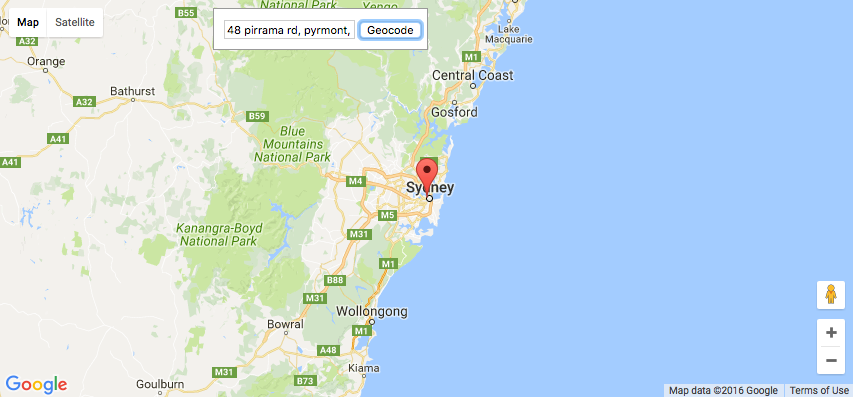
The Geocoding API is best for handling unambiguous queries: complete postal address strings (for example, “48 Pirrama Rd, Pyrmont, NSW, Australia”). Compared to other Google APIs, the Geocoding API provides the best quality matching of addresses globally for these types of complete, unambiguous queries. However, Geocoding API is not recommended if your application handles ambiguous or incomplete queries, such as “123 Main St”, or if it handles queries that may contain non-address information such as apartment numbers or business names.
Screen Shot 2016-11-15 at 6.16.15 PM.png
Geocoding API is best used for unambiguous complete addresses, such as "48 Pirrama Rd, Pyrmont, NSW, Australia" 

Places API

The Places API allows users to discover both addresses and semantic locations, such as cafes or parks, by name or type. In contrast to the Geocoding API, it handles ambiguous or incomplete requests in a more robust way. If your application handles user interaction, or addresses that are ambiguous or incomplete, consider the following services.


Place Autocomplete service

For applications that respond in real time to user input, we recommend using the Place Autocomplete service in the Places API. This service is designed to return multiple possible addresses and allow the user to choose between them. The autocomplete lookup function can also be biased to return results specific to a location, enabling high quality results to be returned for incomplete queries such as “123 Main St”. Since the Place Autocomplete service is optimized for responding to user input, it also has very low latency, usually at least 10x lower than the Geocoding API. It’s also good at handling misspelled queries, or queries containing non-address information, since as the user types, they can see suggestions and correct their spelling if needed.
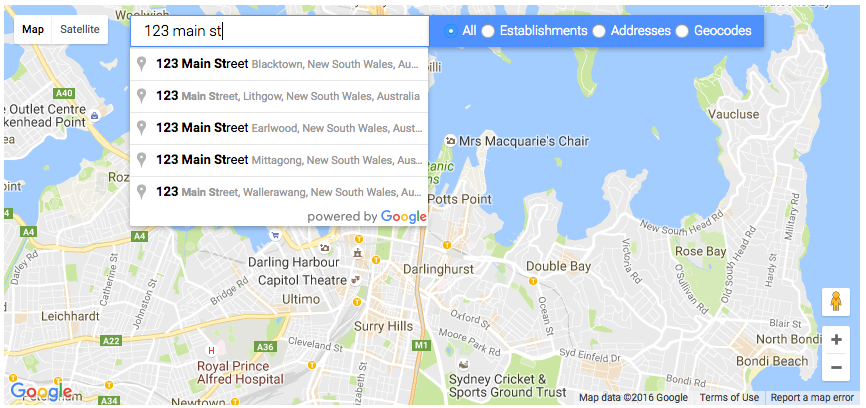
Screen Shot 2016-11-14 at 5.35.53 PM.png
Typing "123 Main St" into a Place Autocomplete search box lets the user choose from multiple results. Results can also be biased to prefer those near the area shown on the map or near the current user location

Place Search service

The Place Autocomplete service relies on a user to choose the best option from multiple results. What if you have an application that handles ambiguous or incomplete queries in an automated fashion, with no user able to provide input?

For geocoding ambiguous or incomplete addresses in automated systems, when there is no user to select one of the autocomplete suggestions, we recommend the Place Search service in Places API. Place Search is better at coping with ambiguous queries than the Geocoding API, and lets you restrict your search to a specified area, or rank results by distance, allowing more precise filtering and ranking of results for ambiguous or incomplete queries. Place search is also more robust at responding to queries with additional non-address information such as business names or apartment numbers.

Future Changes to Geocoding API

We plan to roll out an update to the Geocoding API at the end of November 2016 that will increase the difference between Geocoding and Places performance for ambiguous and unambiguous queries. This change will improve the quality of Geocoding results for unambiguous queries, but will be more likely to return ZERO_RESULTS for ambiguous or incomplete queries where the Geocoding API was unable to find a high quality result.

If you are already using the above best practices, you should see an improvement in your Geocoding API results. If you are currently using the Geocoding API for incomplete or ambiguous queries, or for queries that may contain non-address information such as business names or apartment numbers, we recommend that you switch to the Places API instead, as it is likely to give better quality results for your use case.

You can try the new Geocoding service ahead of launch by adding an optional parameter, new_forward_geocoder=true, to your Geocoding API request. For example:

https://maps.googleapis.com/maps/api/geocode/json?new_forward_geocoder=true&address=1600+Amphitheatre+Parkway,+Mountain+View,+CA&key=YOUR_API_KEY

If you want to try the new Geocoding service in the JavaScript Maps API Geocoding Service, you can set the new optional parameter newForwardGeocoder: true in the GeocoderRequest object. The new Geocoding service will launch for both the Geocoding API and the Geocoding Service in the JavaScript Maps API at the same time. All of the recommendations in this blog post apply to both the server-side and client-side APIs.

If you have any bug reports or feature requests for the new Geocoding service, please let us know using our public issue tracker.

In Summary

The following table sums up when we recommend you use the Geocoding API, Place Autocomplete service and Place Search service.


Geocoding API Place Search Place Autocomplete
Scope Addresses only Semantic locations and addresses, including businesses and points of interest
Strengths Unambiguous complete addresses Ambiguous or incomplete addresses in automated systems Responding to real-time user input

If your application does not yet follow these best practices, you may get worse results from Geocoding API in future, so we recommend you test how your application works with the new Geocoding service and update your application to use the above best practices if required. Try the upcoming Geocoding service by setting new_forward_geocoder=true in your geocoding request.

For more information on the Google Maps Geocoding API, Place Autocomplete in the Places API and Place Search in the Places API, please see the developer documentation. Also see this more detailed best practices guide in our documentation for more details on Geocoding best practices for various use cases, including minimizing latency when querying Directions API with addresses.

Finally, a big thank you to all the developers who use the Google Maps Geocoding API and provide feedback via the issue tracker. Getting feedback from developers is vital for us to be able to keep improving our products, so if you have any bug reports or feature requests, please let us know!

author image
Posted by Elena Kelareva, Product Manager, Google Maps APIs

‘Tis the season, so make sure you have the AdWords app

November 22nd, 2016  |  Published in Google Adwords

What an exciting time of the year. Supershoppers are out in full force, and your AdWords campaigns are ready for them. Last year, on mobile alone, conversion rates jumped 30% on Black Friday and 50% on Cyber Monday when compared to November 1.1

With so much at stake, the AdWords app is the perfect way to stay in touch with your campaigns while still enjoying time away from the office.

Tips for this holiday season

Here are some ways to stay in step with your campaign performance and make last-minute changes throughout the holiday season:
  1. Monitor your budget and bids daily to make sure you’re not missing out on key shopping dates
  2. Make changes to your holiday campaigns, such as pausing or enabling a time-sensitive promotional campaign
  3. Receive critical alerts and notifications, so you can be the first to know if your budget has run out or your ads have been disapproved
  4. Take advantage of opportunities by increasing budgets or bids to drive more profitable conversions in your top-performing campaigns
  5. Review daily performance metrics to understand how your campaigns are performing and if you need to make any last-minute adjustments

Get the app

The AdWords app is available for download on Android and iOS.


Posted by Sugeeti Kochar, Product Management, AdWords


1. Google Analytics Shopping category data, Nov 1, 2015–December 14, 2015, United States

Final update to Android 7.1 Developer Preview

November 22nd, 2016  |  Published in Google Android

Posted by Dave Burke, VP of Engineering

Today we're rolling out an update to the Android 7.1 Developer Preview -- the last before we release the final Android 7.1.1 platform to the ecosystem. Android 7.1.1 includes the developer features already available on Pixel and Pixel XL devices and adds optimizations and bug fixes on top of the base Android 7.1 platform. With Developer Preview 2, you can make sure your apps are ready for Android 7.1.1 and the consumers that will soon be running it on their devices.

As highlighted in October, we're also expanding the range of devices that can receive this Developer Preview update to Nexus 5X, Nexus 6P, Nexus 9, and Pixel C.

If you have a supported device that's enrolled in the Android Beta Program, you'll receive an update to Developer Preview 2 over the coming week. If you haven't enrolled your device yet, just visit the site to enroll your device and get the update.

In early December, we'll roll out Android 7.1.1 to the full lineup of supported devices as well as Pixel and Pixel XL devices.

What's in this update?

Developer Preview 2 is a release candidate for Android 7.1.1 that you can use to complete your app development and testing in preparation for the upcoming final release. In includes near-final system behaviors and UI, along with the latest bug fixes and optimizations across the system and Google apps.

It also includes the developer features and APIs (API level 25) already introduced in Developer Preview 1. If you haven't explored the developer features, you'll want to take a look at app shortcuts, round icon resources, and image keyboard support, among others -- you can see the full list of developer features here.

With Developer Preview 2, we're also updating the SDK build and platform tools in Android Studio, the Android 7.1.1 platform, and the API Level 25 emulator system images. The latest version of the support library (25.0.1) is also available for you to add image keyboard support, bottom navigation, and other features for devices running API Level 25 or earlier.

For details on API Level 25 check out the API diffs and the updated API reference on the developer preview site.

Get your apps ready for Android 7.1

Now is the time to optimize your apps to look their best on Android 7.1.1. To get started, update to Android Studio 2.2.2 and then download the API Level 25 platform, emulator system images, and tools through the SDK Manager in Android Studio.

After installing the API Level 25 SDK, you can update your project's compileSdkVersion to 25 to build and test against the new APIs. If you're doing compatibility testing, we recommend updating your app's targetSdkVersion to 25 to test your app with compatibility behaviors disabled. For details on how to set up your app with the API Level 25 SDK, see Set up the Preview.

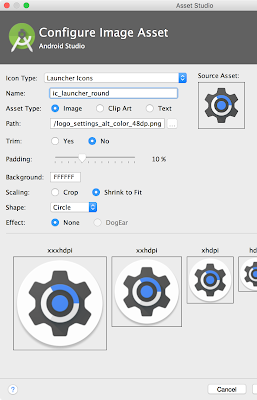
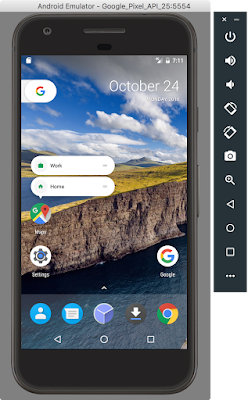
If you're adding app shortcuts or circular launcher icons to your app, you can use Android Studio's built-in Image Asset Studio to quickly help you create icons of different sizes that meet the material design guidelines. You can test your round icons on the Google APIs emulator for API Level 25, which includes support for round icons and the new Google Pixel Launcher.

Android Studio and the Google APIs emulator let you quickly create and test your round icon assets.

If you're adding image keyboard support, you can use the Messenger and Google Keyboard apps included in the preview system images for testing as they include support for this new API.

Scale your tests using Firebase Test Lab for Android

To help scale your testing, make sure to take advantage of Firebase Test Lab for Android and run your tests in the cloud at no charge during the preview period on all virtual devices including the Developer Preview 2 (API 25). You can use the automated crawler (Robo Test) to test your app without having to write any test scripts, or you can upload your own instrumentation (e.g. Espresso) tests. You can upload your tests here.

Publish your apps to alpha, beta or production channels in Google Play

After you've finished final testing, you can publish your updates compiled against, and optionally targeting, API 25 to Google Play. You can publish to your alpha, beta, or even production channels in the Google Play Developer Console. In this way, push your app updates to users whose devices are running Android 7.1, such as Pixel and Android Beta devices.

Get Developer Preview 2 on Your Eligible Device

If you have an eligible device that's already enrolled in the Android Beta Program, the device will get the Developer Preview 2 update over the coming week. No action is needed on your part. If you aren't yet enrolled in program, the easiest way to get started is by visiting android.com/beta and opt-in your eligible Android phone or tablet -- you'll soon receive this preview update over-the-air. As always, you can also download and flash this update manually.

As mentioned above, this Developer Preview update is available for Nexus 5X, Nexus 6P, Nexus 9, and Pixel C devices.

We're expecting to launch the final release of the Android 7.1.1 in just a few weeks Starting in December, we'll roll out Android 7.1.1 to the full lineup of supported preview devices, as well as the recently launched Pixel and Pixel XL devices. At that time, we'll also push the sources to AOSP, so our device manufacturer partners can bring this new platform update to consumers on their devices.

Meanwhile, we continue to welcome your feedback in the Developer Preview issue tracker, N Preview Developer community, or Android Beta community as we work towards the final consumer release in December!

Put a bow on your holiday app marketing with new innovations to find high-value users

November 22nd, 2016  |  Published in Google Adwords

The holiday season is upon us, and millions of people around the world are looking forward to unwrapping their new devices and downloading their favorite apps. People have more choice in apps than ever before, making it critical for brands and developers to deliver useful and delightful experiences.

We introduced the next generation of Universal App Campaigns to help marketers show your apps to the iOS and Android customers that matter most, based on your specific business goals. Today, we’re announcing three new innovations to make your holiday app campaigns more engaging and effective.

Create immersive video ads magically with AutoDirector

People love watching video, and with 1B+ users around the world1, YouTube is the place they go to watch.

Now, advertisers using Universal App Campaigns can easily show their app in action using sight, sound, and motion with AutoDirector --- a new innovation that automatically creates immersive and engaging video ads.

AutoDirector gathers your app's description and ratings, selects the best images of your app from the App Store or Google Play, and even picks the music to give your app a soundtrack. Our machine learning models work behind-the-scenes to figure out which version of those videos gets more people to install and engage with your app across YouTube and the 1M+ apps in the Google Display Network.
App promotion video created by AutoDirector for OLX, a Brazilian shopping app

Advertisers all over the world are using videos created through AutoDirector to help their dollars go further with Universal App Campaigns. According to Caio Ferreira, Performance Marketing Manager, OLX Brazil: "The new AutoDirector videos helped the OLX performance marketing team deliver 78% more conversions through AdWords ... Amazing!" Learn more.

New ways to showcase your app on Google Play

People discover apps in a variety of ways, and nearly half of users find new apps while browsing on their phone’s app store2.

Today, we are announcing a new ad placement in Google Play, exclusively for advertisers running Universal App Campaigns. As people browse apps in the Google Play Store, they may see ads in a carousel alongside other app recommendations. For example, we may suggest a new game like Tap Paradise Cove to users who install the YouTube Gaming app.

Tap Paradise Cove recommendation shown to a user after installing the YouTube Gaming app

We encourage advertisers to monitor their campaigns as there may be some natural changes in performance and delivery as we roll out these new placements.

Using Play data to find users who are likely to make a purchase

There’s no better place to be than front and center on Google Play when users are in the market for related apps. But finding customers who are likely to engage with your app past the install is far more complex.

Now, there’s an easier way to find these customers that matter most. Android developers who use in-app billing can now count in-app purchases as conversions in AdWords without any technical integration. Then you can use Universal App Campaigns to automatically find more of these valuable users who are more likely to make an in-app purchase in the future.

Options for reporting app conversions with Universal App Campaigns in AdWords

And it doesn’t end there. Android and iOS developers can define any in-app actions that matter -- from beating a level of Tap Paradise Cove, to subscribing to HBO Now, to viewing an available hotel room on trivago -- and find new users who are more likely to take those actions. Advertisers can integrate in-app conversion data with AdWords through Firebase Analytics or other third-party measurement providers.

There are 4M+ apps vying for users’ attention this holiday season. With these innovations, we hope Universal App Campaigns will make it easier for you to reach users that will install and engage with your app well into the new year.

Posted by Sissie Hsiao, Product Director, Mobile App Advertising
Please see our Official Guide to Finding Mobile App Users to learn more about getting started before the holidays.


1. https://www.youtube.com/yt/press/en-GB/statistics.html
2. Google/Ipsos, U.S., “How People Discover, Use, and Stay Engaged With Apps,” n=999, based on smartphone users aged 16-64, Sept. 2016.

Zero-Shot Translation with Google’s Multilingual Neural Machine Translation System

November 22nd, 2016  |  Published in Google Research, Google Translate

Posted by Mike Schuster (Google Brain Team), Melvin Johnson (Google Translate) and Nikhil Thorat (Google Brain Team)

In the last 10 years, Google Translate has grown from supporting just a few languages to 103, translating over 140 billion words every day. To make this possible, we needed to build and maintain many different systems in order to translate between any two languages, incurring significant computational cost. With neural networks reforming many fields, we were convinced we could raise the translation quality further, but doing so would mean rethinking the technology behind Google Translate.

In September, we announced that Google Translate is switching to a new system called Google Neural Machine Translation (GNMT), an end-to-end learning framework that learns from millions of examples, and provided significant improvements in translation quality. However, while switching to GNMT improved the quality for the languages we tested it on, scaling up to all the 103 supported languages presented a significant challenge.

In “Google’s Multilingual Neural Machine Translation System: Enabling Zero-Shot Translation”, we address this challenge by extending our previous GNMT system, allowing for a single system to translate between multiple languages. Our proposed architecture requires no change in the base GNMT system, but instead uses an additional “token” at the beginning of the input sentence to specify the required target language to translate to. In addition to improving translation quality, our method also enables “Zero-Shot Translation” — translation between language pairs never seen explicitly by the system.
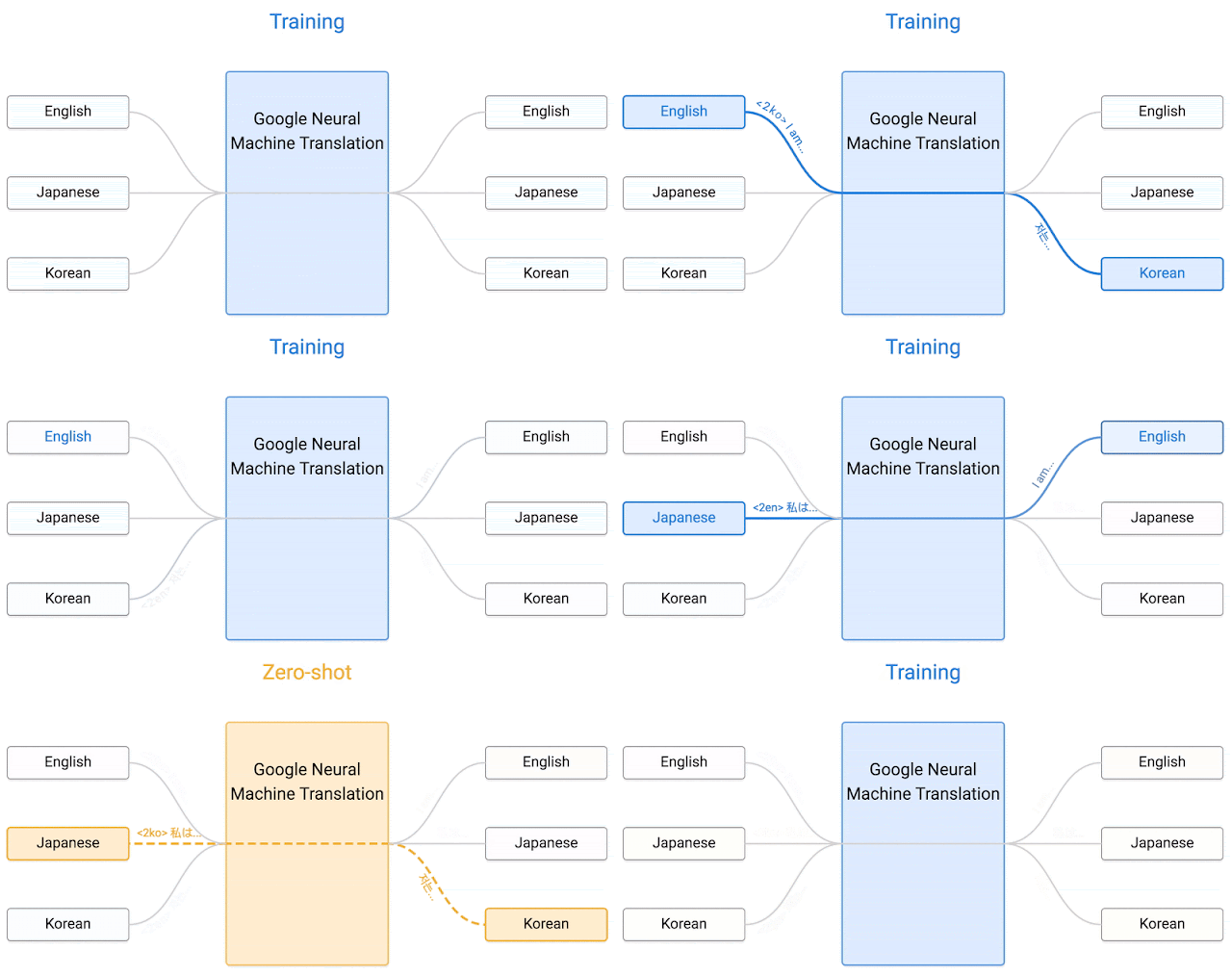
Here’s how it works. Let’s say we train a multilingual system with Japanese⇄English and Korean⇄English examples, shown by the solid blue lines in the animation. Our multilingual system, with the same size as a single GNMT system, shares its parameters to translate between these four different language pairs. This sharing enables the system to transfer the “translation knowledge” from one language pair to the others. This transfer learning and the need to translate between multiple languages forces the system to better use its modeling power.

This inspired us to ask the following question: Can we translate between a language pair which the system has never seen before? An example of this would be translations between Korean and Japanese where Korean⇄Japanese examples were not shown to the system. Impressively, the answer is yes — it can generate reasonable Korean⇄Japanese translations, even though it has never been taught to do so. We call this “zero-shot” translation, shown by the yellow dotted lines in the animation. To the best of our knowledge, this is the first time this type of transfer learning has worked in Machine Translation.

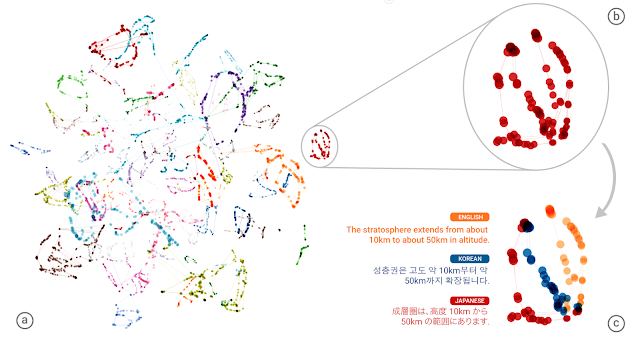
The success of the zero-shot translation raises another important question: Is the system learning a common representation in which sentences with the same meaning are represented in similar ways regardless of language — i.e. an “interlingua”? Using a 3-dimensional representation of internal network data, we were able to take a peek into the system as it translates a set of sentences between all possible pairs of the Japanese, Korean, and English languages.

Part (a) from the figure above shows an overall geometry of these translations. The points in this view are colored by the meaning; a sentence translated from English to Korean with the same meaning as a sentence translated from Japanese to English share the same color. From this view we can see distinct groupings of points, each with their own color. Part (b) zooms in to one of the groups, and part (c) colors by the source language. Within a single group, we see a sentence with the same meaning but from three different languages. This means the network must be encoding something about the semantics of the sentence rather than simply memorizing phrase-to-phrase translations. We interpret this as a sign of existence of an interlingua in the network.

We show many more results and analyses in our paper, and hope that its findings are not only interesting for machine learning or machine translation researchers but also to linguists and others who are interested in how multiple languages can be processed by machines using a single system.

Finally, the described Multilingual Google Neural Machine Translation system is running in production today for all Google Translate users. Multilingual systems are currently used to serve 10 of the recently launched 16 language pairs, resulting in improved quality and a simplified production architecture.

Calling European game developers, enter the Indie Games Contest by December 31

November 22nd, 2016  |  Published in Google Android

Originally posted on Google Developers blog

Posted by Matteo Vallone, Google Play Games Business Development

To build awareness of the awesome innovation and art that indie game developers are bringing to users on Google Play, we have invested heavily over the past year in programs like Indie Corner, as well as events like the Google Play Indie Games Festivals in North America and Korea.

As part of that sustained effort, we also want to celebrate the passion and innovation of indie game developers with the introduction of the first-ever Google Play Indie Games Contest in Europe. The contest will recognize the best indie talent in several countries and offer prizes that will help you get your game noticed by industry experts and gamers worldwide.

Prizes for the finalists and winners:

  • An open showcase held at the Saatchi Gallery in London
  • YouTube influencer campaigns worth up to 100,000 EUR
  • Premium placements on Google Play
  • Tickets to Google I/O 2017 and other top industry events
  • Promotions on our channels
  • Special prizes for the best Unity game
  • And more!

Entering the contest:

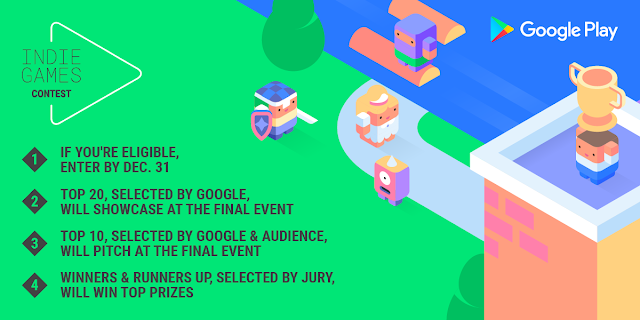
If you're based in Czech Republic, Denmark, Finland, France (coming soon), Germany, Iceland, Israel, Netherlands, Norway, Poland (coming soon), Romania, Spain, Sweden, Turkey, or UK (excl. Northern Ireland), have 15 or less full time employees, and published a new game on Google Play after 1 January 2016, you may now be eligible to enter the contest. If you're planning on publishing a new game soon, you can also enter by submitting a private beta. Check out all the details in the terms and conditions. Submissions close on 31 December 2016.

The process:

Up to 20 finalists will get to showcase their games at an open event at the Saatchi Gallery in London on the 16th February 2017. At the event, the top 10 will be selected by the event attendees and the Google Play team. The top 10 will then get the opportunity to pitch to a jury of industry experts, from which the final winner and runners up will be selected.

Even if someone is NOT entering the contest:

Even if you're not eligible to enter the contest, you can still register to attend the final showcase event in London on 16 February 2017, check out some great indie games, and have fun with various industry experts and indie developers. We will also be hosting a workshop for all indie games developers from across EMEA in the new Google office in Kings Cross the next day, so this will be a packed week.

Get started:

Enter the Indie Games Contest now and visit the contest site to find out more about the contest, the event, and the workshop.

How Consumers Will Shop—and What They’ll Buy—This Holiday Season

November 22nd, 2016  |  Published in Google Adwords

Smartphones have become consumers’ trusted shopping companions. Mobile shopping searches surged in 2015, passing desktop for the first time on Thanksgiving and Black Friday.1 This year, we see supershoppers continuing to turn to their phones for research and purchases.

In fact, for many consumers, smartphones have become a “door-to-the-store.” And that is particularly true during the holidays. Seventy-six percent of people who search for something nearby on their smartphone visit a related business within a day.2

As we head into the one of the busiest shopping weeks of the year, Google data reveals how consumers will shop and what they'll buy.

Women purchase early while men play the waiting game

Women drive the mobile web, searching for and buying products at twice the rate of men throughout the entire holiday season. The week of Christmas, however, men are more likely to complete their mobile purchases.3

Hatchimals and Nintendo top shoppers’ gift lists this year

Consumers are already on the hunt. Top trending product searches for the first two weeks of November include the Nintendo Entertainment System and Hatchimals -- that’s right, stuffed animals that hatch.4
Hatchimals
Nintendo Entertainment System
Baby alive
Trolls
Dji phantom 3 + 4
Sony ps4 pro
Cozmo
Pokemon
Num Noms
RC cars
And while many shoppers can zero in on what they want, others search for inspiration and ideas. Last year, mobile searches related to "unique gifts" grew more than 65% compared to the 2014 holiday season, while mobile searches related to "cool gifts" grew more than 80%.5

On Black Friday, stores are most crowded in the afternoon

Although Black Friday is often associated with early birds, store foot traffic typically peaks in the afternoon between noon and 4:00 p.m.6 But people are shopping all day long. Shopping searches on mobile remain steady throughout the day as shoppers take advantage of Black Friday deals and plan their trips to the store.7


New Englanders love a good deal

Though Black Friday weekend is the rare retail event that pulls even reluctant shoppers into stores, some areas of the country are more interested in deals than others.

By 10:00 a.m. on Black Friday, more than one-quarter of New England shoppers are already on the hunt for a good deal, having stepped inside a department store or shopping center. The rest of the country lags behind an hour.8 And the same is true on mobile: people living in New Hampshire search for more product-related deals than people in other states.9

But even before stores open—and long after they close—consumers continue to shop. Last Thanksgiving, 59% of shopping searches on mobile took place before stores opened. Shopping continued well into the evening, with mobile shopping searches peaking at 8:00 p.m.10


The way consumers shop and behave during the holiday season is rapidly changing, from the way they create their gift lists to the way they purchase. Shoppers are proving that both with their fingertips and their feet.

For more data about mobile search trends and shopper foot traffic on Black Friday, check out our infographic “What Google Data Reveals About Black Friday Shoppers.”

Natalie Zmuda, Managing Editor, Think with Google
Elizabeth Fabiani, Product Marketing Manager, Google Shopping


1. Google Search Data, Nov. 2014 vs. Nov. 2015, U.S.
2. Google/Purchased Digital Diary: How Consumers Solve Their Needs in the Moment, May 2016, Representative sample of U.S. Smartphone users = 1000, Local searchers = 634, Purchases = 1,140
3. Google Analytics, aggregated, anonymized data from U.S. accounts that are opted into sharing benchmark data; mobile only, shopping vertical, Nov. 15, 2015 - Dec. 31, 2015.
4. Google Shopping Insights, U.S., all devices, Nov. 1 - Nov. 13, 2016.
5. Google Search Data, U.S., apparel, home & garden, beauty & personal care, computers & electronics, gifts, toys & games, photo & video, Nov.–Dec. 2014 vs. Nov.–Dec. 2015.
6. Google Data, Aggregated, anonymized store traffic for clothing, electronics, and toy stores from a sample of U.S. users that have turned on Location History, Nov. 2015.
7. Google Search Data, U.S., apparel, computer & electronics, and games & toys. mobile only. Nov. 2015.
8. Google Data, Aggregated anonymized store traffic for clothing, electronics, and toy stores from a sample of U.S. users that have turned on Location History; Store traffic after midnight attributed to Black Friday, Nov. 2015.
9. Google Search Data, U.S., apparel, home & garden, beauty & personal care, computers & electronics, gifts, toys & games, photo & video; mobile only. Nov. 2015, U.S.
10. Google Data, Aggregated, anonymized store traffic for Clothing, Electronics and Toy stores from a sample of U.S. users that have turned on Location History; Google Search Data, U.S., Apparel, Computer & Electronics and Games & Toys; Stores considered open after 6 P.M. on Thanksgiving, November 2015.

Google Play services and Firebase for Android will support API level 14 at minimum

November 21st, 2016  |  Published in Google Android

Posted by Doug Stevenson, Developer Advocate

Version 10.0.0 of the Google Play services client libraries, as well as the Firebase client libraries for Android, will be the last version of these libraries that support Android API level 9 (Android 2.3, Gingerbread). The next scheduled release of these libraries, version 10.2.0, will increase the minimum supported API level from 9 to 14 (Android 4.0.1, Ice Cream Sandwich). This change will happen in early 2017.

Why are we discontinuing support for Gingerbread and Honeycomb in Google Play services?

The Gingerbread platform is almost six years old. Many Android developers have already discontinued support for Gingerbread in their apps. This helps them build better apps that make use of the newer capabilities of the Android platform. For us, the situation is the same. By making this change, we will be able to provide a more robust collection of tools for Android developers with greater speed.

What this means for your Android app that uses Google Play services or Firebase:

You may use version 10.0.0 of Google Play services and Firebase as you are currently. It will continue to work with Gingerbread devices as it has in the past.

When you choose to upgrade to the future version 10.2.0, and if your app minimally supports API level 14 or greater (typically specified as "minSdkVersion" in your build.gradle), you will not encounter any versioning problems. However, if your app supports lower than API level 14, you will encounter a problem at build time with an error that looks like this:

Error:Execution failed for task ':app:processDebugManifest'.
> Manifest merger failed : uses-sdk:minSdkVersion 9 cannot be smaller than version 14 declared in library [com.google.android.gms:play-services:10.2.0]
        Suggestion: use tools:overrideLibrary="com.google.android.gms:play_services" to force usage

Unfortunately, the stated suggestion will not help you successfully run your app on older devices. In order to use Google Play services 10.2.0 and later, you can choose one of the following options:

1. Target API level 14 as the minimum supported API level.

This is the recommended course of action. To discontinue support for API levels that will no longer receive Google Play services updates, simply increase the minSdkVersion value in your app's build.gradle to at least 14. If you update your app in this way and publish it to the Play Store, users of devices with less than that level of support will not be able to see or download the update. However, they will still be able to download and use the most recently published version of the app that does target their device.

A very small percentage of all Android devices are using API levels less than 14. You can read more about the current distribution of Android devices. We believe that many of these old devices are not actively being used.

If your app still has a significant number of users on older devices, you can use multiple APK support in Google Play to deliver an APK that uses Google Play services 10.0.0. This is described below.

2. Build multiple APKs to support devices with an API level less than 14.

Along with some configuration and code management, you can build multiple APKs that support different minimum API levels, with different versions of Google Play services. You can accomplish this with build variants in Gradle. First, define build flavors for legacy and newer versions of your app. For example, in your build.gradle, define two different product flavors, with two different compile dependencies for the components of Play Services you're using:

productFlavors {
    legacy {
        minSdkVersion 9
        versionCode 901  // Min API level 9, v01
    }
    current {
        minSdkVersion 14
        versionCode 1401  // Min API level 14, v01
    }
}

dependencies {
    legacyCompile 'com.google.android.gms:play-services:10.0.0'
    currentCompile 'com.google.android.gms:play-services:10.2.0'
}

In the above situation, there are two product flavors being built against two different versions of the Google Play services client libraries. This will work fine if only APIs are called that are available in the 10.0.0 library. If you need to call newer APIs made available with 10.2.0, you will have to create a compatibility library for the newer API calls so that they are only built into the version of the application that can use them:

  • Declare a Java interface that exposes the higher-level functionality you want to perform that is only available in current versions of Play services.
  • Build two Android libraries that implement that interface. The "current" implementation should call the newer APIs as desired. The "legacy" implementation should no-op or otherwise act as desired with older versions of Play services. The interface should be added to both libraries.
  • Conditionally compile each library into the app using "legacyCompile" and "currentCompile" dependencies.
  • In the app's code, call through to the compatibility library whenever newer Play APIs are required.

After building a release APK for each flavor, you then publish them both to the Play Store, and the device will update with the most appropriate version for that device. Read more about multiple APK support in the Play Store.

Spotlight on Women Techmakers Scholars: Amy & Alma (Spoiler alert: application advice!)

November 21st, 2016  |  Published in Google Student Blog

Through the Women Techmakers Scholars Program - formerly the Google Anita Borg Memorial Scholarship - Google is furthering Dr. Anita Borg’s vision of creating gender equality in the field of computer science by encouraging women to excel in computing and technology and become active leaders and role models in the field.

We have awarded the scholarship to women from all over the world since 2004 who continue to inspire us with their leadership and achievements. We recently caught up with Alma Castillo (2015 scholar from EMEA) and Amy Baldwin (2014 scholar from the US) to share their experiences as scholars and advice for potential applicants:
Amy Baldwin
Alma Castillo
 

Tell us a little about yourself:
Alma Castillo: I studied Computer Science and Mathematics as an undergrad at the Autonomous University of Madrid and at the time I received the scholarship, I was studying a MSc. in HCI at Chalmers University of Technology in Sweden. I always knew I wanted to make software people could interact with to make their lives easier and better.

Amy Baldwin: I grew up in Prescott, Arizona and graduated from Arizona State University in 2015 with a BS in Computer Science. While I was a student I did two internships at Google — as an Engineering Practicum intern in 2013 and a Software Engineering intern in 2014. I came back to Google as a full-time Software Engineer in August 2015 and currently work on home automation for the Google Assistant. In my free time, I love to knit, do yoga, and hike.

What do you think of the application process?
Alma: The application process is a great way to reflect on yourself and the hard work you have done until now. Take your time and make sure you show who you are in your essay.

Amy: Essay questions are always nerve-racking and, of course, the part of the application process that scares us all the most. I believe the key is to just be yourself and speak honestly in your own voice. Make sure the readers know who you are and what you're passionate about. Once you dive in with this mindset, it's not too bad!

Besides the financial benefit, what else did you gain from the scholarship?
Alma: When I think about the scholarship, the most important thing I see is the amazing people I have met through it. At the scholar's' retreat I met other women studying Computer Science in different countries that have now become great friends I turn to for collaboration and advice. The scholars network expands through the years and the different regions providing an incredible family of computer scientists full of women ready to help each other.

What impact has the Scholarship had on you and your academic career?
Amy: Thanks to the scholarship, I was able to leave my off-campus job to only work on campus, and better focus on school. I actually had enough time to finish my undergraduate honors thesis, which I'm thankful I did! I [also] was invited to attend the annual award night held by my school, which is typically exclusive to graduating students, to be recognized for the award. It was really cool to be recognized in front of my professors and staff for my accomplishments, and I ended up attending the following spring as the Outstanding Undergraduate in Computer Science.

What advice would you give to someone considering applying for the scholarship next Year?
Alma: Apply! Even if you think it will be difficult. The application process is a great way to reflect on yourself and discover the great things you have done. Don't be afraid. Just show who you are and what you are passionate about.

Amy: As I mentioned before, just be honest and speak in your own voice. The scholarship committee wants to know who you are, which includes all of the awesome things you've accomplished but also the road you've taken to get where you are and your potential to do the many incredible things you'll do in the future. Also, don't hesitate to apply! I was so close to never submitting my application because I truly believed there was no way I was possibly good enough. I had the same fear when applying for my first internship. You just need to remember that you are awesome, and if you don't apply, you'll never know you had it in you!

What are the next steps for you?
Alma: I recently graduated from my MSc. and I now work as a Software Engineer at Google Play. I hope to continue passing it on through the scholars community.

Amy: I certainly can't see myself leaving Google anytime soon. I love my job and my team - it's exciting being at the center of a product that is so important to the company and our users!

Read more about the program and apply here! We are currently accepting applications for the US, Canada and EMEA. Applications for Asia Pacific will open in early 2017.

Google Team Drives Early Adopter Program now accepting applications

November 21st, 2016  |  Published in Google Apps

In September, we announced that we would soon launch an Early Adopter Program (EAP) for the Team Drives feature in Google Drive. We’re now ready to accept applications for that EAP, which will kick off shortly.


Team Drives are shared spaces where teams can store their files and guarantee that every member has the most up-to-date information, no matter the time or place. Team Drives make onboarding easy, because every person and Google Group added to a Team Drive gets instant access to that team’s documents. Moreover, Team Drives are designed to store the team’s work collectively, so if a document’s creator moves off of the team that document doesn’t go with them. Advanced access controls make Team Drives even more robust, preventing team members from accidentally removing or deleting files that others need.

Before applying for the Team Drives EAP, please note the following restrictions:

  • The Team Drives EAP is only open to G Suite Business and Education customers.
  • Only G Suite admins can sign up for the Team Drives EAP. If you are not the G Suite admin for your organization, please contact that individual and ask them to sign up.
  • Admins will need to enroll their entire primary domain in the EAP. They will be able to restrict Team Drives creation to certain organizational units, but all users in the domain will be able to see and access Team Drives. They will not be able to enroll secondary domains.
  • At the moment, Team Drives does not support some features, including adding members from outside of one’s domain, syncing to a desktop computer, and Vault capabilities.

Apply for the Team Drives Early Adopter Program (EAP) today, and help teams of all sizes at your organization work better together.

Launch release calendar
Launch detail categories
Get these product update alerts by email
Subscribe to the RSS feed of these updates

How to earn money blogging with AdSense

November 21st, 2016  |  Published in Google Adsense

This is the first of five guest posts from AdSense publisher Brandon Gaille. Brandon has built his small business marketing blog, BrandonGaille.com, to over 2 million monthly visitors in less than three years. He’s featured as our guest blogger to share insights and tips from his personal blogging experience to help AdSense publishers grow earnings. If you’re new to AdSense, be sure to sign up for AdSense and start turning your #PassionIntoProfit. 

Blogging is one of the easiest ways to build a residual income with Google AdSense. However, most bloggers are doing it the wrong way, and that’s keeping them from growing their earnings to a whole new level. Today, I’m going to share with you the four pillars that helped me build my blog traffic to over 1 million monthly visitors in less than 18 months after my first blog post.

My blogging success story is rather unique. For most of my thirties, I was mentally and physically disabled because of damage done by a small pituitary brain tumor. I was fortunate enough to find a doctor that identified the right combination of medicine to bring me back from the depths of nowhere. My mental cognition was regained a mere months before my pregnant wife was diagnosed with stage 3 breast cancer. I was able to be there for my wife. Our first son was born healthy, and my wife officially beat cancer two months later.


story2


The fear of our health problems returning led me down the road of creating a blog. One of my top skills is reverse engineering successful systems and rebuilding them into a more productive system. Before my health was ravaged, I had built several multi-million dollar companies on the back of this unique skillset.

Before I made my first blog post, I spent six months researching the blogs that received the most traffic from Google organic search. I identified the specific tactics from over 70 high traffic blogs. Then I ranked the tactics by the most productive, and I eliminated the bottom 80%. This is what I built my blogging system upon. Within four months of launching the blog, I had surpassed 100,000 monthly visitors. Today, my blog receives over 2 million monthly visitors.

Here are the four pillars that my system was built upon:

Pillar #1 – Keyword research

Most amateur bloggers fail miserably at keyword research. The reason for this is because they are overwhelmed by all of the data, and they are usually using the wrong tools. I will be breaking down my simple system for identifying keyword phrases that serves as the topic and title for future blog posts. This will allow you to blog with a purpose. And that purpose is to create blog posts that consistently produce organic traffic.

Pillar #2 – Compelling blog titles


You can write an epic 4000 word post, and it can doomed for failure because of a poorly chosen title. The post title is a very important part of the post, and often overlooked. I’ll be revealing my Perfect Title Formula, which will allow you to craft blog headlines that drive a ridiculous amount of traffic and social shares.

Pillar #3 – Engaging content 


Over the last three years, I’ve perfected my blog’s ability to engage new visitors. The average visitor spends 5 minutes reading one of my blog posts. I will be sharing the eleven techniques that I apply to my blog posts to achieve absolute engagement.

Pillar #4 – Getting High Quality Links


The key to remember here is quality over quantity. Do not waste your time chasing low quality links or adding your blog to a directory. There are two strategies that work better than everything else, and I will show you exactly how to execute them.


Over the next four weeks I’ll be sharing tips on how to increase your AdSense earnings right here on the Inside AdSense blog. In the meantime, go here to keep reading “How to Build a Blog to Over 1 Million Monthly Visitors” and find out how to apply the four pillars to your blog.


Posted By
Brandon Gaille

Brandon Gaille


Brandon Gaille is an AdSense publisher. You can learn more about Brandon at BrandonGaille.com and listen to his popular blogging podcast, The Blog Millionaire.


If you’re new to AdSense, be sure to sign up for AdSense and start turning your #PassionIntoProfit. 

Serve up the perfect message this holiday season

November 18th, 2016  |  Published in Google Adwords

Right now supershoppers are online, looking for great holiday gifts to give their family and friends -- from the coolest gadgets to the latest styles. In fact, 4 in 5 smartphone holiday shoppers use their phone during spare moments or while doing other activities.1 This means it’s important for you to be present wherever and whenever people are browsing their favorite apps and websites. To reach these consumers with a perfectly crafted message this holiday season, check out three of our latest display ad innovations:


Deliver beautiful catalog experiences with Gmail ads

During the holidays, shoppers look to their inboxes to get updates from their favorite brands. Now you can be there with beautiful catalog experiences that wow them. When people click on your Gmail ad, it expands to show up to four rich images or videos, with descriptions. For example, a beauty brand can show customers Black Friday deals on eyeshadow trios and matching eyeliner. These ads automatically adapt to any device, so people can scroll through your beautiful imagery wherever and whenever they’re using Gmail.
A beautiful catalog experience in Gmail ads

Customize your message with responsive ads

It’s easier than ever to keep your ads in tune with the season. We recently introduced responsive ads, which help you reach more people because they adapt to fit millions of websites and apps on the Google Display Network (GDN). Responsive ads also give you the flexibility to customize your message for the holidays -- without doing heavy lifting. Simply provide holiday-themed headlines, a description, an image, and your URL -- and Google automatically designs beautiful responsive ads that can run across the GDN. That means it’s a snap to add holiday promotions and seasonal products to your campaigns. iZettle, a payment technology company, used responsive ads and drove a 2x increase in conversion rate compared to text ads.


Help customers find you with location extensions

When people know where to find you this holiday season, they’re more likely to stop by your business. Location extensions for display lets you highlight your address, Google Maps directions, and photos in your ad so you can turn online clicks into foot traffic to your store. The Home Depot used location extensions for display to reach consumers actively browsing their phones near the brand’s most popular stores, driving an 8X in-store ROI.

It’s the most important time of the year for many businesses. Delivering the right message can mean the difference between customers choosing your business -- or another one. Whether you’re trying to drive sales on your website or bring people into your stores, we hope these innovations will help you tell your story and win more customers this holiday season.

Posted by Brad Bender, Vice President of Display and Video Advertising

1. Google/Ipsos, "Post-Holiday Shopping Intentions Study—Total Shoppers Report," base: used smartphone for holiday shopping, n=410, Jan. 2016.

Google Summer of Code 2016 wrap-up: Linux XIA

November 18th, 2016  |  Published in Google Open Source

We're sharing guest posts from students, mentors and organization administrators who participated in Google Summer of Code 2016. This is the fifth post in that series and there are more on the way.


Linux XIA is the native implementation of XIA, a meta network architecture that supports evolution of all of its components, which we call “principals,” and promotes interoperability between these principals. It is the second year that our organization, Boston University / XIA, has participated in Google Summer of Code (GSoC), and this year we received 31 proposals from 8 countries.

Our ideas list this year focused on upgrading key forwarding data structures to their best known versions. Our group chose the most deserving students for each of the following projects:

Accelerating the forwarding speed of the LPM principal with poptrie

Student André Ferreira Eleuterio and mentor Cody Doucette implemented the first version of the LPM principal in Linux XIA for GSoC 2015. The LPM principal enables Linux XIA to leverage routing tables derived from BGP, OSPF, IS-IS and any other IP routing protocol to forward XIA packets natively, that is, without encapsulation in IP. For GSoC 2016, student Vaibhav Raj Gupta from India partnered with mentor Cody Doucette to speed up the LPM principal by employing a state-of-the-art data structure to find the longest prefix matching using general purpose processors: poptrie.

Upgrading the FIB hash table of principals to the relativistic hash table

Principals that rely on routing flat names have used a resizable hash table that supports lockless readers since 2011. While this data structure was unique in 2011, in the same year, relativistic hash tables were published. The appeal to upgrade to relativistic hash tables was twofold: reduced memory footprint per hashed element, and the fact they were implemented in the Linux kernel in 2014. Student Sachin Paryani, also from India, worked with mentor Qiaobin Fu to replace our resizable hash table with the relativistic hash table.

Google Summer of Code nurtures a brighter future. Thanks to GSoC, our project has received important code contributions, and our community has been enlarged. It was rewarding to learn that two of our GSoC students have decided to pursue graduate school after their GSoC experience with us: Pranav Goswami (2015) and Sachin Paryani (2016). We hope these examples will motivate other students to do their best because the world is what we make of it.

By Michel Machado, Boston University / XIA organization administrator

What Test Engineers do at Google: Building Test Infrastructure

November 18th, 2016  |  Published in Google Testing

Author: Jochen Wuttke

In a recent post, we broadly talked about What Test Engineers do at Google. In this post, I talk about one aspect of the work TEs may do: building and improving test infrastructure to make engineers more productive.

Refurbishing legacy systems makes new tools necessary
A few years ago, I joined an engineering team that was working on replacing a legacy system with a new implementation. Because building the replacement would take several years, we had to keep the legacy system operational and even add features, while building the replacement so there would be no impact on our external users.

The legacy system was so complex and brittle that the engineers spent most of their time triaging and fixing bugs and flaky tests, but had little time to implement new features. The goal for the rewrite was to learn from the legacy system and to build something that was easier to maintain and extend. As the team's TE, my job was to understand what caused the high maintenance cost and how to improve on it. I found two main causes:
  • Tight coupling and insufficient abstraction made unit testing very hard, and as a consequence, a lot of end-to-end tests served as functional tests of that code.
  • The infrastructure used for the end-to-end tests had no good way to create and inject fakes or mocks for these services. As a result, the tests had to run the large number of servers for all these external dependencies. This led to very large and brittle tests that our existing test execution infrastructure was not able to handle reliably.
Exploring solutions
At first, I explored if I could split the large tests into smaller ones that would test specific functionality and depend on fewer external services. This proved impossible, because of the poorly structured legacy code. Making this approach work would have required refactoring the entire system and its dependencies, not just the parts my team owned.

In my second approach, I also focussed on large tests and tried to mock services that were not required for the functionality under test. This also proved very difficult, because dependencies changed often and individual dependencies were hard to trace in a graph of over 200 services. Ultimately, this approach just shifted the required effort from maintaining test code to maintaining test dependencies and mocks.

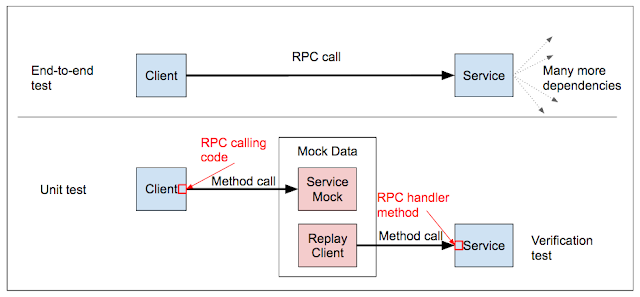
My third and final approach, illustrated in the figure below, made small tests more powerful. In the typical end-to-end test we faced, the client made RPCcalls to several services, which in turn made RPC calls to other services. Together the client and the transitive closure over all backend services formed a large graph (not tree!) of dependencies, which all had to be up and running for the end-to-end test. The new model changes how we test client and service integration. Instead of running the client on inputs that will somehow trigger RPC calls, we write unit tests for the code making method calls to the RPC stub. The stub itself is mocked with a common mocking framework like Mockito in Java. For each such test, a second test verifies that the data used to drive that mock "makes sense" to the actual service. This is also done with a unit test, where a replay client uses the same data the RPC mock uses to call the RPC handler method of the service.


This pattern of integration testing applies to any RPC call, so the RPC calls made by a backend server to another backend can be tested just as well as front-end client calls. When we apply this approach consistently, we benefit from smaller tests that still test correct integration behavior, and make sure that the behavior we are testing is "real".

To arrive at this solution, I had to build, evaluate, and discard several prototypes. While it took a day to build a proof-of-concept for this approach, it took me and another engineer a year to implement a finished tool developers could use.

Adoption
The engineers embraced the new solution very quickly when they saw that the new framework removes large amounts of boilerplate code from their tests. To further drive its adoption, I organized multi-day events with the engineering team where we focussed on migrating test cases. It took a few months to migrate all existing unit tests to the new framework, close gaps in coverage, and create the new tests that validate the mocks. Once we converted about 80% of the tests, we started comparing the efficacy of the new tests and the existing end-to-end tests.

The results are very good:
  • The new tests are as effective in finding bugs as the end-to-end tests are.
  • The new tests run in about 3 minutes instead of 30 minutes for the end-to-end tests.
  • The client side tests are 0% flaky. The verification tests are usually less flaky than the end-to-end tests, and never more.
Additionally, the new tests are unit tests, so you can run them in your IDE and step through them to debug. These results allowed us to run the end-to-end tests very rarely, only to detect misconfigurations of the interacting services, but not as functional tests.

Building and improving test infrastructure to help engineers be more productive is one of the many things test engineers do at Google. Running this project from requirements gathering all the way to a finished product gave me the opportunity to design and implement several prototypes, drive the full implementation of one solution, lead engineering teams to adoption of the new framework, and integrate feedback from engineers and actual measurements into the continuous refinement of the tool.

Pixel Security: Better, Faster, Stronger

November 17th, 2016  |  Published in Google Online Security

Posted by Paul Crowley, Senior Software Engineer and Paul Lawrence, Senior Software Engineer
[Cross-posted from the Android Developers Blog]

Encryption protects your data if your phone falls into someone else's hands. The new Google Pixel and Pixel XL are encrypted by default to offer strong data protection, while maintaining a great user experience with high I/O performance and long battery life. In addition to encryption, the Pixel phones debuted running the Android Nougat release, which has even more security improvements.

This blog post covers the encryption implementation on Google Pixel devices and how it improves the user experience, performance, and security of the device.
File-Based Encryption Direct Boot experience
One of the security features introduced in Android Nougat was file-based encryption. File-based encryption (FBE) means different files are encrypted with different keys that can be unlocked independently. FBE also separates data into device encrypted (DE) data and credential encrypted (CE) data.

Direct boot uses file-based encryption to allow a seamless user experience when a device reboots by combining the unlock and decrypt screen. For users, this means that applications like alarm clocks, accessibility settings, and phone calls are available immediately after boot.

Enhanced with TrustZone® security

Modern processors provide a means to execute code in a mode that remains secure even if the kernel is compromised. On ARM®-based processors this mode is known as TrustZone. Starting in Android Nougat, all disk encryption keys are stored encrypted with keys held by TrustZone software.

This secures encrypted data in two ways:

  • TrustZone enforces the Verified Boot process. If TrustZone detects that the operating system has been modified, it won't decrypt disk encryption keys; this helps to secure device encrypted (DE) data.
  • TrustZone enforces a waiting period between guesses at the user credential, which gets longer after a sequence of wrong guesses. With 1624 valid four-point patterns and TrustZone's ever-growing waiting period, trying all patterns would take more than four years. This improves security for all users, especially those who have a shorter and more easily guessed pattern, PIN, or password.

Encryption on Pixel phones

Protecting different folders with different keys required a distinct approach from full-disk encryption (FDE). The natural choice for Linux-based systems is the industry-standard eCryptFS. However, eCryptFS didn't meet our performance requirements. Fortunately one of the eCryptFS creators, Michael Halcrow, worked with the ext4 maintainer, Ted Ts'o, to add encryption natively to ext4, and Android became the first consumer of this technology. ext4 encryption performance is similar to full-disk encryption, which is as performant as a software-only solution can be.


Additionally, Pixel phones have an inline hardware encryption engine, which gives them the ability to write encrypted data at line speed to the flash memory. To take advantage of this, we modified ext4 encryption to use this hardware by adding a key reference to the bio structure, within the ext4 driver before passing it to the block layer. (The bio structure is the basic container for block I/O in the Linux kernel.) We then modified the inline encryption block driver to pass this to the hardware. As with ext4 encryption, keys are managed by the Linux keyring. To see our implementation, take a look at the source code for the Pixel kernel.


While this specific implementation of file-based encryption using ext4 with inline encryption benefits Pixel users, FBE is available in AOSP and ready to use, along with the other features mentioned in this post.

Previously


Dec 28, 2016
Open source down under: Linux.conf.au 2017

by Open Source Programs Office | Read | No Comments

It’s a new year and open source enthusiasts from around the globe are preparing to gather at the edge of the world for Linux.conf.au 2017. Among those preparing are Googlers, including some of us from the Open Source Programs Office.

This year Linux.conf.au is returning to Hobart, the riverside capital of Tasmania, home of Australia’s famous Tasmanian devils, running five days between January 16 and 20.

Circle_DevilTuz.png
Tuz, a Tasmanian devil sporting a penguin beak, is the Linux.conf.au mascot.
(Artwork by Tania Walker licensed under CC BY-SA.)

The conference, which began in 1999 and is community organized, is well equipped to explore the theme, “the Future of Open Source,” which is reflected in the program schedule and miniconfs.

You’ll find Googlers speaking throughout the week (listed below), as well as participating in the hallway track. Don’t miss our Birds of a Feather session if you’re a student, educator, project maintainer, or otherwise interested in talking about outreach and student programs like Google Summer of Code and Google Code-in.

Monday, January 16th
12:20pm The Sound of Silencing by Julien Goodwin
4:35pm   Year of the Linux Desktop? by Jessica Frazelle

Tuesday, January 17th
All day    Community Leadership Summit X at LCA

Wednesday, January 18th
2:15pm   Community Building Beyond the Black Stump by Josh Simmons
4:35pm   Contributing to and Maintaining Large Scale Open Source Projects by Jessica Frazelle

Thursday, January 19th
4:35pm   Using Python for creating hardware to record FOSS conferences! by Tim Ansell

Friday, January 20th
1:20pm   Linux meets Kubernetes by Vishnu Kannan

Not able to make it to the conference? Keynotes and sessions will be livestreamed, and you can always find the session recordings online after the event.

We’ll see you there!

By Josh Simmons, Open Source Programs Office


Dec 23, 2016
Taking the pulse of Google Code-in 2016

by Open Source Programs Office | Read | No Comments

GCI official horizontal_1372x448dp.png

Today is the official midpoint of this year’s Google Code-in contest and we are delighted to announce this is our most popular year ever! 930 teenagers from 60 countries have completed 3,503 tasks with 17 open source organizations. The number of students successfully completing tasks has almost met the total number of students from the 2015 contest already.

Tasks that the students have completed include:

  • writing test suites
  • improving mobile UI 
  • writing documentation and creating videos to help new users 
  • working on internationalization efforts
  • fixing and finding bugs in the organization’s’ software 

Participants from all over the world
In total, over 2,800 students from 87 countries have registered for the contest and we look forward to seeing great work from these (and more!) students over the next few weeks. 2016 has also seen a huge increase in student participation in places such as Indonesia, Vietnam and the Philippines.

Google Code-in participants by country
Please welcome two new countries to the GCI family: Mauritius and Moldova! Mauritius made a very strong debut to the contest and currently has 13 registered students who have completed 31 tasks.

The top five countries with the most completed tasks are:

  1. India: 982
  2. United States: 801
  3. Singapore: 202
  4. Vietnam: 119
  5. Canada: 117

Students, there is still plenty of time to get started with Google Code-in. New tasks are being added daily to the contest site — there are over 1,500 tasks available for students to choose from right now! If you don’t see something that interests you today, check back again every couple of days for new tasks.

The last day to register for the contest and claim a task is Friday, January 13, 2017 with all work being due on Monday, January 16, 2017 at 9:00 am PT.

Good luck to all of the students participating this year in Google Code-in!

By Stephanie Taylor, Google Code-in Program Manager

All numbers reported as of 8:00 PM Pacific Time, December 22, 2016.


Dec 21, 2016
Introducing the ExifInterface Support Library

by Android Developers | Read | No Comments

With the release of the 25.1.0 Support Library, there’s a new entry in the family: the ExifInterface Support Library. With significant improvements introduced in Android 7.1 to the framework’s ExifInterface, it only made sense to make those available t…


Dec 21, 2016
Geolocation and Firebase for the Internet of Things

by Maps Devel | Read | No Comments

Posted by Ken Nevarez, Industry Solutions Lead at Google

GPS is the workhorse of location based services, but there are use cases where you may want to avoid the cost and power consumption of GPS hardware or locate devices in places where GPS lacks accuracy, such as in urban environments or buildings.

We’ve seen recent growth in Internet of Things (IoT) applications using the Google Maps Geolocation API instead of GPS for asset tracking, theft prevention, usage optimization, asset servicing, and more. As part of my 20 percent project at Industry Solutions, I created a prototype IoT device that can locate itself using surrounding WiFi networks and the Google Maps Geolocation API. In this post, I’ll discuss some interesting implementation features and outline how you can create the prototype yourself.

I built a device that scans for local WiFi and writes results (WiFi hotspots and their signal strength) to a Firebase Realtime Database. A back-end service then reads this data and uses the Google Maps Geolocation API to turn this into a real-world location, which can be plotted on a map.


Set up the Device & Write Locally

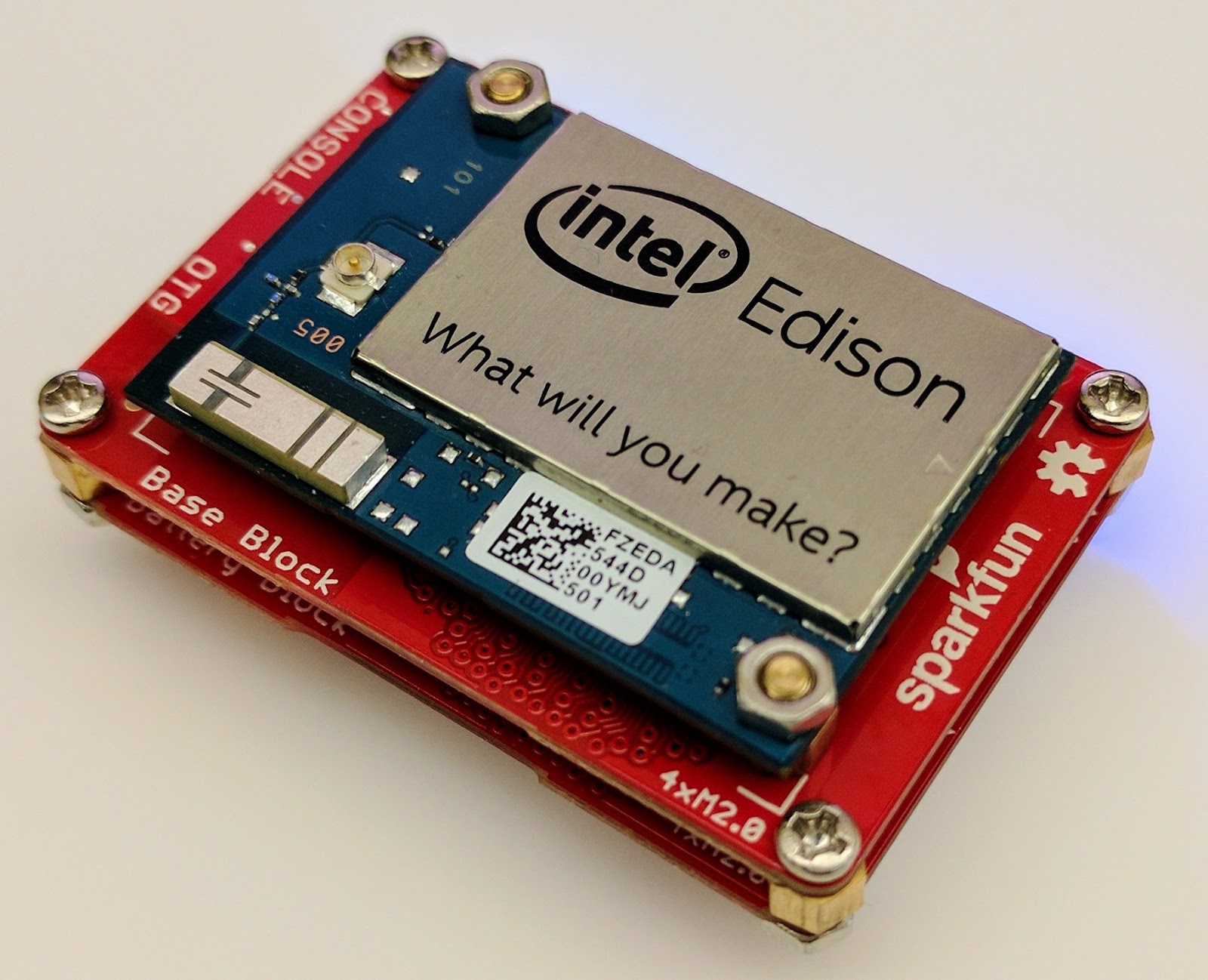
For this proof of concept, I used the Intel Edison as a Linux-based computing platform and augmented it with Sparkfun’s Edison Blocks. To build the device, you will need an Intel Edison, a Base Block, a Battery Block and a Hardware pack.


Developing for the Edison is straightforward using the Intel XDK IDE. We will be creating a simple Node.js application in JavaScript. I relied on 3 libraries: Firebase for the database connection, wireless-tools/iwlist to capture WiFi networks, and macaddress to capture the device MAC. Installation instructions can be found on the linked pages.

Step 1: get the device MAC address and connect to Firebase:

function initialize() {
    macaddress.one('wlan0', function (err, mac) {
        mac_address = mac;
        if (mac === null) {
            console.log('exiting due to null mac Address');
            process.exit(1);
        }
        firebase.initializeApp({
            serviceAccount: '/node_app_slot/.json',
            databaseURL: 'https://.firebaseio.com/'
        });
        var db = firebase.database();
        ref_samples = db.ref('/samples');
        locationSample();
    });
}

The above code contains two placeholders:

  1. The service-account-key is a private key you create in the Firebase Console. Follow the gear icon in the upper left of console, select “settings”, and click Generate New Private Key. Place this key on your Edison in the directory /node_app_slot/. See this Firebase documentation for more information.
  2. The project-id in the database URL is found in the Firebase console database page after you have linked your Google project with Firebase.

Step 2: scan for WiFi networks every 10 seconds and write locally:

function locationSample() {
    var t = new Date();
    iwlist.scan('wlan0', function(err, networks) {
        if(err === null) {
            ref_samples.push({
                mac: mac_address,
                t_usec: t.getTime(),
                t_locale_string: t.toLocaleString(),
                networks: networks,
            });
        } else {
            console.log(err);
        }        
    });
    setTimeout(locationSample, 10000);
}

Write to the cloud

The locationSample() function above writes detectable WiFi networks to a Firebase database that syncs to the cloud when connected to a network.

Caveat: To configure access rights and authentication to Firebase, I set up the device as a “server”. Instructions for this configuration are on the Firebase website. For this proof of concept, I made the assumption that the device was secure enough to house our credentials. If this is not the case for your implementation you should instead follow the instructions for setting up the client JavaScript SDK.

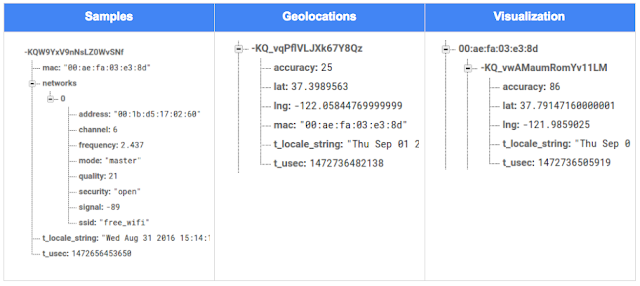
The database uses 3 queues to manage workload: a WiFi samples queue, a geolocation results queue and a visualization data queue. The workflow will be: samples from the device go into a samples queue, which gets consumed to produce geolocations that are put into a geolocations queue. Geolocations are consumed and formatted for presentation, organized by device, and the output is stored in a visualizations bucket for use by our front end website.

Below is an example of a sample, a geolocation, and our visualization data written by the device and seen in the Firebase Database Console.

Processing the Data with Google App Engine

To execute the processing of the sample data I used a long running Google App Engine Backend Module and a custom version of the Java Client for Google Maps Services.

Caveat: To use Firebase with App Engine, you must use manual scaling. Firebase uses background threads to listen for changes and App Engine only allows long-lived background threads on manually scaled backend instances.

The Java Client for Google Maps Services takes care of a lot of the communications code required to use the Maps APIs and follows our published best practices for error handling and retry strategies that respect rate limits. The GeolocateWifiSample() function below is registered as an event listener with Firebase. It loops over each network reported by the device and incorporates it into the geolocation request.

private void GeolocateWifiSample(DataSnapshot sample,  Firebase db_geolocations, Firebase db_errors) {
    // initalize the context and request
    GeoApiContext context = new GeoApiContext(new GaeRequestHandler()).setApiKey("");
    GeolocationApiRequest request = GeolocationApi.newRequest(context)
            .ConsiderIp(false);
    // for every network that was reported in this sample...
    for (DataSnapshot wap : sample.child("networks").getChildren()) {
        // extract the network data from the database so it’s easier to work with
        String wapMac = wap.child("address").getValue(String.class);
        int wapSignalToNoise = wap.child("quality").getValue(int.class);
        int wapStrength = wap.child("signal").getValue(int.class);
        // include this network in our request
        request.AddWifiAccessPoint(new WifiAccessPoint.WifiAccessPointBuilder()
                .MacAddress(wapMac)
                .SignalStrength(wapStrength)
                .SignalToNoiseRatio(wapSignalToNoise)
                .createWifiAccessPoint());
    }
    ...
    try {
        // call the api
        GeolocationResult result = request.CreatePayload().await();
        ...
        // write results to the database and remove the original sample
    } catch (final NotFoundException e) {
        ...
    } catch (final Throwable e) {
        ...
    }
}

Register the GeolocateWifiSample() function as an event handler. The other listeners that process geolocation results and create the visualization data are built in a similar pattern.

ChildEventListener samplesListener = new ChildEventListener() {
    @Override
    public void onChildAdded(DataSnapshot dataSnapshot, String previousChildName) {
        // geolocate and write to new location
        GeolocateWifiSample(dataSnapshot, db_geolocations, db_errors);
    }
    ...
};
db_samples.addChildEventListener(samplesListener);

Visualize the Data

To visualize the device locations I used Google App Engine to serve stored data from Firebase and the Google Maps JavaScript API to create a simple web page that displays the results. The index.html page contains an empty

with id “map”. I initialized this
to contain the Google Map object. I also added “child_added” and “child_removed” event handlers to update the map as the data changes over time.
function initMap() {
    // attach listeners
    firebase.database().ref('/visualization').on('child_added', function(data) {
        ...
        data.ref.on('child_added', function(vizData) {
            circles[vizData.key]= new CircleRoyale(map,
                                vizData.val().lat,
                                vizData.val().lng,
                                vizData.val().accuracy,
                                color);
          set_latest_position(data.key, vizData.val().lat, vizData.val().lng);
        });
        data.ref.on('child_removed', function(data) {
            circles[data.key].removeFromMap();
        });
    });
    // create the map
    map = new google.maps.Map(document.getElementById('map'), {
      center: get_next_device(),
      zoom: 20,
      scaleControl: true,
    });
    ...
}

Since the API returns not only a location but also an indication of accuracy, I’ve created a custom marker that has a pulsing radius to indicate the accuracy component.

Two devices (red and blue) and their last five known positions


What’s next?

In this post I’ve outlined how you can build an IoT device that uses Google Maps Geolocation API to track any internet-connected device – from robotics to wearables. The App Engine processing module can be expanded to use other Google Maps APIs Web Services providing geographic data such as directions, elevation, place or time zone information. Happy building!

As an alternative, you can achieve a similar solution using Google Cloud Platform as a replacement for Firebase—this article shows you how.

author image
About Ken: Ken is a Lead on the Industry Solutions team. He works with customers to bring innovative solutions to market.

Dec 21, 2016
Google Summer of Code 2016 wrap-up: Public Lab

by Open Source Programs Office | Read | No Comments

This post is part of our series of guest posts from students, mentors and organization administrators who participated in Google Summer of Code 2016.


How we made this our best Google Summer of Code ever

This was our fourth year doing Google Summer of Code (GSoC), and it was our best year ever by a wide margin! We had five hard-working students who contributed over 17,000 new lines of (very useful) code to our high-priority projects.

Students voluntarily started coding early and hit the ground running, with full development environments and a working knowledge of GitHub Flow-style pull request process. They communicated with one another and provided peer support. They wrote tests. Hundreds of them! They blogged about their work as they went, and chatted with other community members about how to design features.

All of that was amazing, and it was made better by the fact that we were accepting pull requests with new code twice weekly. Tuesdays and Fridays, I went through new submissions, provided feedback, and pulled new code into our master branch, usually publishing it to our production site once a week.

I don’t know how other projects do things, but this was very new for us, and it’s revolutionized how we work together. In past years, students would work on their forks, slowly building up features. Then in a mad dash at the end, we’d try to merge them into trunk, with lots of conflicts and many hours (weeks!) of work on the part of project maintainers.

Screenshot_2016-08-26_at_11.44.16_AM.png

What made this year so good?

Many things aligned to make this summer great, and basically none of them are our ideas. I’m sure plenty of you are cringing at how we used to do things, but I also don’t think that it’s that unusual for projects not “born” in the fast-paced world of modern code collaboration.

We used ideas and learned from Nicolas Bevacqua, author of JavaScript Application Design and of the woofmark and horsey libraries which I’ve contributed to. We’ve also learned a great deal from the Hoodie community, particularly Gregor Martynus, who we ran into at a BostonJS meetup. Lastly, we learned from SpinachCon, organized by Shauna Gordon McKeon and Deb Nicholson, where people refine their install process by actually going through the process while sitting next to each other.

Broadly, our strategies were:

  • Good documentation for newcomers (duh)
  • Short and sweet install process that you’ve tried yourself (thanks, SpinachCon!)
  • Predictable, regular merge schedule
  • Thorough test suite, and requiring tests with each pull request
  • Modularity, insisting that projects be broken into small, independently testable parts and merged as they’re written

Installation and pull requests

Most of the above sound kind of obvious or trivial, but we saw a lot of changes when we put it all together. Having a really fast install process, and guidance on getting it running in a completely consistent environment like the virtualized Cloud9 service, meant that many students were able to get the code running the same day they found the project. We aimed for an install time of 15 minutes max, and supplied a video of this for one of our codebases.

We also asked students to make a small change (even just add a space to a file) and walk through the GitHub Flow pull request (PR) submission process. We had clear step-by-step guidance for this, and we took it as a good sign when students were able to read through it and do this.

Importantly, we really tried to make each step welcoming, not demanding or dismissive, of folks who weren’t familiar with this process. This ultimately meant that all five students already knew the PR process when they began coding.

Twice-weekly merge schedule

We were concerned that, in past years, students only tried merging a few times and typically towards the end of the summer. This meant really big conflicts (with each other, often) and frustration.

This year we decided that, even though we’re a tiny organization with just one staff coder, we’d try merging on Tuesday and Friday mornings, and we mostly succeeded. Any code that wasn’t clearly presented, commits squashed, passing tests, and submitting new tests, was reviewed and I left friendly comments and requests so it could be merged the following week.

At first I felt bad rejecting PRs, but we had such great students that they got used to the strictness. They got really good at separating out features, demonstrating their features through clear tests, and some began submitting more than two PRs per week – always rebasing on top of the latest master to ensure a linear commit history. Sweet!

Wrap-up and next steps

The last thing we did was to ask each student, essentially as their documentation, to write a series of new issues which clearly described the problem and/or desired behavior, leave suggestions and links to specific lines of code or example code, and mark them with the special “help-wanted” tag which was so helpful to them when they first started out. We asked each to also make one extra-welcoming “first-timers-only” issue which walks a new contributor through every step of making a commit and even provides suggested code to be inserted.

This final requirement was key. While I personally made each of the initial set of “help-wanted” and “first-timers-only” issues before GSoC, now five students were offloading their unfinished to-dos as very readable and inviting issues for others. The effect was immediate, in part because these special tags are syndicated on some sites. Newcomers began picking them up within hours and our students were very helpful in guiding them through their first contributions to open source.

I want to thank everyone who made this past summer so great, from our champion mentors and community members, to our stellar students, to all our inspirations in this new process, to the dozen or so new contributors we’ve attracted since the end of August.

By Jeff Warren, Organization Administrator for PublicLab.org


Dec 20, 2016
Get the guide to finding success in new markets on Google Play

by Android Developers | Read | No Comments

Posted by Lily Sheringham, Developer Marketing at Google Play

With just a few clicks, you can publish an app to Google Play and access a
global audience of more than 1 billion 30 days active users. Finding success in
global markets means considering how each market differs, planning for high
quality localization, and tailoring your activity to the local audience. The new
Going
Global Playbook provides best practices and tips, with advice from
developers who’ve successfully gone global.

This guide includes advice to help you plan your approach to going global,
prepare your app for new markets, take your app to market, and also include data
and insights for key countries and other useful resources.

This ebook joins others that we’ve recently published including The
Building for Billions Playbook and The
News Publisher Playbook. All of our ebooks are promoted in the Playbook for Developers app, which is
where you can stay up to date with all the news and best practices you need to
find success on Google Play.

How useful did you find this blogpost?


★ ★ ★ ★ ★
What is Google Data?

Google Data is the only site where you can get news from 60+ official Google blogs all in one place. We have published 24,235 official posts since January 2005.


Categories

  • Gmail (Google Mail) (436)
  • Google Adsense (1,013)
  • Google Adsense Feeds (46)
  • Google Adwords (1,224)
  • Google Adwords API (366)
  • Google Affiliate Network (141)
  • Google Ajax API (121)
  • Google Analytics (961)
  • Google Android (654)
  • Google App Engine (332)
  • Google Apps (1,865)
  • Google Blog (1,650)
  • Google Blogger Buzz (527)
  • Google Books (300)
  • Google Checkout (162)
  • Google Chrome (312)
  • Google Code (828)
  • Google Conversions (137)
  • Google CPG (198)
  • Google Custom Search (129)
  • Google Desktop (144)
  • Google Desktop API (175)
  • Google Docs (717)
  • Google DoubleClick (730)
  • Google Earth (1,006)
  • Google Enterprise (1,278)
  • Google Finance (88)
  • Google Gadgets (31)
  • Google Gears (60)
  • Google Grants (285)
  • Google Mac Blog (149)
  • Google Maps (736)
  • Google Merchant (219)
  • Google Mobile (386)
  • Google News (152)
  • Google Notebook (20)
  • Google Online Security (221)
  • Google Open Source (929)
  • Google OpenSocial (197)
  • Google Orkut (381)
  • Google Photos (Picasa) (109)
  • Google Product Ideas (23)
  • Google Public Policy (675)
  • Google Reader (124)
  • Google RechargeIT (29)
  • Google Research (423)
  • Google SketchUp (692)
  • Google Student Blog (848)
  • Google Talk (107)
  • Google Testing (326)
  • Google Translate (98)
  • Google TV Ads Blog (163)
  • Google Video (293)
  • Google Voice (86)
  • Google Wave (38)
  • Google Webmaster Central (376)
  • Google Website Optimizer (101)
  • Google.org (183)
  • iGoogle (87)
  • Uncategorized (1,262)
  • Youtube (779)
  • Youtube API (173)

Tags

adsense adsense google advertisers advertising adwords adwords google adwords tips analytics analytics google android gmail for domains Google Adsense Google Adwords google adwords help Google Analytics google analytics ga.js Google Android Google Apps google apps enterprise google apps free google apps gmail google apps standard google apps sync Google Blog google calendar google chat google culture Google Docs Google Earth Google Enterprise google insights google lat-long Google Mobile Google News google products google statistics google student google updates official google blog open source publishers students website analytics website statistics website stats

Archives

  • December 2016 (58)
  • November 2016 (83)
  • October 2016 (97)
  • September 2016 (113)
  • August 2016 (90)
  • July 2016 (87)
  • June 2016 (100)
  • May 2016 (112)
  • April 2016 (101)
  • March 2016 (116)
  • February 2016 (93)
  • January 2016 (66)
  • December 2015 (111)
  • November 2015 (105)
  • October 2015 (105)
  • September 2015 (116)
  • August 2015 (98)
  • July 2015 (106)
  • June 2015 (149)
  • May 2015 (94)
  • April 2015 (107)
  • March 2015 (124)
  • February 2015 (109)
  • January 2015 (69)
  • December 2014 (123)
  • November 2014 (107)
  • October 2014 (134)
  • September 2014 (132)
  • August 2014 (110)
  • July 2014 (118)
  • June 2014 (142)
  • May 2014 (129)
  • April 2014 (99)
  • March 2014 (125)
  • February 2014 (112)
  • January 2014 (88)
  • December 2013 (104)
  • November 2013 (147)
  • October 2013 (152)
  • September 2013 (114)
  • August 2013 (119)
  • July 2013 (136)
  • June 2013 (173)
  • May 2013 (213)
  • April 2013 (168)
  • March 2013 (167)
  • February 2013 (145)
  • January 2013 (132)
  • December 2012 (156)
  • November 2012 (151)
  • October 2012 (203)
  • September 2012 (168)
  • August 2012 (190)
  • July 2012 (151)
  • June 2012 (169)
  • May 2012 (169)
  • April 2012 (193)
  • March 2012 (227)
  • February 2012 (195)
  • January 2012 (191)
  • December 2011 (243)
  • November 2011 (248)
  • October 2011 (282)
  • September 2011 (271)
  • August 2011 (261)
  • July 2011 (275)
  • June 2011 (259)
  • May 2011 (148)
  • April 2011 (83)
  • March 2011 (92)
  • February 2011 (109)
  • January 2011 (253)
  • December 2010 (397)
  • November 2010 (322)
  • October 2010 (328)
  • September 2010 (402)
  • August 2010 (305)
  • July 2010 (293)
  • June 2010 (362)
  • May 2010 (367)
  • April 2010 (355)
  • March 2010 (363)
  • February 2010 (294)
  • January 2010 (267)
  • December 2009 (321)
  • November 2009 (308)
  • October 2009 (380)
  • September 2009 (344)
  • August 2009 (302)
  • July 2009 (347)
  • June 2009 (357)
  • May 2009 (352)
  • April 2009 (353)
  • March 2009 (351)
  • February 2009 (296)
  • January 2009 (239)
  • December 2008 (253)
  • November 2008 (273)
  • October 2008 (357)
  • September 2008 (316)
  • August 2008 (239)
  • July 2008 (241)
  • June 2008 (250)
  • May 2008 (247)
  • April 2008 (263)
  • March 2008 (251)
  • February 2008 (187)
  • January 2008 (172)
  • December 2007 (179)
  • November 2007 (177)
  • October 2007 (195)
  • September 2007 (148)
  • August 2007 (161)
  • July 2007 (182)
  • June 2007 (152)
  • May 2007 (109)
  • April 2007 (98)
  • March 2007 (93)
  • February 2007 (75)
  • January 2007 (75)
  • December 2006 (82)
  • November 2006 (122)
  • October 2006 (115)
  • September 2006 (106)
  • August 2006 (120)
  • July 2006 (69)
  • June 2006 (61)
  • May 2006 (51)
  • April 2006 (46)
  • March 2006 (48)
  • February 2006 (45)
  • January 2006 (46)
  • December 2005 (51)
  • November 2005 (50)
  • October 2005 (23)
  • September 2005 (39)
  • August 2005 (28)
  • July 2005 (15)
  • June 2005 (25)
  • May 2005 (27)
  • April 2005 (31)
  • March 2005 (31)
  • February 2005 (3)
  • January 2005 (1)

Recent Posts

  • Other sites are using my ad code. What should I do?
  • Open source down under: Linux.conf.au 2017
  • Taking the pulse of Google Code-in 2016
  • Introducing the ExifInterface Support Library
  • Geolocation and Firebase for the Internet of Things
  • Google Summer of Code 2016 wrap-up: Public Lab
  • Get the guide to finding success in new markets on Google Play
  • Start building Actions on Google
  • Best practices to improve app engagement
  • Project Wycheproof
January 2017
M T W T F S S
« Dec    
  1
2 3 4 5 6 7 8
9 10 11 12 13 14 15
16 17 18 19 20 21 22
23 24 25 26 27 28 29
30 31  

Page 6 of 1,615« First«...45678...203040...»Last »


Copyright © 2017 GoogleData.org, All Rights Reserved.
This site is not operated by, sponsored by, endorsed by, or affiliated with Google Inc. in any way.
Rss Feed Tweeter button Facebook button Technorati button Reddit button Myspace button Linkedin button Delicious button Digg button Stumbleupon button Newsvine button