Google Data

  • Home
  • Everything Google
    • Gmail (Google Mail)
    • Google Adsense
    • Google Adsense Feeds
    • Google Adwords
    • Google Adwords API
    • Google Affiliate Network
    • Google Ajax API
    • Google Analytics
    • Google Android
    • Google App Engine
    • Google Apps
    • Google Blog
    • Google Blogger Buzz
    • Google Books
    • Google Checkout
    • Google Chrome
    • Google Code
    • Google Conversions
    • Google CPG
    • Google Custom Search
    • Google Desktop
    • Google Desktop API
    • Google Docs
    • Google DoubleClick
    • Google Earth
    • Google Enterprise
    • Google Finance
    • Google Gadgets
    • Google Gears
    • Google Grants
    • Google Mac Blog
    • Google Maps
    • Google Merchant
    • Google Mobile
    • Google News
    • Google Notebook
    • Google Online Security
    • Google Open Source
    • Google OpenSocial
    • Google Orkut
    • Google Photos (Picasa)
    • Google Product Ideas
    • Google Public Policy
    • Google Reader
    • Google RechargeIT
    • Google Research
    • Google SketchUp
    • Google Student Blog
    • Google Talk
    • Google Testing
    • Google Translate
    • Google TV Ads Blog
    • Google Video
    • Google Voice
    • Google Wave
    • Google Webmaster Central
    • Google Website Optimizer
    • Google.org
    • iGoogle
    • Uncategorized
    • Youtube
    • Youtube API
  • Resources
    • Google Products & Services
    • Google Twitter Directory
    • Google Trademarks
    • Google Data Site Map
  • About
  • Contact
  • Subscribe via RSS

Protecting Android with more Linux kernel defenses

July 27th, 2016  |  Published in Google Online Security

Posted by Jeff Vander Stoep, Android Security team

[Cross-posted from the Android Developers Blog]

Android relies heavily on the Linux kernel for enforcement of its security model. To better protect the kernel, we’ve enabled a number of mechanisms within Android. At a high level these protections are grouped into two categories—memory protections and attack surface reduction.
Memory Protections
One of the major security features provided by the kernel is memory protection for userspace processes in the form of address space separation. Unlike userspace processes, the kernel’s various tasks live within one address space and a vulnerability anywhere in the kernel can potentially impact unrelated portions of the system’s memory. Kernel memory protections are designed to maintain the integrity of the kernel in spite of vulnerabilities.
Mark Memory As Read-Only/No-Execute
This feature segments kernel memory into logical sections and sets restrictive page access permissions on each section. Code is marked as read only + execute. Data sections are marked as no-execute and further segmented into read-only and read-write sections. This feature is enabled with config option CONFIG_DEBUG_RODATA. It was put together by Kees Cook and is based on a subset of Grsecurity’s KERNEXEC feature by Brad Spengler and Qualcomm’s CONFIG_STRICT_MEMORY_RWX feature by Larry Bassel and Laura Abbott. CONFIG_DEBUG_RODATA landed in the upstream kernel for arm/arm64 and has been backported to Android’s 3.18+ arm/arm64 common kernel.
Restrict Kernel Access to User Space
This feature improves protection of the kernel by preventing it from directly accessing userspace memory. This can make a number of attacks more difficult because attackers have significantly less control over kernel memory that is executable, particularly with CONFIG_DEBUG_RODATA enabled. Similar features were already in existence, the earliest being Grsecurity’s UDEREF. This feature is enabled with config option CONFIG_CPU_SW_DOMAIN_PAN and was implemented by Russell King for ARMv7 and backported to Android’s 4.1 kernel by Kees Cook.
Improve Protection Against Stack Buffer Overflows
Much like its predecessor, stack-protector, stack-protector-strong protects against stack buffer overflows, but additionally provides coverage for more array types, as the original only protected character arrays. Stack-protector-strong was implemented by Han Shan and added to the gcc 4.9 compiler.

Attack Surface Reduction
Attack surface reduction attempts to expose fewer entry points to the kernel without breaking legitimate functionality. Reducing attack surface can include removing code, removing access to entry points, or selectively exposing features.
Remove Default Access to Debug Features
The kernel’s perf system provides infrastructure for performance measurement and can be used for analyzing both the kernel and userspace applications. Perf is a valuable tool for developers, but adds unnecessary attack surface for the vast majority of Android users. In Android Nougat, access to perf will be blocked by default. Developers may still access perf by enabling developer settings and using adb to set a property: “adb shell setprop security.perf_harden 0”.
The patchset for blocking access to perf may be broken down into kernel and userspace sections. The kernel patch is by Ben Hutchings and is derived from Grsecurity’s CONFIG_GRKERNSEC_PERF_HARDEN by Brad Spengler. The userspace changes were contributed by Daniel Micay. Thanks to Wish Wu and others for responsibly disclosing security vulnerabilities in perf.
Restrict App Access to IOCTL Commands
Much of Android security model is described and enforced by SELinux. The ioctl() syscall represented a major gap in the granularity of enforcement via SELinux. Ioctl command whitelisting with SELinux was added as a means to provide per-command control over the ioctl syscall by SELinux.
Most of the kernel vulnerabilities reported on Android occur in drivers and are reached using the ioctl syscall, for example CVE-2016-0820. Some ioctl commands are needed by third-party applications, however most are not and access can be restricted without breaking legitimate functionality. In Android Nougat, only a small whitelist of socket ioctl commands are available to applications. For select devices, applications’ access to GPU ioctls has been similarly restricted.
Require SECCOMP-BPF
Seccomp provides an additional sandboxing mechanism allowing a process to restrict the syscalls and syscall arguments available using a configurable filter. Restricting the availability of syscalls can dramatically cut down on the exposed attack surface of the kernel. Since seccomp was first introduced on Nexus devices in Lollipop, its availability across the Android ecosystem has steadily improved. With Android Nougat, seccomp support is a requirement for all devices. On Android Nougat we are using seccomp on the mediaextractor and mediacodec processes as part of the media hardening effort.

Ongoing Efforts
There are other projects underway aimed at protecting the kernel:

  • The Kernel Self Protection Project is developing runtime and compiler defenses for the upstream kernel.
  • Further sandbox tightening and attack surface reduction with SELinux is ongoing in AOSP.
  • Minijail provides a convenient mechanism for applying many containment and sandboxing features offered by the kernel, including seccomp filters and namespaces.
  • Projects like kasan and kcov help fuzzers discover the root cause of crashes and to intelligently construct test cases that increase code coverage—ultimately resulting in a more efficient bug hunting process.
Due to these efforts and others, we expect the security of the kernel to continue improving. As always, we appreciate feedback on our work and welcome suggestions for how we can improve Android. Contact us at .

Protecting Android with more Linux kernel defenses

July 27th, 2016  |  Published in Google Android

Posted by Jeff Vander Stoep, Android Security team

Android relies heavily on the Linux kernel for enforcement of its security model. To better protect the kernel, we’ve enabled a number of mechanisms within Android. At a high level these protections are grouped into two categories—memory protections and attack surface reduction.

Memory protections

One of the major security features provided by the kernel is memory protection for userspace processes in the form of address space separation. Unlike userspace processes, the kernel’s various tasks live within one address space and a vulnerability anywhere in the kernel can potentially impact unrelated portions of the system’s memory. Kernel memory protections are designed to maintain the integrity of the kernel in spite of vulnerabilities.

Mark memory as read-only/no-execute

This feature segments kernel memory into logical sections and sets restrictive page access permissions on each section. Code is marked as read only + execute. Data sections are marked as no-execute and further segmented into read-only and read-write sections. This feature is enabled with config option CONFIG_DEBUG_RODATA. It was put together by Kees Cook and is based on a subset of Grsecurity’s KERNEXEC feature by Brad Spengler and Qualcomm’s CONFIG_STRICT_MEMORY_RWX feature by Larry Bassel and Laura Abbott. CONFIG_DEBUG_RODATA landed in the upstream kernel for arm/arm64 and has been backported to Android’s 3.18+ arm/arm64 common kernel.

Restrict kernel access to userspace

This feature improves protection of the kernel by preventing it from directly accessing userspace memory. This can make a number of attacks more difficult because attackers have significantly less control over kernel memory that is executable, particularly with CONFIG_DEBUG_RODATA enabled. Similar features were already in existence, the earliest being Grsecurity’s UDEREF. This feature is enabled with config option CONFIG_CPU_SW_DOMAIN_PAN and was implemented by Russell King for ARMv7 and backported to Android’s 4.1 kernel by Kees Cook.

Improve protection against stack buffer overflows

Much like its predecessor, stack-protector, stack-protector-strong protects against stack buffer overflows, but additionally provides coverage for more array types, as the original only protected character arrays. Stack-protector-strong was implemented by Han Shen and added to the gcc 4.9 compiler.

Attack surface reduction

Attack surface reduction attempts to expose fewer entry points to the kernel without breaking legitimate functionality. Reducing attack surface can include removing code, removing access to entry points, or selectively exposing features.

Remove default access to debug features

The kernel’s perf system provides infrastructure for performance measurement and can be used for analyzing both the kernel and userspace applications. Perf is a valuable tool for developers, but adds unnecessary attack surface for the vast majority of Android users. In Android Nougat, access to perf will be blocked by default. Developers may still access perf by enabling developer settings and using adb to set a property: “adb shell setprop security.perf_harden 0”.

The patchset for blocking access to perf may be broken down into kernel and userspace sections. The kernel patch is by Ben Hutchings and is derived from Grsecurity’s CONFIG_GRKERNSEC_PERF_HARDEN by Brad Spengler. The userspace changes were contributed by Daniel Micay. Thanks to Wish Wu and others for responsibly disclosing security vulnerabilities in perf.

Restrict app access to ioctl commands

Much of Android security model is described and enforced by SELinux. The ioctl() syscall represented a major gap in the granularity of enforcement via SELinux. Ioctl command whitelisting with SELinux was added as a means to provide per-command control over the ioctl syscall by SELinux.

Most of the kernel vulnerabilities reported on Android occur in drivers and are reached using the ioctl syscall, for example CVE-2016-0820. Some ioctl commands are needed by third-party applications, however most are not and access can be restricted without breaking legitimate functionality. In Android Nougat, only a small whitelist of socket ioctl commands are available to applications. For select devices, applications’ access to GPU ioctls has been similarly restricted.

Require seccomp-bpf

Seccomp provides an additional sandboxing mechanism allowing a process to restrict the syscalls and syscall arguments available using a configurable filter. Restricting the availability of syscalls can dramatically cut down on the exposed attack surface of the kernel. Since seccomp was first introduced on Nexus devices in Lollipop, its availability across the Android ecosystem has steadily improved. With Android Nougat, seccomp support is a requirement for all devices. On Android Nougat we are using seccomp on the mediaextractor and mediacodec processes as part of the media hardening effort.

Ongoing efforts

There are other projects underway aimed at protecting the kernel:

  • The Kernel Self Protection Project is developing runtime and compiler defenses for the upstream kernel.
  • Further sandbox tightening and attack surface reduction with SELinux is ongoing in AOSP.
  • Minijail provides a convenient mechanism for applying many containment and sandboxing features offered by the kernel, including seccomp filters and namespaces.
  • Projects like kasan and kcov help fuzzers discover the root cause of crashes and to intelligently construct test cases that increase code coverage—ultimately resulting in a more efficient bug hunting process.

Due to these efforts and others, we expect the security of the kernel to continue improving. As always, we appreciate feedback on our work and welcome suggestions for how we can improve Android. Contact us at .

What’s new with Chrome devices for meetings?

July 27th, 2016  |  Published in Google Apps

With the recent release of Chrome OS 52 stable, the Chrome for Work team is excited to announce the following updates:

Timed reboot 
We have improved the scheduled reboot feature in the Admin console to allow domain administrators to set a more specific schedule for rebooting their devices. Until now it was only possible to apply a general schedule that allowed you to specify the number of days before a reboot.

Promoting the present short link feature on CfM home screen 
Presenting wirelessly without a cable is a great Hangouts feature, but many users are not aware that it exists. We are featuring a promotion that highlights the g.co/present short link functionality on the home screen of Chrome devices for meetings.

Launch Details 
Release track: 
All features launched to both Rapid release and Scheduled release

Action:
Admin action suggested/FYI


Note: all launches are applicable to all Google Apps editions unless otherwise noted

Launch release calendar
Launch detail categories
Get these product update alerts by email
Subscribe to the RSS feed of these updates

AdWords Editor 11.5 supports expanded text ads, mobile app engagement ads, and more

July 27th, 2016  |  Published in Google Adwords

We’re introducing several updates to AdWords Editor, available today to all advertisers globally. This version includes support for expanded text ads and mobile app engagement ads, import/export and simultaneous posting for multiple accounts, and much more.

Expanded text ads


AdWords Editor 11.5 provides full support for expanded text ads. Expanded text ads offer nearly 50% more ad text for you to highlight your products and services before people even click into your ad. It’s important to take advantage of expanded text ads as soon as possible because after October 26th, 2016, you’ll no longer be able to create or edit standard text ads. AdWords Editor lets you create and edit expanded text ads at scale so you can easily migrate all of your standard text ads before this date. To help you get started, check out our best practices guide.

Mobile app engagement ads


Mobile app engagement ads are a great choice if you want to help existing app users take action in your app. You can now create and edit mobile app engagement ads in AdWords Editor, making it easier to reach more of the right app users with the right message.

Import, export, and posting for multiple accounts

We’re always looking for new ways to make managing accounts easier and more efficient. With this latest version of AdWords Editor, you can post changes to multiple accounts at the same time, import a CSV file into multiple accounts, and export more than one account into a single CSV file.

Structured snippet extensions


Structured snippets let you highlight features of a specific product or describe the range of products or services your business offers. AdWords Editor now allows you to create and edit structured snippets at scale.

and much more...


AdWords Editor 11.5 also provides support for filtering by type when downloading campaigns, aggressive targeting optimization for mobile app installs campaigns, multi-column sorting, and enhancements to advanced search. You can learn more about these updates in the AdWords Editor Help Center or download AdWords Editor 11.5 here.

Posted by: Blake Reese, Senior Product Manager, AdWords Editor

The results are in for the 2016 Google Online Marketing Challenge!

July 27th, 2016  |  Published in Google Student Blog

G+CoverPhoto.png
The Google Online Marketing Challenge (GOMC) provides a hands-on learning platform for students around the world to develop their online marketing skills and gain practical experience working with real businesses and non-profits to solve real problems and produce real results.

Every year Google gives thousands of student teams across the world an AdWords budget of US$250 to spend on a 3-week online marketing campaign for a business or non-profit of their choice. Students also have the option to create and manage a Google+ page for their client to help further boost their online presence and engage the community.


The teams that develop and communicate the most successful campaigns win awesome prizes, including a trip to Google, a donation to their non-profit partner, digital devices and more. This year over 500 professors and 10,000 students from more than 60 countries competed in the Challenge and we are happy to announce the results are in!


Check out the AdWords Business, Social Media Marketing and Social Impact Winners below and the full list of the 2016 Team Results can be found on the GOMC Past Challenges page.


AdWords Business Awards

Global Winners
  • The Global Winning team comes from the ESG UQAM - School of Management Sciences in Canada, under Professor Harold Boeck. The team of James Forbes, Nicolas Archambault-Doucet, Esme Fentener Levi and Thomas St-Amour worked with Alvéole, a company that helps people and organizations install and care for urban honeybee colonies.
Regional Winners
  • The Americas Winner comes from James Madison University in the United States, under Professor Theresa B. Clarke. The team of Lynn Radocha, Alexander Adley, Maianh Phan, John Thompson and Cari Ross worked with the Rockingham/Harrisonburg SPCA, a non-profit animal rescue shelter that provides care for all dogs, cats, and other small animals until they can be adopted into a safe, permanent home.
  • The Asia & Pacific Winner comes from the Narsee Monjee Institute of Management Studies, under Professor Shilpa Sawant in India. The team of Aniruddha Pandhare, Devarsh Ganatra, Urvi Talaty, Dhananjay Thaker, Akash Pandey and Rini Antony worked with Dr. Babasaheb Ambedkar Vaidyakiya Pratishthan, a non-profit Trust that invests in various medical and social welfare initiatives to transform the lives of the poor and needy in the drought prone ‘Marathwada’ region of Maharashtra.
  • The Europe Winner comes from the University of Turku in Finland, under Professor Joni Salminen. The team of Elina Ojala, Miia Bergström, Paula Suominen and Emma Jalonen worked with ResQ, a recently founded company with a mission to help consumers “rescue” leftovers from restaurants and acquire quality meals at a cheap price, while restaurants profit from selling food that would have otherwise been wasted.
  • The Middle East & Africa Winner comes from Daystar University in Kenya, under Professor Maranga Moriasi. The team of Jeffrey Kanae, Moses Njeri Khatiebere, Evelyne Magaju, Sharone Awuori Tindi and Roselinda Were worked with Youth on the Move, a non-profit organization whose mission is to empower youth with epilepsy to build their skills, stand up for themselves and transform their desires into realistic plans and actions.

Google+ Social Media Marketing Awards

Global Winners
  • The Global Winner comes from the Dwarkadas J. Sanghvi College of Engineering in India under Professor Khushali Deulkar. The team of Rosanlal Behera, Niki Jain, Harsh Jain, Chandrasekhar Raman, Pratik Bhambhani and Aayushi Dholakia worked with Kossine, a Neebal initiative and coaching institute that specializes in teaching Computer Programming and Electronics courses to students.
Regional Winners
  • The Americas Winner comes from James Madison University in the United States, under Professor Theresa B. Clarke. The team of Matt Deters, Molly McDevitt, Caitlin Fikac, Natalie Krewin and Claudia Schnorbus worked with the Poricy Park Conservancy, a non-profit that preserves 250 acres of open space, prehistoric fossil beds, and the historic Murray Farmhouse for the surrounding community.
  • The Asia & Pacific Winner comes from the Narsee Monjee Institute of Management Studies, under Professor Shilpa Sawant in India. The team of Aniruddha Pandhare, Devarsh Ganatra, Urvi Talaty, Dhananjay Thaker, Akash Pandey and Rini Antony worked with Dr. Babasaheb Ambedkar Vaidyakiya Pratishthan, a non-profit Trust that invests in various medical and social welfare initiatives to transform the lives of the poor and needy in the drought prone ‘Marathwada’ region of Maharashtra.
  • The Europe Winner comes from Kaunas University of Technology in Lithuania, under Professor Elena Vitkauskaitė. The team of Mantas Mitrauskas, Merita Simanavičiūtė, Agnė Raulinavičiūtė, Severina Sekrytė and Paulina Lazauskaitė worked with Dalinuosi.lt, an online sharing platform that promotes the protection of the environment and stimulates responsible usage by allowing people to lend their goods or borrow them from other consumers.
  • The Middle East & Africa Winner comes from the Institute of Management Technology, Dubai in the United Arab Emirates, under Professor Ali Zalzala. The team of Pratiksha Kumar, Shikhar Ahuja and Rahul Jain worked with Community Tracks, a non-profit in California that has a global agenda to provide under-served communities with sustainable technology solutions and associated education services that enhance the quality of life.

AdWords Social Impact Awards

  • The 1st Place Winner comes from James Madison University in the United States, under Professor Theresa B. Clarke. The team of Emily Maynard, Jacob Shibley, Christine Provino, Jacob Brown and Amy Goffe worked with the Children's Science Center, a non-profit children’s science museum focused on hands-on STEM (Science, Technology, Engineering, and Math) learning and providing unique opportunities for children to explore, create and be inspired.
  • The 2nd Place Winner comes from the Narsee Monjee Institute of Management Studies, under Professor Shilpa Sawant in India. The team of Aniruddha Pandhare, Devarsh Ganatra, Urvi Talaty, Dhananjay Thaker, Akash Pandey and Rini Antony worked with Dr. Babasaheb Ambedkar Vaidyakiya Pratishthan, a non-profit Trust that invests in various medical and social welfare initiatives to transform the lives of the poor and needy in the drought prone ‘Marathwada’ region of Maharashtra.
  • The 3rd Place Winner comes from James Madison University in the United States, under Professor Theresa B. Clarke. The team of Lynn Radocha, Alexander Adley, Maianh Phan, John Thompson and Cari Ross worked with the Rockingham/Harrisonburg SPCA, a non-profit animal rescue shelter that provides care for all dogs, cats, and other small animals until they can be adopted into a safe, permanent home.
Congratulations to the 2016 winners and a big round of applause for all teams that participated in the Google Online Marketing Challenge this year!

To learn more about the Google Online Marketing Challenge and to pre-register for next year’s competition, please watch the GOMC video and visit our website: www.google.com/onlinechallenge.

Android Developer Story: Culture Alley reaches millions of English learners on Google Play

July 27th, 2016  |  Published in Google Android

Posted by Lily Sheringham, Google Play team

Culture Alley developed the app Hello English to help Indians learn English through gamification, supporting over 15 dialects. More than 13 million people now use Hello English in India and around the world.

Hear Nishant Patni, Founder & CEO and Pranshu Bhandari, Co-Founder, explain how they optimized the app to address challenges faced by emerging markets. Learn how they used various Google Play tools to address varying levels of connectivity and device capabilities, and improve user retention.

Learn more best practices about building for billions and watch the ‘10 tips to build an app for billions of users’ video to get more tips. Also, get the Playbook for Developers app and stay up-to-date with more features and best practices that will help you grow a successful business on Google Play.

Google Play Family Library: Share what you love with the ones you love

July 27th, 2016  |  Published in Google Blog

Friday night is movie night at our home, and my wife and I look forward to our weekly ritual of putting the kids to bed, getting some takeout, and catching up on our movie wishlist. Whether it’s making the BLUE STEEL face from Zoolander, swapping tips on playing Monument Valley, or reading Dragons Love Tacos to the kids at bedtime, these shared moments bring us closer together.

For families like mine, who bond over shared entertainment, we’re introducing Family Library, a way for up to six family members to share purchases on Google Play. When you buy an eligible app, game, movie, TV show, or book in the Play Store, you can now share it with your family—across devices—with no additional sign-up fee.


Share across your family’s devices
Today’s families have a lot of devices, and it should be easy to share content no matter where we are or what we’re doing. Everyone in my family loves the Star Wars movies and we all want to be able to watch them, on our phones, tablets, laptops, or TV. All purchases added to Family Library are available across Android devices, and movies, TV shows, and books can be enjoyed on iOS devices and the web.

Easily manage sharing and family purchases
As with most family matters, flexibility and choice is important. With Family Library, you can choose which items you want to share and which to keep to yourself—for example, I’ll probably keep my collection of comic books in my personal library. Flexibility is also built into your purchasing options. When you sign up, you’ll select a credit card to share as your family payment method, but your family members will always have the option of buying stuff with their personal credit cards or gift cards. And for your younger family members, you’ll have the option to approve each of their purchases.

Share a Music subscription with your family
Finally, if your family loves music, you can also subscribe to the Google Play Music family plan. On this plan, up to six family members can stream millions of songs on demand for $14.99 a month. We launched the family plan late last year, and today we’re expanding it to Ireland, Italy, Mexico, and New Zealand. And you can now sign up on the web, in addition to your Android device.

Starting today, Family Library will be rolling out over the next few days and will be available in Australia, Brazil, Canada, France, Germany, Ireland, Italy, Japan, Mexico, New Zealand, the United Kingdom and the United States. To get started, sign up in Google Play, invite your family members, and start sharing what you love!

Posted by Raj Iyengar, Product Manager, Google Play https://1.bp.blogspot.com/-3j_0lZ3pI-w/V5ejW8jcoJI/AAAAAAAAStw/ht0F9TZzSeM5ssT7p3rZSoJCiIWb7LReACLcB/s200/FamilyPlay.jpg Raj Iyengar Product Manager Google Play

Google Data Studio for Ecommerce Businesses

July 27th, 2016  |  Published in Google Analytics

Google Data Studio is a great tool to visualize datasets from multiple sources, such as Google Sheets, BigQuery, AdWords, and others. But being part of the Google Analytics 360 Suite, it is no surprise that it makes a perfect visualization tool for Google Analytics too! In the coming weeks and months we will showcase some best practices and sample reports in this blog, but we thought we would start with something you are acquainted with: Google Analytics. 

With that in mind, we decided to create a sample report that may give you some inspiration on how to build your next dashboard. The example below will provide some good ideas on which charts, dimensions and metrics to use to visualize your Ecommerce data. Please note that some of this data will be available only for accounts that have Enhanced Ecommerce implemented.

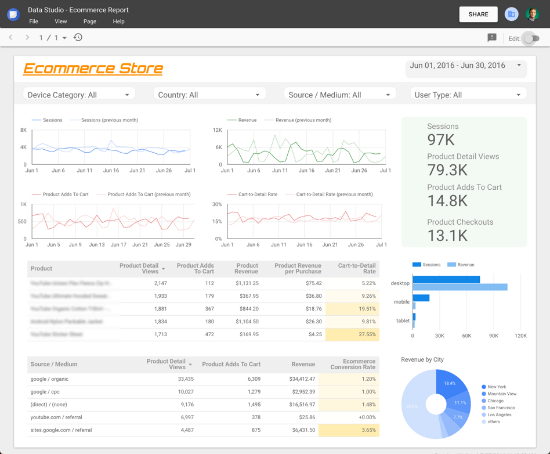
Report created using Google Analytics data on Google Data Studio 

Let’s go over some of the elements you see in the screenshot above.
  1. Header: it is always helpful to provide some info and controls in the top of the report. In this case you will see the website logo, a time range control and a series of four filter controls, with which you can segment your reports by Device, Country, Source or User Type.
  2. Trend charts: the four line charts in the top left will show how the business is performing over time (also compared to the previous period). This is important to understand drops and spikes in the data.
  3. Scorecards: the overall stats (green background) show in a glance how the business is doing, they provide a quick and effective way to understand the bottom line.
  4. Detailed information: tables are the best way to represent data in a detailed way. As seen in the report, the tables provide more information about the products being sold and also the traffic sources bringing the most users.
  5. Additional info: depending on your business, you might want to add special metrics and dimensions to enrich your report (e.g. custom dimensions & metrics). In the report above you will find some additional information on the bar and pie charts in the bottom right corner.
We hope that this sample report helps you get up and running. Feel free to share your own report in the comments, we would love to learn how you are using Data Studio to report and visualize your data!

This report was created using a Google Analytics data source, check this step-by-step guide for a detailed account on how to create Data Studio reports using Google Analytics. Learn more about Data Studio in the Help Centre: https://support.google.com/datastudio/ 

Posted by Daniel Waisberg, Analytics Advocate

Introducing new app categories — From Art to Autos to Dating — to help users better find your apps

July 26th, 2016  |  Published in Google Android

Posted by By Sarah Karam, Google Play Apps Business Development

With more than 1 billion active users in 190 countries around the world, Google Play continues to be an important distribution platform for you to build a global audience. To help you get your apps in front of more users, it’s important to make them more quickly and easily discoverable in Google Play. That’s why we rolled out major features, such as Search Ads, Indie Corner, store listing experiments, and more, over the past year.

To improve the overall search experience, we’re introducing new app categories and renaming a few existing ones, making them more comprehensive and relevant to what users are looking for today.

The new categories include:

  • Art & Design
  • Auto & Vehicles
  • Beauty
  • Dating
  • Events
  • Food & Drink
  • House & Home
  • Parenting

In addition, the “Transportation” category will be renamed “Maps & Navigation,” and the “Media & Video” category will be renamed “Video Players & Editors.”

To select a new category for your app or game

  1. Sign in to your Google Play Developer Console.
  2. Select an app.
  3. On the left menu, click Store Listing.
  4. Under "Categorization," select an application type and category.
  5. Near the top of the page, click Save draft (new apps) or Submit update (existing apps).

Newly added categories will be available on Google Play within 60 days. If you choose a newly added category for an app before the category is available for users, your current app category may change. See additional details and view our full list of categories in the Help Center.

From Google Summer of Code to Game of Thrones on the Back of a JavaScript Dragon (Part 1)

July 26th, 2016  |  Published in Google Open Source

This guest post is a part of a short series about Tatyana Goldberg and Guy Yachdav, instructors at Technical University of Munich, and the journey that was inspired by their participation as Google Summer of Code mentors for the BioJS project.

Hello there! We are from the BioJavaScript (BioJS) project which first joined Google Summer of Code (GSoC) in 2014. Our experience in the program set us on a grand open source adventure that we’ll be sharing with you in a series of blog posts. We hope you enjoy our story and, more importantly, hope it inspires you to pursue your own open source adventure.

Tatyana Goldberg and Guy Yachdav, GSoC mentors and open source enthusiasts. Photo taken at the MorpheusCup competition Luxembourg, May 2016.
We came together around the BioJS community, an open source project for creating beautiful and interactive open source visualizations of biological data on the web. BioJS visualizations are made up of components which have a modular design. This modular design enables several things: they can be used by non-programmers, they can be combined to make more complex visualizations, and they can be easily integrated into existing web applications. Despite being a young community, BioJS already has traction in industry and academia.

In early 2014 we decided to apply for GSoC and we were fortunate to have our application accepted on our first try. The experience was extremely positive — the five students we accepted delivered great software and they had a big impact on the BioJS community:
  • The number of mailing list subscribers doubled in less than a month.
  • All five of our accepted students from 2014 became core developers.
  • Students were invited to six international conferences to share their work.
  • Students helped organize the first BioJS conference held July 2015.
  • Most importantly, the students have independently designed BioJS version 2.0 which positioned BioJS as the leading open source visualization library for biological data. 
You can see three examples of the work GSoC students did on BioJS below:


MSAViewer is a visualization and analysis of multiple sequence alignments and was developed by Sebastian Wilzbach. Proteome Viewer is a multilevel visualization of proteomes in the UniProt database and was developed by Jose Villaveces. Genetic Variation Viewer is visualization of the number and type of mutations at each position in a biological sequence and was developed by Saket Choudhary.

We learned a lot in the first year we participated in Google Summer of Code. Here are some of the takeaways that are especially relevant to mentors and organizations that are considering joining the program:
  1. GSoC is a great source of dedicated and enthusiastic young developers.
  2. Mentors need to carefully manage students, listen to them and let them lead initiatives when it makes sense.
  3. Org admins should leverage success in GSoC beyond the program.
  4. Orgs need to find the most motivated students and make sure their projects are feasible.
  5. People want to share in your success, so participation in GSoC can start a positive feedback loop attracting new contributors and users.
  6. Most importantly: the ideas behind GSoC - the love for open source and coding - are contagious and spread easily to larger audiences, especially to students and other people who work in academia. Just try it! 
Our positive experience spurred us to seek out and conquer new challenges. Stay tuned for our next post where we explain how GSoC inspired us to create a popular new class and how we applied data science to Game of Thrones.

By Tatyana Goldberg and Guy Yachdav, BioJS and TU Munich

Available today: three ad innovations for a mobile-first world

July 26th, 2016  |  Published in Google Adwords

The shift to mobile is no longer happening, or will happen — the shift to mobile has happened. At the Google Performance Summit in May, we announced a completely new ad platform built from the ground up to help consumers and marketers succeed in this mobile-first world: expanded text ads and responsive ads bring to life the canvas you use to connect with consumers, while device bid adjustments provide more control and flexibility so you can optimize with greater precision.

Starting today, these innovations will begin rolling out in AdWords to all advertisers around the world.

Get started with expanded text ads Earlier this year, we removed right-hand side ads to improve the search experience and make it consistent across mobile, desktop, and tablet. This helped pave the way for the biggest update to our ad creative since we introduced AdWords more than 15 years ago.


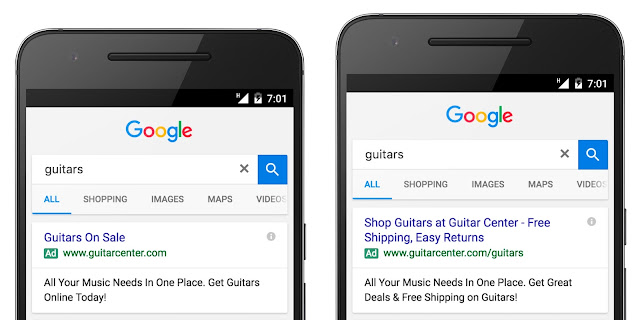
Expanded text ads are optimized for the screen sizes of the most popular smartphones and feature two headlines, each with 30 characters, and one long 80-character description line. That’s nearly 50% more ad text for you to highlight your products and services.
Standard text ad Expanded text ad

Our research shows longer ad headlines are more useful to mobile users because they provide additional information about your business before they click your ad. In fact, here are some early success stories from advertisers who have started using expanded text ads:

“Working closely with our agency Adlucent, Guitar Center was one of the first to adopt expanded text ads. With the additional ad space, we’re now able to highlight our promotions and sales while preserving our core brand message — like we did for the 4th of July. Our non-brand campaigns alone have seen more than a 2x increase in CTR.” — Robert Spears, Digital Marketing Director at Guitar Center

"Expanded text ads represent a tremendous opportunity for L'Oréal and our agency iCrossing. We’re now able to showcase the breadth and depth of our beauty products, and build brand love — all from a single ad creative. So far, expanded text ads have helped us deliver a 92% increase in click-through rate for one of our brands, compared to our old text ads.” — Kirsty Woolley, Multi Channel Acquisition Manager at L'Oréal Luxe

“In such a competitive industry like telecom, it was critical for EE and our agency MEC to implement expanded text ads as quickly as possible. From the start, we utilized the additional ad text to tell a better brand story and provide more information for consumers. By combining our ‘50% faster network’ value proposition with details around EE’s competitive pricing and packages, we’ve been able to increase clickthrough rates by up to 79%.” — Sam Richardson, Digital Media Executive, EE

“Kueski jumped at the opportunity to use expanded text ads and immediately implemented a strategy across our best performing campaigns. By highlighting the speed of our service, and safety and security of our platform, we were able to take advantage of the additional ad space and deliver amazing results, including an 18% increase in conversion rate for generic keyword campaigns.” — Rodolfo Orozco, User Acquisition Manager at Kueski

It’s important for advertisers to take advantage of expanded text ads as soon as possible, especially with back to school and the holiday season right around the corner. To help you get started, we’ve published a best practices guide that walks through tips and tricks for creating and optimizing expanded text ads. Specifically:

Create and test multiple expanded text ads for each ad group, and evaluate performance before pausing or deleting your standard text ads

Remember to include important information about your business and other tried-and-true components from your standard text ads, like price and keyword insertion

Focus on your headlines: they’re the most prominent part of your text ad

AdWords Editor and the AdWords API also support expanded text ads, which means you can create and edit your ads in bulk to help save time. If you use leading 3rd-party tools to manage your ads, DoubleClick Search, Kenshoo, and Marin Software all support expanded text ads as well.

Starting on October 26th, 2016, you’ll no longer be able to create or edit standard text ads — meaning you’ll only be able to create and edit text ads using the expanded text ads format after this date. Existing standard text ads will continue to serve alongside expanded text ads.

Create responsive ads for display 

In a mobile-first world, display ads need to fit seamlessly within the websites and apps people visit, while delivering a consistent experience across devices. We built responsive ads for display to help your ads adapt to the increasingly diverse mix of content types and screen sizes. Provide 25-character and 90-character headlines, a 90-character description, an image, and a URL, and Google designs ads that fit beautifully across more than two million apps and websites on the Google Display Network (GDN). Responsive ads also unlock new native inventory so you can engage consumers with ads that match the look and feel of the website or app they’re using.

JustFab.de, a fashion retailer, wanted to reach more shoppers as they browsed content online. JustFab provided headlines featuring its latest promotions, descriptions highlighting popular products like capri pants and strappy sandals, and images of its top selling items — and Google designed ads that fit anywhere on the GDN. As a result, JustFab drove a 56% higher conversion rate and a 55% decrease in CPA.

Set device bid adjustments 

As we re-imagine how ads look in a mobile-first world, it’s also important to have more flexible tools that help you optimize device-level performance. New device bid adjustments allow you to maintain the efficiency of managing a consolidated campaign that reaches consumers across devices while giving you more control to set individual bid adjustments for each device type — mobile devices, computers, and tablets. Our updated best practices guide can help you evaluate your bidding strategy and set accurate performance targets that reflect the full value of mobile. You can also join us for a Hangout on Air at 9am PDT/12pm EDT on August 9th, 2016 for a live Q&A about device bid adjustments with Google product experts. Register here.

While device bid adjustments enable you to optimize with greater precision, you still need to factor in other signals which impact performance, like location, time of day, and audience. To optimize at scale across this wide range of contextual signals, you should take advantage of automated bidding. Smart Bidding utilizes the power of Google’s machine learning to set more informed bids and help you get the most out of your marketing budget. The latest Smart Bidding innovations are available in both AdWords and DoubleClick Search. In the coming weeks, you’ll also be able to set device-specific CPA goals with Target CPA Smart Bidding in AdWords.

The way consumers use technology to connect with the world around them has changed. As a result, we’ve re-designed AdWords, from ad formats to bidding, to help you reach potential customers in more meaningful and relevant ways. We’re excited to undertake this journey with you and look forward to hearing your feedback.

Posted by Sridhar Ramaswamy, Senior Vice President, Ads and Commerce

Videos get views: why you should embed video content on your site

July 26th, 2016  |  Published in Google Adsense


Video content is one of the most engaging formats for content consumption. According to Hubspot, online video now accounts for 50% of all mobile traffic.

Videos are easily consumable from desktop and mobile devices to social media platforms and email communications. Studies from the 2012 Olympics showed that 50% of users either watched Olympics related online video for the first time or watched more online video than their usual habits.

Video content can be incorporated into your content strategy in two ways:

  1. Create, share and then embed your own original video content onto your site.
  2. Embed public video content onto your site.

The first option may lead to greater revenue gains for your site through the use of pre-roll, mid-roll or post-roll ads. However beneficial this may sound, this option is far more resource intensive than the second and requires an upfront investment to create original video content. YouTube is a popular platform for you to upload and share your content. YouTube has over a billion users - almost one-third of all people on the Internet - and every day people watch hundreds of millions of hours on YouTube and generate billions of views.[1]

If you choose to create and monetize original video content as an additional format for your audience to consume your unique perspective, check out these resources.

  • YouTube Creator Hub is the destination for resources to help you make great videos, find your audience, and grow your YouTube channel.
  • YouTube Audio Library is a place for you to browse and download free music to use for your original videos.
  • Google+ Hangouts On Air can help you connect directly with your audience and then distribute your content to engage your users on your site or on YouTube after the event.
  • Read the article In Video Advertising, Is Longer Strong? to learn about video advertising.

The second strategy is to embed public video content directly onto your site. This strategy lets you focus on curating high quality video content rather than spending time and resources on creating it yourself.


YouTube players can be embedded in a web page using either an iframe tag or an object tag, both provided by YouTube. By appending parameters to the iframe, you can even customize the playback experience. For example, you can automatically play videos when the page loads or choose a specific video size to match the UX of your site.

We highly recommend using YouTube to embed videos on your site, here’s the five step process:
  • On a computer, go to the YouTube video you want to embed.
  • Under the video, click Share.
  • Click Embed.
  • From the box that appears, copy the HTML code.
  • Paste the code into your blog or website HTML.
Embedding public videos onto your site that supplement your original content is a great strategy to help meet the user demand of online video and further engage your users. If you have original content on your site and choose to use embedded videos to supplement your content, ensure that the videos themselves do not violate any policies. To learn how to correctly embed public videos please read the AdSense Program Policies.

Whichever strategy you choose, embed video content onto your site this summer. The summer of sport creates a huge opportunity for AdSense Publishers, especially in the sports category. In fact, over the last four years, sports YouTube watch time has grown 267%.[2] The 2016 Summer Olympics has already generated 30,000 hours of Olympics related content on YouTube and there’s an expectation that this year’s games will garner 3.6 billion views on YouTube alone.[3]

Big events mean big views for related videos. Invest into video to boost your traffic, draw new crowds, and further engage with your audience.

New to AdSense? Sign up now and turn your passion into profit

Posted by Barbara Sarti, from the AdSense Team


[1] https://www.youtube.com/yt/press/statistics.html
[2] Google internal data
[3] YouTube Internal Tools, 2015, +/1 one month of games

New Zagat iOS app: Tap into tailored, trustworthy dining recommendations — wherever you may be

July 26th, 2016  |  Published in Google Earth

For over three decades, Zagat has been dishing out trustworthy guidance for urban foodies across the US. We thought it was time to spice up Zagat’s look and refresh its mobile iOS app in order to provide relevant restaurant recommendations for diners on the go. Looking for new watering holes in your area or wanting the top recommended dining spots for the city you’re visiting? Zagat now makes it simple and easy using its reliable recipe that looks at the wisdom of the crowds combined with hand-crafted reviews. Check out the Zagat blog for more details.

Author: Laura Slabin, Director, Local Content & Community

Google Places API for iOS & Google Maps SDK for iOS are now in separate CocoaPods

July 25th, 2016  |  Published in Google Maps

In today’s release, the Google Places API for iOS 2.0 and the Google Maps SDK for iOS 2.0 are now in separate CocoaPods. For developers who only use the Google Places API for iOS, this will significantly reduce the binary size of their app.

What does this mean for me? What do I have to do?

Nothing immediately for your current implementation, but we strongly suggest that you upgrade within the next year to the new Google Maps SDK for iOS 2.0 and Google Places API for iOS 2.0. The Google Maps for iOS SDK Version 1.x will become unsupported in one year’s time.

If you are using the Standard Plan Google Maps SDK for iOS 1.x, and haven’t specified a version in your podfile, you will be automatically upgraded to the new Google Maps SDK for iOS 2.0 when you run ‘pod update’. If you use any Places functionality, we’ve created this migration guide for the Places API to step you through the process of migrating to the new Google Places API for iOS 2.0.

In addition, we’ve documented how to extract all the frameworks (Maps, Places) from the relevant CocoaPods so you can manually include the SDKs in your project rather than using CocoaPods if you wish. [Issue 8856]

What does this mean for Premium Plan Maps SDK customers?

There is no longer a separate Google Maps Premium Plan SDK. Instead it has been replaced with the new streamlined Google Maps SDK for iOS 2.0 for both Standard and Premium Plan developers.

We’ve created a Premium Plan migration guide that will step you through the process of migrating to the new Google Maps SDK for iOS 2.0. We’ve also documented how to extract the frameworks from the CocoaPods so you can manually include the SDKs in your project if you’d prefer that. Your Enterprise Maps key will continue to work, as will your Premium Plan.

Please note:
The Google Maps SDK for iOS Premium Plan SDK 1.13.2 (current version) will be supported for one year during which time we suggest you upgrade to the new streamlined Google Maps SDK for iOS 2.0.

Take a look at our release notes and start using version 2.0 today!

author image
Posted by Megan Boundey, Product Manager, Google Maps Mobile APIs

Data Studio: New, Simplified, AdWords Connector

July 25th, 2016  |  Published in Google Analytics

Google Data Studio is our new Business Intelligence product that makes it easy to connect, visualize, and share data. Today we updated the Google Data Studio AdWords connector to be more flexible and easier to use.

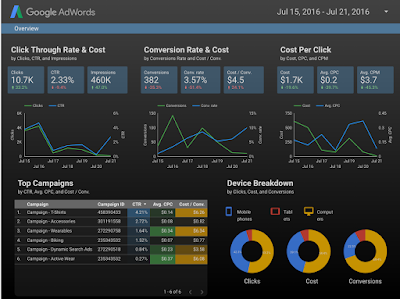
The AdWords connector allows AdWords customers to access their AdWords account data in Data Studio, build visually stunning reports, and share those reports to business stakeholders across their organization.


Report built with the AdWords connector in Google Data Studio 

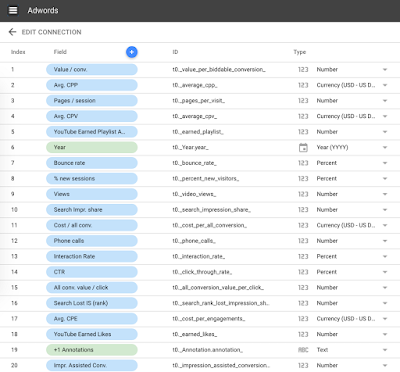
With our recent update, the new AdWords connector now unifies over 100 AdWords dimensions and metrics as a single list, making it easier select the data you want to visualize.


20 of over 100 dimensions and metrics available in the new connector 

The new connector also supports many more combinations of dimensions and metrics, dramatically simplifying building reports.


Customizing a table with AdWords data in the Report Editor 

Of course, when you build AdWords reports with Data Studio, all the existing Data Studio features are compatible with this data including: calculated metrics, derived fields, custom visualizations, rich styling and custom branding, simplified sharing through Google Drive and realtime collaboration. 

These new changes are available today in both Data Studio 360 and Data Studio versions. To use the new connector, you must create a new Data Studio Data Source. Data Source using the previous connector will continue to work. Please read our help documentation on how to migrate to the new version. 

We’re excited to see all of the new reports customers will create with this enhancement.

Posted by Nick Mihailovski, Google Data Studio team

Previously


Dec 28, 2016
Open source down under: Linux.conf.au 2017

by Open Source Programs Office | Read | No Comments

It’s a new year and open source enthusiasts from around the globe are preparing to gather at the edge of the world for Linux.conf.au 2017. Among those preparing are Googlers, including some of us from the Open Source Programs Office.

This year Linux.conf.au is returning to Hobart, the riverside capital of Tasmania, home of Australia’s famous Tasmanian devils, running five days between January 16 and 20.

Circle_DevilTuz.png
Tuz, a Tasmanian devil sporting a penguin beak, is the Linux.conf.au mascot.
(Artwork by Tania Walker licensed under CC BY-SA.)

The conference, which began in 1999 and is community organized, is well equipped to explore the theme, “the Future of Open Source,” which is reflected in the program schedule and miniconfs.

You’ll find Googlers speaking throughout the week (listed below), as well as participating in the hallway track. Don’t miss our Birds of a Feather session if you’re a student, educator, project maintainer, or otherwise interested in talking about outreach and student programs like Google Summer of Code and Google Code-in.

Monday, January 16th
12:20pm The Sound of Silencing by Julien Goodwin
4:35pm   Year of the Linux Desktop? by Jessica Frazelle

Tuesday, January 17th
All day    Community Leadership Summit X at LCA

Wednesday, January 18th
2:15pm   Community Building Beyond the Black Stump by Josh Simmons
4:35pm   Contributing to and Maintaining Large Scale Open Source Projects by Jessica Frazelle

Thursday, January 19th
4:35pm   Using Python for creating hardware to record FOSS conferences! by Tim Ansell

Friday, January 20th
1:20pm   Linux meets Kubernetes by Vishnu Kannan

Not able to make it to the conference? Keynotes and sessions will be livestreamed, and you can always find the session recordings online after the event.

We’ll see you there!

By Josh Simmons, Open Source Programs Office


Dec 23, 2016
Taking the pulse of Google Code-in 2016

by Open Source Programs Office | Read | No Comments

GCI official horizontal_1372x448dp.png

Today is the official midpoint of this year’s Google Code-in contest and we are delighted to announce this is our most popular year ever! 930 teenagers from 60 countries have completed 3,503 tasks with 17 open source organizations. The number of students successfully completing tasks has almost met the total number of students from the 2015 contest already.

Tasks that the students have completed include:

  • writing test suites
  • improving mobile UI 
  • writing documentation and creating videos to help new users 
  • working on internationalization efforts
  • fixing and finding bugs in the organization’s’ software 

Participants from all over the world
In total, over 2,800 students from 87 countries have registered for the contest and we look forward to seeing great work from these (and more!) students over the next few weeks. 2016 has also seen a huge increase in student participation in places such as Indonesia, Vietnam and the Philippines.

Google Code-in participants by country
Please welcome two new countries to the GCI family: Mauritius and Moldova! Mauritius made a very strong debut to the contest and currently has 13 registered students who have completed 31 tasks.

The top five countries with the most completed tasks are:

  1. India: 982
  2. United States: 801
  3. Singapore: 202
  4. Vietnam: 119
  5. Canada: 117

Students, there is still plenty of time to get started with Google Code-in. New tasks are being added daily to the contest site — there are over 1,500 tasks available for students to choose from right now! If you don’t see something that interests you today, check back again every couple of days for new tasks.

The last day to register for the contest and claim a task is Friday, January 13, 2017 with all work being due on Monday, January 16, 2017 at 9:00 am PT.

Good luck to all of the students participating this year in Google Code-in!

By Stephanie Taylor, Google Code-in Program Manager

All numbers reported as of 8:00 PM Pacific Time, December 22, 2016.


Dec 21, 2016
Introducing the ExifInterface Support Library

by Android Developers | Read | No Comments

With the release of the 25.1.0 Support Library, there’s a new entry in the family: the ExifInterface Support Library. With significant improvements introduced in Android 7.1 to the framework’s ExifInterface, it only made sense to make those available t…


Dec 21, 2016
Geolocation and Firebase for the Internet of Things

by Maps Devel | Read | No Comments

Posted by Ken Nevarez, Industry Solutions Lead at Google

GPS is the workhorse of location based services, but there are use cases where you may want to avoid the cost and power consumption of GPS hardware or locate devices in places where GPS lacks accuracy, such as in urban environments or buildings.

We’ve seen recent growth in Internet of Things (IoT) applications using the Google Maps Geolocation API instead of GPS for asset tracking, theft prevention, usage optimization, asset servicing, and more. As part of my 20 percent project at Industry Solutions, I created a prototype IoT device that can locate itself using surrounding WiFi networks and the Google Maps Geolocation API. In this post, I’ll discuss some interesting implementation features and outline how you can create the prototype yourself.

I built a device that scans for local WiFi and writes results (WiFi hotspots and their signal strength) to a Firebase Realtime Database. A back-end service then reads this data and uses the Google Maps Geolocation API to turn this into a real-world location, which can be plotted on a map.


Set up the Device & Write Locally

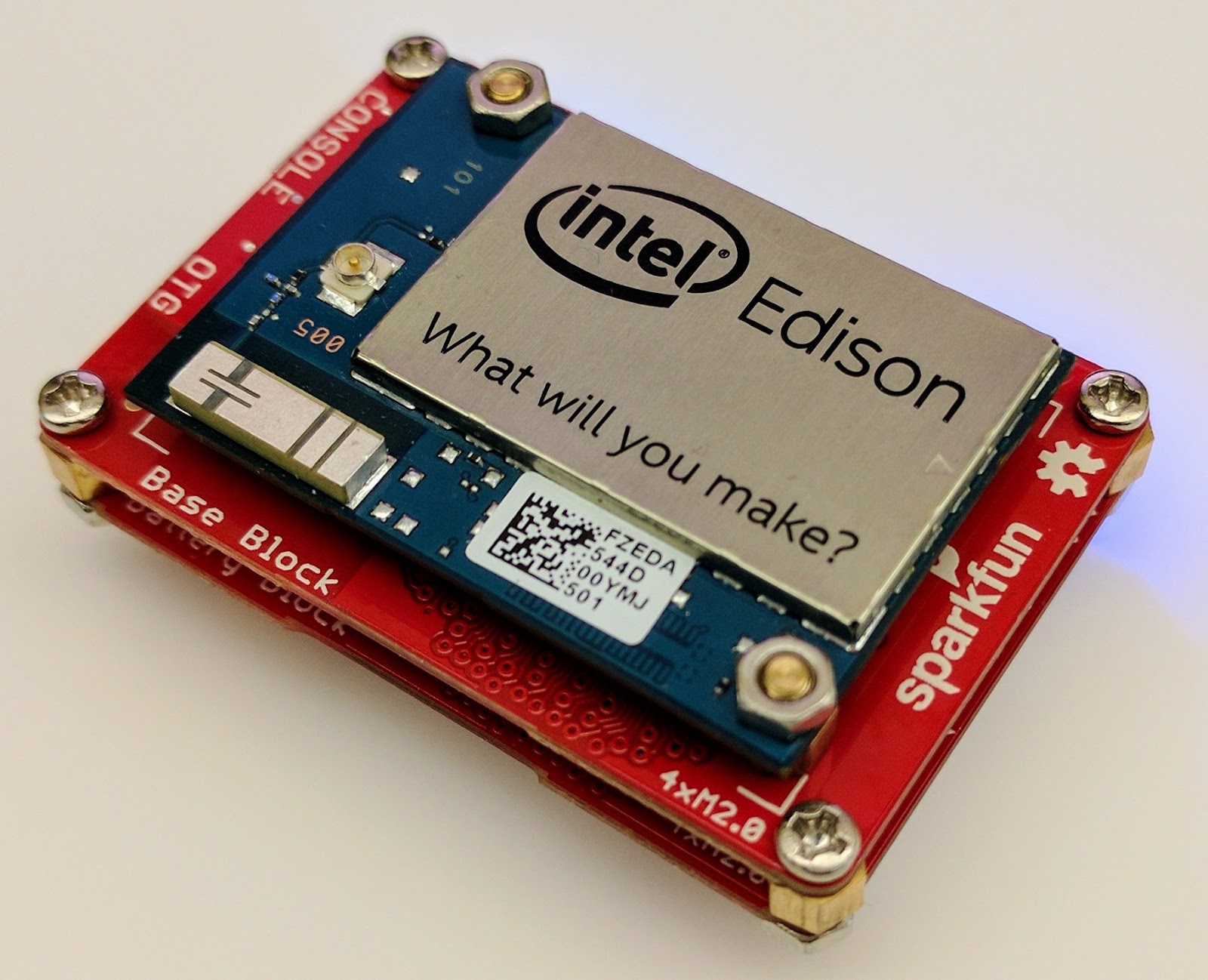
For this proof of concept, I used the Intel Edison as a Linux-based computing platform and augmented it with Sparkfun’s Edison Blocks. To build the device, you will need an Intel Edison, a Base Block, a Battery Block and a Hardware pack.


Developing for the Edison is straightforward using the Intel XDK IDE. We will be creating a simple Node.js application in JavaScript. I relied on 3 libraries: Firebase for the database connection, wireless-tools/iwlist to capture WiFi networks, and macaddress to capture the device MAC. Installation instructions can be found on the linked pages.

Step 1: get the device MAC address and connect to Firebase:

function initialize() {
    macaddress.one('wlan0', function (err, mac) {
        mac_address = mac;
        if (mac === null) {
            console.log('exiting due to null mac Address');
            process.exit(1);
        }
        firebase.initializeApp({
            serviceAccount: '/node_app_slot/.json',
            databaseURL: 'https://.firebaseio.com/'
        });
        var db = firebase.database();
        ref_samples = db.ref('/samples');
        locationSample();
    });
}

The above code contains two placeholders:

  1. The service-account-key is a private key you create in the Firebase Console. Follow the gear icon in the upper left of console, select “settings”, and click Generate New Private Key. Place this key on your Edison in the directory /node_app_slot/. See this Firebase documentation for more information.
  2. The project-id in the database URL is found in the Firebase console database page after you have linked your Google project with Firebase.

Step 2: scan for WiFi networks every 10 seconds and write locally:

function locationSample() {
    var t = new Date();
    iwlist.scan('wlan0', function(err, networks) {
        if(err === null) {
            ref_samples.push({
                mac: mac_address,
                t_usec: t.getTime(),
                t_locale_string: t.toLocaleString(),
                networks: networks,
            });
        } else {
            console.log(err);
        }        
    });
    setTimeout(locationSample, 10000);
}

Write to the cloud

The locationSample() function above writes detectable WiFi networks to a Firebase database that syncs to the cloud when connected to a network.

Caveat: To configure access rights and authentication to Firebase, I set up the device as a “server”. Instructions for this configuration are on the Firebase website. For this proof of concept, I made the assumption that the device was secure enough to house our credentials. If this is not the case for your implementation you should instead follow the instructions for setting up the client JavaScript SDK.

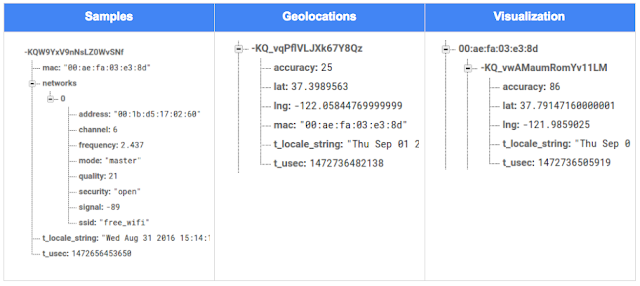
The database uses 3 queues to manage workload: a WiFi samples queue, a geolocation results queue and a visualization data queue. The workflow will be: samples from the device go into a samples queue, which gets consumed to produce geolocations that are put into a geolocations queue. Geolocations are consumed and formatted for presentation, organized by device, and the output is stored in a visualizations bucket for use by our front end website.

Below is an example of a sample, a geolocation, and our visualization data written by the device and seen in the Firebase Database Console.

Processing the Data with Google App Engine

To execute the processing of the sample data I used a long running Google App Engine Backend Module and a custom version of the Java Client for Google Maps Services.

Caveat: To use Firebase with App Engine, you must use manual scaling. Firebase uses background threads to listen for changes and App Engine only allows long-lived background threads on manually scaled backend instances.

The Java Client for Google Maps Services takes care of a lot of the communications code required to use the Maps APIs and follows our published best practices for error handling and retry strategies that respect rate limits. The GeolocateWifiSample() function below is registered as an event listener with Firebase. It loops over each network reported by the device and incorporates it into the geolocation request.

private void GeolocateWifiSample(DataSnapshot sample,  Firebase db_geolocations, Firebase db_errors) {
    // initalize the context and request
    GeoApiContext context = new GeoApiContext(new GaeRequestHandler()).setApiKey("");
    GeolocationApiRequest request = GeolocationApi.newRequest(context)
            .ConsiderIp(false);
    // for every network that was reported in this sample...
    for (DataSnapshot wap : sample.child("networks").getChildren()) {
        // extract the network data from the database so it’s easier to work with
        String wapMac = wap.child("address").getValue(String.class);
        int wapSignalToNoise = wap.child("quality").getValue(int.class);
        int wapStrength = wap.child("signal").getValue(int.class);
        // include this network in our request
        request.AddWifiAccessPoint(new WifiAccessPoint.WifiAccessPointBuilder()
                .MacAddress(wapMac)
                .SignalStrength(wapStrength)
                .SignalToNoiseRatio(wapSignalToNoise)
                .createWifiAccessPoint());
    }
    ...
    try {
        // call the api
        GeolocationResult result = request.CreatePayload().await();
        ...
        // write results to the database and remove the original sample
    } catch (final NotFoundException e) {
        ...
    } catch (final Throwable e) {
        ...
    }
}

Register the GeolocateWifiSample() function as an event handler. The other listeners that process geolocation results and create the visualization data are built in a similar pattern.

ChildEventListener samplesListener = new ChildEventListener() {
    @Override
    public void onChildAdded(DataSnapshot dataSnapshot, String previousChildName) {
        // geolocate and write to new location
        GeolocateWifiSample(dataSnapshot, db_geolocations, db_errors);
    }
    ...
};
db_samples.addChildEventListener(samplesListener);

Visualize the Data

To visualize the device locations I used Google App Engine to serve stored data from Firebase and the Google Maps JavaScript API to create a simple web page that displays the results. The index.html page contains an empty

with id “map”. I initialized this
to contain the Google Map object. I also added “child_added” and “child_removed” event handlers to update the map as the data changes over time.
function initMap() {
    // attach listeners
    firebase.database().ref('/visualization').on('child_added', function(data) {
        ...
        data.ref.on('child_added', function(vizData) {
            circles[vizData.key]= new CircleRoyale(map,
                                vizData.val().lat,
                                vizData.val().lng,
                                vizData.val().accuracy,
                                color);
          set_latest_position(data.key, vizData.val().lat, vizData.val().lng);
        });
        data.ref.on('child_removed', function(data) {
            circles[data.key].removeFromMap();
        });
    });
    // create the map
    map = new google.maps.Map(document.getElementById('map'), {
      center: get_next_device(),
      zoom: 20,
      scaleControl: true,
    });
    ...
}

Since the API returns not only a location but also an indication of accuracy, I’ve created a custom marker that has a pulsing radius to indicate the accuracy component.

Two devices (red and blue) and their last five known positions


What’s next?

In this post I’ve outlined how you can build an IoT device that uses Google Maps Geolocation API to track any internet-connected device – from robotics to wearables. The App Engine processing module can be expanded to use other Google Maps APIs Web Services providing geographic data such as directions, elevation, place or time zone information. Happy building!

As an alternative, you can achieve a similar solution using Google Cloud Platform as a replacement for Firebase—this article shows you how.

author image
About Ken: Ken is a Lead on the Industry Solutions team. He works with customers to bring innovative solutions to market.

Dec 21, 2016
Google Summer of Code 2016 wrap-up: Public Lab

by Open Source Programs Office | Read | No Comments

This post is part of our series of guest posts from students, mentors and organization administrators who participated in Google Summer of Code 2016.


How we made this our best Google Summer of Code ever

This was our fourth year doing Google Summer of Code (GSoC), and it was our best year ever by a wide margin! We had five hard-working students who contributed over 17,000 new lines of (very useful) code to our high-priority projects.

Students voluntarily started coding early and hit the ground running, with full development environments and a working knowledge of GitHub Flow-style pull request process. They communicated with one another and provided peer support. They wrote tests. Hundreds of them! They blogged about their work as they went, and chatted with other community members about how to design features.

All of that was amazing, and it was made better by the fact that we were accepting pull requests with new code twice weekly. Tuesdays and Fridays, I went through new submissions, provided feedback, and pulled new code into our master branch, usually publishing it to our production site once a week.

I don’t know how other projects do things, but this was very new for us, and it’s revolutionized how we work together. In past years, students would work on their forks, slowly building up features. Then in a mad dash at the end, we’d try to merge them into trunk, with lots of conflicts and many hours (weeks!) of work on the part of project maintainers.

Screenshot_2016-08-26_at_11.44.16_AM.png

What made this year so good?

Many things aligned to make this summer great, and basically none of them are our ideas. I’m sure plenty of you are cringing at how we used to do things, but I also don’t think that it’s that unusual for projects not “born” in the fast-paced world of modern code collaboration.

We used ideas and learned from Nicolas Bevacqua, author of JavaScript Application Design and of the woofmark and horsey libraries which I’ve contributed to. We’ve also learned a great deal from the Hoodie community, particularly Gregor Martynus, who we ran into at a BostonJS meetup. Lastly, we learned from SpinachCon, organized by Shauna Gordon McKeon and Deb Nicholson, where people refine their install process by actually going through the process while sitting next to each other.

Broadly, our strategies were:

  • Good documentation for newcomers (duh)
  • Short and sweet install process that you’ve tried yourself (thanks, SpinachCon!)
  • Predictable, regular merge schedule
  • Thorough test suite, and requiring tests with each pull request
  • Modularity, insisting that projects be broken into small, independently testable parts and merged as they’re written

Installation and pull requests

Most of the above sound kind of obvious or trivial, but we saw a lot of changes when we put it all together. Having a really fast install process, and guidance on getting it running in a completely consistent environment like the virtualized Cloud9 service, meant that many students were able to get the code running the same day they found the project. We aimed for an install time of 15 minutes max, and supplied a video of this for one of our codebases.

We also asked students to make a small change (even just add a space to a file) and walk through the GitHub Flow pull request (PR) submission process. We had clear step-by-step guidance for this, and we took it as a good sign when students were able to read through it and do this.

Importantly, we really tried to make each step welcoming, not demanding or dismissive, of folks who weren’t familiar with this process. This ultimately meant that all five students already knew the PR process when they began coding.

Twice-weekly merge schedule

We were concerned that, in past years, students only tried merging a few times and typically towards the end of the summer. This meant really big conflicts (with each other, often) and frustration.

This year we decided that, even though we’re a tiny organization with just one staff coder, we’d try merging on Tuesday and Friday mornings, and we mostly succeeded. Any code that wasn’t clearly presented, commits squashed, passing tests, and submitting new tests, was reviewed and I left friendly comments and requests so it could be merged the following week.

At first I felt bad rejecting PRs, but we had such great students that they got used to the strictness. They got really good at separating out features, demonstrating their features through clear tests, and some began submitting more than two PRs per week – always rebasing on top of the latest master to ensure a linear commit history. Sweet!

Wrap-up and next steps

The last thing we did was to ask each student, essentially as their documentation, to write a series of new issues which clearly described the problem and/or desired behavior, leave suggestions and links to specific lines of code or example code, and mark them with the special “help-wanted” tag which was so helpful to them when they first started out. We asked each to also make one extra-welcoming “first-timers-only” issue which walks a new contributor through every step of making a commit and even provides suggested code to be inserted.

This final requirement was key. While I personally made each of the initial set of “help-wanted” and “first-timers-only” issues before GSoC, now five students were offloading their unfinished to-dos as very readable and inviting issues for others. The effect was immediate, in part because these special tags are syndicated on some sites. Newcomers began picking them up within hours and our students were very helpful in guiding them through their first contributions to open source.

I want to thank everyone who made this past summer so great, from our champion mentors and community members, to our stellar students, to all our inspirations in this new process, to the dozen or so new contributors we’ve attracted since the end of August.

By Jeff Warren, Organization Administrator for PublicLab.org


Dec 20, 2016
Get the guide to finding success in new markets on Google Play

by Android Developers | Read | No Comments

Posted by Lily Sheringham, Developer Marketing at Google Play

With just a few clicks, you can publish an app to Google Play and access a
global audience of more than 1 billion 30 days active users. Finding success in
global markets means considering how each market differs, planning for high
quality localization, and tailoring your activity to the local audience. The new
Going
Global Playbook provides best practices and tips, with advice from
developers who’ve successfully gone global.

This guide includes advice to help you plan your approach to going global,
prepare your app for new markets, take your app to market, and also include data
and insights for key countries and other useful resources.

This ebook joins others that we’ve recently published including The
Building for Billions Playbook and The
News Publisher Playbook. All of our ebooks are promoted in the Playbook for Developers app, which is
where you can stay up to date with all the news and best practices you need to
find success on Google Play.

How useful did you find this blogpost?


★ ★ ★ ★ ★
What is Google Data?

Google Data is the only site where you can get news from 60+ official Google blogs all in one place. We have published 24,235 official posts since January 2005.


Categories

  • Gmail (Google Mail) (436)
  • Google Adsense (1,013)
  • Google Adsense Feeds (46)
  • Google Adwords (1,224)
  • Google Adwords API (366)
  • Google Affiliate Network (141)
  • Google Ajax API (121)
  • Google Analytics (961)
  • Google Android (654)
  • Google App Engine (332)
  • Google Apps (1,865)
  • Google Blog (1,650)
  • Google Blogger Buzz (527)
  • Google Books (300)
  • Google Checkout (162)
  • Google Chrome (312)
  • Google Code (828)
  • Google Conversions (137)
  • Google CPG (198)
  • Google Custom Search (129)
  • Google Desktop (144)
  • Google Desktop API (175)
  • Google Docs (717)
  • Google DoubleClick (730)
  • Google Earth (1,006)
  • Google Enterprise (1,278)
  • Google Finance (88)
  • Google Gadgets (31)
  • Google Gears (60)
  • Google Grants (285)
  • Google Mac Blog (149)
  • Google Maps (736)
  • Google Merchant (219)
  • Google Mobile (386)
  • Google News (152)
  • Google Notebook (20)
  • Google Online Security (221)
  • Google Open Source (929)
  • Google OpenSocial (197)
  • Google Orkut (381)
  • Google Photos (Picasa) (109)
  • Google Product Ideas (23)
  • Google Public Policy (675)
  • Google Reader (124)
  • Google RechargeIT (29)
  • Google Research (423)
  • Google SketchUp (692)
  • Google Student Blog (848)
  • Google Talk (107)
  • Google Testing (326)
  • Google Translate (98)
  • Google TV Ads Blog (163)
  • Google Video (293)
  • Google Voice (86)
  • Google Wave (38)
  • Google Webmaster Central (376)
  • Google Website Optimizer (101)
  • Google.org (183)
  • iGoogle (87)
  • Uncategorized (1,262)
  • Youtube (779)
  • Youtube API (173)

Tags

adsense adsense google advertisers advertising adwords adwords google adwords tips analytics analytics google android gmail for domains Google Adsense Google Adwords google adwords help Google Analytics google analytics ga.js Google Android Google Apps google apps enterprise google apps free google apps gmail google apps standard google apps sync Google Blog google calendar google chat google culture Google Docs Google Earth Google Enterprise google insights google lat-long Google Mobile Google News google products google statistics google student google updates official google blog open source publishers students website analytics website statistics website stats

Archives

  • December 2016 (58)
  • November 2016 (83)
  • October 2016 (97)
  • September 2016 (113)
  • August 2016 (90)
  • July 2016 (87)
  • June 2016 (100)
  • May 2016 (112)
  • April 2016 (101)
  • March 2016 (116)
  • February 2016 (93)
  • January 2016 (66)
  • December 2015 (111)
  • November 2015 (105)
  • October 2015 (105)
  • September 2015 (116)
  • August 2015 (98)
  • July 2015 (106)
  • June 2015 (149)
  • May 2015 (94)
  • April 2015 (107)
  • March 2015 (124)
  • February 2015 (109)
  • January 2015 (69)
  • December 2014 (123)
  • November 2014 (107)
  • October 2014 (134)
  • September 2014 (132)
  • August 2014 (110)
  • July 2014 (118)
  • June 2014 (142)
  • May 2014 (129)
  • April 2014 (99)
  • March 2014 (125)
  • February 2014 (112)
  • January 2014 (88)
  • December 2013 (104)
  • November 2013 (147)
  • October 2013 (152)
  • September 2013 (114)
  • August 2013 (119)
  • July 2013 (136)
  • June 2013 (173)
  • May 2013 (213)
  • April 2013 (168)
  • March 2013 (167)
  • February 2013 (145)
  • January 2013 (132)
  • December 2012 (156)
  • November 2012 (151)
  • October 2012 (203)
  • September 2012 (168)
  • August 2012 (190)
  • July 2012 (151)
  • June 2012 (169)
  • May 2012 (169)
  • April 2012 (193)
  • March 2012 (227)
  • February 2012 (195)
  • January 2012 (191)
  • December 2011 (243)
  • November 2011 (248)
  • October 2011 (282)
  • September 2011 (271)
  • August 2011 (261)
  • July 2011 (275)
  • June 2011 (259)
  • May 2011 (148)
  • April 2011 (83)
  • March 2011 (92)
  • February 2011 (109)
  • January 2011 (253)
  • December 2010 (397)
  • November 2010 (322)
  • October 2010 (328)
  • September 2010 (402)
  • August 2010 (305)
  • July 2010 (293)
  • June 2010 (362)
  • May 2010 (367)
  • April 2010 (355)
  • March 2010 (363)
  • February 2010 (294)
  • January 2010 (267)
  • December 2009 (321)
  • November 2009 (308)
  • October 2009 (380)
  • September 2009 (344)
  • August 2009 (302)
  • July 2009 (347)
  • June 2009 (357)
  • May 2009 (352)
  • April 2009 (353)
  • March 2009 (351)
  • February 2009 (296)
  • January 2009 (239)
  • December 2008 (253)
  • November 2008 (273)
  • October 2008 (357)
  • September 2008 (316)
  • August 2008 (239)
  • July 2008 (241)
  • June 2008 (250)
  • May 2008 (247)
  • April 2008 (263)
  • March 2008 (251)
  • February 2008 (187)
  • January 2008 (172)
  • December 2007 (179)
  • November 2007 (177)
  • October 2007 (195)
  • September 2007 (148)
  • August 2007 (161)
  • July 2007 (182)
  • June 2007 (152)
  • May 2007 (109)
  • April 2007 (98)
  • March 2007 (93)
  • February 2007 (75)
  • January 2007 (75)
  • December 2006 (82)
  • November 2006 (122)
  • October 2006 (115)
  • September 2006 (106)
  • August 2006 (120)
  • July 2006 (69)
  • June 2006 (61)
  • May 2006 (51)
  • April 2006 (46)
  • March 2006 (48)
  • February 2006 (45)
  • January 2006 (46)
  • December 2005 (51)
  • November 2005 (50)
  • October 2005 (23)
  • September 2005 (39)
  • August 2005 (28)
  • July 2005 (15)
  • June 2005 (25)
  • May 2005 (27)
  • April 2005 (31)
  • March 2005 (31)
  • February 2005 (3)
  • January 2005 (1)

Recent Posts

  • Other sites are using my ad code. What should I do?
  • Open source down under: Linux.conf.au 2017
  • Taking the pulse of Google Code-in 2016
  • Introducing the ExifInterface Support Library
  • Geolocation and Firebase for the Internet of Things
  • Google Summer of Code 2016 wrap-up: Public Lab
  • Get the guide to finding success in new markets on Google Play
  • Start building Actions on Google
  • Best practices to improve app engagement
  • Project Wycheproof
January 2017
M T W T F S S
« Dec    
  1
2 3 4 5 6 7 8
9 10 11 12 13 14 15
16 17 18 19 20 21 22
23 24 25 26 27 28 29
30 31  

Page 31 of 1,615« First«...1020...2930313233...405060...»Last »


Copyright © 2017 GoogleData.org, All Rights Reserved.
This site is not operated by, sponsored by, endorsed by, or affiliated with Google Inc. in any way.
Rss Feed Tweeter button Facebook button Technorati button Reddit button Myspace button Linkedin button Delicious button Digg button Stumbleupon button Newsvine button