Google Data

  • Home
  • Everything Google
    • Gmail (Google Mail)
    • Google Adsense
    • Google Adsense Feeds
    • Google Adwords
    • Google Adwords API
    • Google Affiliate Network
    • Google Ajax API
    • Google Analytics
    • Google Android
    • Google App Engine
    • Google Apps
    • Google Blog
    • Google Blogger Buzz
    • Google Books
    • Google Checkout
    • Google Chrome
    • Google Code
    • Google Conversions
    • Google CPG
    • Google Custom Search
    • Google Desktop
    • Google Desktop API
    • Google Docs
    • Google DoubleClick
    • Google Earth
    • Google Enterprise
    • Google Finance
    • Google Gadgets
    • Google Gears
    • Google Grants
    • Google Mac Blog
    • Google Maps
    • Google Merchant
    • Google Mobile
    • Google News
    • Google Notebook
    • Google Online Security
    • Google Open Source
    • Google OpenSocial
    • Google Orkut
    • Google Photos (Picasa)
    • Google Product Ideas
    • Google Public Policy
    • Google Reader
    • Google RechargeIT
    • Google Research
    • Google SketchUp
    • Google Student Blog
    • Google Talk
    • Google Testing
    • Google Translate
    • Google TV Ads Blog
    • Google Video
    • Google Voice
    • Google Wave
    • Google Webmaster Central
    • Google Website Optimizer
    • Google.org
    • iGoogle
    • Uncategorized
    • Youtube
    • Youtube API
  • Resources
    • Google Products & Services
    • Google Twitter Directory
    • Google Trademarks
    • Google Data Site Map
  • About
  • Contact
  • Subscribe via RSS

Go bananas for the 2016 Doodle Fruit Games

August 4th, 2016  |  Published in Google Blog

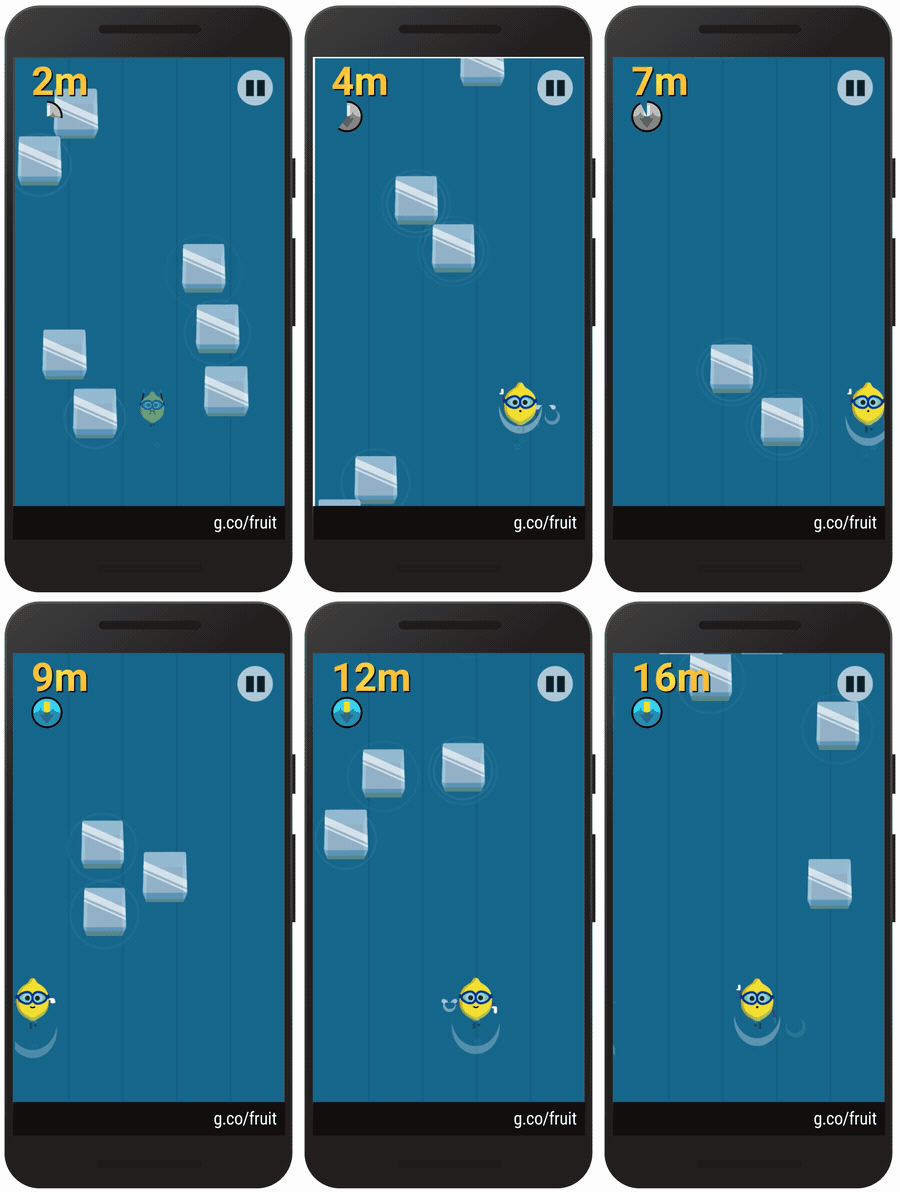
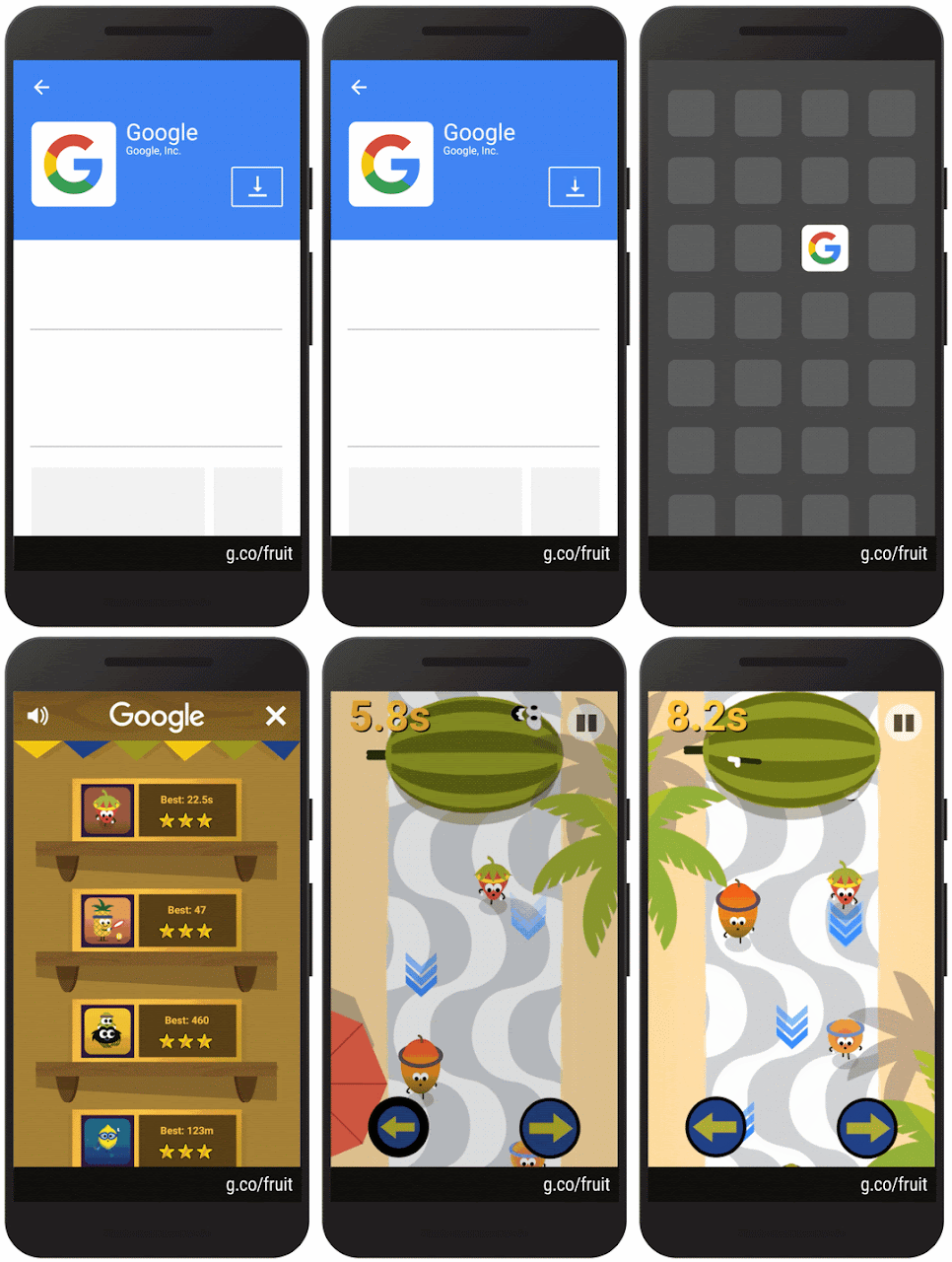
The summer just got sweeter. Today marks the season opener of the 2016 Doodle Fruit Games. For the next couple of weeks in the latest Google app for Android and iOS, journey to an otherwise unassuming fruit stand in Rio, where produce from all over the market are ripe to compete for the title of freshest fruit.


The name of today’s featured game is to see who’s the fastest fruit on the track in this berry special race. Don’t be MELONcholy if your sprint turns into more of a smoothie.


If you like the taste of that, be sure to weave your way through the ice cooler to see if you’re the chillest lemon around. Remember: No one likes sour losers!


We hope you find these fruits as apPEELing as we do. And don’t forget to share your cherry impressive results with friends to see who claims the top seed. These two games are just a taste of what's in store, so come back to the Google app throughout the week to catch the featured game of the day.


Posted by Matt Cruickshank, Google Doodler https://2.bp.blogspot.com/-xausnUUeFZw/V6OLFnHPhAI/AAAAAAAASwg/7tqruAhwtdsVJhjIBFTqutNRgoYctAH9gCLcB/s1600/peach_autograph.gif Matt Cruickshank Google Doodler Google

Improvements to PDF, Microsoft Office, image file previewing in Google Drive on web

August 4th, 2016  |  Published in Google Apps


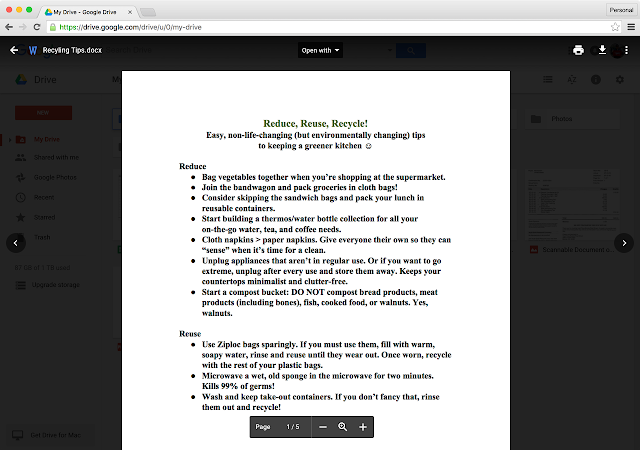
The Google Drive preview feature is a way to quickly preview files you’d typically open in Microsoft Office, Adobe Acrobat, or photo editors. Available in Gmail, Inbox, and Google Drive, previewing a file is a useful and fast experience and works across a wide range of files. Starting this week, we’re rolling out some improvements to the preview feature to make it simpler and easier to use:

  • Cleaner interface: Buttons and toolbars stay out of the way when you’re not using them.

  • Spreadsheet zooming support: If you preview Microsoft Excel, OpenOffice, or other spreadsheet files in Drive, you can now zoom in and out to inspect specific cells. This complements earlier launched improvements where we added support for frozen rows and columns, and the ability to switch between sheets.
  • Simpler zooming for Microsoft and OpenOffice document files: Zoom buttons are now easier to find and make images and documents larger than you could before.


Launch Details
Release track:
Launching to Rapid release, with Scheduled release coming in 2 weeks

Rollout pace:
Full rollout (1-3 days for feature visibility)

Impact:
All end users

Action:
Change management suggested/FYI

More Information
Help Center


Note: all launches are applicable to all Google Apps editions unless otherwise noted

Launch release calendar
Launch detail categories
Get these product update alerts by email
Subscribe to the RSS feed of these updates

New research: Zeroing in on deceptive software installations

August 4th, 2016  |  Published in Google Online Security

Posted by Kurt Thomas, Research Scientist and Juan A. Elices Crespo, Software Engineer

As part of Google’s ongoing effort to protect users from unwanted software, we have been zeroing in on the deceptive installation tactics and actors that play a role in unwanted software delivery. This software includes unwanted ad injectors that insert unintended ads into webpages and browser settings hijackers that change search settings without user consent.

Every week, Google Safe Browsing generates over 60 million warnings to help users avoid installing unwanted software--that’s more than 3x the number of warnings we show for malware. Many of these warnings appear when users unwittingly download software bundles laden with several additional applications, a business model known as pay-per-install that earns up to $1.50 for each successful install. Recently, we finished the first in-depth investigation with NYU Tandon School of Engineering into multiple pay-per-install networks and the unwanted software families purchasing installs. The full report, which you can read here, will be presented next week at the USENIX Security Symposium.

Over a year-long period, we found four of the largest pay-per-install networks routinely distributed unwanted ad injectors, browser settings hijackers, and scareware flagged by over 30 anti-virus engines. These bundles were deceptively promoted through fake software updates, phony content lockers, and spoofed brands--techniques openly discussed on underground forums as ways to trick users into unintentionally downloading software and accepting the installation terms. While not all software bundles lead to unwanted software, critically, it takes only one deceptive party in a chain of web advertisements, pay-per-install networks, and application developers for abuse to manifest.
Behind the scenes of unwanted software distribution
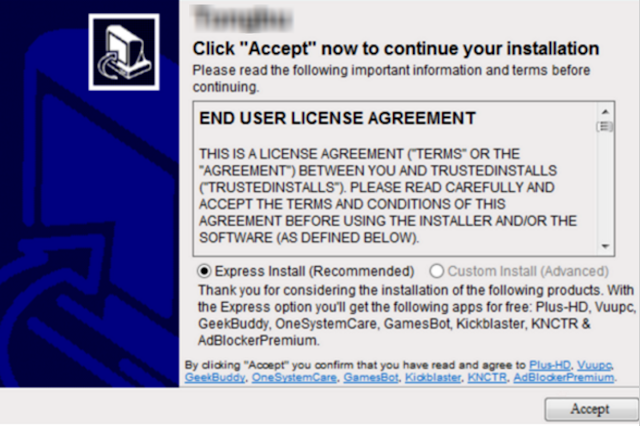
Software bundle installation dialogue. Accepting the express install option will cause eight other programs to be installed with no indication of each program’s functionality.

If you have ever encountered an installation dialog like the one above, then you are already familiar with the pay-per-install distribution model. Behind the scenes there are a few different players:
  • Advertisers: In pay-per-install lingo, advertisers are software developers, including unwanted software developers, paying for installs via bundling. In our example above, these advertisers include Plus-HD and Vuupc among others. The cost per install ranges anywhere from $0.10 in South America to $1.50 in the United States. Unwanted software developers will recoup this loss via ad injection, selling search traffic, or levying subscription fees. During our investigation, we identified 1,211 advertisers paying for installs.
  • Affiliate networks: Affiliate networks serve as middlemen between advertisers looking to buy installs and popular software packages willing to bundle additional applications in return for a fee. These affiliate networks provide the core technology for tracking successful installs and billing. Additionally, they provide tools that attempt to thwart Google Safe Browsing or anti-virus detection. We spotted at least 50 affiliate networks fueling this business.
  • Publishers: Finally, popular software applications re-package their binaries to include several advertiser offers. Publishers are then responsible for getting users to download and install their software through whatever means possible: download portals, organic page traffic, or often times deceptive ads. Our study uncovered 2,518 publishers distributing through 191,372 webpages.
This decentralized model encourages advertisers to focus solely on monetizing users upon installation and for publishers to maximize conversion, irrespective of the final user experience. It takes only one bad actor anywhere in the distribution chain for unwanted installs to manifest.


What gets bundled?

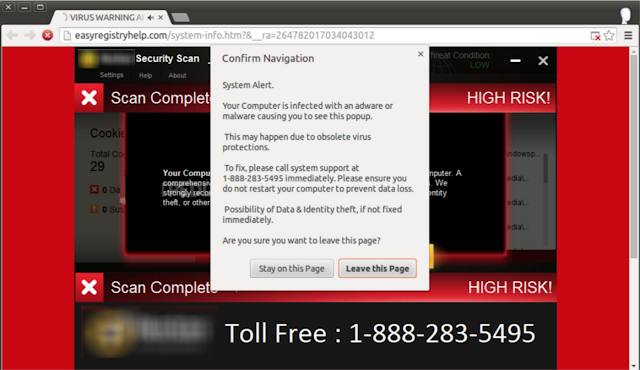
We monitored the offers bundled by four of the largest pay-per-install affiliate networks on a daily basis for over a year. In total, we collected 446K offers related to 843 unique software packages. The most commonly bundled software included unwanted ad injectors, browser settings hijackers, and scareware purporting to fix urgent issues with a victim’s machine for $30-40. Here’s an example of an ad injector impersonating an anti-virus alert to scam users into fixing non-existent system issues:


Deceptive practices

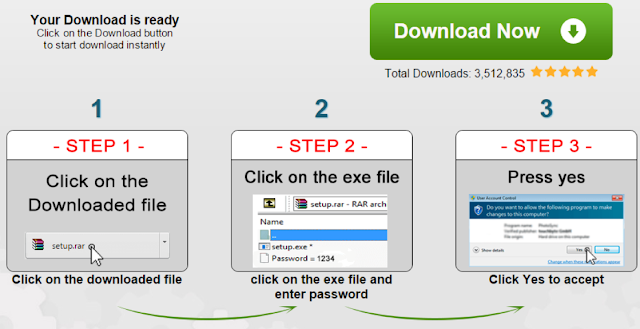
Taken as a whole, we found 59% of weekly offers bundled by pay-per-install affiliate networks were flagged by at least one anti-virus engine as potentially unwanted. In response, software bundles will first fingerprint a user’s machine prior to installation to detect the presence of “hostile” anti-virus engines. Furthermore, in response to protections provide by Google Safe Browsing, publishers have resorted to increasingly convoluted tactics to try and avoid detection, like the defunct technique shown below of password protecting compressed binaries:


Paired with deceptive promotional tools like fake video codecs, software updates, or misrepresented brands, there are a multitude of deceptive behaviors currently pervasive to software bundling.


Cleaning up the ecosystem

We are constantly improving Google Safe Browsing defenses and the Chrome Cleanup Tool to protect users from unwanted software installs. When it comes to our ads policy, we take quick action to block and remove advertisers who misrepresent downloads or distribute software that violates Google’s unwanted software policy.

Additionally, Google is pushing for real change from businesses involved in the pay-per-install market to address the deceptive practices of some participants. As part of this, Google recently hosted a Clean Software Summit bringing together members of the anti-virus industry, bundling platforms, and the Clean Software Alliance. Together, we laid the groundwork for an industry-wide initiative to provide users with clear choices when installing software and to block deceptive actors pushing unwanted installs. We continue to advocate on behalf of users to ensure they remain safe while downloading software online.

Introducing the Google Analytics Demo Account

August 3rd, 2016  |  Published in Google Analytics

In theory, theory and practice are the same. In practice, they are not - Albert Einstein


There are many resources available to learn Google Analytics, from the courses and training we offer, to advice from the community, or from the many books, guides, and articles written about Google Analytics. However, we’ve heard many of you would also like a resource so you can learn through practical experience and to apply your theoretical analytics knowledge. It can be difficult to gain practical experience since not everyone has access to a fully-implemented Google Analytics account. To fix this we’re introducing a fully functional Google Analytics Demo Account, available to everyone (get access here).


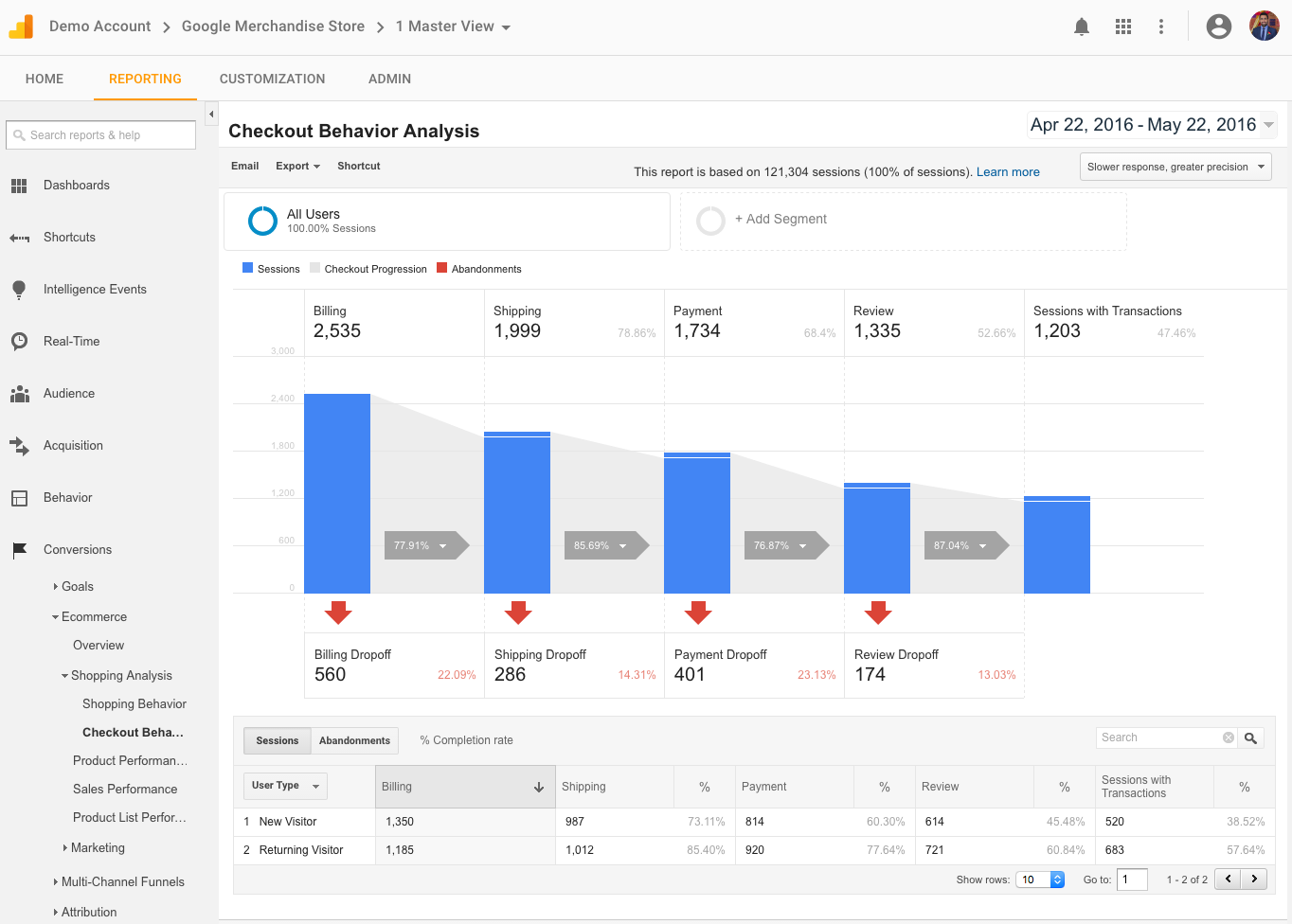
The Demo Account includes data from the Google Merchandise Store, an active Ecommerce site that sells Google branded merchandise. The ongoing Google Analytics implementation which will be completed this month already includes all the major features you would typically implement, like AdWords linking, Goals and Enhanced Ecommerce. The result is a fully functional account, with real business data.


Demo Account: Checkout Behavior Analysis Report


“Have you wondered why you've always gravitated towards people with real-world experience rather than on-paper experiences? The real-world part :) So while it hurts my feelings a bit to say that my best selling analytics books are not enough, I'm massively excited that the GA team has figured out a solution for the entire universe to get real-world experience. Get the access, download my awesome bundle of segments, dashboards and custom reports, and really start your learning experience!”
- Avinash Kaushik, Author - Web Analytics 2.0 and Web Analytics : An Hour a Day


Self-Learning
You can use the Demo Account to learn about Google Analytics features and functionality, for example:


  1. Access all the Standard reports to see which ones are useful to you
  2. Get inspiration from predefined dashboards and segments imported from the Solutions Gallery to create your own
  3. Alter reports by adding table filters and secondary dimensions, and by changing the report type
  4. Learn how to compare audience, acquisition, behavior and conversion performance to a previous date range period
  5. Create your own personal assets such as custom reports, annotations, shortcuts and custom alerts
  6. Become familiar with the predefined attribution models and even create your own
  7. Determine whether features you don't haven’t implemented could be beneficial to you e.g. AdWords and Search Console integrations
  8. Use it as a companion when following a training course


Education Programs
If you’re an educator trying to teach others to use Google Analytics then we encourage you to use the Demo Account as a tool. You can use it to create tests, quizzes, and other learning materials for your students. In fact, we’re excited to announce that some organizations are already starting to integrate it into their learning materials.


General Assembly offers courses both online and at their campuses around the world that will help you master new skills in design, marketing, technology, and data. Their Digital Marketing course includes a unit covering Marketing Analytics that utilizes the Demo Account.


Google Analytics Partners, including E-Nor and Loves Data, use the Demo Account to provide online and classroom style trainings to cater to beginners and advanced analytics users. Their specialists will provide actionable training to create and improve your analytics configuration, implementation and marketing performance.


Access the Demo account
You can get access to the Demo Account and learn more about it, from this help article. If you need some help please let us know within the FAQs post and share any feature requests or ideas to make the Demo Account more useful within the Feature Requests post. We hope the Demo Account gives you a practical way to try new features and learn about Google Analytics.


Happy analyzing!
Posted by Deepak Aujla, Program Manager, Google Analytics


Computational Thinking for All Students

August 3rd, 2016  |  Published in Google Research

Posted by Maggie Johnson, Director of Education and University Relations, Google

(Crossposted on the Google for Education Blog, and the the Huffington Post)

Last year, I wrote about the importance of teaching computational thinking to all K-12 students. Given the growing use of computing, algorithms and data in all fields from the humanities to medicine to business, it’s becoming increasingly important for students to understand the basics of computer science (CS). One lesson we have learned through Google’s CS education outreach efforts is that these skills can be accessible to all students, if we introduce them early in K-5. These are truly 21st century skills which can, over time, produce a workforce ready for a technology-enabled and driven economy.

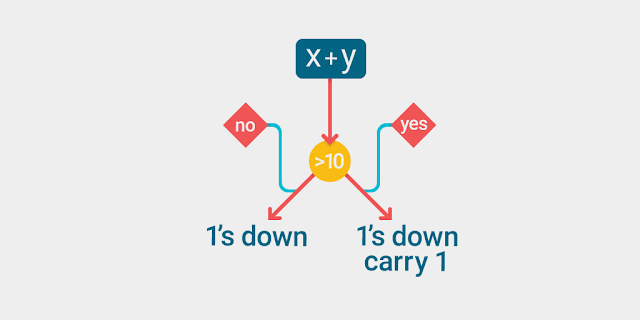
How can teachers start introducing computational thinking in early school curriculum? It is already present in many topic areas - algorithms for solving math problems, for example. However, what is often missing in current examples of computational thinking is the explicit connection between what students are learning and its application in computing. For example, once a student has mastered adding multi-digit numbers, the following algorithm could be presented:
  1. Add together the digits in the ones place. If the result is = 10 or greater, the ones digit of the result becomes the ones digit of the answer, and you add 1 to the next column.
  2. Add together the digits in the tens place, plus the 1 carried over from the ones place, if necessary. If the answer = 10, the ones digit becomes the tens digit of the answer and 1 is added to the next column.
  3. Repeat this process for any additional columns until they are all added.
This allows a teacher to present the concept of an algorithm and its use in computing, as well as the most important elements of any computer program: conditional branching (“if the result is less than 10…”) and iteration (“repeat this process…”). Going a step farther, a teacher translating the algorithm into a running program can have a compelling effect. When something that students have used to solve an instance of a problem can automatically solve all instances of the that problem, it’s quite a powerful moment for them even if they don’t do the coding themselves.

Google has created an online course for K-12 teachers to learn about computational thinking and how to make these explicit connections for their students. We also have a large repository of lessons, explorations and programs to support teachers and students. Our videos illustrate real-world examples of the application of computational thinking in Google’s products and services, and we have compiled a set of great resources showing how to integrate computational thinking into existing curriculum. We also recently announced Project Bloks to engage younger children in computational thinking. Finally, code.org, for whom Google is a primary sponsor, has curriculum and materials for K-5 teachers and students.

We feel that computational thinking is a core skill for all students. If we can make these explicit connections for students, they will see how the devices and apps that they use everyday are powered by algorithms and programs. They will learn the importance of data in making decisions. They will learn skills that will prepare them for a workforce that will be doing vastly different tasks than the workforce of today. We owe it to all students to give them every possible opportunity to be productive and successful members of society.

Learn from Experts in the AdWords Community

August 3rd, 2016  |  Published in Google Adwords

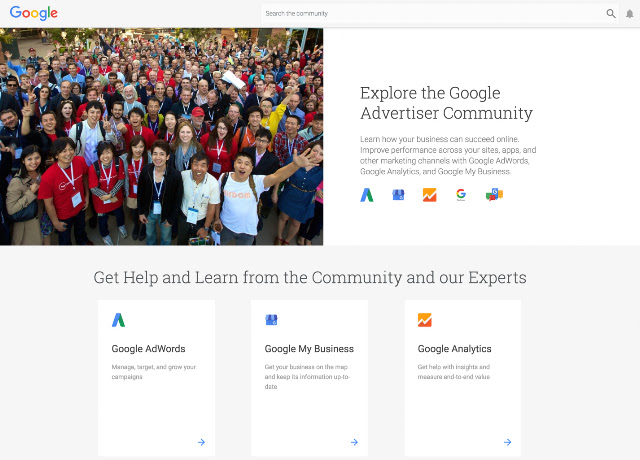
The AdWords Community exists to help advertisers like you improve performance and share best practices. If you haven’t visited the AdWords Community in a while, you might be surprised by what you find. Over the last six months, we’ve made a number of exciting changes. From a new design to expanded content areas, the Google Advertiser Community continues to evolve and help you connect with our experts and improve your performance.

Ask an Expert 

One of the most valuable resources you’ll find on the Community is the experts who frequent the forum on a daily (or even hourly) basis. These experts, part of Google’s Top Contributor program, have years of professional experience with AdWords and a passion for helping fellow Community members succeed.

Most of our Top Contributors have an area of expertise. If you ask a question on the AdWords Community about account automation, you will probably meet Jon Gritton. Jon hails from the UK and runs his own AdWords agency. He is also one of our most tenured AdWords Top Contributors (he’s been answering questions on the forum since 2006!) and our resident AdWords Scripts expert. He has solved well over 800 questions in his time on the AdWords Community.

An Improved Look and Feel 

We also wanted to improve the look and feel of the Community.
  • Using Material Design, the Community now offers the same modern and intuitive experience that’s at the core of our favorite Google apps like Maps, Search, and Gmail. 
  • Managing your advertising isn’t something you only do at your desk, which is why we’re re-designing AdWords for marketing in a mobile-first world. The redesigned Community is also responsive and mobile-friendly—perfect for browsing and resolving questions on-the-go. 

Go Beyond AdWords 

Finally, we know that AdWords isn’t the only way to promote your business with Google. You can get information about other important Google products on the Community: Google Analytics, Google My Business, Google Partners and Google Small Business.

Get Involved 

Anyone can join the Advertiser Community, post questions and find answers. Visit today to connect with other advertisers.  

Julian Chu, Director of Customer Engagement

An experiment built with 3D Google Maps imagery, inspired by kids

August 3rd, 2016  |  Published in Google Earth


For years, Google Maps has been adding 3D imagery from all over the world – New York City, the Grand Canyon, Mont Blanc, and more. A few of us started wondering if this 3D imagery could make learning about the world a bit more fun for kids. We started playing with quick prototypes, and even brainstormed with our own kids to get inspired by their sense of curiosity.

Our idea became a new, experimental app called Verne: The Himalayas. It invites you to explore the Himalayas as a 500 foot Yeti named Verne. You can run up Mt. Everest, chase yaks, discover bits of information, ride a jetpack, play Himalayan instruments, and more.

We're excited to share it today as a fun way for anyone to take a summer trip to the tallest mountain range in the world. Get the app for your Android device from the Play Store, or learn more here.

Posted by: Amar Gandhi and JR Schmidt - 3D tinkerers and Yeti Enthusiasts


Autotrack turns 1.0

August 2nd, 2016  |  Published in Google Analytics


The following was originally posted on the Google Developers Blog.

Autotrack is a JavaScript library built for use with analytics.jsthat provides developers with a wide range of plugins to track the most common user interactions relevant to today's modern web.
The first version of autotrack for analytics.js was released on Github earlier this year, and since then the response and adoption from developers has been amazing. The project has been starred over a thousand times, and sites using autotrack are sending millions of hits to Google Analytics every single day.
Today I'm happy to announce that we've released autotrack version 1.0, which includes several new plugins, improvements to the existing plugins, and tons of new ways to customize autotrack to meet your needs.
Note: autotrack is not an official Google Analytics product and does not qualify for Google Analytics 360 support. It is maintained by members of the Google Analytics developer platform team and is primarily intended for a developer audience.

New plugins

Based on the feedback and numerous feature requests we received from developers over the past few months, we've added the following new autotrack plugins:

Impression Tracker

The impression tracker plugin allows you to track when an element is visible within the browser viewport. This lets you much more reliably determine whether a particular advertisement or call-to-action button was seen by the user.
Impression tracking has been historically tricky to implement on the web, particularly in a way that doesn't degrade the performance of your site. This plugin leverages new browser APIs that are specifically designed to track these kinds of interactions in a highly performant way.

Clean URL Tracker

If your analytics implementation sends pageviews to Google Analytics without modifying the URL, then you've probably experienced the problem of seeing multiple different page paths in your reports that all point to the same place. Here's an example:
  • /contact
  • /contact/
  • /contact?hl=en
  • /contact/index.html
The clean URL tracker plugin avoids this problem by letting you set your preferred URL format (e.g. strip trailing slashes, remove index.html filenames, remove query parameters, etc.), and the plugin automatically updates all page URLs based on your preference before sending them to Google Analytics.
Note: setting up View Filters in your Google Analytics view settings is another way to modify the URLs sent to Google Analytics.

Page Visibility Tracker

It's becoming increasingly common for users to visit sites on the web and then leave them open in an inactive browser tab for hours or even days. And when users return to your site, they often won't reload the page, especially if your site fetches new content in the background.
If your site implements just the default javascript tracking snippet, these types of interactions will never be captured.
The page visibility tracker plugin takes a more modern approach to what should constitute a pageview. In addition to tracking when a page gets loaded, it also tracks when the visibility state of the page changes (i.e. when the tab goes into or comes out of the background). These additional interaction events give you more insight into how users behave on your site.

Updates and improvements

In addition to the new plugins added to autotrack, the existing plugins have undergone some significant improvements, most notably in the ability to customize them to your needs.
All plugins that send data to Google Analytics now give you 100% control over precisely what fieldsget sent, allowing you to set, modify, or remove anything you want. This gives advanced users the ability to set their own custom dimensions on hits or change the interaction setting to better reflect how they choose to measure bounce rate.
Users upgrading from previous versions of autotrack should refer to the upgrade guide for a complete list of changes (note: some of the changes are incompatible with previous versions).

Who should use autotrack

Perhaps the most common question we received after the initial release of autotrack is who should use it. This was especially true of Google Tag Managerusers who wanted to take advantage of some of the more advanced autotrack features.
Autotrack is a developer project intended to demonstrate and streamline some advanced tracking techniques with Google Analytics, and it's primarily intended for a developer audience. Autotrack will be a good fit for small to medium sized developer teams who already have analytics.js on their website or who prefer to manage their tracking implementation in code.
Large teams and organizations, those with more complex collaboration and testing needs, and those with tagging needs beyond just Google Analytics should instead consider using Google Tag Manager. While Google Tag Manager does not currently support custom analytics.js plugins like those that are part of autotrack, many of the same tracking techniques are easy to achieve with Tag Manager’s built-in triggers, and others may be achieved by pushing data layer events based on custom code on your site or in Custom HTML tags in Google Tag Manager. Read Google Analytics Events in the Google Tag Manager help center to learn more about automatic event tracking based on clicks and form submissions.

Next steps

If you're not already using autotrack but would like to, check out the installation and usage section of the documentation. If you already use autotrack and want to upgrade to the latest version, be sure to read the upgrade guide first.
To get a sense of what the data captured by autotrack looks like, the Google Analytics Demos & Tools site includes several reports displaying its own autotrack usage data. If you want to go deeper, the autotrack library is open source and can be a great learning resource. Have a read through the plugin source code to get a better understanding of how some of the advanced analytics.js features work.
Lastly, if you have feedback or suggestions, please let us know. You can report bugs or submit any issues on Github.

Posted by Philip Walton, Developer Programs Engineer

5 Tips to help you improve game-as-a-service monetization

August 2nd, 2016  |  Published in Google Android

Posted by Moonlit Wang, Partner Development Manager at Google Play Games, & Tammy Levy, Director of Product for Mobile at Kongregate

In today’s world of game-as-a-service on mobile, the lifetime value of a player is a lot more complex, where revenue is now the sum of many micro transactions instead of a single purchase with traditional console games.

Of course you don’t need a sophisticated statistical model to understand that the more time a player invests in your game, and the more money they spend, the greater their LTV. But how can you design and improve monetization as a mobile game developer? Here are 5 tips to help you improve game-as-a-service monetization, with best practice examples from mobile games publisher, Kongregate:

1. Track player behavior metrics that have a strong and positive correlation with LTV

  • D1, D7, D30 retention indicates how well a casual player can be converted into a committed fan.
  • Session length and frequency measures user engagement and how fun your game is.
  • Completion rate at important milestones can measure and pinpoint churn.
  • Buyer and repeated buyer conversion, represents your most valuable user segment.

2. Optimize for long-term engagement and delight your best players

Retention is the first metric that can distinguish great games from mediocre ones. Games with higher retention rates throughout the user’ lifecycle, monetize better consistently. Retention is king, and more importantly, long-term retention should be prioritized. Therefore, when designing your game, aim to create a sophisticated and engaging experience to delight your most committed fans.

[This chart shows the retention of top games / apps over time]
  • When considering long term retention, focus on achieving a strong D30, but also look beyond the first 30 days. Measure long term retention by assessing the following rates: D30 to D60, D30 to D90, and D30 to D180. The higher the rate, the stickier your game is in the long term, which will increase your LTV.
  • Players are willing to pay a fixed amount of money per hour of “fun”, so think about updates when designing your game, to make the content rich and fun for those who will play at very high levels and spend the most time within your game, don’t gate your players or hinder their in-game progression.
  • Use the Google Play Games Services - Funnel Report to help you track different milestone completion rates in your games, so you can identify drop off points and reduce churn
.
3. Increase buyer conversion through targeted offers

First-time buyer conversion is the most important as player churn rate drops significantly after the first purchase, but stays relatively flat regardless of the amount spent. Also, past purchase behavior is the best predictor of future purchases. Find your first-time and repeated buyer conversion rate directly in the Developer Console.

  • Use A/B testing to find the price that will maximize your total revenue. Different people have different willingness to pay for a given product and the tradeoff between price and quantity is different for different products, so don’t decrease prices blindly.
  • Tailor your in-game experience as well as in-app purchase offers based on the player’s predicted probability to spend using the Player Stats API, which predicts players churn and spend.

For example, in Kongregate’s game Spellstone, testing two pricing points for a promotion called Shard Bot, which provides players with a daily “drip” of Shards (the premium currency) for 30 days, showed players had a much stronger preference for the higher priced pack. The first pack, Shard Bot, priced at $4, granted players 5 daily shards, and the second pack, the Super Shard Bot, was priced at $8 and granted players 10 daily shards.

[Two week test results showing preference for the more expensive pack, which also generated more revenue]

Kongregate decided to keep the higher priced Super Shard Bot in the store, although both packs resulted in very similar retention rates:

4. As well as what monetization features to implement, take into consideration why, when and how to do so

  • Why: “Buyer intent” is most important. Any item with a price tag should serve to enhance your players in-game experience. For example, a new map, a new power, something exciting and additional to the free experience. Don’t gate your players with a purchase-only item as happy users means more time spent with your game, which will lead to higher revenue. Educate users by gifting some free premium goods and currency during the tutorial, and let users experience the benefit first.
  • When: Time offers based on when users may need it. If your IAP is to continue gameplay after timeout, then you should surface it right when the timer ends. If your IAP is to offer premium equipment, then you should surface it when users gear up their characters. The offer should be contextually relevant, such that the content should cater to the player’s current status and needs in-game.

    In particular, Starter Packs or New Buyer Promos need to be well timed. Players need to understand the value and importance of all the items before they are shown the promotion. If surfaced too early, players will not feel compelled to purchase. If surfaced too late, the offer will not be compelling enough. The Starter Pack should appear within 3 to 5 sessions since install, depending on your game. Additionally, limiting its availability to 3 to 5 days will urge players to make a quicker purchase decision.

For example, BattleHand’s starter pack is surfaced around the 4th session, it is available for 36hrs and contains the following items to aid players in all areas of the game:

  • Powerful cards that have an immediate effect in battle
  • High rarity upgrade materials to upgrade your card deck
  • A generous amount of soft currency that can be used in all areas of the game
  • A generous amount of hard currency so players can purchase premium store items
  • Rare upgrade materials for Heroes
[Example starter pack offer in Battle Hands]
Thanks to the strength of the promotion over 50% of players choose the Starter Pack instead of the regular gems offerings:
  • How: There are many ways you can implement premium content and goods in your game, such as power-ups, characters, equipment, maps, hints, chapters etc. The two most impactful monetization designs are:
Gacha - There are many ways to design, present and balance gacha but the key is to have randomized rewards, which allows you to sell extremely powerful items that players want without having to charge really high prices per purchase.
[Example of randomized rewards in Raid Brigade’s boxes]
LiveOps - Limited time content on a regular cadence will also create really compelling opportunities for the players to both engage further with the game and invest in the game. For instance, Adventure Capitalist has been releasing regular limited themed time events with their spin on the permanent content, their own progression, achievements and IAP promotions.
[Example timed event for Adventure Capitalist]

Through this initiative, the game has seen regular increases in both engagement and revenue during event times without affecting the non-event periods:

[Timed events drastically increase engagement and revenue without lowering the baseline average over time]

5. Take into account local prices and pricing models


Just like different people have different willingness-to-pay, different markets have different purchasing powers.

  • Test what price points make sense for local consumers in each major market. Don’t just apply an umbrella discount, find the price points that maximize total revenue.
  • Consider charm pricing but remember it doesn’t work everywhere. For example, in the United States, prices always end in $x.99, but that’s not the case in Japan and Korea, where rounded numbers are used. Pricing in accordance to the local norm signals to the customers that you care and designed the game with them in mind. The Google Developer Console now automatically applies local pricing conventions of each currency for you.

Check out the Android Developer Story from games developer, Divmob, who improved their game’s monetization threefold simply by adopting sub-dollar pricing strategies. Also, learn more best practices about building for billions to get more tips on monetization.

Get the Playbook for Developers app and stay up-to-date with more features and best practices that will help you grow a successful business on Google Play.

AMP your content: A preview of AMP’d results in Search

August 2nd, 2016  |  Published in Google Adsense

Cross-posted from the Webmaster Central blog


It's 2016 and it's hard to believe that browsing the web on a mobile phone can still feel so slow with users abandoning sites that just don't load quickly. To us -- and many in the industry -- it was clear that something needed to change. That was why we started working with the Accelerated Mobile Pages Project, an open source initiative to improve the mobile web experience for everyone.

Less than six months ago, we started sending people to AMP pages in the “Top stories” section of the Google Search Results page on mobile phones. Since then, we’ve seen incredible global adoption of AMP that has gone beyond the news industry to include e-commerce, entertainment, travel, recipe sites and so on. To date we have more than 150 million AMP docs in our index, with over 4 million new ones being added every week. As a result, today we’re sharing an early preview of our expanded AMP support across the entire search results page --not just the “Top stories” section.

To clarify, this is not a ranking change for sites. As a result of the growth of AMP beyond publishers, we wanted to make it easier for people to access this faster experience. The preview shows an experience where web results that that have AMP versions are labeled with The AMP Logo. When you tap on these results, you will be directed to the corresponding AMP page within the AMP viewer. 

AmpBlueLinksDemo_v3_garciarobert (1).gif
AMP in Search Preview

Try it out for yourself on your mobile device by navigating to g.co/ampdemo. Once you’re in the demo, search for something like “french toast recipe” or music lyrics by your favorite artist to experience how AMP can provide a speedier reading experience on the mobile web. The “Who” page on AMPProject.org has a flavor of some of the sites already creating AMP content.

We’re starting with a preview to get feedback from users, developers and sites so that we can create a better Search experience when we make this feature more broadly available later this year. In addition, we want to give everyone who might be interested in “AMPing up” their content enough time to learn how to implement AMP and to see how their content appears in the demo. And beyond developing AMP pages, we invite everyone to get involved and contribute to the AMP Project.

We can’t wait to hear from you as we work together to speed up the web. And as always, if you have any questions, please visit our webmaster forums.

Posted by Nick Zukoski, Software Engineer

Behind the Scenes with Google Data Studio

August 2nd, 2016  |  Published in Google Analytics

This Spring, as part of our Google Analytics 360 suite, we introduced Google Data Studio 360, to help you simply and beautifully present data from multiple data sources, including Google Analytics, Google Sheets and much more.

In May, we introduced Google Data Studio, a free version of our tool, to put it in the hands of many more of you - which has led to the design and sharing of creative reports that bring your information to life. We’ve been excited to see the rapid adoption, and initiated a series of livestreams to answer questions around our design of the product, deliver demos and highlight features.

The first recording in this series, hosted by Product Manager Nick Mihailovski and Louis Gray, is now available, and shares:
  • An introduction to Google Data Studio 
  • The perspective of our product manager on Data Visualization 
  • Walkthroughs and sample reports 
Watch the first video in this series via the embed below or on YouTube here.


Posted by Louis Gray, Google Analytics Team

User-initiated mail and contacts import from Gmail and Rediffmail accounts now supported

August 2nd, 2016  |  Published in Google Apps

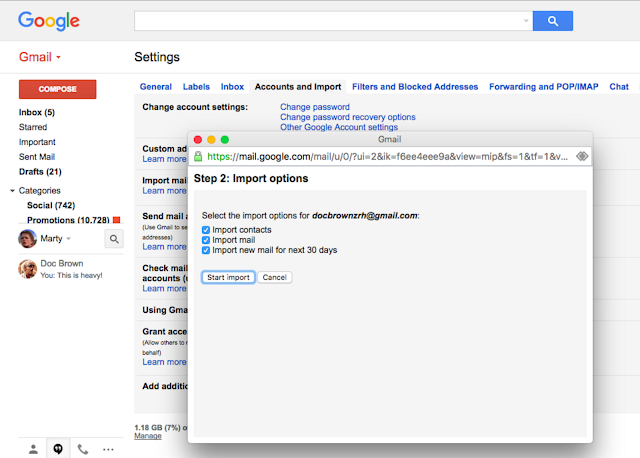
Earlier this year, we launched contact importing from a wide variety of supported mail and contact sources in the new Google Contacts preview. A popular request from Google Apps users has been the ability to import mail in addition to contacts from additional sources. Today, we’re happy to announce that we’re adding two more: Gmail and Rediffmail.

These secure user-initiated migrations can now be enabled from the Admin console and are powered by ShuttleCloud.  If you have already enabled User email uploads from the Admin console, then this feature is already available for your end-users.

Once enabled, the user will see a new section in their Gmail settings to Import mail and contacts. Users will then follow the prompts to migrate their email and contacts.
Note: If you import multiple times, the migration service will handle contact and mail duplicates seamlessly.


Launch Details
Release track:
Launching to Rapid release, with Scheduled release coming in 2 weeks

Rollout pace:
Full rollout (1-3 days for feature visibility)

Impact:
All end users

Action:
Change management suggested/FYI

More Information
Import email and contacts


Note: all launches are applicable to all Google Apps editions unless otherwise noted

Launch release calendar
Launch detail categories
Get these product update alerts by email
Subscribe to the RSS feed of these updates

Fast and smooth video on Android

August 2nd, 2016  |  Published in Google Chrome

With Chrome 52, video playback on Android now feels smoother, loads faster, and consumes less battery.

Web video is huge, with over a billion hours played in Chrome every week on sites like Amazon, Facebook, The New York Times, Netflix and YouTube. Much of that is on mobile devices, and we want to make your viewing experience great.

With the release of Chrome 52 on Android, video playback has been improved for speed and power efficiency. This means you will see smoother playback and faster load times. Videos will now start playing sooner, instead of pausing briefly before loading, and your battery will last longer.


Video also now works with Data Saver Mode, saving you as much as 50% on data by showing a lightweight version of the video.

These improvements will be most noticeable on short videos, which make up the majority of videos on the web. With more publishers and sites moving to HTML5, your video experience on Chrome will just keep getting better. Update Chrome on Android today and give it a spin.

Posted by Renganathan Ramamoorthy, Proud Papa of Playbacks

Keep users focused on what’s important with the latest Google Maps Android API

August 1st, 2016  |  Published in Google Maps

Released today, the latest version of the Google Maps Android API includes more developer requested features: you can now track camera movements more accurately via our new camera listeners, set the minimum & maximum zoom levels on your map, and restrict the user’s panning to particular lat/lng bounds of the camera target. In addition, we’ve added a new marker Tag property so you can now associate your own data object with a marker.

Track camera movements more accurately

As one of our top requests, developers have been asking for a better way to track camera movements and the ability to see why the camera is moving, whether caused by user gestures, built-in API animations or developer controlled movements [Issue 4636]. Our new camera change listeners support you in doing this. Your app can now receive notifications for camera start, ongoing, and end events.

See the developer’s guide to camera change events and take a look at this code sample which shows you how to detect when the user drags the map, and draws a line to track this movement when it happens.

Control the zooming, panning and scrolling experience

Have you ever wanted to be able to control how much your user can zoom in and out and pan around on your map so that you can more tightly control the experience? Or have you got tile overlays only for zoom levels 15 through 20 and wish you could limit the zooming capability of both the map and your tile overlays to those particular levels?

You can now set the min and max zoom levels on your map by using GoogleMap.setMinZoomPreference() and GoogleMap.setMaxZoomPreference() [Issue 4663]. These zoom levels will also apply to any tile overlays you have on your map.

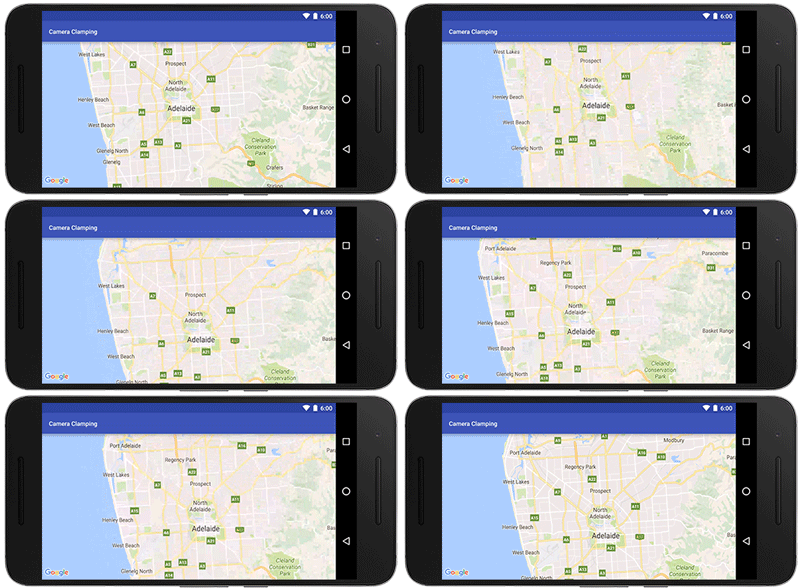
In addition, you can also constrain the lat/lng center bounds of the focal point of the map (the camera target) so that users can only scroll and pan within these bounds using GoogleMap.setLatLngBoundsForCameraTarget(). This is awesome if you want your users to stay within the map area of your tile overlays, or you wish to confine the map in your app to a particular local area.
Pan and zoom limits on a map for Adelaide, a beautiful city in South Australia
See the developer’s guide to learn more about setting boundaries on the map as well as this code sample.

Marker tags

Does your app cater for different types of markers and you want to treat them differently when a user taps on them? Or do you want to assign priorities to your markers? The new marker Tag property allows you to associate whatever data object you like with a marker, supporting you in doing this and more [Issue 4650].

A big thank you to Android developers everywhere for using the Google Maps Android API and submitting feedback via the issue tracker.

Our release notes contain details of bugs fixed as well as the features mentioned in this post. Take a look and start using our new features today!
author image Posted by Megan Boundey, Product Manager, Google Maps Mobile APIs


What’s New in Google Apps newsletter – July 2016

August 1st, 2016  |  Published in Google Apps


Check out the latest "What's New in Google Apps" newsletter [pdf] for a roundup of all Apps launches from July 2016.


Note: all launches are applicable to all Google Apps editions unless otherwise noted

Launch release calendar
Launch detail categories
Get these product update alerts by email
Subscribe to the RSS feed of these updates

Previously


Dec 28, 2016
Open source down under: Linux.conf.au 2017

by Open Source Programs Office | Read | No Comments

It’s a new year and open source enthusiasts from around the globe are preparing to gather at the edge of the world for Linux.conf.au 2017. Among those preparing are Googlers, including some of us from the Open Source Programs Office.

This year Linux.conf.au is returning to Hobart, the riverside capital of Tasmania, home of Australia’s famous Tasmanian devils, running five days between January 16 and 20.

Circle_DevilTuz.png
Tuz, a Tasmanian devil sporting a penguin beak, is the Linux.conf.au mascot.
(Artwork by Tania Walker licensed under CC BY-SA.)

The conference, which began in 1999 and is community organized, is well equipped to explore the theme, “the Future of Open Source,” which is reflected in the program schedule and miniconfs.

You’ll find Googlers speaking throughout the week (listed below), as well as participating in the hallway track. Don’t miss our Birds of a Feather session if you’re a student, educator, project maintainer, or otherwise interested in talking about outreach and student programs like Google Summer of Code and Google Code-in.

Monday, January 16th
12:20pm The Sound of Silencing by Julien Goodwin
4:35pm   Year of the Linux Desktop? by Jessica Frazelle

Tuesday, January 17th
All day    Community Leadership Summit X at LCA

Wednesday, January 18th
2:15pm   Community Building Beyond the Black Stump by Josh Simmons
4:35pm   Contributing to and Maintaining Large Scale Open Source Projects by Jessica Frazelle

Thursday, January 19th
4:35pm   Using Python for creating hardware to record FOSS conferences! by Tim Ansell

Friday, January 20th
1:20pm   Linux meets Kubernetes by Vishnu Kannan

Not able to make it to the conference? Keynotes and sessions will be livestreamed, and you can always find the session recordings online after the event.

We’ll see you there!

By Josh Simmons, Open Source Programs Office


Dec 23, 2016
Taking the pulse of Google Code-in 2016

by Open Source Programs Office | Read | No Comments

GCI official horizontal_1372x448dp.png

Today is the official midpoint of this year’s Google Code-in contest and we are delighted to announce this is our most popular year ever! 930 teenagers from 60 countries have completed 3,503 tasks with 17 open source organizations. The number of students successfully completing tasks has almost met the total number of students from the 2015 contest already.

Tasks that the students have completed include:

  • writing test suites
  • improving mobile UI 
  • writing documentation and creating videos to help new users 
  • working on internationalization efforts
  • fixing and finding bugs in the organization’s’ software 

Participants from all over the world
In total, over 2,800 students from 87 countries have registered for the contest and we look forward to seeing great work from these (and more!) students over the next few weeks. 2016 has also seen a huge increase in student participation in places such as Indonesia, Vietnam and the Philippines.

Google Code-in participants by country
Please welcome two new countries to the GCI family: Mauritius and Moldova! Mauritius made a very strong debut to the contest and currently has 13 registered students who have completed 31 tasks.

The top five countries with the most completed tasks are:

  1. India: 982
  2. United States: 801
  3. Singapore: 202
  4. Vietnam: 119
  5. Canada: 117

Students, there is still plenty of time to get started with Google Code-in. New tasks are being added daily to the contest site — there are over 1,500 tasks available for students to choose from right now! If you don’t see something that interests you today, check back again every couple of days for new tasks.

The last day to register for the contest and claim a task is Friday, January 13, 2017 with all work being due on Monday, January 16, 2017 at 9:00 am PT.

Good luck to all of the students participating this year in Google Code-in!

By Stephanie Taylor, Google Code-in Program Manager

All numbers reported as of 8:00 PM Pacific Time, December 22, 2016.


Dec 21, 2016
Introducing the ExifInterface Support Library

by Android Developers | Read | No Comments

With the release of the 25.1.0 Support Library, there’s a new entry in the family: the ExifInterface Support Library. With significant improvements introduced in Android 7.1 to the framework’s ExifInterface, it only made sense to make those available t…


Dec 21, 2016
Geolocation and Firebase for the Internet of Things

by Maps Devel | Read | No Comments

Posted by Ken Nevarez, Industry Solutions Lead at Google

GPS is the workhorse of location based services, but there are use cases where you may want to avoid the cost and power consumption of GPS hardware or locate devices in places where GPS lacks accuracy, such as in urban environments or buildings.

We’ve seen recent growth in Internet of Things (IoT) applications using the Google Maps Geolocation API instead of GPS for asset tracking, theft prevention, usage optimization, asset servicing, and more. As part of my 20 percent project at Industry Solutions, I created a prototype IoT device that can locate itself using surrounding WiFi networks and the Google Maps Geolocation API. In this post, I’ll discuss some interesting implementation features and outline how you can create the prototype yourself.

I built a device that scans for local WiFi and writes results (WiFi hotspots and their signal strength) to a Firebase Realtime Database. A back-end service then reads this data and uses the Google Maps Geolocation API to turn this into a real-world location, which can be plotted on a map.


Set up the Device & Write Locally

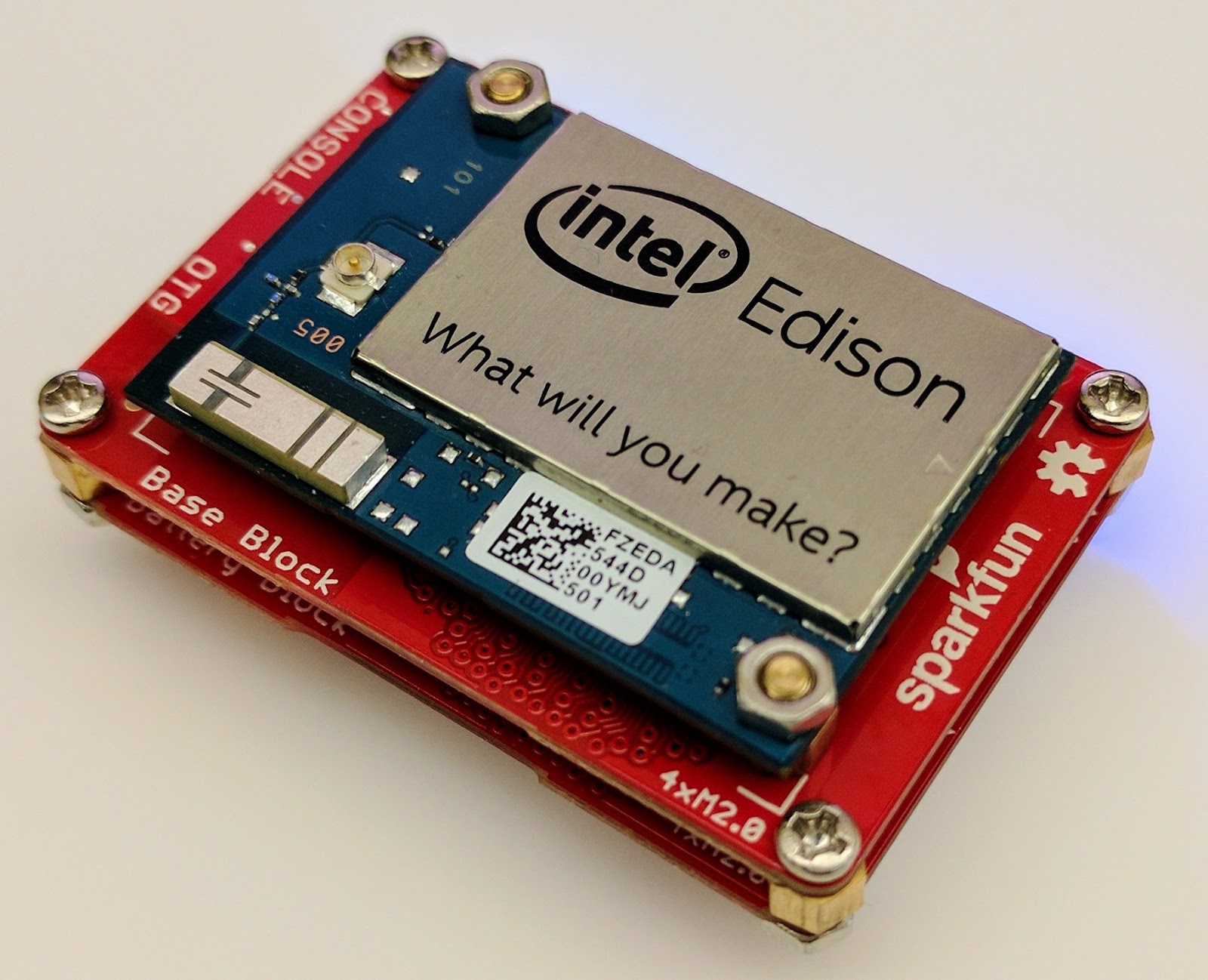
For this proof of concept, I used the Intel Edison as a Linux-based computing platform and augmented it with Sparkfun’s Edison Blocks. To build the device, you will need an Intel Edison, a Base Block, a Battery Block and a Hardware pack.


Developing for the Edison is straightforward using the Intel XDK IDE. We will be creating a simple Node.js application in JavaScript. I relied on 3 libraries: Firebase for the database connection, wireless-tools/iwlist to capture WiFi networks, and macaddress to capture the device MAC. Installation instructions can be found on the linked pages.

Step 1: get the device MAC address and connect to Firebase:

function initialize() {
    macaddress.one('wlan0', function (err, mac) {
        mac_address = mac;
        if (mac === null) {
            console.log('exiting due to null mac Address');
            process.exit(1);
        }
        firebase.initializeApp({
            serviceAccount: '/node_app_slot/.json',
            databaseURL: 'https://.firebaseio.com/'
        });
        var db = firebase.database();
        ref_samples = db.ref('/samples');
        locationSample();
    });
}

The above code contains two placeholders:

  1. The service-account-key is a private key you create in the Firebase Console. Follow the gear icon in the upper left of console, select “settings”, and click Generate New Private Key. Place this key on your Edison in the directory /node_app_slot/. See this Firebase documentation for more information.
  2. The project-id in the database URL is found in the Firebase console database page after you have linked your Google project with Firebase.

Step 2: scan for WiFi networks every 10 seconds and write locally:

function locationSample() {
    var t = new Date();
    iwlist.scan('wlan0', function(err, networks) {
        if(err === null) {
            ref_samples.push({
                mac: mac_address,
                t_usec: t.getTime(),
                t_locale_string: t.toLocaleString(),
                networks: networks,
            });
        } else {
            console.log(err);
        }        
    });
    setTimeout(locationSample, 10000);
}

Write to the cloud

The locationSample() function above writes detectable WiFi networks to a Firebase database that syncs to the cloud when connected to a network.

Caveat: To configure access rights and authentication to Firebase, I set up the device as a “server”. Instructions for this configuration are on the Firebase website. For this proof of concept, I made the assumption that the device was secure enough to house our credentials. If this is not the case for your implementation you should instead follow the instructions for setting up the client JavaScript SDK.

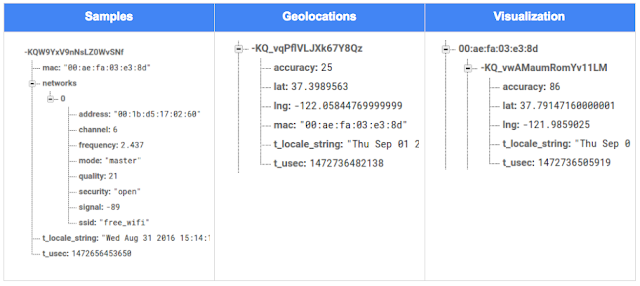
The database uses 3 queues to manage workload: a WiFi samples queue, a geolocation results queue and a visualization data queue. The workflow will be: samples from the device go into a samples queue, which gets consumed to produce geolocations that are put into a geolocations queue. Geolocations are consumed and formatted for presentation, organized by device, and the output is stored in a visualizations bucket for use by our front end website.

Below is an example of a sample, a geolocation, and our visualization data written by the device and seen in the Firebase Database Console.

Processing the Data with Google App Engine

To execute the processing of the sample data I used a long running Google App Engine Backend Module and a custom version of the Java Client for Google Maps Services.

Caveat: To use Firebase with App Engine, you must use manual scaling. Firebase uses background threads to listen for changes and App Engine only allows long-lived background threads on manually scaled backend instances.

The Java Client for Google Maps Services takes care of a lot of the communications code required to use the Maps APIs and follows our published best practices for error handling and retry strategies that respect rate limits. The GeolocateWifiSample() function below is registered as an event listener with Firebase. It loops over each network reported by the device and incorporates it into the geolocation request.

private void GeolocateWifiSample(DataSnapshot sample,  Firebase db_geolocations, Firebase db_errors) {
    // initalize the context and request
    GeoApiContext context = new GeoApiContext(new GaeRequestHandler()).setApiKey("");
    GeolocationApiRequest request = GeolocationApi.newRequest(context)
            .ConsiderIp(false);
    // for every network that was reported in this sample...
    for (DataSnapshot wap : sample.child("networks").getChildren()) {
        // extract the network data from the database so it’s easier to work with
        String wapMac = wap.child("address").getValue(String.class);
        int wapSignalToNoise = wap.child("quality").getValue(int.class);
        int wapStrength = wap.child("signal").getValue(int.class);
        // include this network in our request
        request.AddWifiAccessPoint(new WifiAccessPoint.WifiAccessPointBuilder()
                .MacAddress(wapMac)
                .SignalStrength(wapStrength)
                .SignalToNoiseRatio(wapSignalToNoise)
                .createWifiAccessPoint());
    }
    ...
    try {
        // call the api
        GeolocationResult result = request.CreatePayload().await();
        ...
        // write results to the database and remove the original sample
    } catch (final NotFoundException e) {
        ...
    } catch (final Throwable e) {
        ...
    }
}

Register the GeolocateWifiSample() function as an event handler. The other listeners that process geolocation results and create the visualization data are built in a similar pattern.

ChildEventListener samplesListener = new ChildEventListener() {
    @Override
    public void onChildAdded(DataSnapshot dataSnapshot, String previousChildName) {
        // geolocate and write to new location
        GeolocateWifiSample(dataSnapshot, db_geolocations, db_errors);
    }
    ...
};
db_samples.addChildEventListener(samplesListener);

Visualize the Data

To visualize the device locations I used Google App Engine to serve stored data from Firebase and the Google Maps JavaScript API to create a simple web page that displays the results. The index.html page contains an empty

with id “map”. I initialized this
to contain the Google Map object. I also added “child_added” and “child_removed” event handlers to update the map as the data changes over time.
function initMap() {
    // attach listeners
    firebase.database().ref('/visualization').on('child_added', function(data) {
        ...
        data.ref.on('child_added', function(vizData) {
            circles[vizData.key]= new CircleRoyale(map,
                                vizData.val().lat,
                                vizData.val().lng,
                                vizData.val().accuracy,
                                color);
          set_latest_position(data.key, vizData.val().lat, vizData.val().lng);
        });
        data.ref.on('child_removed', function(data) {
            circles[data.key].removeFromMap();
        });
    });
    // create the map
    map = new google.maps.Map(document.getElementById('map'), {
      center: get_next_device(),
      zoom: 20,
      scaleControl: true,
    });
    ...
}

Since the API returns not only a location but also an indication of accuracy, I’ve created a custom marker that has a pulsing radius to indicate the accuracy component.

Two devices (red and blue) and their last five known positions


What’s next?

In this post I’ve outlined how you can build an IoT device that uses Google Maps Geolocation API to track any internet-connected device – from robotics to wearables. The App Engine processing module can be expanded to use other Google Maps APIs Web Services providing geographic data such as directions, elevation, place or time zone information. Happy building!

As an alternative, you can achieve a similar solution using Google Cloud Platform as a replacement for Firebase—this article shows you how.

author image
About Ken: Ken is a Lead on the Industry Solutions team. He works with customers to bring innovative solutions to market.

Dec 21, 2016
Google Summer of Code 2016 wrap-up: Public Lab

by Open Source Programs Office | Read | No Comments

This post is part of our series of guest posts from students, mentors and organization administrators who participated in Google Summer of Code 2016.


How we made this our best Google Summer of Code ever

This was our fourth year doing Google Summer of Code (GSoC), and it was our best year ever by a wide margin! We had five hard-working students who contributed over 17,000 new lines of (very useful) code to our high-priority projects.

Students voluntarily started coding early and hit the ground running, with full development environments and a working knowledge of GitHub Flow-style pull request process. They communicated with one another and provided peer support. They wrote tests. Hundreds of them! They blogged about their work as they went, and chatted with other community members about how to design features.

All of that was amazing, and it was made better by the fact that we were accepting pull requests with new code twice weekly. Tuesdays and Fridays, I went through new submissions, provided feedback, and pulled new code into our master branch, usually publishing it to our production site once a week.

I don’t know how other projects do things, but this was very new for us, and it’s revolutionized how we work together. In past years, students would work on their forks, slowly building up features. Then in a mad dash at the end, we’d try to merge them into trunk, with lots of conflicts and many hours (weeks!) of work on the part of project maintainers.

Screenshot_2016-08-26_at_11.44.16_AM.png

What made this year so good?

Many things aligned to make this summer great, and basically none of them are our ideas. I’m sure plenty of you are cringing at how we used to do things, but I also don’t think that it’s that unusual for projects not “born” in the fast-paced world of modern code collaboration.

We used ideas and learned from Nicolas Bevacqua, author of JavaScript Application Design and of the woofmark and horsey libraries which I’ve contributed to. We’ve also learned a great deal from the Hoodie community, particularly Gregor Martynus, who we ran into at a BostonJS meetup. Lastly, we learned from SpinachCon, organized by Shauna Gordon McKeon and Deb Nicholson, where people refine their install process by actually going through the process while sitting next to each other.

Broadly, our strategies were:

  • Good documentation for newcomers (duh)
  • Short and sweet install process that you’ve tried yourself (thanks, SpinachCon!)
  • Predictable, regular merge schedule
  • Thorough test suite, and requiring tests with each pull request
  • Modularity, insisting that projects be broken into small, independently testable parts and merged as they’re written

Installation and pull requests

Most of the above sound kind of obvious or trivial, but we saw a lot of changes when we put it all together. Having a really fast install process, and guidance on getting it running in a completely consistent environment like the virtualized Cloud9 service, meant that many students were able to get the code running the same day they found the project. We aimed for an install time of 15 minutes max, and supplied a video of this for one of our codebases.

We also asked students to make a small change (even just add a space to a file) and walk through the GitHub Flow pull request (PR) submission process. We had clear step-by-step guidance for this, and we took it as a good sign when students were able to read through it and do this.

Importantly, we really tried to make each step welcoming, not demanding or dismissive, of folks who weren’t familiar with this process. This ultimately meant that all five students already knew the PR process when they began coding.

Twice-weekly merge schedule

We were concerned that, in past years, students only tried merging a few times and typically towards the end of the summer. This meant really big conflicts (with each other, often) and frustration.

This year we decided that, even though we’re a tiny organization with just one staff coder, we’d try merging on Tuesday and Friday mornings, and we mostly succeeded. Any code that wasn’t clearly presented, commits squashed, passing tests, and submitting new tests, was reviewed and I left friendly comments and requests so it could be merged the following week.

At first I felt bad rejecting PRs, but we had such great students that they got used to the strictness. They got really good at separating out features, demonstrating their features through clear tests, and some began submitting more than two PRs per week – always rebasing on top of the latest master to ensure a linear commit history. Sweet!

Wrap-up and next steps

The last thing we did was to ask each student, essentially as their documentation, to write a series of new issues which clearly described the problem and/or desired behavior, leave suggestions and links to specific lines of code or example code, and mark them with the special “help-wanted” tag which was so helpful to them when they first started out. We asked each to also make one extra-welcoming “first-timers-only” issue which walks a new contributor through every step of making a commit and even provides suggested code to be inserted.

This final requirement was key. While I personally made each of the initial set of “help-wanted” and “first-timers-only” issues before GSoC, now five students were offloading their unfinished to-dos as very readable and inviting issues for others. The effect was immediate, in part because these special tags are syndicated on some sites. Newcomers began picking them up within hours and our students were very helpful in guiding them through their first contributions to open source.

I want to thank everyone who made this past summer so great, from our champion mentors and community members, to our stellar students, to all our inspirations in this new process, to the dozen or so new contributors we’ve attracted since the end of August.

By Jeff Warren, Organization Administrator for PublicLab.org

Dec 20, 2016
Get the guide to finding success in new markets on Google Play

by Android Developers | Read | No Comments

Posted by Lily Sheringham, Developer Marketing at Google Play

With just a few clicks, you can publish an app to Google Play and access a
global audience of more than 1 billion 30 days active users. Finding success in
global markets means considering how each market differs, planning for high
quality localization, and tailoring your activity to the local audience. The new
Going
Global Playbook provides best practices and tips, with advice from
developers who’ve successfully gone global.

This guide includes advice to help you plan your approach to going global,
prepare your app for new markets, take your app to market, and also include data
and insights for key countries and other useful resources.

This ebook joins others that we’ve recently published including The
Building for Billions Playbook and The
News Publisher Playbook. All of our ebooks are promoted in the Playbook for Developers app, which is
where you can stay up to date with all the news and best practices you need to
find success on Google Play.

How useful did you find this blogpost?


★ ★ ★ ★ ★
What is Google Data?

Google Data is the only site where you can get news from 60+ official Google blogs all in one place. We have published 24,235 official posts since January 2005.


Categories

  • Gmail (Google Mail) (436)
  • Google Adsense (1,013)
  • Google Adsense Feeds (46)
  • Google Adwords (1,224)
  • Google Adwords API (366)
  • Google Affiliate Network (141)
  • Google Ajax API (121)
  • Google Analytics (961)
  • Google Android (654)
  • Google App Engine (332)
  • Google Apps (1,865)
  • Google Blog (1,650)
  • Google Blogger Buzz (527)
  • Google Books (300)
  • Google Checkout (162)
  • Google Chrome (312)
  • Google Code (828)
  • Google Conversions (137)
  • Google CPG (198)
  • Google Custom Search (129)
  • Google Desktop (144)
  • Google Desktop API (175)
  • Google Docs (717)
  • Google DoubleClick (730)
  • Google Earth (1,006)
  • Google Enterprise (1,278)
  • Google Finance (88)
  • Google Gadgets (31)
  • Google Gears (60)
  • Google Grants (285)
  • Google Mac Blog (149)
  • Google Maps (736)
  • Google Merchant (219)
  • Google Mobile (386)
  • Google News (152)
  • Google Notebook (20)
  • Google Online Security (221)
  • Google Open Source (929)
  • Google OpenSocial (197)
  • Google Orkut (381)
  • Google Photos (Picasa) (109)
  • Google Product Ideas (23)
  • Google Public Policy (675)
  • Google Reader (124)
  • Google RechargeIT (29)
  • Google Research (423)
  • Google SketchUp (692)
  • Google Student Blog (848)
  • Google Talk (107)
  • Google Testing (326)
  • Google Translate (98)
  • Google TV Ads Blog (163)
  • Google Video (293)
  • Google Voice (86)
  • Google Wave (38)
  • Google Webmaster Central (376)
  • Google Website Optimizer (101)
  • Google.org (183)
  • iGoogle (87)
  • Uncategorized (1,262)
  • Youtube (779)
  • Youtube API (173)

Tags

adsense adsense google advertisers advertising adwords adwords google adwords tips analytics analytics google android gmail for domains Google Adsense Google Adwords google adwords help Google Analytics google analytics ga.js Google Android Google Apps google apps enterprise google apps free google apps gmail google apps standard google apps sync Google Blog google calendar google chat google culture Google Docs Google Earth Google Enterprise google insights google lat-long Google Mobile Google News google products google statistics google student google updates official google blog open source publishers students website analytics website statistics website stats

Archives

  • December 2016 (58)
  • November 2016 (83)
  • October 2016 (97)
  • September 2016 (113)
  • August 2016 (90)
  • July 2016 (87)
  • June 2016 (100)
  • May 2016 (112)
  • April 2016 (101)
  • March 2016 (116)
  • February 2016 (93)
  • January 2016 (66)
  • December 2015 (111)
  • November 2015 (105)
  • October 2015 (105)
  • September 2015 (116)
  • August 2015 (98)
  • July 2015 (106)
  • June 2015 (149)
  • May 2015 (94)
  • April 2015 (107)
  • March 2015 (124)
  • February 2015 (109)
  • January 2015 (69)
  • December 2014 (123)
  • November 2014 (107)
  • October 2014 (134)
  • September 2014 (132)
  • August 2014 (110)
  • July 2014 (118)
  • June 2014 (142)
  • May 2014 (129)
  • April 2014 (99)
  • March 2014 (125)
  • February 2014 (112)
  • January 2014 (88)
  • December 2013 (104)
  • November 2013 (147)
  • October 2013 (152)
  • September 2013 (114)
  • August 2013 (119)
  • July 2013 (136)
  • June 2013 (173)
  • May 2013 (213)
  • April 2013 (168)
  • March 2013 (167)
  • February 2013 (145)
  • January 2013 (132)
  • December 2012 (156)
  • November 2012 (151)
  • October 2012 (203)
  • September 2012 (168)
  • August 2012 (190)
  • July 2012 (151)
  • June 2012 (169)
  • May 2012 (169)
  • April 2012 (193)
  • March 2012 (227)
  • February 2012 (195)
  • January 2012 (191)
  • December 2011 (243)
  • November 2011 (248)
  • October 2011 (282)
  • September 2011 (271)
  • August 2011 (261)
  • July 2011 (275)
  • June 2011 (259)
  • May 2011 (148)
  • April 2011 (83)
  • March 2011 (92)
  • February 2011 (109)
  • January 2011 (253)
  • December 2010 (397)
  • November 2010 (322)
  • October 2010 (328)
  • September 2010 (402)
  • August 2010 (305)
  • July 2010 (293)
  • June 2010 (362)
  • May 2010 (367)
  • April 2010 (355)
  • March 2010 (363)
  • February 2010 (294)
  • January 2010 (267)
  • December 2009 (321)
  • November 2009 (308)
  • October 2009 (380)
  • September 2009 (344)
  • August 2009 (302)
  • July 2009 (347)
  • June 2009 (357)
  • May 2009 (352)
  • April 2009 (353)
  • March 2009 (351)
  • February 2009 (296)
  • January 2009 (239)
  • December 2008 (253)
  • November 2008 (273)
  • October 2008 (357)
  • September 2008 (316)
  • August 2008 (239)
  • July 2008 (241)
  • June 2008 (250)
  • May 2008 (247)
  • April 2008 (263)
  • March 2008 (251)
  • February 2008 (187)
  • January 2008 (172)
  • December 2007 (179)
  • November 2007 (177)
  • October 2007 (195)
  • September 2007 (148)
  • August 2007 (161)
  • July 2007 (182)
  • June 2007 (152)
  • May 2007 (109)
  • April 2007 (98)
  • March 2007 (93)
  • February 2007 (75)
  • January 2007 (75)
  • December 2006 (82)
  • November 2006 (122)
  • October 2006 (115)
  • September 2006 (106)
  • August 2006 (120)
  • July 2006 (69)
  • June 2006 (61)
  • May 2006 (51)
  • April 2006 (46)
  • March 2006 (48)
  • February 2006 (45)
  • January 2006 (46)
  • December 2005 (51)
  • November 2005 (50)
  • October 2005 (23)
  • September 2005 (39)
  • August 2005 (28)
  • July 2005 (15)
  • June 2005 (25)
  • May 2005 (27)
  • April 2005 (31)
  • March 2005 (31)
  • February 2005 (3)
  • January 2005 (1)

Recent Posts

  • Other sites are using my ad code. What should I do?
  • Open source down under: Linux.conf.au 2017
  • Taking the pulse of Google Code-in 2016
  • Introducing the ExifInterface Support Library
  • Geolocation and Firebase for the Internet of Things
  • Google Summer of Code 2016 wrap-up: Public Lab
  • Get the guide to finding success in new markets on Google Play
  • Start building Actions on Google
  • Best practices to improve app engagement
  • Project Wycheproof
January 2017
M T W T F S S
« Dec    
  1
2 3 4 5 6 7 8
9 10 11 12 13 14 15
16 17 18 19 20 21 22
23 24 25 26 27 28 29
30 31  

Page 29 of 1,615« First«...1020...2728293031...405060...»Last »


Copyright © 2017 GoogleData.org, All Rights Reserved.
This site is not operated by, sponsored by, endorsed by, or affiliated with Google Inc. in any way.
Rss Feed Tweeter button Facebook button Technorati button Reddit button Myspace button Linkedin button Delicious button Digg button Stumbleupon button Newsvine button