Google Data

  • Home
  • Everything Google
    • Gmail (Google Mail)
    • Google Adsense
    • Google Adsense Feeds
    • Google Adwords
    • Google Adwords API
    • Google Affiliate Network
    • Google Ajax API
    • Google Analytics
    • Google Android
    • Google App Engine
    • Google Apps
    • Google Blog
    • Google Blogger Buzz
    • Google Books
    • Google Checkout
    • Google Chrome
    • Google Code
    • Google Conversions
    • Google CPG
    • Google Custom Search
    • Google Desktop
    • Google Desktop API
    • Google Docs
    • Google DoubleClick
    • Google Earth
    • Google Enterprise
    • Google Finance
    • Google Gadgets
    • Google Gears
    • Google Grants
    • Google Mac Blog
    • Google Maps
    • Google Merchant
    • Google Mobile
    • Google News
    • Google Notebook
    • Google Online Security
    • Google Open Source
    • Google OpenSocial
    • Google Orkut
    • Google Photos (Picasa)
    • Google Product Ideas
    • Google Public Policy
    • Google Reader
    • Google RechargeIT
    • Google Research
    • Google SketchUp
    • Google Student Blog
    • Google Talk
    • Google Testing
    • Google Translate
    • Google TV Ads Blog
    • Google Video
    • Google Voice
    • Google Wave
    • Google Webmaster Central
    • Google Website Optimizer
    • Google.org
    • iGoogle
    • Uncategorized
    • Youtube
    • Youtube API
  • Resources
    • Google Products & Services
    • Google Twitter Directory
    • Google Trademarks
    • Google Data Site Map
  • About
  • Contact
  • Subscribe via RSS

A faster way to share photos and videos, and all-new movies

September 19th, 2016  |  Published in Google Blog

Sharing all the photos from your weekend with friends can be hard: Not everyone uses the same apps, texting can be slow, and email has attachment limits.

Now, with Google Photos, you pick the photos, tap “share” and select the people you want to share with, instead of the apps — and we take care of the rest. If your friends are on Google Photos, they’ll get a notification. If you share via phone number, they’ll get a link to the photos and videos via SMS. And email addresses will get an email with a link from Google Photos. So you can spend less time toggling from app to app to share photos — dealing with failed texts or email attachment limits along the way — and more time enjoying life’s photo-worthy moments.


We’re also upping our game when it comes to automatic creations. Google Photos has always made movies for you using your recently uploaded photos. Now we’re going further, with new movies that are based on creative concepts — the kinds of movies you might make yourself, if you just had the time. And they’re not only limited to your most recent uploads.

One of the first concepts is designed to show your child growing up right before your eyes. Here’s an example:


We’re rolling out a couple more concepts this week, with more coming soon. Look out for a concept to commemorate the good times from this summer, and another one for formal events like weddings. And you don’t need to do a thing — these movies get made automatically for you.

These updates are rolling out today across Android, iOS, and the web.


Posted by David Lieb, Product Lead, Google Photos https://2.bp.blogspot.com/-IT1gpc5ZUtA/V-AYz6NEw1I/AAAAAAAAS_4/zyYAY6tVVig1_jlHpAANIlW1qCyNXHR1QCLcB/s1600/Screen%2BShot%2B2016-09-19%2Bat%2B9.55.02%2BAM David Lieb Product Lead Google Photos

See more, plan less – try Google Trips

September 19th, 2016  |  Published in Google Blog

Whether you’re juggling work, school, family, or just the demands of daily life, everyone needs a little break and a new adventure sometimes.

But knowing what to do once your vacation starts can turn what’s supposed to be fun into a lot of work. You might get recommendations from friends, professional travel guides, or online reviews — but figuring out how to squeeze everything you want to do into a finite window of time can be stressful, especially when you’re in a new place, often with limited access to the web. In fact, a GoodThink study showed that 74% of travelers feel the most stressful aspect of travel is figuring out the details.

We wanted to reduce the hassle and help travelers enjoy their hard-earned vacations. So today, we’re introducing a new mobile app to help you instantly plan each day of your trip with just a few taps of your finger: Google Trips.


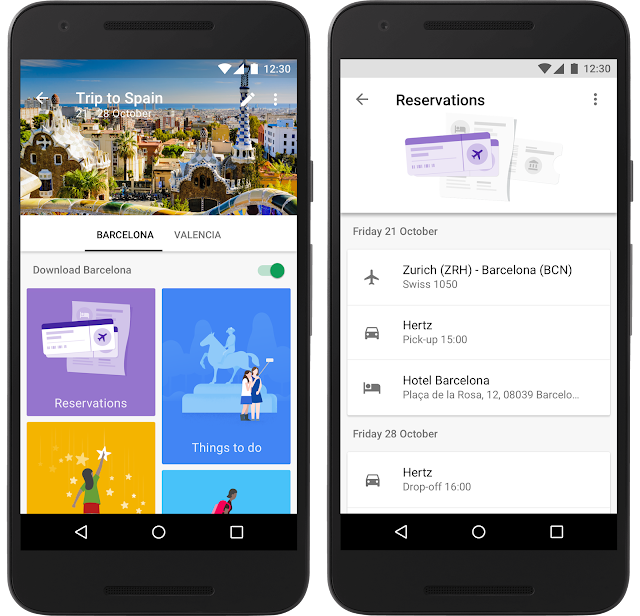
Google Trips is a personalized tour guide in your pocket. Each trip contains key categories of information, including day plans, reservations, things to do, food & drink, and more, so you have everything you need at your fingertips. The entire app is available offline — simply tap the “Download” button under each trip to save it to your phone.


Choose your own adventure
For the top 200 cities in the world, Google Trips shows you a variety of day plans featuring the most popular daily itineraries. We’ve automatically assembled the most popular sights, attractions, and local gems into a full day’s tour — all based on historic visits by other travelers. Say you’re visiting Barcelona. You can choose from multiple day plans, like “Eixample District,” which maps out the can’t-miss buildings by Antoni Gaudi, the famous Spanish architect.


Plan each day of your trip like magic
Everyone has different interests and time constraints. No matter how popular an itinerary is, there’s no one-size-fits-all solution for the perfect day or the perfect trip. Google Trips can help you build your day around places you already know you want to visit.

Say your friends told you that you have to see the Sagrada Familia — and you’re looking for suggestions on things to do around that spot. Press the “+” button in the day plans tile to jump into a map view containing all the top attractions in your destination. If you’re time constrained, you can specify above the map whether you have just the morning or afternoon, versus a full day. Then simply tap and pin the Sagrada Familia to build your itinerary around it. Google Trips automatically fills in the day for you. If you want more options, tap the “magic wand” button for more nearby sights. You can pin any new spots you like, and if you want even more, each tap of the “magic wand” instantly gives you a new itinerary with updated nearby attractions like Palau Macaya or Parc del Guinardo, so you can build your own custom itinerary in minutes while munching on your morning churro.

For more details on how this works on our Research Blog.


All your travel info, all in one place
Keeping track of all your flight, hotel, car and restaurant reservations when you travel can be tough. With Google Trips, all your travel reservations are automatically gathered from Gmail and organized for you into individual trips, so you don’t have to search and dig up those emails. They’re waiting for you within the reservations tile, even without WiFi.


Vacations are a chance to recharge and experience new places and cultures. For your next trip, let us help you see all the sights you want to see, without all the work. Google Trips, available now on Android and iOS, has you covered from departure to return.

Posted by Stefan Frank, Product Manager, Google Trips https://2.bp.blogspot.com/-Yl145tls6Qc/V-BUTIka0fI/AAAAAAAATAI/3U0DEQu7IG4_FR6Hyu6x0zLe3-4dqDH3gCLcB/s1600/GoogleTrips_1.original.png Stefan Frank Product Manager Google Trips

The 2016 Google Earth Engine User Summit: Turning pixels into insights

September 19th, 2016  |  Published in Google Research

Posted by Chris Herwig, Program Manager, Google Earth Engine

"We are trying new methods [of flood modeling] in Earth Engine based on machine learning techniques which we think are cheaper, more scalable, and could exponentially drive down the cost of flood mapping and make it accessible to everyone."
-Beth Tellman, Arizona State University and Cloud to Street

Recently, Google headquarters hosted the Google Earth Engine User Summit 2016, a three-day hands-on technical workshop for scientists and students interested in using Google Earth Engine for planetary-scale cloud-based geospatial analysis. Earth Engine combines a multi-petabyte catalog of satellite imagery and geospatial datasets with a simple, yet powerful API backed by Google's cloud, which scientists and researchers use to detect, measure, and predict changes to the Earth's surface.
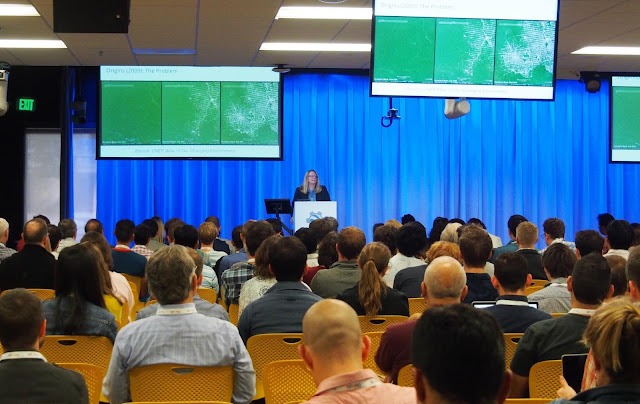
Earth Engine founder Rebecca Moore kicking off the first day of the summit
Summit attendees could choose among twenty-five hands-on workshops over the course of the three day summit, most generated for the summit specifically, giving attendees an exclusive introduction to the latest features in our platform. The sessions covered a wide range of topics and Earth Engine experience levels, from image classifiers and classifications, time series analysis, building custom web applications, all the way to arrays, matrices, and linear algebra in Earth Engine.
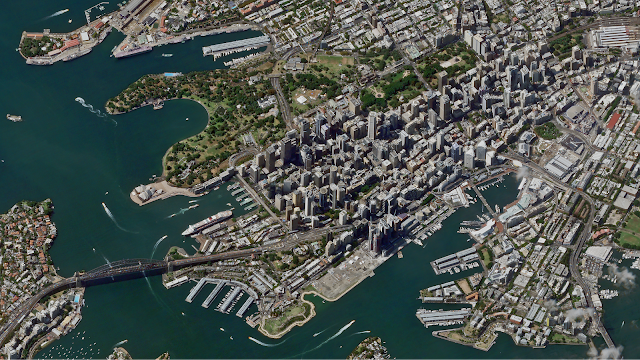
Terra Bella Product Manager, Kristi Bohl, taught a session on using SkySat imagery, like the image above over Sydney, Australia, for change detection. Workshop attendees also learned how to take advantage of the deep temporal stack the SkySat archive offers for change-over-time analyses.
Cross-correlation between Landsat 8 NDVI and the sum of CHIRPS precipitation. Red is high cross-correlation and blue is low. The gap in data is because CHIRPS is masked over water.
Nick Clinton, a developer advocate for Earth Engine, taught a time series session that covered statistical techniques as applied to satellite imagery data. Students learned how to make graphics like the above, which shows the cross-correlation between Landsat 8 NDVI and the sum of CHIRPS precipitation from the previous month over San Francisco, CA. The correlation should be high for relatively r-selected plants like grasses and weeds and relatively low for perennials, shrubs, or forest.

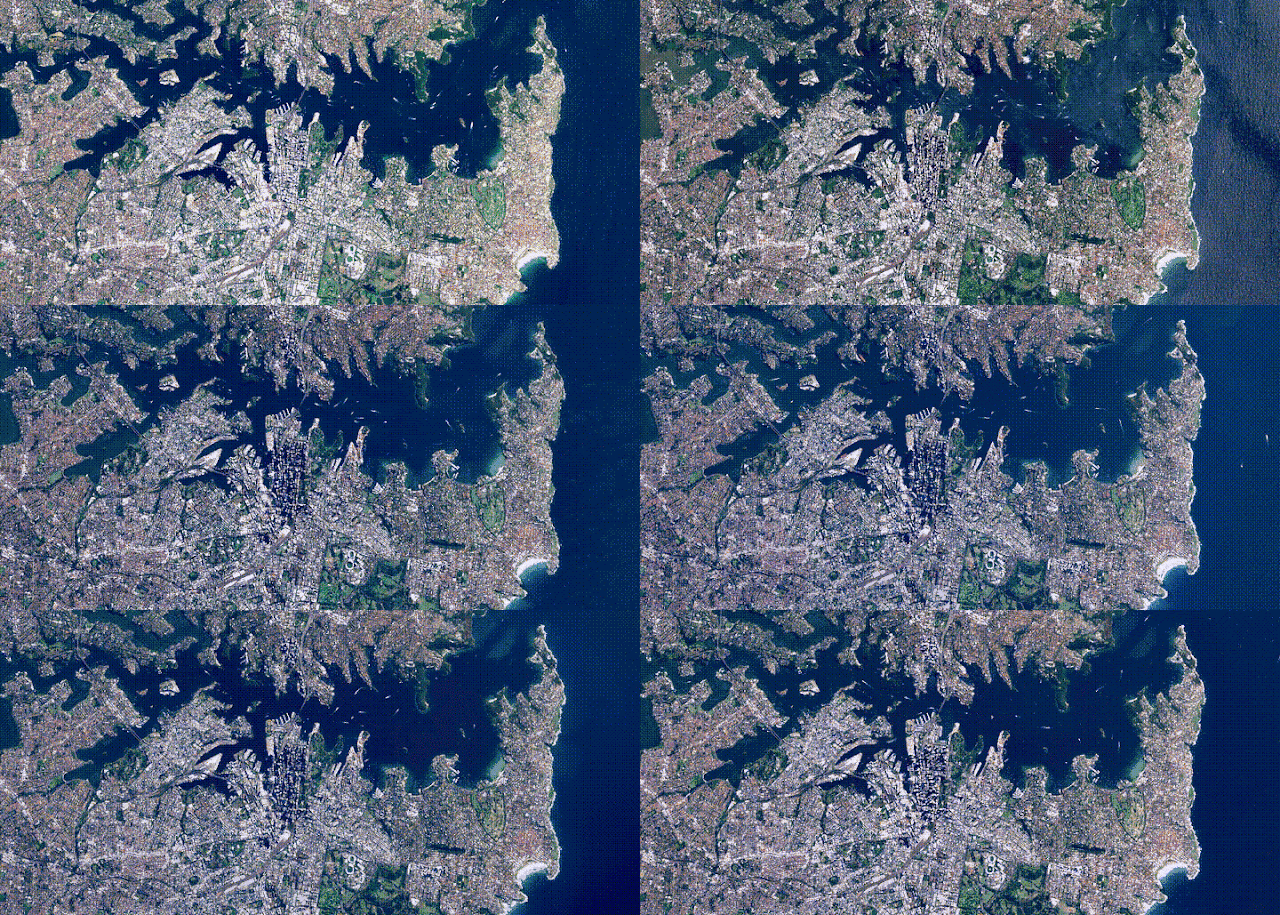
My workshop session covered how users can upload their own data into Earth Engine and the many different ways to take the results of their analyses with them, including rendering static map tiles hosted on Google Cloud Storage, exporting images, creating new assets, and even making movies, like this timelapse video of all the Sentinel 2A images captured over Sydney Australia.
Along with the workshop sessions, we hosted five plenary speakers and 18 lightning talk presenters. These presenters shared how Earth Engine fits into their research, spanning from drought monitoring, agriculture, conservation, flood risk mapping, and hydrological analysis.

Plenary Speakers
  • Agriculture in the Sentinel era: scaling up with Earth Engine, Guido Lemoine, European Commission's Joint Research Centre
  • Flood Vulnerability from the Cloud to the Street (and back!) powered by Google Earth Engine, Beth Tellman, Arizona State University and Cloud to Street
  • Accelerating Rangeland Conservation, Brady Allred, University of Montana
  • Monitoring Drought with Google Earth Engine: From Archives to Answers, Justin Huntington, Desert Research Institute / Western Regional Climate Center
  • Automated methods for surface water detection, Gennadii Donchytes, Deltares
Lightning Presentations
  • Mapping the Behavior of Rivers, Alex Bryk, University of California, Berkeley
  • Climate Data for Crisis and Health Applications, Pietro Ceccato, Columbia University
  • Appalachian Communities at Risk, Matt Wasson, Jeff Deal, Appalachian Voices
  • Water, Wildlife and Working Lands, Patrick Donnelly, U.S. Fish and Wildlife Service
  • Stream-side NDVI and The Salmonid Population Viability Project, Kurt Fesenmyer, Trout Unlimited
  • Mapping Evapotranspiration for Water Use and Availability, Mac Friedrichs, USGS
  • Dynamic Wildfire Modeling in Earth Engine, Miranda Gray, Conservation Science Partners
  • Fishing at Scale, now also in Earth Engine, David Kroodsma, Skytruth
  • Mapping crop yields from field to national scales in Earth Engine, David Lobell, Stanford University
  • Mapping Pacific Wildfires Impacts with Earth Engine, Matthew Lucas, University of Hawaii
  • EarthEnv.org - Environmental layers for accessing status and trends in biodiversity, ecosystems and climate, Jeremy Malczyk, Map of Life
  • Building a Landsat 8 Mosaic of Antarctica, Allen Pope, University of Colorado Boulder
  • Monitoring Primary Production at Broad Spatial and Temporal Scales, Nathaniel Robinson, University of Montana
  • Assessing Urbanization Trends for Public Health: Modelling Nighttime Lights Imagery in Africa with Earth Engine, David Savory, University of California, San Francisco
  • National-scale mapping of forest carbon, Ty Wilson, US Forest Service
  • Utilizing Google Earth Engine to Enhance Decision-Making Capabilities, Brittany Zajic, NASA DEVELOP National Program
Keeping our users first

It is always inspiring to see such a diverse group of people come together to celebrate, learn, and share all the amazing and wondrous things people are doing with Earth Engine. It is not only an opportunity for our users to learn the latest techniques; it is also a way for the Earth Engine team to experience the new and exciting ways people are harnessing Earth Engine to solve some of the most pressing environmental issues facing humanity.
We've already begun planning for next year's user summit, and based on the success of this year's, we're hoping to hold an even larger one.

Join #AskAdSense on Google+ and Twitter

September 19th, 2016  |  Published in Google Adsense

We’ve expanded AdSense support to our English AdSense Twitter and Google+ pages. Join our weekly #AskAdSense office hours and speak directly with our support specialists on topics like: ad placements, mobile implementation, account activation, account suspension, ad formats, and much more.


#AskAdSense office hours will be held every Thursday morning 9:30am Pacific Daylight Time beginning September 29th, 2016. Participating is easy:
  1. Follow AdSense on Twitter and Google+ 
  2. Tweet, post, comment, or reply to AdSense on Twitter or Google+ asking your question during the office hours. 
  3. Please do not provide personally identifiable information in your tweets or comments.
  4. If you can’t attend during our office hour times, be sure to use #AskAdSense in your tweet, post, comment or reply to AdSense and we’ll do our best to respond during our weekly office hours.


On October 27th, John Brown, Head of Publisher Policy Communications for Google, will be joining our office hours to provide transparency into our program policies. John is actively involved with the AdSense community helping to ensure that we continue to make a great web and advertising experience. You can also follow John on the SearchEngineJournal.com column "Ask the AdSense Guy" to learn more about Google ad network policies, processes, and best practices.

AdSense strives to provide many ways to help you when you need it, we’re happy to extend this to our Twitter and Google+ profiles. Be sure to follow us and we’re looking forward to speaking to you there. 


Posted by: Jay Castro from the AdSense Team

Research from VLDB 2016: Improved Friend Suggestion using Ego-Net Analysis

September 15th, 2016  |  Published in Google Research

Posted by Alessandro Epasto, Research Scientist, Google Research NY

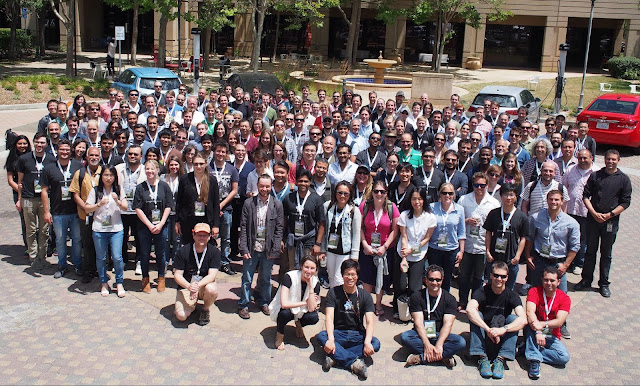
On September 5 - 9, New Delhi, India hosted the 42nd International Conference on Very Large Data Bases (VLDB), a premier annual forum for academic and industry research on databases, data management, data mining and data analytics. Over the past several years, Google has actively participated in VLDB, both as official sponsor and with numerous contributions to the research and industrial tracks. In this post, we would like to share the research presented in one of the Google papers from VLDB 2016.

In Ego-net Community Mining Applied to Friend Suggestion, co-authored by Googlers Silvio Lattanzi, Vahab Mirrokni, Ismail Oner Sebe, Ahmed Taei, Sunita Verma and myself, we explore how social networks can provide better friend suggestions to users, a challenging practical problem faced by all social network platforms

Friend suggestion – the task of suggesting to a user the contacts she might already know in the network but that she hasn’t added yet – is major driver of user engagement and social connection in all online social networks. Designing a high quality system that can provide relevant and useful friend recommendations is very challenging, and requires state-of-the-art machine learning algorithms based on a multitude of parameters.

An effective family of features for friend suggestion consist of graph features such as the number of common friends between two users. While widely used, the number of common friends has some major drawbacks, including the following which is shown in Figure 1.
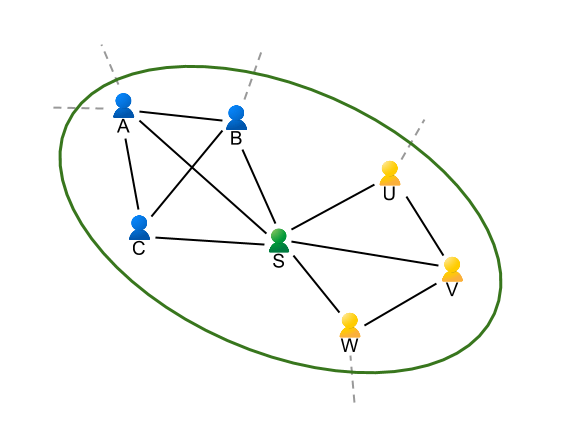
Figure 1: Ego-net of Sally.
In this figure we represent the social connections of Sally and her friends – the ego-net of Sally. An ego-net of a node (in this case, Sally) is defined as the graph that contains the node itself, all of the node’s neighbors and the connection among those nodes. Sally has 6 friends in her ego-net: Albert (her husband), Brian (her son), Charlotte (her mother) as well as Uma (her boss), Vincent and Wally (two of her team members). Notice how A, B and C are all connected with each other while they do not know U, V or W. On the other hand U, V and W have all added each other as their friend (except U and W who are good friend but somehow forgot to add each other).

Notice how each of A, B, C have a common friend with each of U, V and W: Sally herself. A friend recommendation system based on common neighbors might suggest to Sally’s son (for instance) to add Sally’s boss as his friend! In reality the situation is even more complicated because users’ online and offline friends span several different social circles or communities (family, work, school, sports, etc).

In our paper we introduce a novel technique for friend suggestions based on independently analyzing the ego-net structure. The main contribution of the paper is to show that it is possible to provide friend suggestions efficiently by constructing all ego-nets of the nodes in the graph and then independently applying community detection algorithms on them in large-scale distributed systems.

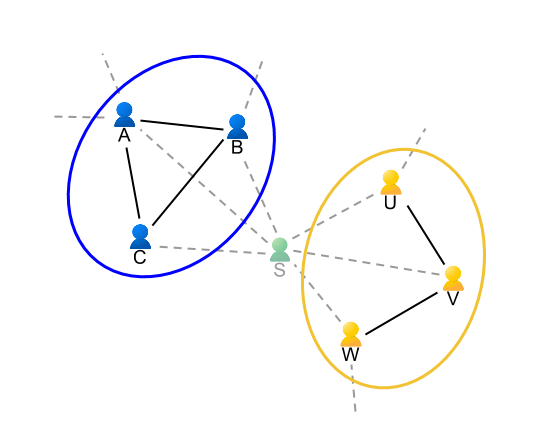
Specifically, the algorithm proceeds by constructing the ego-nets of all nodes and applying, independently on each of them, a community detection algorithm. More precisely the algorithm operates on so-called “ego-net-minus-ego” graphs, which is defined as the graph including only the neighbors of a given node, as shown in the figure below.
Figure 2: Clustering of the ego-net of Sally.
Notice how in this example the ego-net-minus-ego of Sally has two very clear communities: her family (A, B, C) and her co-workers (U, V, W) which are easily separated. Intuitively, this is because one might expect that while nodes (e.g. Sally) participate in many communities, there is usually a single (or a limited number of) contexts in which two specific neighbors interact. While Sally is both part of her family and work community, Sally and Uma interact only at work. Through extensive experimental evaluation on large-scale public social networks and formally through a simple mathematical model, our paper confirms this intuition. It seems that while communities are hard to separate in a global graph, they are easier to identify at the local level of ego-nets.

This allows for a novel graph-based method for friend suggestion which intuitively only allows suggestion of pairs of users that are clustered together in the same community from the point of view of their common friends. With this method, U and W will be suggested to add each other (as they are in the same community and they are not yet connected) while B and U will not be suggested as friends as they span two different communities.

From an algorithmic point of view, the paper introduces efficient parallel and distributed techniques for computing and clustering all ego-nets of very large graphs at the same time – a fundamental aspect enabling use of the system on the entire world Google+ graph. We have applied this feature in the “You May Know” system of Google+, resulting in a clear positive impact on the prediction task, improving the acceptance rate by more than 1.5% and decreasing the rejection rate by more than 3.3% (a significative impact at Google scales).

We believe that many future directions of work might stem from our preliminary results. For instance ego-net analysis could be potentially to automatically classify a user contacts in circles and to detect spam. Another interesting direction is the study of ego-network evolution in dynamic graphs.

Mapping global fishing activity with machine learning

September 15th, 2016  |  Published in Google Earth


The world’s oceans and fisheries are at a turning point. Over a billion people depend on wild-caught fish for their primary source of protein. Fisheries are intertwined with global food security, slave labor issues, livelihoods, sovereign wealth and biodiversity but our fisheries are being harvested beyond sustainable levels. Fish populations have already plummeted by 90 percent for some species within the last generation, and the human population is only growing larger. One in five fish entering global markets is harvested illegally, or is unreported or unregulated. But amidst all these sobering trends, we're also better equipped to face these challenges — thanks to the rise of technology, increased availability of information, and a growing international desire to create a sustainable future.

Today, in partnership with Oceana and SkyTruth, we’re launching Global Fishing Watch, a beta technology platform intended to increase awareness of fisheries and influence sustainable policy through transparency. Global Fishing Watch combines cloud computing technology with satellite data to provide the world’s first global view of commercial fishing activities. It gives anyone around the world — citizens, governments, industry, and researchers — a free, simple, online platform to visualize, track, and share information about fishing activity worldwide.

Global Fishing Watch, the first global view of large scale commercial fishing activity over time

At any given time, there are about 200,000 vessels publicly broadcasting their location at sea through the Automatic Identification System (AIS). Their signals are picked up by dozens of satellites and thousands of terrestrial receivers. Global Fishing Watch runs this information — more than 22 million points of information per day — through machine learning classifiers to determine the type of ship (e.g., cargo, tug, sail, fishing), what kind of fishing gear (longline, purse seine, trawl) they’re using and where they’re fishing based on their movement patterns. To do this, our research partners and fishery experts have manually classified thousands of vessel tracks as training data to “teach” our algorithms what fishing looks like. We then apply that learning to the entire dataset — 37 billion points over the last 4.5 years — enabling anyone to see the individual tracks and fishing activity of every vessel along with its name and flag state.
An individual vessel fishing off Madagascar

This data can help inform sustainable policy and identify suspicious behaviors for further investigation. By understanding what areas of the ocean are being heavily fished, agencies and governments can make important decisions about how much fishing should be allowed in any given area. Often, fish populations are so depleted that the only way to ensure they are replenished is to create “no take areas” where fishing is not allowed. Our hope is that this new technology can help governments and other organizations make decisions about which areas need protection and monitor if policies are respected.
Kiribati's Phoenix Island Protected Area transitioning from heavy tuna fishing to a protected area.

Partners have already started using Global Fishing Watch and have committed to providing additional data sources for greater impact:

  • Indonesia’s Minister of Fisheries and Marine Affairs, Susi Pudjiastuti, has committed to making the government’s Vessel Monitoring System (VMS) public in Global Fishing Watch in 2017. Ibu Susi has been a progressive leader for transparency in fisheries with other governments now expressing similar interest to collaborate.
  • Food and Agriculture Organization of the United Nations will collaborate on new research methodologies for reporting spatial fishery and vessel statistics, building on Global Fishing Watch and developing transparency tools to support their member states in improving the monitoring, control and surveillance of fishing activities.
  • Trace Register, a seafood digital supply chain company, has committed to using Global Fishing Watch to verify catch documentation for its customers such as Whole Foods.
  • Bali Seafood, the largest exporter of snapper from Indonesia, has teamed up with Pelagic Data Systems, manufacturers of cellular and solar powered tracking devices to bring the same transparency for small scale and artisanal fishing vessels, into Global Fishing Watch as part of a pilot program.

We’ve also developed a Global Fishing Watch Research Program with 10 leading institutions from around the world. By combining Google tools, methodologies, and datasets in a collaborative environment, they’re modeling economic, environmental, policy, and climate change implications on fisheries at a scale not otherwise possible.

Global Fishing Watch was not possible five years ago. From a technology perspective, satellites were just beginning to collect vessel positions over the open ocean, and the "global coverage" was spotty. There has been tremendous growth in machine learning with applications in new fields. Policy and regulatory frameworks have evolved, with the United States, European Union, and other nations and Regional Fishery Management Organizations now requiring that vessels broadcast their positions. Market forces and import laws are beginning to demand transparency and traceability, both as a positive differentiator and for risk management. All of these forces interact and shape each other.

Today, Global Fishing Watch is an early preview of what is possible. We’re committed to continuing to build tools, partnerships, and access to information to help restore our abundant ocean for generations to come.


Go explore your ocean at www.globalfishingwatch.org


Posted By: Brian Sullivan, Google Lead - Global Fishing Watch, Sr. Program Manager - Google Ocean & Earth Outreach

Even More Safe Browsing on Android!

September 15th, 2016  |  Published in Google Online Security

Posted by Stephan Somogyi, Safe Browsing Team & William Luh, Android Security Team
During Google I/O in June, we told everyone that we were going to make a device-local Safe Browsing API available to all Android developers later in the year. That time has come!

Starting with Google Play Services version 9.4, all Android developers can use our privacy-preserving, and highly network as well as power-efficient on-device Safe Browsing infrastructure to protect all of their apps’ users. Even better, the API is simple and straightforward to use.

Since we introduced client-side Safe Browsing on Android, updated our documentation for Safe Browsing Protocol Version 4 (pver4), and also released our reference pver4 implementation in Go, we’ve been able to see how much protection this new technology provides to all our users. Since our initial launch we’ve shown hundreds of millions of warnings, actively warning many millions of mobile users about badness before they’re exposed to it.

We look forward to all Android developers extending this same protection to their users, too.

Making the most of the Google Maps Web Service APIs

September 15th, 2016  |  Published in Google Maps

When it comes to app development, there can be a disconnect between the robust app we intended to build and the code we actually get into a minimum viable product. These shortcuts end up causing error conditions once under load in production.

The Google Maps API team maintains client libraries that give you the power to develop with the confidence that your app will scale smoothly. We provide client libraries for Python, Java, and Go, which are used by thousands of developers around the world. We're excited to announce the recent addition of Node.js to the client library family.

When building mobile applications, it is a best practice to use native APIS like Places API for Android and Places API for iOS where you can, but when you find that your use case requires data that is only available via the Google Maps APIs Web Services, such as Elevation, then using these client libraries is the best way forward.

These libraries help you implement API request best practices such as:
  • Requests are sent at the default rate limit for each web service, but of course this is configurable.
  • The client libraries will automatically retry any request if the API sends a 5xx error. Retries use exponential back-off, which helps in the event of intermittent failures.
  • The client libraries make it easy to authenticate with your freely available API Key. Google Maps APIs Premium Plan customers can alternatively use their client ID and secret.
  • The Java and Go libraries return native objects for each of the API responses. The Python and Node.js libraries return the structure as it is received from the API.
The client libraries can help you in a variety of ways. One of them is exposing the result sets in a format that makes most sense for the language in question. For example, the Java and Go client libraries include object hierarchies that are type-safe representations of the potential results for each API. This allows you to write code in the comfort of your editor with the knowledge that the compiler will catch any mistakes.

With 3 million apps and websites using Google Maps APIs, we have an important tip for ensuring reliability when using web services: call APIs from a server rather than directly from Android or iOS. This secures your API key so that your quota can't be consumed by a bad actor, along with being able to add caching to handle common requests quickly.

A server instance acts as a proxy that takes requests from your Android and iOS apps and then forwards them to the Google Maps Web Service APIs on your app’s behalf. The easiest way to create a server side proxy is using the Google Maps Web Service client libraries from Google App Engine instances. For more detail, please watch Laurence Moroney’s Google I/O 2016 session “Building geo services that scale”.

You can learn more about the Google Maps API web services in our documentation. The easiest way to use these APIs and follow best practices is to use the Client Libraries for Google Maps Web Services. Download the client libraries for Java, Python, Go or Node.js from Github to start using them today!

author image
Posted by Brett Morgan, Developer Programs Engineer

Experience British political history with Google Arts and Culture

September 15th, 2016  |  Published in Google Blog


The storied halls of 10 Downing Street aren’t often open to the public. Those who want to see inside the Prime Minister’s residence and office usually have to wait for a rare open house...


...until today. Visitors from anywhere in the world are now invited to experience one of the UK’s most important political buildings on Google Arts and Culture.


Walk through historic rooms and hallways and get up-close looks at more than 50 photographs and works of art. Take a peek into the cabinet room, where the Prime Minister has held weekly cabinet meetings since 1735, or look around Margaret Thatcher’s office. Stroll down the grand main staircase, stopping to study the carefully ordered portraits of the house’s previous residents. Once you’re ready for some fresh air, you can wander through the gardens, where Winston Churchill liked to nap.
There are also two brand new online exhibits. The first introduces two of Britain’s most iconic leaders, Winston Churchill and Harold Wilson. The second highlights three of the building’s most historic rooms: the Cabinet Room, the Study and the Grand Staircase.


And if you want the full immersive experience, be sure to try it out using a Google Cardboard virtual reality viewer, complete with the built-in audio tour, with the Google Arts and Culture app on Android and iOS.

Posted by Suhair Khan, Program Manager, Google Cultural Institute https://4.bp.blogspot.com/-xwAA9SuTxGM/V9pyoi0JVYI/AAAAAAAABew/6Lye-MqHXm45qMhAz1c9czcEBkuMBW8TgCEw/s1600/image001%2B%25281%2529.jpg Suhair Khan Program Manager Google Cultural Institute

Better emails, tailored to all your devices

September 14th, 2016  |  Published in Gmail (Google Mail)

Posted by Pierce Vollucci, Product Manager

Have you ever opened an email on your phone and something about the formatting just looks … off? Maybe the text is hard to read, or the buttons and links too small to tap. That’s because many emails are still formatted for computers' larger screens, which means reading them on mobile can be a hassle.

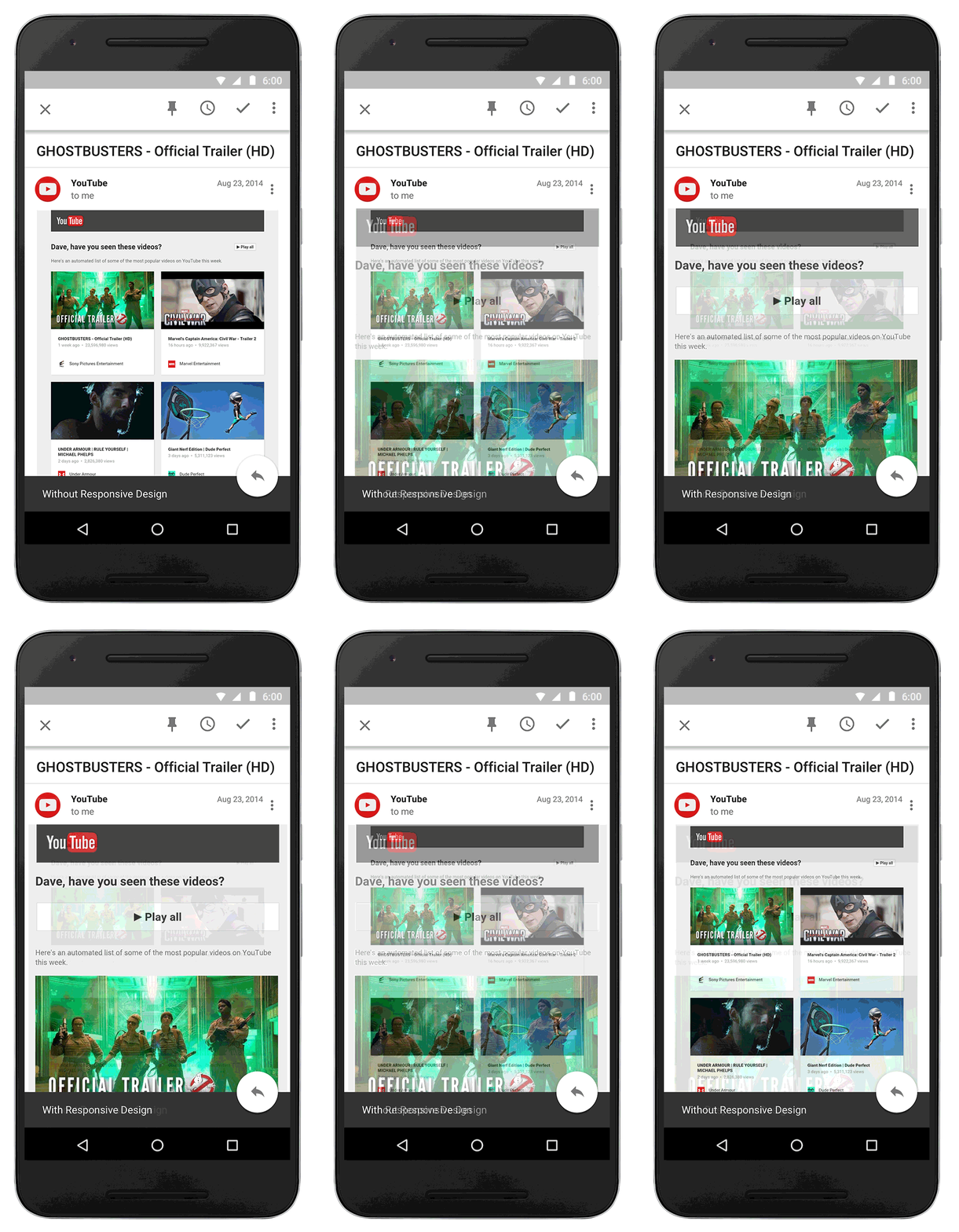
Starting later this month, Gmail and Inbox by Gmail will support emails created with responsive design, meaning their content adapts to fit screens of all sizes. Text, links, and even buttons will enlarge to make reading and tapping easier on a smaller screen. If you’re on desktop, you’ll also see improvements, since emails designed for mobile can also adapt to fit larger screens.
Example of an email before and after responsive design
These changes will make your email experience as comfortable and intuitive as possible. And as responsive design becomes more common, you’ll continue to see emails that fit better on all your screens and devices.

P.S. Are you an email designer? Check out our post on the Google Apps Developer Blog for all the crunchy details on what this update means for you.

Start sketching what you see for the future

September 14th, 2016  |  Published in Google Blog

If it ain’t Baroque, don’t fix it: your favorite art contest is back! Today we’re kicking off the 2016 Doodle 4 Google contest, where art-loving K-12 students from across the U.S., Guam and Puerto Rico are invited to bring their imagination to life in a doodle of the Google logo, using any medium they choose. The winning masterpiece will hang on the Google homepage for a day, where millions will enjoy it.


We like to think about what’s next. So we’re asking kids to imagine what awaits them in the years to come and represent that vision of this year’s theme: “What I see for the future…” Yes, that means anything they see — even if it includes flying dogs, living on a shooting star, the trip of their dreams, or for the true Futurists out there — perhaps a distant world filled with dazzling new technology of all shapes and sizes.

This year’s contest is going to be one for the record books; the future and the ways to depict it are limitless. That’s why we’ll have an all-star group of judges including our very own Google Doodlers help select the National Winner. In addition to the homepage showcase, the winner will receive $30,000 towards a college scholarship, and the opportunity to work with the Doodle team at the Googleplex in Mountain View. As an added bonus: Their home school will get to spend $50,000 on technology to help foster the next generation of professionals (and who knows, maybe future Googlers, too!).


Submissions are open until December 2, 2016. So for you parents, teachers, babysitters, camp counselors or non-profit leaders out there: Encourage your kids and students to apply. We can’t wait to see what wonders await in their dreams for the future.

And now, we bid you farewell as we’re Van Goghing, Goghing, Gone.

Posted by Ryan Germick, Google Doodle Team Lead https://3.bp.blogspot.com/-j07reB7D8UU/V9hYQaRid3I/AAAAAAAAS98/aR1ooRkw_m4sIZqrKos8YzLfBrk7ZcO8wCLcB/s1600/Screen%2BShot%2B2016-09-13%2Bat%2B12.45.36%2BPM.png Ryan Germick Google Doodle Team Lead Google

National Museum of African American History and Culture finds a new way to tell stories

September 14th, 2016  |  Published in Google Blog

Next week marks the grand opening of the Smithsonian's National Museum of African American History and Culture (NMAAHC). A museum 100 years in the making, the NMAAHC is much more than just a collection of artifacts. Within its walls, visitors will take part in an immersive journey into the important contributions of African Americans in the United States. It’s a mosaic of stories — stories from our history that are core to who we are as a nation. And we’re proud to help bring these stories to life with a first-of-its-kind 3D interactive exhibit and a $1 million grant from Google.org, part of our ongoing work on racial and social justice issues.

A new way to explore artifacts
A few years ago, Dr. Lonnie Bunch, the NMAAHC’s director, came to Google’s headquarters and shared his vision to make the museum the most technologically advanced in the world. I immediately knew I wanted to be involved, and pulled together people from across the company: designers who focus on user interaction, members of the Cultural Institute, engineers who work on everything from Google Maps to YouTube, and members of the Black Googler Network. For the past year, we’ve been working to deliver on Dr. Bunch’s vision.

Our team quickly learned that museums are often only able to showcase a fraction of their content and archives to visitors. So we asked ourselves: what technology do we have at Google that could help enrich the museum experience? We worked closely with the museum to build an interactive exhibit to house artifacts from decades of African American history and let visitors explore and learn about them. With 3D scanning, 360 video, multiple screens and other technologies, visitors can see artifacts like a powder horn or handmade dish from all angles by rotating them with a mobile device. The interactive exhibit will open in spring 2017.
Travis McPhail in front of the National Museum of African American History and Culture on one of many site visits to the museum in Washington, DC

Taking an Expedition through African American history
In addition to the interactive exhibit, we’re also launching two new Google Expeditions that take students on a digital journey through African American history. Earlier this year, we formed the African American Expeditions Council — a group of top minds in Black culture, academia and curation — to help develop Expeditions that tell the story of Africans in America. The Google Cultural Institute has also worked to preserve and share important artworks, artifacts and archives from African American history. With participation from the National Park Service, the Expeditions and Cultural Institute teams captured images of the Selma to Montgomery National Historic Trail, which commemorates the events, people and route of the 1965 Voting Rights March. A second Expedition, from the Martin Luther King Jr. National Historic Site, takes you around Dr. King's childhood home and the historic Ebenezer Baptist Church, where he preached.
Screenshot from the new Google Expedition highlighting the Selma to Montgomery National Historic Trail, which commemorates the events, people and route of the 1965 Voting Rights March

Discovering and sharing new stories
At the end of this week, we're celebrating the opening of the NMAAHC during one of the most important weeks for African Americans in D.C., the week of the Congressional Black Caucus Annual Legislative Conference (ALC). On Friday night of ALC, we’ll salute NMAAHC Founding Director, Dr. Bunch, and the Congressional Black Caucus. The iconic Congressman John Lewis will be on hand to talk about the impact of Expeditions in telling the story that the NMAAHC will bring to life in so many important ways.

Day to day, I work on Google Maps, where we help people around the world find and discover new places. Working on this exhibit has given me a chance to help people discover something else — the ways African American history is vitally intertwined with our history as a nation. I’m proud of the role Google has played a role in taking people on that journey.

Posted by Travis McPhail, Software Engineer, Google Maps, and Team Lead, Project Griot
https://2.bp.blogspot.com/-ZlrEtjkoHm0/V9jtY68-BNI/AAAAAAAAS-g/AxeOln_ZJ0w7ZAMXP8UoHDdDi3kQtMJHwCLcB/s1600/Screen%2BShot%2B2016-09-13%2Bat%2B11.24.25%2BPM.png Travis McPhail Software Engineer, Google Maps Team Lead, Project Griot

AdSense help, when and where you need it

September 14th, 2016  |  Published in Google Adsense

Whether you need help urgently or just want to learn, Adsense provides different ways to provide help when you need it.  In this post we’ll share the different ways we offer support to our AdSense partners.

Did you know you can get help on any AdSense issue from within your AdSense account using the help widget? You can find the help widget by clicking on the Help button on the upper right corner of your AdSense account. This will take you directly to informative articles related to the topic or issue you provide.


We hope that this widget will help solve your problems directly within your AdSense account, eliminating the need to switch back and forth between tasks.

Additionally, if you consistently earn more than $25 per week (or the local equivalent), you may be eligible to email the AdSense support team. If you don’t meet the earnings threshold, you can still get help through the issue-based troubleshooters in the AdSense Help Center or by using these relevant resources:
  • AdSense Help Center: Articles written to help you get started and grow your AdSense account
  • AdSense Troubleshooting: A step-by-step guide to help you solve or "troubleshoot" your issue
  • AdSense Help Forum: Post your questions and get answers and advice from the community
  • Guide to AdSense: Designed to help you understand the program before you sign up for AdSense
  • Optimizing AdSense: Videos created to help you earn more from your account
  • AdSense YouTube Channel: Video resources from a wide range of topics
The AdSense support team is here to help so you can continue to focus on creating amazing content for your audience. Use the support resources noted above when you require assistance and let us know on Twitter or Google+ how we can improve your support experience.

Posted by Melina Lopez, from the AdSense team

Google delivers new app and video ad innovations for the mobile-first world

September 14th, 2016  |  Published in Google Adwords

When I started at Google 13 years ago, I was an ad tech engineer building products based on the idea that an online ad is only effective if it leads to a click and a purchase. It sounded simple at the time, but it’s revolutionized the way brands connect with consumers.

Today, our industry is adjusting to another revolution, and it’s all thanks to the tiny device we carry with us everywhere we go – our phones. Throughout the day, when we want to go somewhere, watch something, or buy something, we reach for our mobile devices for help, whether it’s to find the best hotel deal or buy the perfect car. And billions of times a day, we find what we want on Google, YouTube, Maps, and Play. This morning at dmexco, a digital conference in Cologne, Germany, I announced two ad innovations that will help you be there in those moments, connecting the right consumers with what they want, when they want it.

Go beyond the install and find your most valuable customers

Apps are ubiquitous with mobile and are an increasingly important touchpoint for consumers. To date, AdWords has delivered more than 3 billion app downloads to developers and advertisers.1 And I meet with many of you from around the world to learn about the creative ways you’re connecting with your users – it’s the best part of my job. One insight I keep hearing is that users who engage with your app are the users that matter the most to your business. It’s not just about driving installs, it’s about delivering valuable actions within your apps – whether it’s reaching a specific level in a game or completing a purchase. We set out to solve this challenge.

At dmexco this morning, I announced the next generation of Universal App Campaigns, available globally to all advertisers. Across Google Search, Play, YouTube, and the millions of sites and apps in the Google Display Network, Universal App Campaigns can now help you find the customers that matter most to you, based on your defined business goals.

trivago, a popular hotel search app, was one of the first to test this new version of Universal App Campaigns. The brand cares deeply about helping travelers find the perfect hotel room and knows that users who tap on a deal are more likely to take the next step: book a stay.
Example of the user journey from install to viewing a deal on a hotel room
Like trivago, you get to choose the in-app activity you want to optimize for, whether that’s tapping into a deal or reaching level 10, and can use third-party measurement partners or Google’s app measurement solutions like Firebase Analytics to measure those activities. Once your in-app activities are defined within AdWords, you’ve plugged in your analytics solution, and set your cost-per-install, Google will put our machine learning algorithm to work. Universal App Campaigns evaluate countless signals in real time to continuously refine your ads so you can reach your most valuable users at the right price across Google’s largest properties. As people start to engage with your ads, we learn where you’re finding the highest value users. For example, we may learn that the users who tap into the most hotel deals are those who watch travel vlogs on YouTube. So, we'll show more of your ads on those types of YouTube channels.

For trivago, Universal App Campaigns was able to find users who were more likely to click on hotel deals in app to book a room. As a result, the travel brand acquired customers who were 20% more valuable to its business across both Android and iOS.

This is a major shift in how Google can help you grow your app business. We’re listening, and we’re no longer just focusing on the install. Our goal with Universal App Campaigns is to deliver user engagement and value for the apps you worked so hard to build.

Turn consideration into action with TrueView for action

The mobile revolution hasn’t just changed how we search or interact with apps, it's also changed the way we interact with almost every kind of media. Nowhere is this more evident than the way people watch video. We see this every day on YouTube.

In a recent study, we found that 47% of U.S. adults aged 18 to 54 say YouTube helps them at least once a month when making a decision about buying something – that’s an estimated 70 million people going to YouTube every month for help with a purchase.2 These intent-rich moments are opportunities for brands to connect with consumers when it matters, so we took on the challenge of making it easier for consumers to move from consideration to purchase.

Over the last few years, we’ve evolved our TrueView format to change the way video delivers value for performance marketers. TrueView for app promotion and TrueView for shopping make it incredibly easy for brands to drive downloads and purchases directly from YouTube. But what about brands with other types of conversions, like requesting a quote, booking a hotel, signing up for a newsletter, or scheduling a test drive?

Today I’m excited to introduce TrueView for action: a new format that encourages users to take any online action that’s meaningful for your business.
TrueView for action example
TrueView for action makes your video ad more actionable by displaying a tailored call-to-action during and after your video. This call-to-action can be adapted to your specific use case, like “Get a quote,” “Book now” or “Sign up.” Since this is an easy add-on to your video, you can drive performance on top of all the benefits of showing your video to an engaged audience. This is especially advantageous for brands that offer products or services with high consideration, like financial services, automotive, or travel. TrueView for action can help you move your customers along the path to purchase by encouraging actions like scheduling an appointment or requesting more information. We’re excited to start testing this new format with advertisers throughout the rest of this year.

As consumers live their lives in a mobile-first world, it’s increasingly important for brands to build transformational mobile experiences. We know it’s not always easy, and Google is here to help. It’s been so inspiring to see so many of you deliver extraordinary experiences for your customers, and I think dmexco embodies this shared passion and innovative spirit for connecting brands with consumers. I look forward to meeting with more of you and continuing along this amazing journey.
Posted by Sridhar Ramaswamy, Senior Vice President, Ads and Commerce


1. Google Internal Data, Global
2. Google / Ipsos Connect, YouTube Sports Viewers Survey, U.S., March 2016 (n=1500, 18-54 year olds)

Introducing OpenType Font Variations

September 14th, 2016  |  Published in Google Open Source

Cześć and hello from the ATypI conference in Warsaw! Together with Microsoft, Apple and Adobe, we’re happy to announce the launch of variable fonts as part of OpenType 1.8, the newest version of the font standard. With variable fonts, your device can display text in myriads of weights, widths, or other stylistic variations from a single font file with less space and bandwidth.
 OpenType variable fonts support OpenType Layout variation.
To prevent that the $ sign becomes a black blob,
the stroke disappears at a certain weight.


At Google, we started tinkering with variable fonts about two years ago. We were fascinated by the typographic opportunities, and we got really excited when we realized that variable fonts would also help to save space and bandwidth. We proposed reviving Apple’s TrueType GX variations in OpenType, and started experimenting with it in our tools. The folks at Microsoft then started a four-way collaboration between Microsoft, Apple, Adobe, and Google, together with experts from type foundries and tool makers. Microsoft did the spec work; Apple brought their existing technology and expertise; Adobe updated their CFF format into CFF2; and we brought the tools and testing we’d been developing.  After months of intense polishing, the specification is now finished.

On the Google end, we did a lot of work to build, edit and display variable fonts:
  • implemented most of the spec in FontTools
  • updated the fontmake pipeline so variable fonts can be built from common source formats
  • updated HarfBuzz
  • worked with Adobe to implement CFF2 in FreeType
  • fixed bugs in FreeType
  • developed a demo tool FontView
As always, all our font tools are free and open source for everyone to use and contribute.

Now that the spec is public, we can finish the work by merging the changes upstream so that our code will soon flow into products. We’ll also update Noto to support variations (for many writing systems, the sources are already there — the rest will follow). Much more work lies ahead, for example, implementing variations in Google Fonts. Together with other browser makers, we’re already working on a proposal to extend CSS fonts with variations. Once everyone agrees on the format, we’ll support it in Google Chrome. And there are many other challenges ahead, like incorporating font variations into other Google products—so it will be a busy time for us!  We are incredibly excited that an amazing technology from 23 years ago is coming back to life again today. Huge thanks to our friends at Adobe, Apple, and Microsoft for a great collaboration!

To learn more, read Introducing OpenType Variable Fonts, or talk to us at the FontTools group.

By Behdad Esfahbod and Sascha Brawer, Fonts and Text Rendering, Google Internationalization

Previously


Dec 28, 2016
Open source down under: Linux.conf.au 2017

by Open Source Programs Office | Read | No Comments

It’s a new year and open source enthusiasts from around the globe are preparing to gather at the edge of the world for Linux.conf.au 2017. Among those preparing are Googlers, including some of us from the Open Source Programs Office.

This year Linux.conf.au is returning to Hobart, the riverside capital of Tasmania, home of Australia’s famous Tasmanian devils, running five days between January 16 and 20.

Circle_DevilTuz.png
Tuz, a Tasmanian devil sporting a penguin beak, is the Linux.conf.au mascot.
(Artwork by Tania Walker licensed under CC BY-SA.)

The conference, which began in 1999 and is community organized, is well equipped to explore the theme, “the Future of Open Source,” which is reflected in the program schedule and miniconfs.

You’ll find Googlers speaking throughout the week (listed below), as well as participating in the hallway track. Don’t miss our Birds of a Feather session if you’re a student, educator, project maintainer, or otherwise interested in talking about outreach and student programs like Google Summer of Code and Google Code-in.

Monday, January 16th
12:20pm The Sound of Silencing by Julien Goodwin
4:35pm   Year of the Linux Desktop? by Jessica Frazelle

Tuesday, January 17th
All day    Community Leadership Summit X at LCA

Wednesday, January 18th
2:15pm   Community Building Beyond the Black Stump by Josh Simmons
4:35pm   Contributing to and Maintaining Large Scale Open Source Projects by Jessica Frazelle

Thursday, January 19th
4:35pm   Using Python for creating hardware to record FOSS conferences! by Tim Ansell

Friday, January 20th
1:20pm   Linux meets Kubernetes by Vishnu Kannan

Not able to make it to the conference? Keynotes and sessions will be livestreamed, and you can always find the session recordings online after the event.

We’ll see you there!

By Josh Simmons, Open Source Programs Office


Dec 23, 2016
Taking the pulse of Google Code-in 2016

by Open Source Programs Office | Read | No Comments

GCI official horizontal_1372x448dp.png

Today is the official midpoint of this year’s Google Code-in contest and we are delighted to announce this is our most popular year ever! 930 teenagers from 60 countries have completed 3,503 tasks with 17 open source organizations. The number of students successfully completing tasks has almost met the total number of students from the 2015 contest already.

Tasks that the students have completed include:

  • writing test suites
  • improving mobile UI 
  • writing documentation and creating videos to help new users 
  • working on internationalization efforts
  • fixing and finding bugs in the organization’s’ software 

Participants from all over the world
In total, over 2,800 students from 87 countries have registered for the contest and we look forward to seeing great work from these (and more!) students over the next few weeks. 2016 has also seen a huge increase in student participation in places such as Indonesia, Vietnam and the Philippines.

Google Code-in participants by country
Please welcome two new countries to the GCI family: Mauritius and Moldova! Mauritius made a very strong debut to the contest and currently has 13 registered students who have completed 31 tasks.

The top five countries with the most completed tasks are:

  1. India: 982
  2. United States: 801
  3. Singapore: 202
  4. Vietnam: 119
  5. Canada: 117

Students, there is still plenty of time to get started with Google Code-in. New tasks are being added daily to the contest site — there are over 1,500 tasks available for students to choose from right now! If you don’t see something that interests you today, check back again every couple of days for new tasks.

The last day to register for the contest and claim a task is Friday, January 13, 2017 with all work being due on Monday, January 16, 2017 at 9:00 am PT.

Good luck to all of the students participating this year in Google Code-in!

By Stephanie Taylor, Google Code-in Program Manager

All numbers reported as of 8:00 PM Pacific Time, December 22, 2016.


Dec 21, 2016
Introducing the ExifInterface Support Library

by Android Developers | Read | No Comments

With the release of the 25.1.0 Support Library, there’s a new entry in the family: the ExifInterface Support Library. With significant improvements introduced in Android 7.1 to the framework’s ExifInterface, it only made sense to make those available t…


Dec 21, 2016
Geolocation and Firebase for the Internet of Things

by Maps Devel | Read | No Comments

Posted by Ken Nevarez, Industry Solutions Lead at Google

GPS is the workhorse of location based services, but there are use cases where you may want to avoid the cost and power consumption of GPS hardware or locate devices in places where GPS lacks accuracy, such as in urban environments or buildings.

We’ve seen recent growth in Internet of Things (IoT) applications using the Google Maps Geolocation API instead of GPS for asset tracking, theft prevention, usage optimization, asset servicing, and more. As part of my 20 percent project at Industry Solutions, I created a prototype IoT device that can locate itself using surrounding WiFi networks and the Google Maps Geolocation API. In this post, I’ll discuss some interesting implementation features and outline how you can create the prototype yourself.

I built a device that scans for local WiFi and writes results (WiFi hotspots and their signal strength) to a Firebase Realtime Database. A back-end service then reads this data and uses the Google Maps Geolocation API to turn this into a real-world location, which can be plotted on a map.


Set up the Device & Write Locally

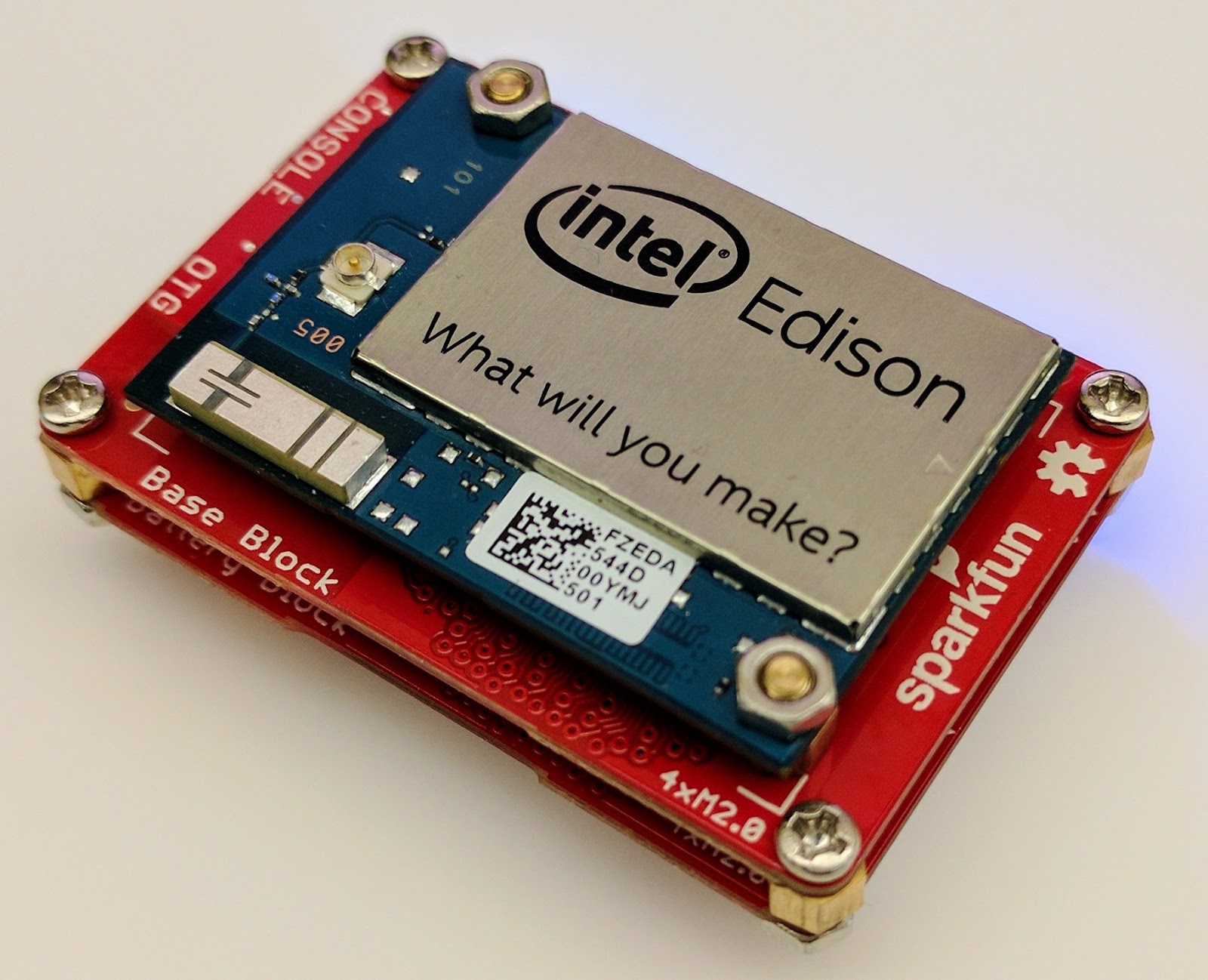
For this proof of concept, I used the Intel Edison as a Linux-based computing platform and augmented it with Sparkfun’s Edison Blocks. To build the device, you will need an Intel Edison, a Base Block, a Battery Block and a Hardware pack.


Developing for the Edison is straightforward using the Intel XDK IDE. We will be creating a simple Node.js application in JavaScript. I relied on 3 libraries: Firebase for the database connection, wireless-tools/iwlist to capture WiFi networks, and macaddress to capture the device MAC. Installation instructions can be found on the linked pages.

Step 1: get the device MAC address and connect to Firebase:

function initialize() {
    macaddress.one('wlan0', function (err, mac) {
        mac_address = mac;
        if (mac === null) {
            console.log('exiting due to null mac Address');
            process.exit(1);
        }
        firebase.initializeApp({
            serviceAccount: '/node_app_slot/.json',
            databaseURL: 'https://.firebaseio.com/'
        });
        var db = firebase.database();
        ref_samples = db.ref('/samples');
        locationSample();
    });
}

The above code contains two placeholders:

  1. The service-account-key is a private key you create in the Firebase Console. Follow the gear icon in the upper left of console, select “settings”, and click Generate New Private Key. Place this key on your Edison in the directory /node_app_slot/. See this Firebase documentation for more information.
  2. The project-id in the database URL is found in the Firebase console database page after you have linked your Google project with Firebase.

Step 2: scan for WiFi networks every 10 seconds and write locally:

function locationSample() {
    var t = new Date();
    iwlist.scan('wlan0', function(err, networks) {
        if(err === null) {
            ref_samples.push({
                mac: mac_address,
                t_usec: t.getTime(),
                t_locale_string: t.toLocaleString(),
                networks: networks,
            });
        } else {
            console.log(err);
        }        
    });
    setTimeout(locationSample, 10000);
}

Write to the cloud

The locationSample() function above writes detectable WiFi networks to a Firebase database that syncs to the cloud when connected to a network.

Caveat: To configure access rights and authentication to Firebase, I set up the device as a “server”. Instructions for this configuration are on the Firebase website. For this proof of concept, I made the assumption that the device was secure enough to house our credentials. If this is not the case for your implementation you should instead follow the instructions for setting up the client JavaScript SDK.

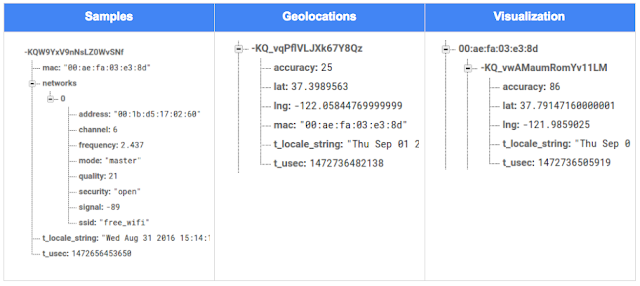
The database uses 3 queues to manage workload: a WiFi samples queue, a geolocation results queue and a visualization data queue. The workflow will be: samples from the device go into a samples queue, which gets consumed to produce geolocations that are put into a geolocations queue. Geolocations are consumed and formatted for presentation, organized by device, and the output is stored in a visualizations bucket for use by our front end website.

Below is an example of a sample, a geolocation, and our visualization data written by the device and seen in the Firebase Database Console.

Processing the Data with Google App Engine

To execute the processing of the sample data I used a long running Google App Engine Backend Module and a custom version of the Java Client for Google Maps Services.

Caveat: To use Firebase with App Engine, you must use manual scaling. Firebase uses background threads to listen for changes and App Engine only allows long-lived background threads on manually scaled backend instances.

The Java Client for Google Maps Services takes care of a lot of the communications code required to use the Maps APIs and follows our published best practices for error handling and retry strategies that respect rate limits. The GeolocateWifiSample() function below is registered as an event listener with Firebase. It loops over each network reported by the device and incorporates it into the geolocation request.

private void GeolocateWifiSample(DataSnapshot sample,  Firebase db_geolocations, Firebase db_errors) {
    // initalize the context and request
    GeoApiContext context = new GeoApiContext(new GaeRequestHandler()).setApiKey("");
    GeolocationApiRequest request = GeolocationApi.newRequest(context)
            .ConsiderIp(false);
    // for every network that was reported in this sample...
    for (DataSnapshot wap : sample.child("networks").getChildren()) {
        // extract the network data from the database so it’s easier to work with
        String wapMac = wap.child("address").getValue(String.class);
        int wapSignalToNoise = wap.child("quality").getValue(int.class);
        int wapStrength = wap.child("signal").getValue(int.class);
        // include this network in our request
        request.AddWifiAccessPoint(new WifiAccessPoint.WifiAccessPointBuilder()
                .MacAddress(wapMac)
                .SignalStrength(wapStrength)
                .SignalToNoiseRatio(wapSignalToNoise)
                .createWifiAccessPoint());
    }
    ...
    try {
        // call the api
        GeolocationResult result = request.CreatePayload().await();
        ...
        // write results to the database and remove the original sample
    } catch (final NotFoundException e) {
        ...
    } catch (final Throwable e) {
        ...
    }
}

Register the GeolocateWifiSample() function as an event handler. The other listeners that process geolocation results and create the visualization data are built in a similar pattern.

ChildEventListener samplesListener = new ChildEventListener() {
    @Override
    public void onChildAdded(DataSnapshot dataSnapshot, String previousChildName) {
        // geolocate and write to new location
        GeolocateWifiSample(dataSnapshot, db_geolocations, db_errors);
    }
    ...
};
db_samples.addChildEventListener(samplesListener);

Visualize the Data

To visualize the device locations I used Google App Engine to serve stored data from Firebase and the Google Maps JavaScript API to create a simple web page that displays the results. The index.html page contains an empty

with id “map”. I initialized this
to contain the Google Map object. I also added “child_added” and “child_removed” event handlers to update the map as the data changes over time.
function initMap() {
    // attach listeners
    firebase.database().ref('/visualization').on('child_added', function(data) {
        ...
        data.ref.on('child_added', function(vizData) {
            circles[vizData.key]= new CircleRoyale(map,
                                vizData.val().lat,
                                vizData.val().lng,
                                vizData.val().accuracy,
                                color);
          set_latest_position(data.key, vizData.val().lat, vizData.val().lng);
        });
        data.ref.on('child_removed', function(data) {
            circles[data.key].removeFromMap();
        });
    });
    // create the map
    map = new google.maps.Map(document.getElementById('map'), {
      center: get_next_device(),
      zoom: 20,
      scaleControl: true,
    });
    ...
}

Since the API returns not only a location but also an indication of accuracy, I’ve created a custom marker that has a pulsing radius to indicate the accuracy component.

Two devices (red and blue) and their last five known positions


What’s next?

In this post I’ve outlined how you can build an IoT device that uses Google Maps Geolocation API to track any internet-connected device – from robotics to wearables. The App Engine processing module can be expanded to use other Google Maps APIs Web Services providing geographic data such as directions, elevation, place or time zone information. Happy building!

As an alternative, you can achieve a similar solution using Google Cloud Platform as a replacement for Firebase—this article shows you how.

author image
About Ken: Ken is a Lead on the Industry Solutions team. He works with customers to bring innovative solutions to market.

Dec 21, 2016
Google Summer of Code 2016 wrap-up: Public Lab

by Open Source Programs Office | Read | No Comments

This post is part of our series of guest posts from students, mentors and organization administrators who participated in Google Summer of Code 2016.


How we made this our best Google Summer of Code ever

This was our fourth year doing Google Summer of Code (GSoC), and it was our best year ever by a wide margin! We had five hard-working students who contributed over 17,000 new lines of (very useful) code to our high-priority projects.

Students voluntarily started coding early and hit the ground running, with full development environments and a working knowledge of GitHub Flow-style pull request process. They communicated with one another and provided peer support. They wrote tests. Hundreds of them! They blogged about their work as they went, and chatted with other community members about how to design features.

All of that was amazing, and it was made better by the fact that we were accepting pull requests with new code twice weekly. Tuesdays and Fridays, I went through new submissions, provided feedback, and pulled new code into our master branch, usually publishing it to our production site once a week.

I don’t know how other projects do things, but this was very new for us, and it’s revolutionized how we work together. In past years, students would work on their forks, slowly building up features. Then in a mad dash at the end, we’d try to merge them into trunk, with lots of conflicts and many hours (weeks!) of work on the part of project maintainers.

Screenshot_2016-08-26_at_11.44.16_AM.png

What made this year so good?

Many things aligned to make this summer great, and basically none of them are our ideas. I’m sure plenty of you are cringing at how we used to do things, but I also don’t think that it’s that unusual for projects not “born” in the fast-paced world of modern code collaboration.

We used ideas and learned from Nicolas Bevacqua, author of JavaScript Application Design and of the woofmark and horsey libraries which I’ve contributed to. We’ve also learned a great deal from the Hoodie community, particularly Gregor Martynus, who we ran into at a BostonJS meetup. Lastly, we learned from SpinachCon, organized by Shauna Gordon McKeon and Deb Nicholson, where people refine their install process by actually going through the process while sitting next to each other.

Broadly, our strategies were:

  • Good documentation for newcomers (duh)
  • Short and sweet install process that you’ve tried yourself (thanks, SpinachCon!)
  • Predictable, regular merge schedule
  • Thorough test suite, and requiring tests with each pull request
  • Modularity, insisting that projects be broken into small, independently testable parts and merged as they’re written

Installation and pull requests

Most of the above sound kind of obvious or trivial, but we saw a lot of changes when we put it all together. Having a really fast install process, and guidance on getting it running in a completely consistent environment like the virtualized Cloud9 service, meant that many students were able to get the code running the same day they found the project. We aimed for an install time of 15 minutes max, and supplied a video of this for one of our codebases.

We also asked students to make a small change (even just add a space to a file) and walk through the GitHub Flow pull request (PR) submission process. We had clear step-by-step guidance for this, and we took it as a good sign when students were able to read through it and do this.

Importantly, we really tried to make each step welcoming, not demanding or dismissive, of folks who weren’t familiar with this process. This ultimately meant that all five students already knew the PR process when they began coding.

Twice-weekly merge schedule

We were concerned that, in past years, students only tried merging a few times and typically towards the end of the summer. This meant really big conflicts (with each other, often) and frustration.

This year we decided that, even though we’re a tiny organization with just one staff coder, we’d try merging on Tuesday and Friday mornings, and we mostly succeeded. Any code that wasn’t clearly presented, commits squashed, passing tests, and submitting new tests, was reviewed and I left friendly comments and requests so it could be merged the following week.

At first I felt bad rejecting PRs, but we had such great students that they got used to the strictness. They got really good at separating out features, demonstrating their features through clear tests, and some began submitting more than two PRs per week – always rebasing on top of the latest master to ensure a linear commit history. Sweet!

Wrap-up and next steps

The last thing we did was to ask each student, essentially as their documentation, to write a series of new issues which clearly described the problem and/or desired behavior, leave suggestions and links to specific lines of code or example code, and mark them with the special “help-wanted” tag which was so helpful to them when they first started out. We asked each to also make one extra-welcoming “first-timers-only” issue which walks a new contributor through every step of making a commit and even provides suggested code to be inserted.

This final requirement was key. While I personally made each of the initial set of “help-wanted” and “first-timers-only” issues before GSoC, now five students were offloading their unfinished to-dos as very readable and inviting issues for others. The effect was immediate, in part because these special tags are syndicated on some sites. Newcomers began picking them up within hours and our students were very helpful in guiding them through their first contributions to open source.

I want to thank everyone who made this past summer so great, from our champion mentors and community members, to our stellar students, to all our inspirations in this new process, to the dozen or so new contributors we’ve attracted since the end of August.

By Jeff Warren, Organization Administrator for PublicLab.org


Dec 20, 2016
Get the guide to finding success in new markets on Google Play

by Android Developers | Read | No Comments

Posted by Lily Sheringham, Developer Marketing at Google Play

With just a few clicks, you can publish an app to Google Play and access a
global audience of more than 1 billion 30 days active users. Finding success in
global markets means considering how each market differs, planning for high
quality localization, and tailoring your activity to the local audience. The new
Going
Global Playbook provides best practices and tips, with advice from
developers who’ve successfully gone global.

This guide includes advice to help you plan your approach to going global,
prepare your app for new markets, take your app to market, and also include data
and insights for key countries and other useful resources.

This ebook joins others that we’ve recently published including The
Building for Billions Playbook and The
News Publisher Playbook. All of our ebooks are promoted in the Playbook for Developers app, which is
where you can stay up to date with all the news and best practices you need to
find success on Google Play.

How useful did you find this blogpost?


★ ★ ★ ★ ★
What is Google Data?

Google Data is the only site where you can get news from 60+ official Google blogs all in one place. We have published 24,235 official posts since January 2005.


Categories

  • Gmail (Google Mail) (436)
  • Google Adsense (1,013)
  • Google Adsense Feeds (46)
  • Google Adwords (1,224)
  • Google Adwords API (366)
  • Google Affiliate Network (141)
  • Google Ajax API (121)
  • Google Analytics (961)
  • Google Android (654)
  • Google App Engine (332)
  • Google Apps (1,865)
  • Google Blog (1,650)
  • Google Blogger Buzz (527)
  • Google Books (300)
  • Google Checkout (162)
  • Google Chrome (312)
  • Google Code (828)
  • Google Conversions (137)
  • Google CPG (198)
  • Google Custom Search (129)
  • Google Desktop (144)
  • Google Desktop API (175)
  • Google Docs (717)
  • Google DoubleClick (730)
  • Google Earth (1,006)
  • Google Enterprise (1,278)
  • Google Finance (88)
  • Google Gadgets (31)
  • Google Gears (60)
  • Google Grants (285)
  • Google Mac Blog (149)
  • Google Maps (736)
  • Google Merchant (219)
  • Google Mobile (386)
  • Google News (152)
  • Google Notebook (20)
  • Google Online Security (221)
  • Google Open Source (929)
  • Google OpenSocial (197)
  • Google Orkut (381)
  • Google Photos (Picasa) (109)
  • Google Product Ideas (23)
  • Google Public Policy (675)
  • Google Reader (124)
  • Google RechargeIT (29)
  • Google Research (423)
  • Google SketchUp (692)
  • Google Student Blog (848)
  • Google Talk (107)
  • Google Testing (326)
  • Google Translate (98)
  • Google TV Ads Blog (163)
  • Google Video (293)
  • Google Voice (86)
  • Google Wave (38)
  • Google Webmaster Central (376)
  • Google Website Optimizer (101)
  • Google.org (183)

  • iGoogle (87)
  • Uncategorized (1,262)
  • Youtube (779)
  • Youtube API (173)

Tags

adsense adsense google advertisers advertising adwords adwords google adwords tips analytics analytics google android gmail for domains Google Adsense Google Adwords google adwords help Google Analytics google analytics ga.js Google Android Google Apps google apps enterprise google apps free google apps gmail google apps standard google apps sync Google Blog google calendar google chat google culture Google Docs Google Earth Google Enterprise google insights google lat-long Google Mobile Google News google products google statistics google student google updates official google blog open source publishers students website analytics website statistics website stats

Archives

  • December 2016 (58)
  • November 2016 (83)
  • October 2016 (97)
  • September 2016 (113)
  • August 2016 (90)
  • July 2016 (87)
  • June 2016 (100)
  • May 2016 (112)
  • April 2016 (101)
  • March 2016 (116)
  • February 2016 (93)
  • January 2016 (66)
  • December 2015 (111)
  • November 2015 (105)
  • October 2015 (105)
  • September 2015 (116)
  • August 2015 (98)
  • July 2015 (106)
  • June 2015 (149)
  • May 2015 (94)
  • April 2015 (107)
  • March 2015 (124)
  • February 2015 (109)
  • January 2015 (69)
  • December 2014 (123)
  • November 2014 (107)
  • October 2014 (134)
  • September 2014 (132)
  • August 2014 (110)
  • July 2014 (118)
  • June 2014 (142)
  • May 2014 (129)
  • April 2014 (99)
  • March 2014 (125)
  • February 2014 (112)
  • January 2014 (88)
  • December 2013 (104)
  • November 2013 (147)
  • October 2013 (152)
  • September 2013 (114)
  • August 2013 (119)
  • July 2013 (136)
  • June 2013 (173)
  • May 2013 (213)
  • April 2013 (168)
  • March 2013 (167)
  • February 2013 (145)
  • January 2013 (132)
  • December 2012 (156)
  • November 2012 (151)
  • October 2012 (203)
  • September 2012 (168)
  • August 2012 (190)
  • July 2012 (151)
  • June 2012 (169)
  • May 2012 (169)
  • April 2012 (193)
  • March 2012 (227)
  • February 2012 (195)
  • January 2012 (191)
  • December 2011 (243)
  • November 2011 (248)
  • October 2011 (282)
  • September 2011 (271)
  • August 2011 (261)
  • July 2011 (275)
  • June 2011 (259)
  • May 2011 (148)
  • April 2011 (83)
  • March 2011 (92)
  • February 2011 (109)
  • January 2011 (253)
  • December 2010 (397)
  • November 2010 (322)
  • October 2010 (328)
  • September 2010 (402)
  • August 2010 (305)
  • July 2010 (293)
  • June 2010 (362)
  • May 2010 (367)
  • April 2010 (355)
  • March 2010 (363)
  • February 2010 (294)
  • January 2010 (267)
  • December 2009 (321)
  • November 2009 (308)
  • October 2009 (380)
  • September 2009 (344)
  • August 2009 (302)
  • July 2009 (347)
  • June 2009 (357)
  • May 2009 (352)
  • April 2009 (353)
  • March 2009 (351)
  • February 2009 (296)
  • January 2009 (239)
  • December 2008 (253)
  • November 2008 (273)
  • October 2008 (357)
  • September 2008 (316)
  • August 2008 (239)
  • July 2008 (241)
  • June 2008 (250)
  • May 2008 (247)
  • April 2008 (263)
  • March 2008 (251)
  • February 2008 (187)
  • January 2008 (172)
  • December 2007 (179)
  • November 2007 (177)
  • October 2007 (195)
  • September 2007 (148)
  • August 2007 (161)
  • July 2007 (182)
  • June 2007 (152)
  • May 2007 (109)
  • April 2007 (98)
  • March 2007 (93)
  • February 2007 (75)
  • January 2007 (75)
  • December 2006 (82)
  • November 2006 (122)
  • October 2006 (115)
  • September 2006 (106)
  • August 2006 (120)
  • July 2006 (69)
  • June 2006 (61)
  • May 2006 (51)
  • April 2006 (46)
  • March 2006 (48)
  • February 2006 (45)
  • January 2006 (46)
  • December 2005 (51)
  • November 2005 (50)
  • October 2005 (23)
  • September 2005 (39)
  • August 2005 (28)
  • July 2005 (15)
  • June 2005 (25)
  • May 2005 (27)
  • April 2005 (31)
  • March 2005 (31)
  • February 2005 (3)
  • January 2005 (1)

Recent Posts

  • Other sites are using my ad code. What should I do?
  • Open source down under: Linux.conf.au 2017
  • Taking the pulse of Google Code-in 2016
  • Introducing the ExifInterface Support Library
  • Geolocation and Firebase for the Internet of Things
  • Google Summer of Code 2016 wrap-up: Public Lab
  • Get the guide to finding success in new markets on Google Play
  • Start building Actions on Google
  • Best practices to improve app engagement
  • Project Wycheproof
January 2017
M T W T F S S
« Dec    
  1
2 3 4 5 6 7 8
9 10 11 12 13 14 15
16 17 18 19 20 21 22
23 24 25 26 27 28 29
30 31  

Page 21 of 1,615« First«...10...1920212223...304050...»Last »


Copyright © 2017 GoogleData.org, All Rights Reserved.
This site is not operated by, sponsored by, endorsed by, or affiliated with Google Inc. in any way.
Rss Feed Tweeter button Facebook button Technorati button Reddit button Myspace button Linkedin button Delicious button Digg button Stumbleupon button Newsvine button