Google Data

  • Home
  • Everything Google
    • Gmail (Google Mail)
    • Google Adsense
    • Google Adsense Feeds
    • Google Adwords
    • Google Adwords API
    • Google Affiliate Network
    • Google Ajax API
    • Google Analytics
    • Google Android
    • Google App Engine
    • Google Apps
    • Google Blog
    • Google Blogger Buzz
    • Google Books
    • Google Checkout
    • Google Chrome
    • Google Code
    • Google Conversions
    • Google CPG
    • Google Custom Search
    • Google Desktop
    • Google Desktop API
    • Google Docs
    • Google DoubleClick
    • Google Earth
    • Google Enterprise
    • Google Finance
    • Google Gadgets
    • Google Gears
    • Google Grants
    • Google Mac Blog
    • Google Maps
    • Google Merchant
    • Google Mobile
    • Google News
    • Google Notebook
    • Google Online Security
    • Google Open Source
    • Google OpenSocial
    • Google Orkut
    • Google Photos (Picasa)
    • Google Product Ideas
    • Google Public Policy
    • Google Reader
    • Google RechargeIT
    • Google Research
    • Google SketchUp
    • Google Student Blog
    • Google Talk
    • Google Testing
    • Google Translate
    • Google TV Ads Blog
    • Google Video
    • Google Voice
    • Google Wave
    • Google Webmaster Central
    • Google Website Optimizer
    • Google.org
    • iGoogle
    • Uncategorized
    • Youtube
    • Youtube API
  • Resources
    • Google Products & Services
    • Google Twitter Directory
    • Google Trademarks
    • Google Data Site Map
  • About
  • Contact
  • Subscribe via RSS

Contest Spotlight: ‘Paying It Forward’ in honor of Hispanic Heritage Month

September 26th, 2016  |  Published in Google Student Blog

Are you passionate about helping your community? Know someone who is? If so, check out Google’s annual Pay It Forward contest!

In honor of Hispanic Heritage month, the Google Staffing Programs team has worked closely with the Hispanic Googler Network to recognize leaders in education who are advancing opportunities for their local communities.

Students (high school or college, 14 and older), educators (teachers, administrators, school staff), and education-focused organization leaders (non-profit, private) are invited to tell us how they have positively impacted and influenced Hispanic communities within the U.S. We’re seeking leaders whose work in education demonstrates a commitment to expanding access and opportunities for the Hispanic community.

The deadline to enter the contest is October 3rd, 2016 at 11:59pm PT.

Submissions will be judged by a team of Googlers, who will be assessing the innovation, scale and the short- and  long-term effects of your impact. Contest winners will have the opportunity to have their work featured on the Google Student Blog and connect with experts from our education outreach team.

To both enter the competition and get more info, visit our 2016 Pay It Forward website.

Excited to see your submissions!

Reshaping web defenses with strict Content Security Policy

September 26th, 2016  |  Published in Google Online Security

Posted by Artur Janc, Michele Spagnuolo, Lukas Weichselbaum, and David Ross, Information Security Engineers

Cross-site scripting — the ability to inject undesired scripts into a trusted web application — has been one of the top web security vulnerabilities for over a decade. Just in the past 2 years Google has awarded researchers over $1.2 million for reporting XSS bugs in our applications via the Vulnerability Reward Program. Modern web technologies such as strict contextual auto-escaping help developers avoid mistakes which lead to XSS, and automated scanners can catch classes of vulnerabilities during the testing process. However, in complex applications bugs inevitably slip by, allowing attacks ranging from harmless pranks to malicious targeted exploits.

Content Security Policy (CSP) is a mechanism designed to step in precisely when such bugs happen; it provides developers the ability to restrict which scripts are allowed to execute so that even if attackers can inject HTML into a vulnerable page, they should not be able to load malicious scripts and other types of resources. CSP is a flexible tool allowing developers to set a wide range of policies; it is supported — though not always in its entirety — by all modern browsers.

However, the flexibility of CSP also leads to its biggest problem: it makes it easy to set policies which appear to work, but offer no real security benefit. In a recent Internet-wide study we analyzed over 1 billion domains and found that 95% of deployed CSP policies are ineffective as a protection against XSS. One of the underlying reasons is that out of the 15 domains most commonly whitelisted by developers for loading external scripts as many as 14 expose patterns which allow attackers to bypass CSP protections. We believe it's important to improve this, and help the web ecosystem make full use of the potential of CSP.

Towards safer CSP policies
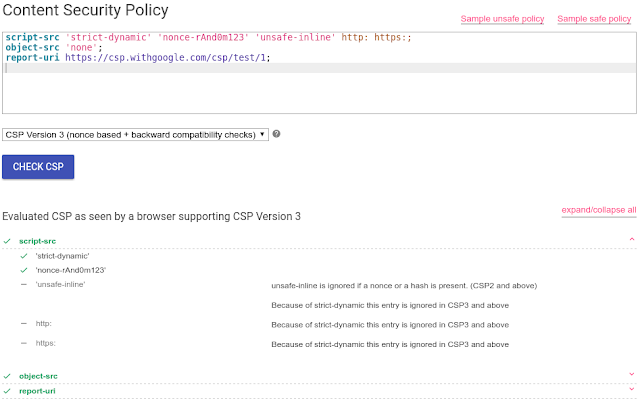
To help developers craft policies which meaningfully protect their applications, today we’re releasing the CSP Evaluator, a tool to visualize the effect of setting a policy and detect subtle misconfigurations. CSP Evaluator is used by security engineers and developers at Google to make sure policies provide a meaningful security benefit and cannot be subverted by attackers.
Even with such a helpful tool, building a safe script whitelist for a complex application is often all but impossible due to the number of popular domains with resources that allow CSP to be bypassed. Here’s where the idea of a nonce-based CSP policy comes in. Instead of whitelisting all allowed script locations, it’s often simpler to modify the application to prove that a script is trusted by the developer by giving it a nonce -- an unpredictable, single-use token which has to match a value set in the policy:

Content-Security-Policy: script-src 'nonce-random123'


With 'strict-dynamic', a part of the upcoming CSP3 specification already supported by Chrome and Opera (and coming soon to Firefox), adopting such policies in complex, modern applications becomes much easier. Developers can now set a single, short policy such as:

script-src 'nonce-random123' 'strict-dynamic'; object-src 'none'

and make sure that all static elements contain a matching nonce attribute — in many cases this is all that’s needed to enjoy added protection against XSS since ‘strict-dynamic’ will take care of loading any trusted scripts added at runtime. This approach allows setting policies which are backwards-compatible with all CSP-aware browsers, and plays well with applications which already use a traditional CSP policy; it also simplifies the process of adopting CSP and doesn’t require changing the policy as the application evolves.

Adopting strict CSP
In the past months we’ve deployed this approach in several large Google applications, including Cloud Console, Photos, History, Careers Search, Maps Timeline, Cultural Institute and are working on many more. We believe this approach can also help other developers so today we’re publishing documentation discussing the best strategies for implementing CSP, including an overview of the benefits of CSP, sample policies, and examples of common code changes.

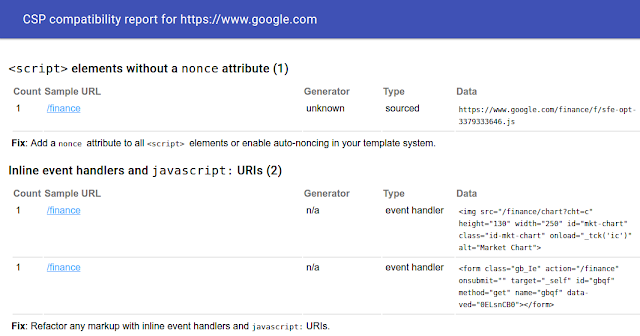
Further, today we’re releasing CSP Mitigator, a Chrome extension that helps developers review an application for compatibility with nonce-based CSP. The extension can be enabled for any URL prefix and will collect data about any programming patterns that need to be refactored to support CSP. This includes identifying scripts which do not have the correct nonce attribute, detecting inline event handlers, javascript: URIs, and several other more subtle patterns which might need attention.
As with the CSP Evaluator, we use the extension with our applications to help speed up the process of adopting nonce-based CSP policies nonce-based policies across Google.

Encouraging broader use of strict CSP
Finally, today we’re including CSP adoption efforts in the scope of the Patch Reward Program; proactive work to help make popular open-source web frameworks compatible with nonce-based CSP can qualify for rewards (but please read the program rules and CSP refactoring tips first). We hope that increased attention to this area will also encourage researchers to find new, creative ways to circumvent CSP restrictions, and help us further improve the mechanism so that we can better protect Internet users from web threats.

To reach out to us, email [email protected].

Preserving a Free and Open Internet

September 26th, 2016  |  Published in Google Public Policy

Why the IANA Transition Must Move Forward


Posted by Kent Walker, SVP and General Counsel


The Internet community is about to take an important step to protect the Internet for generations to come.


Over the past several years, an ecosystem of users, civil society experts, academics, governments, and companies has worked to protect the free and open Internet.  These efforts have produced a detailed proposal that will enable the U.S. government to relinquish its contract with a California non-profit called the Internet Corporation for Assigned Names and Numbers (ICANN) to perform certain technical functions through an organization called IANA, short for the Internet Assigned Names Authority.  IANA essentially maintains the Internet’s address book, which lets you browse the web and communicate with friends without worrying about remembering long strings of numbers or other technical information.


When this proposal takes effect at the end of this month, you won’t notice anything different when you go online, but we are transitioning the IANA functions into good hands.


Why?  Although this is a change in how one technical function of the Internet is governed, it will give innovators and users a greater role in managing the global Internet.  And that’s a very good thing.  The Internet has been built by -- and has thrived because of -- the companies, civil society activists, technologists, and selfless users around the world who recognized the Internet’s power to transform communities and economies.  If we want the Internet to have this life-changing impact on everyone in the world, then we need to make sure that the right people are in a position to drive its future growth.  This proposal does just that.


The proposal will also protect the Internet from those who want to break it into pieces.  Unfortunately, some see the Internet’s incredible power to connect people and ideas around the world as a threat.  For them, the U.S. government’s contract with ICANN proves that governments are the only ones who should play a role in the way the Internet works.  We disagree.


Thinking that only governments should have a say in the Internet’s future is a dangerous proposition.  It incentivizes those who fear the Internet’s transformative power to impose burdensome restrictions online, and over time could even lead some repressive governments to try to build their own closed networks operating independently of ICANN, at the expense of a thriving Internet ecosystem.


The Internet community’s proposal avoids this risk by ensuring that the Internet is governed in a bottom-up way that puts its future in the hands of users and innovators, not authoritarian governments.  That’s why it’s not just engineers and companies, but also civil society and national security experts, who see the proposal as a critical way to protect Internet freedom.


Finally, and importantly, the proposal will fulfill a promise the United States made almost two decades ago: that the Internet could and should be governed by everyone with a stake in its continued growth.  The U.S. government’s contract with ICANN was always supposed to be merely temporary.  In fact, since ICANN was created in 1998, the U.S. government has invited the global Internet community to decide the Internet’s future in a bottom-up fashion.  The community has proven more than up to the task.  The U.S. government’s continued contractual relationship with ICANN is simply no longer necessary.


We’re grateful to have worked with so many stakeholders, including the dedicated officials at the U.S. government who have worked so hard to fulfill the promise made by their predecessors nearly twenty years ago, during this effort to protect one of the greatest engines of economic and social opportunity the world has ever seen.  And because the proposal makes sure that ICANN is more accountable and transparent than ever before, we hope that more people from around the world will take this opportunity to get involved.  The Internet’s future is in all of our hands.

How to set up Analytics on your AMP page

September 26th, 2016  |  Published in Google Analytics


In the digital world, whether you’re writing stories for your loyal readers, creating creative content that your fans love, helping the digital community, or providing items and services for your customer, understanding your audience is at the heart of it all. Key to unlocking that information is access to tools for measuring your audience and understanding their behavior. In addition to making your page load faster, Accelerated Mobile Pages (AMP) provides multiple analytics options without compromising on performance.

You can choose to use a solution like amp-pixel that behaves like a simple tracking pixel. It uses a single URL that allows variable substitutions, so it’s very customizable. See the amp-pixel documentation for more detail.

The amp-analytics component, on the other hand, is a powerful solution that recognizes many types of event triggers to help you collect specific metrics. Since amp-analytics is supported by multiple analytics providers, this means you can use amp-analytics to configure multiple endpoints and data sets. AMP then manages all of the instrumentation to come up with the data specified and shares it with these analytics solution providers.

To use amp-analytics, include the component library in your document's :

="amp-analytics" src="https://cdn.ampproject.org/v0/amp-analytics-0.1.js">


And then include the component as follows (for these examples, make sure to specify your own account number instead of the placeholder):

type="googleanalytics">
="application/json">
{
 "vars": {
   "account": "UA-YYYY-Y"
 },
 "triggers": {
   "defaultPageview": {
     "on": "visible",
     "request": "pageview",
     "vars": {
       "title": "Name of the Article"
     }
   }
 }
}


The JSON format is super flexible for describing several different types of events and it does not include any JavaScript code which could potentially lead to mistakes.

Expanding the above example, we can add another trigger, clickOnHeader:

type="googleanalytics">
="application/json">
{
 "vars": {
   "account": "UA-YYYY-Y"
 },
 "triggers": {
   "defaultPageview": {
     "on": "visible",
     "request": "pageview",
     "vars": {
       "title": "Name of the Article"
     }
   },
   "clickOnHeader": {
     "on": "click",
     "selector": "#header",
     "request": "event",
     "vars": {
       "eventCategory": "examples",
       "eventAction": "clicked-header"
     }
   }
 }
}

For a detailed description of data sets you can request, as well as the complete list of analytics providers supporting amp-analytics, check out the amp-analytics documentation. You can also see more implementation examples in the Amp By Example site.

If you want to conduct a user experience experiment on your AMP pages,  such as an A/B test, you can use the amp-experiment element. Any configurations done in this element will also be exposed to amp-analytics and amp-pixel, so you can easily do a statistical analysis of your experiment.

There are still plenty of ongoing developments for AMP analytics to help you gain insights as you AMPlify the user experience on your site. Visit the AMP Project roadmap to see a summary of what the team is cooking up. If you see some features missing, please file a request on GitHub.

Posted by Arudea Mahartianto, Google AMP Specialist

Improving Google Analytics Events with Unique Events

September 26th, 2016  |  Published in Google Analytics

Unique Events is a metric that counts the number of events with distinct Event attributes (Event Category, Action, and Label) that occur within a single user session. These events can be tracked independently from a web page or a screen load, giving you greater insight into actions taken within or across pages/screens. Downloads, mobile ad clicks, gadgets, Flash elements, AJAX embedded elements, and video plays are all examples of interactions you might want to track as Unique Events.

Some benefits of Unique Events include: 

  • Understanding how many users start/complete some action on your website 
  • Understanding the most popular media types/content consumed on your website 
  • Having an understanding of how many users repeat actions that should only occur once 
  • And many, many, more... 

How Unique Events Work 

Unique Events is a metric that counts the number of events with distinct Event attributes (Event Category, Action, and Label) that occur within a single user session.

This means that Analytics will increment the count of Unique Events by 1 for each unique combination of event category/action/label we receive the very first time we see them within a session, but will ignore future events with the same category/action/label when computing unique event counts. The metric Total Events will count each event regardless of the uniqueness of the category/action/labels therein.

Unique Events improves upon events in Google Analytics and will help make your measurement better.

 Learn more in our Help Center article here.

Posted by Breen Baker, Google Analytics Team

#IRegistered to vote. Have you?

September 26th, 2016  |  Published in Google Blog

¡Hola! Desplazarse hacia abajo para leer este mensaje en español -Ed.

On the eve of National Voter Registration Day, we’re doing our part to encourage American voters to get registered for the 2016 election. We've already added in-depth information in Search for registration and how to vote, and now we're adding this same information in Spanish. Now both Spanish and English speakers will be able to get custom, state-by-state information on key registration deadlines, when to get to the polls, and even steps on how to vote early or by mail. We hope this feature helps simplify the registration process for more American voters.

vote_spanish_2.jpg
By helping more people get registered, we're also helping ensure more people get to the polls and vote. The majority of Americans who register to vote end up voting — according to the US Census Bureau, in 2012, 86 percent of those who registered also voted in the November election.


Today's Google Doodle encourages people to get registered in time for National Voter Registration Day

YouTube creators also want you to head to the polls and #voteIRL. Tune in to this playlist to see how you can register to vote in the amount of time it takes Ryan Seacrest to host a radio show or The Fung Bros to shoot hoops. Surprising fact: it only takes one minute and 34 seconds! Once you’ve registered, join us in encouraging others along the voting process by sharing a post with #IRegistered on social media.

Registering to vote is just the first step toward casting your ballot in this year’s election. We hope that you’ll be inspired to learn more about the candidates, the issues, and the voting process — and make your voice heard in 2016!

Posted by Jonathan Betz, Engineering Manager, Civic Engagement


_________________________________________________________________________________

Yo me registre para votar. ¿Y tu? #IRegistered

En la víspera del Día Nacional de Registro de Votantes, estamos haciendo nuestra parte para animar a los votantes estadounidenses para registrarse para las elecciones del 2016. Ya hemos añadido información detallada en búsqueda de como registrarte y cómo votar, y ahora estamos añadiendo esa misma información en español.

Ahora, tanto los hablantes de español e inglés podrán obtener información personalizada, estado por estado sobre las fechas clave de registro, horarios para llegar a las urnas, e incluso los pasos necesarios para votar temprano o por correo. Esperamos que esta función ayude a simplificar el proceso de registro para más votantes estadounidenses.


Al ayudar a que más personas se registren, también estamos ayudando a asegurar que más personas lleguen a las urnas y voten. La mayoría de los estadounidenses que se registran para votar terminan ejerciendo su voto - según la Oficina del Censo de Estados Unidos, en el año 2012, el 86 por ciento de los que se registraron también votaron en las elecciones de noviembre.


El Google Doodle de hoy anima a la gente para que se registren a tiempo como parte del Día Nacional de Registro de Votantes

Los creadores de YouTube también quieren que acudas a las urnas y voten en vida real con la campaña #voteIRL. Te recomendamos sintonizar esta lista de videos para aprender cómo puedes registrarte para votar casi en la misma cantidad de tiempo que le toma a Ryan Seacrest presentar su programa de radio o a los Fung Bros jugar baloncesto. De hecho, te sorprenderá saber que: ¡sólo te tomará un minuto y 34 segundos! Una vez que te hayas registrado, te invitamos a acompañarnos a animar a otros a lo largo del proceso de votar, compartiendo un post utilizando #IRegistered en tus redes sociales.

Registrarse para votar es sólo el primer paso para emitir tu voto en las elecciones de este año. ¡Esperamos que te inspires a aprender más sobre los candidatos, los temas, y el proceso de votación - y al mismo tiempo hacer oír tu voz en el 2016!

Publicado por Jonathan Betz, Gerente de Ingeniería, Participación Cívica

https://1.bp.blogspot.com/--AqQ1CwAvYM/V-WhgzplxLI/AAAAAAAATFE/xrmbLU7UvDYaczAVPBkSiGaE1Pl3c0eegCLcB/s1600/Google_IRegistered.jpg Jonathan Betz Engineering Manager Civic Engagement

New tools to connect with consumers across all devices

September 26th, 2016  |  Published in Google DoubleClick

As part of our Advertising Week announcements, we’re introducing new digital innovations to help advertisers close the loop between television and digital, online and offline, and mobile and desktop.

Consumers make purchase decisions across many different moments, and over 75% of people1 switch from one device to another while shopping. This makes reaching consumers with the right message — in the right moment — more complex. Today we’re introducing new cross-device capabilities in DoubleClick, including cross-device remarketing, to make it easier to close the loop across screens and reach people where they are, on whatever device they’re using.

Connect moments across devices

In July 2015, we introduced the ability to measure cross-device conversions (when a consumer purchase journey starts on one device but is completed on another). These metrics are helping advertisers like American Express and Ringling Bros. better understand consumer behavior and make better decisions about allocating budgets.

The insights have proven to be useful, but we’re excited to help you put them into action. Today we are announcing that you can automatically optimize your bids based on how users are interacting with your ads and converting across devices. This capability will be available as an option for automated bidding2 in DoubleClick Bid Manager, helping you to drive greater impact from cross-screen campaigns.

Re-engage with consumers across devices

As consumers make purchase decisions, they may interact with your business multiple times along the journey. For example, when they’re shopping for their next car, they might download a brochure on their laptop while at work, watch videos while commuting home and read reviews on their tablet on the couch — all before booking a test drive. As an automotive marketer, you could use remarketing to re-engage with consumers who downloaded the brochure and encourage them to book a test drive — but in the past you could only reach them on their laptop.

Today we’re announcing cross-device remarketing in DoubleClick Bid Manager, allowing you to reach consumers across all of their devices, in the moments when they’re most receptive and your ads are most relevant. Cross-device remarketing will be rolled out as a beta early next year. You can contact your DoubleClick team to learn more.

To reach people in real time across all of the moments that shape their decisions, you need a platform that makes it easier to connect with them on all of their devices. DoubleClick surfaces the right cross-device insights while also allowing you to take the right actions to reach your marketing goals.

Posted by Payam Shodjai
Product Management Director, DoubleClick

1 Google/IPSOS Connect, March 2016, Digital Devices Bridge the Physical World, n=2013 US online respondents 18+
2 Only accessible to DoubleClick Bid Manager accounts.

New digital innovations to close the loop for advertisers

September 25th, 2016  |  Published in Google Adwords

Mobile phones have created new ways for consumers to engage with brands, often blurring the physical and digital worlds. People research products online and go into a store to buy. They see a brand on TV and then go online to learn more. Or they watch mobile videos on their commutes that inspire them to book a trip when they’re back home on their laptops.


However your audience engages, only Google has the scale and the tools to help you reach people in the moments that truly matter and measure impact across devices and channels.

I look forward to sharing several new innovations with you on Monday morning at Advertising Week’s Times Center Stage -- all of which are designed to help you close the loop between television and digital, online and offline, and mobile and desktop.

Close the loop between TV and digital with Brand Lift 

For the last several years, we’ve been investing in our Brand Lift product to show marketers how YouTube campaigns impact brand metrics like awareness and purchase intent -- throughout the entire consumer journey.

Today, we’re extending the capabilities of Brand Lift to TV campaigns to show marketers how TV ads increase Google and YouTube searches for your brand compared to YouTube campaigns. From early tests, we've seen that YouTube generates almost 2x searches per impression than TV generates.1


Brand Lift for TV requires very little set-up – you don’t even need to provide your media schedule. As long as you’re running Brand Lift on both a TV campaign and a YouTube campaign, we’ll be able to report the incremental searches for your brand.

"We are excited to see the work Google is doing to better understand the impact of video. Brand Lift now presents us with a way to specifically, credibly, and scientifically compare the effectiveness of cross media campaigns. This is interesting to Volkswagen as we move closer to measuring TV and digital platforms (like YouTube) on even ground." - Paige Parrent, Digital Media Manager, Volkswagen Marketing

Close the loop between online ads and offline sales 

In addition to the interaction between TV, YouTube and online search, there is now a real connection between online ads and offline visits to stores: 30% of smartphone users who visit a website or app on their phones buy something in a store within 24 hours.2

That’s why we’re introducing location extensions and store visits measurement for the Google Display Network -- to help marketers close the loop between online ads and offline sales. As consumers browse their favorite websites or interact with their favorite apps, you can reach them with ads that show your business address, Google Maps directions and photos. It’s a high-impact, immediate way to increase foot traffic to your store.


For The Home Depot, location extensions for display ads reached consumers actively browsing their phones near the brand’s most popular stores, delivering an 8X in-store ROI. “Mobile location extensions for display really proved their worth very quickly,” says Umut Dincer, Director of Online Marketing for The Home Depot. “We're able to reach DIYers who are close to our stores and make a 'just-in-time' connection that brings them the information they really want in their I-want-to-buy-it moments.” [Full story]

So how do marketers measure the impact of these online ads? Store visits for display measures the impact of your Display Network ads on actual visits to your store, hotel, auto dealership or restaurant. With the power of Google Maps technology, we have access to the exact dimensions of over 200 million stores globally to deliver 99% accuracy in reported visits.3 Only Google can deliver this level of precision and scale. [Learn more]

Close the loop across devices 

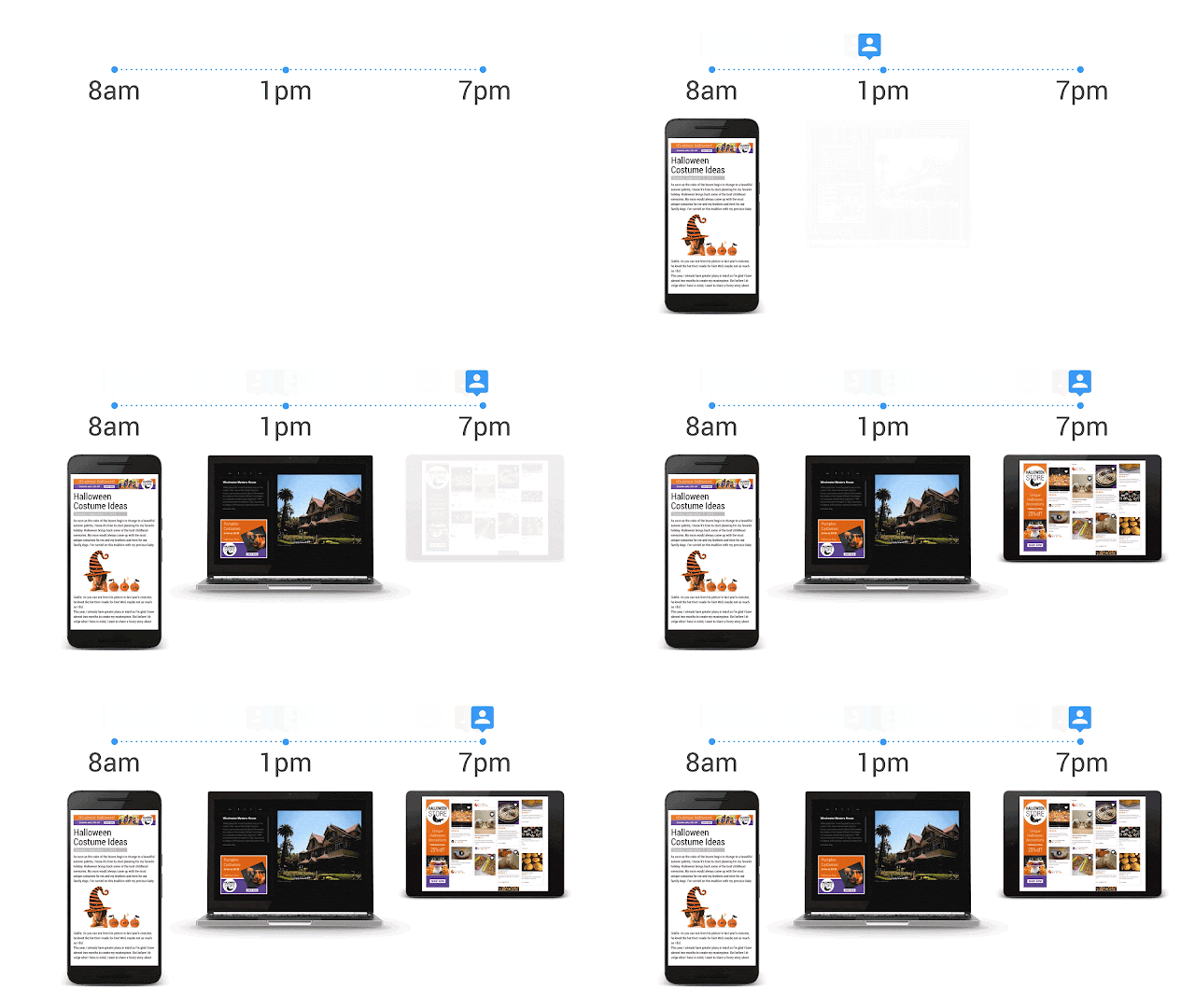
The final loop to close is the one across all the devices people use -- phones, tablets, laptops and everything in between. Today, we’re introducing cross-device remarketing for Google Display Network and DoubleClick Bid Manager to help you reach the same user across devices, apps, and sites. You can now tell a single story to your audience and decide how frequently they see your ad across devices.

Let’s say you’re a retailer and want to build a customized Halloween campaign. With cross-device remarketing, you can reach your customers with an “It’s almost Halloween” ad on their phone during the morning commute. Later in the day, you can follow up with a limited time offer on decorations and recipes when they’re browsing a tablet at home.

All of these innovations will be rolling out over the course of the next few months.

It’s a privilege to build products that help brands close the loop for measurement, reach and engagement. We’re excited to share more details about these innovations with you throughout Advertising Week, and I look forward to your feedback as we continue this journey together.

Join the conversation at #GoogleAW2016.

Posted by Brad Bender, Vice President of Display and Video Advertising 


1.  Google Internal meta-analysis of 1188 U.S. studies, August 2015 - April 2016.
2.  Google/Purchased Digital Diary: How Consumers Solve Their Needs in the Moment, May 2016, Representative sample of US smartphone users = 1000, Visited a Website or App = 721.
3.  Store visits are calculated using conservative data thresholds with 99% certainty that reported visits are less than or equal to actual visits.

Google Open Source Peer Bonus Program

September 23rd, 2016  |  Published in Google Open Source

Five years ago the Open Source Programs Office established the Open Source Peer Bonus Program to remind Googlers of the importance of the myriad developers outside of Google who keep open source healthy and growing.

The program works like this: we invite Googlers to nominate open source developers outside of the company who deserve recognition for their contributions to interesting open source projects including those used by Google. After review by a team of volunteer engineers, the recipients receive our heartfelt thanks and a small token of our appreciation.

We have recognized more than 500 open source developers from 30+ countries who have contributed their time and talent to over 400 open source projects.

Having just finished the latest round of the program, we’d like to recognize the individuals and the projects they worked on. Here’s everyone who gave us permission to thank them publicly:

Name Project Name Project
Olli Etuaho ANGLE Alexander Morozov Go programming language
Minko Gechev Angular Joel Sing LibreSSL
Georgios Kalpakas Angular Daniel Borkmann Linux kernel
Spencer Low AOSP (Android) Michael Ellerman Linux kernel
Holden Karau Apache Spark Heiko Stuebner Linux kernel
Dave Taht Bufferbloat Jonathan Garbee Material Design Lite
Leon Han Chromium Chris Sullo Nikto
Yoav Weiss Chromium Carl Friedrich Bolz PyPy
Rob Wu Chromium Brett Cannon Python
Faisal Vali Clang Raymond Hettinger Python
Matt Godbolt Compiler Explorer Tim Peters Python
Paul Kocialkowski coreboot Tully Foote ROS
Jonathan Kollasch coreboot Igor Babuschkin TensorFlow
Nicolas Reinecke coreboot Yuan Tang TensorFlow
Werner Zeh coreboot Hanno Boeck The Fuzzing Project
Daniel Greenfeld Django Khaled Hosny TruFont
Eric Whitney ext4 Tom Rini U-Boot
Ben Martin FontForge Caitlin Potter V8
Dmitri Shuralyov go-github Brian Behlendorf ZFS on Linux

Congratulations all and thank you so much for your contributions to the open source community!

By Helen Hu, Open Source Programs Office

Using Google Analytics with Leadfeeder for B2B Lead Generation

September 23rd, 2016  |  Published in Google Analytics

Google Analytics is an important tool for marketers. It’s used to understand how people come to your website, how different content performs and how to get more conversions. All this is essential for knowing how to drive more high-quality traffic to your website.

For most B2B firms, the main purpose of their website is to generate sales leads by getting visitors to fill in some kind of contact form. But many see that just a fraction of visitors leave their contact information, and as a result, salespeople don’t get enough good quality leads from their website. So what can be done to improve this situation?

This guide will show you the 3 best ways to generate leads with Google Analytics:

1. Using Google Analytics Network report
2. Using a custom Google Analytics report template tool
3. Using Google Analytics with Leadfeeder for lead generation

One way to gain more leads from your website is identifying companies that visit, based on their IP address. With this data, you can have some information about the 98% of visitors that don’t explicitly contact you. When people visit a website using their office network, marketers can identify that someone from a certain company has visited and pinpoint what they have done there. For B2B outbound sales teams, this information can be very valuable.

If you see a company visiting your website, there’s a high probability that they’re in need of- and evaluating your product, which is the perfect time to get in touch with them.

Based on the IP address alone, it’s impossible to know exactly the name of the visitor, but in many cases this information is not needed. For example, if you sell email marketing tools and a company comes to your website and browses product pages, it’s a strong signal they are looking for a new email marketing tool. When you contact them, you want to contact the person who’s responsible for digital marketing, regardless of who visited your website.

For effective lead generation purposes, you should be able to identify real companies that have visited your website and see how they have behaved, to evaluate if they are a good lead.

1. Using Google Analytics Network Report

Using the Network report is the most common way to see which companies have been visiting your website. There have been many blog posts about this topic, for example this LunaMetrics post by Dan Wilkerson from 2012, this how-to article from Anna Lewis and a post by Traian Neacsu on uncovering hidden leads.

But these posts are all now a couple of years old and the Google Analytics interface has changed quite a lot since then. These days (2016) you can find the Network report in Google Analytics under Audience > Technology > Network.


Network report in Google Analytics

In the Network report (seen above) you will see a list of “Service Providers”. What Google Analytics means by “Service Provider” is the network where the visitor has been when they visited your website. Networks are always owned and registered by someone; typically a company, Internet Service Provider or some other organization.

One challenge in using the Network report is that many times the IP is registered by an Internet Service Provider (ISP) or some other non-interesting organization. In order to see the real companies, you should filter out ISPs from the list. The easiest way of doing this is to use the advanced search button and select to exclude Service Providers that match the following RegExp (just copy/paste this to the filter):
(not set|customer|internet|broadband|isp|cable com|network|tele|dsl|subscriber|pool|telecom|cable|addresses|telefonica|routed|leased line|communication|comcast|verizon|road runner|service provider|unknown|provider|t-mobile|wifi|telkom|sprint|at-t|residential|province|vodafone|clients|china|dial-up|netblock|wimax|wireless|elisa|sonera|dna oy|at&t|assigned|sl-cgn|block|consumers|kpn|telia|bredband|google|hosting|zscaler|city of|tdc|hubspot) 

Now the list of visiting companies should look a lot cleaner. If you wish to filter the results even further, e.g. only companies from a specific country, you should create a segment out of visitors from that country and look at the report again.

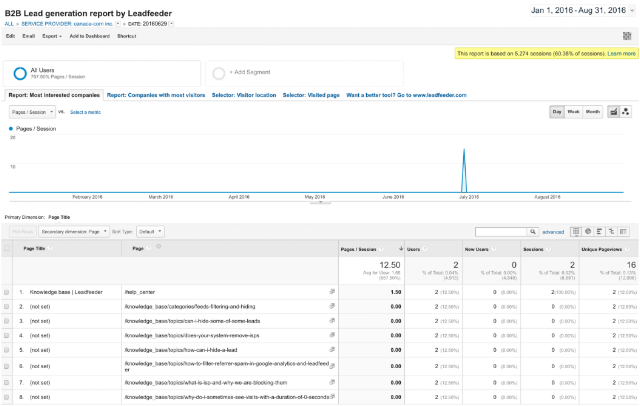
By default for each company in the list you can see how many sessions they have had during the selected time interval, how many pages they have visited and other metrics. When you click on one company, you can get to a more detailed report, like this one below.

In this view, select “Page Title” or “Page” as secondary dimension to know which pages the company has visited. This way you know what they have done on your website and what they were interested in. If they were visiting relevant product pages or they spent a lot to time on your site but didn’t contact you, maybe it’s a good lead for your outbound sales team to contact.


Using Network report to see what company did on the website

If you would really like to know what each company and their employees have done on your website, you can go to the brand new User Explorer report under the Audience section in Google Analytics. This report was introduced in Google Analytics in April 2016 and in the report you can dive into individual visitors and their behavior.

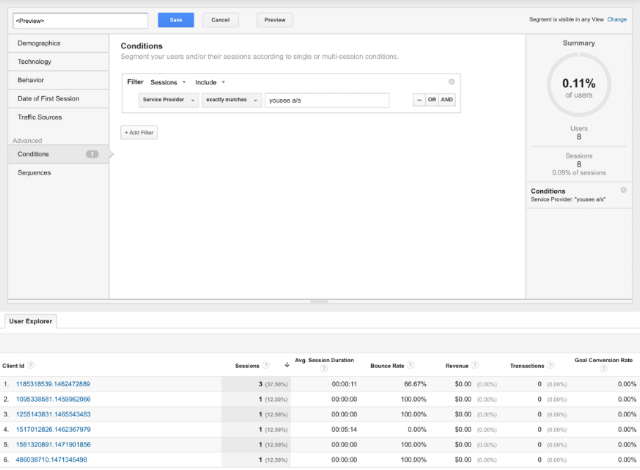
To know what a company did on your website, just create a segment where the Service Provider matches the company you are interested in (see below).

Using User Explorer to see visitors from one company

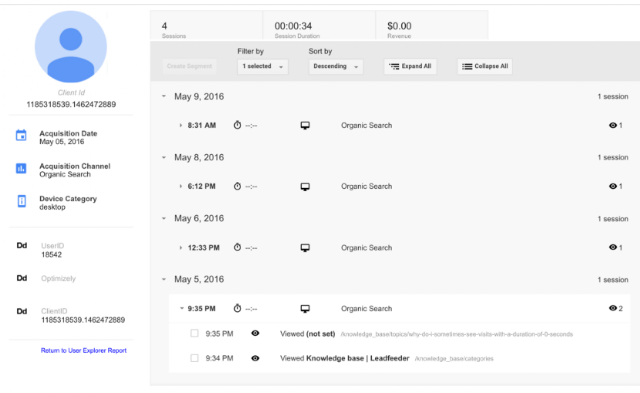
By doing this Google Analytics shows you Client IDs (anonymous and unique IDs of each visitor) from that company and by clicking one client ID (one user) you can see all the behavior of that user on your website. This way you can have a good understanding about what any given person from one specific company did on your website. Pretty powerful stuff, as you can see below.


Using User Explorer to see visits of one user

2. Using a custom Google Analytics report template tool

At Leadfeeder we created a ready-to-use Google Analytics custom report that anyone can take into use for free. Just click the link below and attach it as a custom report to the Google Analytics View you typically use: 

https://analytics.google.com/analytics/web/template?uid=zAQeJwWfT0yxlk8wfPWaGA 

When you click this link, you will be directed to Google Analytics and asked which view you want to attach it to. Remember that by default this custom report will be visible only for you. If other users want to use this report, they should also click the Add to Dashboard link above.


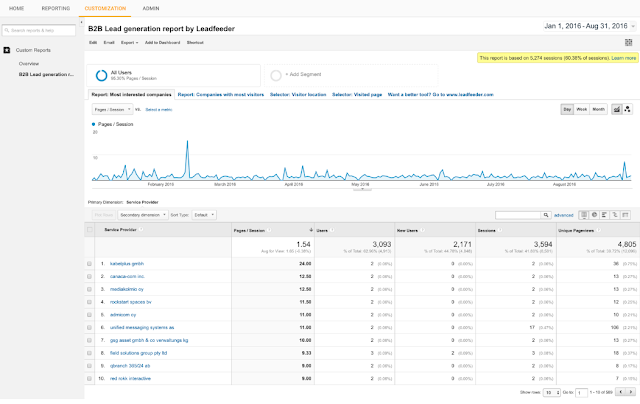
B2B Lead generation report by Leadfeeder

Our custom tool by default shows the most interested companies that have visited your website. To be more precise, this is a list of companies after ISP filtering (using the filter pasted above) sorted by pages / session, with the most interesting visits on top.

Typically companies that have spent a lot of time and loaded many pages are more interested than companies with many short visits. Once you click an interesting company, you can see a list of days on which they have visited. When you click even further into a specific date, you can see a breakdown of all the pages they visited. If page titles are not descriptive enough or not set, you can use “Page” as a secondary dimension to see page URLs (as shows below).


Using B2B Lead generation report by Leadfeeder

In the tool you can see several tabs that you can use (see above). The most interested companies tab is selected by default, but you can also select the second tab – companies with most visitors – that shows companies that have most visits on your website. Many times here you can find ISPs that were not filtered out along with other non-interesting companies. If you like, you can drill into details in the same way as in the first tab.

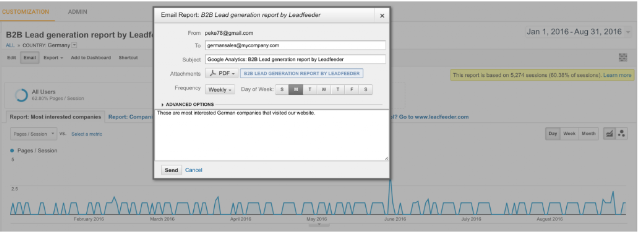
The 3rd and 4th tabs in the report are selectors that you can use to filter data. For example, if you are only interested in German companies, go to “Selector: Visitor location” tab and select Germany. After that click to the first tab to see the most interested companies from Germany. If you have a sales representative located in Germany searching for German leads, you can automatically have Google Analytics send this lead list by daily or weekly email.

Automating notifications from B2B Lead generation tool by Leadfeeder

Similarly, if your sales team’s responsibilities are divided by product, then sales reps might only be interested in leads that have visited certain product pages. Go to “Selector: Visited page” tab and select the product page each sales rep is interested in. Again, after making the selection, go to the first tab to see the list of the most interested companies visiting that product page and automate lead reports to your sales rep’s mailbox. You can also combine these selectors to create a list of companies from a specific country that have visited a specific product page.

3. Using Google Analytics with Leadfeeder for lead generation

Using the Google Analytics user interface for lead generation is possible as you can see, but not very salesperson-friendly.

 In order to better generate leads from your website for your sales department and do much much more, we created an online tool called Leadfeeder. Since Google Analytics is already collecting all the data about your website visitors, Leadfeeder fetches this data from Google Analytics API and does all the data crunching for you.

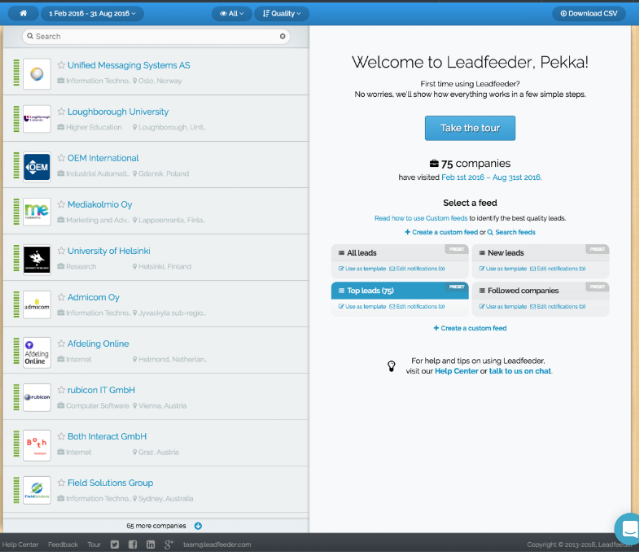
Leadfeeder lead generation main report

Once you sign up to Leadfeeder, it fetches all visitor data from your Google Analytics for the past 30 days. You don’t need to install any codes or script on your website; all you need to do is permit Leadfeeder to access your Google Analytics.

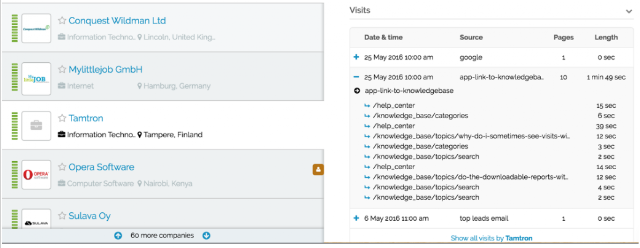
The web app filters out ISPs (a lot more than the Google Analytics filters shown in this post) handing you a clean list of companies. Once you see an interesting company and click on it, you see visit-by-visit, page-by-page what they have done on your website (as shown below). Leads are also enriched with additional company information such as company branch and size. With all this information it’s easier to determine whether the lead is interesting and whether they should be contacted.


Leadfeeder showing which pages a company has visited

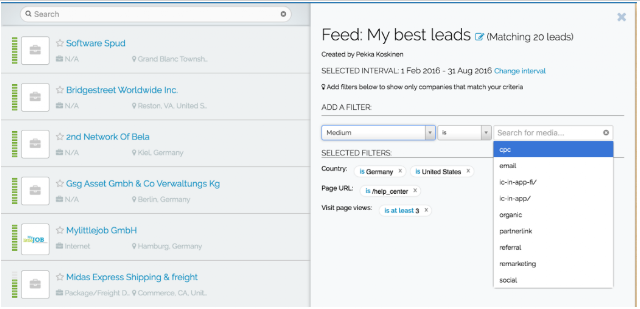
Not all website visitors are interesting, so you can use custom feeds to filter out bounces and view only companies that have behaved in a way you find interesting. For example, you can define a custom feed rule to only show companies from a certain country, from a specific industry, companies that have visited a set number of pages and have visited a specific page but haven’t contacted you.

Using this kind of custom feed you can get a much more relevant list of leads for your sales team. In many companies sales responsibilities are divided by region or product so it’s good practice to make custom feeds for individual sales reps for only their areas of responsibility. Salespeople can subscribe to their personal custom feed to get daily or weekly email notifications about new companies that visit their website and match the set criteria. Understanding the online behaviour of your website visitors combined with knowing the location of the company visit gives sales reps powerful weapons for successful follow-up.


Using custom feeds in Leadfeeder to filter lead list

Seeing a qualified list of interested companies is already powerful, but this sales intelligence should fit within your existing sales process to be really useful. We know it’s the dream of many sales reps to have good leads magically appear in their CRM without the need to do anything, so that’s why at Leadfeeder we have built integrations to sync visitor data with your CRM.

The integration to Pipedrive and WebCRM are made two-way, which means that in Leadfeeder you can see CRM data for the visiting company, while in your CRM you can see all the website visits the company has made, once it’s been connected.

This makes it easier for sales reps to distinguish between new and old clients in Leadfeeder, create accounts and opportunities in their CRM with one click from Leadfeeder, and see in their CRM how prospects are interacting with their website.

Using CRM integration to sending leads from Leadfeeder to CRM

If you are not using a CRM at all, leads can also be sent to sales reps by email or you can assign leads for them to see inside Leadfeeder. It’s good practice to invite the whole sales team to use Leadfeeder with their own user profiles and it’s free to add users.

In addition, if you are using Mailchimp for email marketing, you can connect it to Leadfeeder to see in Leadfeeder what individuals do on your website when they click through from one of your MailChimp campaigns. This is possible because Mailchimp tags links uniquely for all recipients and Leadfeeder can transform these unique links into email addresses. This way you can know exactly who the visitor was on your website.

Leadfeeder offers a free 30-day trial with no credit card required, so if you are in B2B business and would like to get more sales leads, go and sign up at www.leadfeeder.com.

Conclusions

Web analytics has made marketing a lot more intelligent during the last 10 years, but similar development hasn’t transferred to sales.

Web analytics has enabled email tools to evolve into marketing automation by tracking what email clickers do on your website and triggering follow-up emails. Display marketing, similarly, has evolved into very efficient remarketing, where ads are shown to those who have completed action on your website.

In short, there are a lot of digital signals potential customers are giving all the time, but those haven’t been utilized well in sales so far. Many sales reps come to work, open their CRM and start calling through a lead list someone has given them. Meanwhile there are lots of potential customers browsing their website but sales reps aren’t aware of who they are. Our aim at Leadfeeder is to make sales more intelligent by providing salespeople actionable web analytics intelligence about potential customers, thereby making sales more effective.

Posted by Pekka Koskinen, Google Analytics Certified Partner

Angular, version 2: proprioception-reinforcement

September 22nd, 2016  |  Published in Google Open Source

Originally posted on the Angular Blog

Today, at a special meetup at Google HQ, we announced the final release version of Angular 2, the full-platform successor to Angular 1.

What does "final" mean? Stability that's been validated across a wide range of use cases, and a framework that's been optimized for developer productivity, small payload size, and performance. With ahead-of-time compilation and built-in lazy-loading, we’ve made sure that you can deploy the fastest, smallest applications across the browser, desktop, and mobile environments. This release also represents huge improvements to developer productivity with the Angular CLI and styleguide.

Angular 1 first solved the problem of how to develop for an emerging web. Six years later, the challenges faced by today’s application developers, and the sophistication of the devices that applications must support, have both changed immensely. With this release, and its more capable versions of the Router, Forms, and other core APIs, today you can build amazing apps for any platform. If you prefer your own approach, Angular is also modular and flexible, so you can use your favorite third-party library or write your own.

From the beginning, we built Angular in collaboration with the open source development community. We are grateful to the large number of contributors who dedicated time to submitting pull requests, issues, and repro cases, who discussed and debated design decisions, and validated (and pushed back on) our RCs. We wish we could have brought every one of you in person to our meetup so you could celebrate this milestone with us tonight!


What’s next?

Angular is now ready for the world, and we’re excited for you to join the thousands of developers already building with Angular 2.  But what’s coming next for Angular?

A few of the things you can expect in the near future from the Angular team:

  • Bug fixes and non-breaking features for APIs marked as stable
  • More guides and live examples specific to your use cases
  • More work on animations
  • Angular Material 2
  • Moving WebWorkers out of experimental
  • More features and more languages for Angular Universal
  • Even more speed and payload size improvements

Semantic Versioning

We heard loud and clear that our RC labeling was confusing. To make it easy to manage dependencies on stable Angular releases, starting today with Angular 2.0.0, we will move to semantic versioning.  Angular versioning will then follow the MAJOR.MINOR.PATCH scheme as described by semver:

  1. the MAJOR version gets incremented when incompatible API changes are made to stable APIs,
  2. the MINOR version gets incremented when backwards-compatible functionality are added,
  3. the PATCH version gets incremented when backwards-compatible bug are fixed.

Moving Angular to semantic versioning ensures rapid access to the newest features for our component and tooling ecosystem, while preserving a consistent and reliable development environment for production applications that depend on stability between major releases, but still benefit from bug fixes and new APIs.

Contributors

Aaron Frost, Aaron (Ron) Tsui, Adam Bradley, Adil Mourahi, agpreynolds, Ajay Ambre, Alberto Santini, Alec Wiseman, Alejandro Caravaca Puchades, Alex Castillo, Alex Eagle, Alex Rickabaugh, Alex Wolfe, Alexander Bachmann, Alfonso Presa, Ali Johnson, Aliaksei Palkanau, Almero Steyn, Alyssa Nicoll, Alxandr, André Gil, Andreas Argelius, Andreas Wissel, Andrei Alecu, Andrei Tserakhau, Andrew, Andrii Nechytailov, Ansel Rosenberg, Anthony Zotti, Anton Moiseev, Artur Meyster, asukaleido, Aysegul Yonet, Aziz Abbas, Basarat Ali Syed, BeastCode, Ben Nadel, Bertrand Laporte, Blake La Pierre, Bo Guo, Bob Nystrom, Borys Semerenko, Bradley Heinz, Brandon Roberts, Brendan Wyse, Brian Clark, Brian Ford, Brian Hsu, dozingcat, Brian Yarger, Bryce Johnson, CJ Avilla, cjc343, Caitlin Potter, Cédric Exbrayat, Chirayu Krishnappa, Christian Weyer, Christoph Burgdorf, Christoph Guttandin, Christoph Hoeller, Christoffer Noring, Chuck Jazdzewski, Cindy, Ciro Nunes, Codebacca, Cody Lundquist, Cody-Nicholson, Cole R Lawrence, Constantin Gavrilete, Cory Bateman, Craig Doremus, crisbeto, Cuel, Cyril Balit, Cyrille Tuzi, Damien Cassan, Dan Grove, Dan Wahlin, Daniel Leib, Daniel Rasmuson, dapperAuteur, Daria Jung, David East, David Fuka, David Reher, David-Emmanuel Divernois, Davy Engone, Deborah Kurata, Derek Van Dyke, DevVersion, Dima Kuzmich, Dimitrios Loukadakis, Dmitriy Shekhovtsov, Dmitry Patsura, Dmitry Zamula, Dmytro Kulyk, Donald Spencer, Douglas Duteil, dozingcat, Drew Moore, Dylan Johnson, Edd Hannay, Edouard Coissy, eggers, elimach, Elliott Davis, Eric Jimenez, Eric Lee Carraway, Eric Martinez, Eric Mendes Dantas, Eric Tsang, Essam Al Joubori, Evan Martin, Fabian Raetz, Fahimnur Alam, Fatima Remtullah, Federico Caselli, Felipe Batista, Felix Itzenplitz, Felix Yan, Filip Bruun, Filipe Silva, Flavio Corpa, Florian Knop, Foxandxss, Gabe Johnson, Gabe Scholz, GabrielBico, Gautam krishna.R, Georgii Dolzhykov, Georgios Kalpakas, Gerd Jungbluth, Gerard Sans, Gion Kunz, Gonzalo Ruiz de Villa, Grégory Bataille, Günter Zöchbauer, Hank Duan, Hannah Howard, Hans Larsen, Harry Terkelsen, Harry Wolff, Henrique Limas, Henry Wong, Hiroto Fukui, Hongbo Miao, Huston Hedinger, Ian Riley, Idir Ouhab Meskine, Igor Minar, Ioannis Pinakoulakis, The Ionic Team, Isaac Park, Istvan Novak, Itay Radotzki, Ivan Gabriele, Ivey Padgett, Ivo Gabe de Wolff, J. Andrew Brassington, Jack Franklin, Jacob Eggers, Jacob MacDonald, Jacob Richman, Jake Garelick, James Blacklock, James Ward, Jason Choi, Jason Kurian, Jason Teplitz, Javier Ros, Jay Kan, Jay Phelps, Jay Traband, Jeff Cross, Jeff Whelpley, Jennifer Bland, jennyraj, Jeremy Attali, Jeremy Elbourn, Jeremy Wilken, Jerome Velociter, Jesper Rønn-Jensen, Jesse Palmer, Jesús Rodríguez, Jesús Rodríguez, Jimmy Gong, Joe Eames, Joel Brewer, John Arstingstall, John Jelinek IV, John Lindquist, John Papa, John-David Dalton, Jonathan Miles, Joost de Vries, Jorge Cruz, Josef Meier, Josh Brown, Josh Gerdes, Josh Kurz, Josh Olson, Josh Thomas, Joseph Perrott, Joshua Otis, Josu Guiterrez, Julian Motz, Julie Ralph, Jules Kremer, Justin DuJardin, Kai Ruhnau, Kapunahele Wong, Kara Erickson, Kathy Walrath, Keerti Parthasarathy, Kenneth Hahn, Kevin Huang, Kevin Kirsche, Kevin Merckx, Kevin Moore, Kevin Western, Konstantin Shcheglov, Kurt Hong, Levente Morva, laiso, Lina Lu, LongYinan, Lucas Mirelmann, Luka Pejovic, Lukas Ruebbelke, Marc Fisher, Marc Laval, Marcel Good, Marcy Sutton, Marcus Krahl, Marek Buko, Mark Ethan Trostler, Martin Gontovnikas, Martin Probst, Martin Staffa, Matan Lurey, Mathias Raacke, Matias Niemelä, Matt Follett, Matt Greenland, Matt Wheatley, Matteo Suppo, Matthew Hill, Matthew Schranz, Matthew Windwer, Max Sills, Maxim Salnikov, Melinda Sarnicki Bernardo, Michael Giambalvo, Michael Goderbauer, Michael Mrowetz, Michael-Rainabba Richardson, Michał Gołębiowski, Mikael Morlund, Mike Ryan, Minko Gechev, Miško Hevery, Mohamed Hegazy, Nan Schweiger, Naomi Black, Nathan Walker, The NativeScript Team, Nicholas Hydock, Nick Mann, Nick Raphael, Nick Van Dyck, Ning Xia, Olivier Chafik, Olivier Combe, Oto Dočkal, Pablo Villoslada Puigcerber, Pascal Precht, Patrice Chalin, Patrick Stapleton, Paul Gschwendtner, Pawel Kozlowski, Pengfei Yang, Pete Bacon Darwin, Pete Boere, Pete Mertz, Philip Harrison, Phillip Alexander, Phong Huynh, Polvista, Pouja, Pouria Alimirzaei, Prakal, Prayag Verma, Rado Kirov, Raul Jimenez, Razvan Moraru, Rene Weber, Rex Ye, Richard Harrington, Richard Kho, Richard Sentino, Rob Eisenberg, Rob Richardson, Rob Wormald, Robert Ferentz, Robert Messerle, Roberto Simonetti, Rodolfo Yabut, Sam Herrmann, Sam Julien, Sam Lin, Sam Rawlins, Sammy Jelin, Sander Elias, Scott Hatcher, Scott Hyndman, Scott Little, ScottSWu, Sebastian Hillig, Sebastian Müller, Sebastián Duque, Sekib Omazic, Shahar Talmi, Shai Reznik, Sharon DiOrio, Shannon Ayres, Shefali Sinha, Shlomi Assaf, Shuhei Kagawa, Sigmund Cherem, Simon Hürlimann (CyT), Simon Ramsay, Stacy Gay, Stephen Adams, Stephen Fluin, Steve Mao, Steve Schmitt, Suguru Inatomi, Tamas Csaba, Ted Sander, Tero Parviainen, Thierry Chatel, Thierry Templier, Thomas Burleson, Thomas Henley, Tim Blasi, Tim Ruffles, Timur Meyster, Tobias Bosch, Tony Childs, Tom Ingebretsen, Tom Schoener, Tommy Odom, Torgeir Helgevold, Travis Kaufman, Trotyl Yu, Tycho Grouwstra, The Typescript Team, Uli Köhler, Uri Shaked, Utsav Shah, Valter Júnior, Vamsi V, Vamsi Varikuti, Vanga Sasidhar, Veikko Karsikko, Victor Berchet, Victor Mejia, Victor Savkin, Vinci Rufus, Vijay Menon, Vikram Subramanian, Vivek Ghaisas, Vladislav Zarakovsky, Vojta Jina, Ward Bell, Wassim Chegham, Wenqian Guo, Wesley Cho, Will Ngo, William Johnson, William Welling, Wilson Mendes Neto, Wojciech Kwiatek, Yang Lin, Yegor Jbanov, Zach Bjornson, Zhicheng Wang, and many more...

With gratitude and appreciation, and anticipation to see what you'll build next, welcome to the next stage of Angular.

By Jules Kremer, Angular Team

Trial and purchase Chrome device management software directly

September 22nd, 2016  |  Published in Google Apps

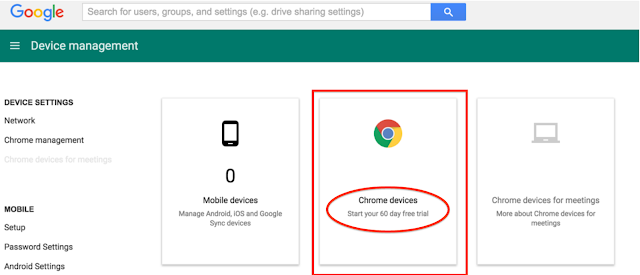
If you’re a current Google Apps customer, we’re making it easier than ever to set up Chrome device management for managing employee Chrome devices — directly from your Admin console. We’re also offering a free trial of Chrome device management for 60 days and up to 10 devices*.
With Chrome device management, you can manage and configure more than 200 features and settings for your Chrome device fleet (and you can buy devices from our Chrome Store). These settings provide added security for your employee and business data, tools for improved employee productivity, and time savings with easier device management.

As an administrator, Chrome device management lets you easily configure Chrome features for users, set up Chrome device access to Wi-Fi networks and VPNs, automatically install Chrome extensions and apps, and more. You can apply each setting to specific sets of users, devices, or to everyone in the organization. For example, you can configure a device to automatically connect to a specific network or restrict devices from a specific network.

You can also manage public session devices where multiple users can share the same Chrome device without the need to sign in with a username and password. For example, you can use public sessions to configure Chrome devices for use as kiosks, loaner devices, shared computers or any other work-related purpose in which users don't need to sign in.
For more details and instructions, check out the Help Center article about Chrome device management trials and subscriptions.
 *Notes:
  • The trial is only available to customers in the U.S. and Canada.
  • Currently the trial is only available if you haven’t already purchased a Chrome device management license. It's also only for annual Chrome device management licenses so is not relevant for Education customers. 


Launch Details
Release track:
Available now to both Rapid release and Scheduled release

Impact:
Admins only

Action:
Admin action suggested/FYI

More Information 
Help Center: Chrome device management Online Trials and Subscriptions

Note: all launches are applicable to all Google Apps editions unless otherwise noted

Launch release calendar
Launch detail categories
Get these product update alerts by email
Subscribe to the RSS feed of these updates

Better Google Drive auditing and reporting in the Admin console and Reports API

September 22nd, 2016  |  Published in Google Apps

To help Google Apps admins monitor and analyze their organizations’ Google Drive content, we offer audit logs in the Reports > Audit > Drive section of the Admin console, as well as via the Reports API. Today’s launch brings the following improvements to that reporting, making it even more useful for you:

  • If a user outside of your domain views or takes action on a document explicitly shared with them (as an individual or as part of a specific group), we will now show that event and that user’s details. Previously, this would be recorded as an anonymous user event.
  • If a user outside of your domain takes action on a document shared with the public via link sharing, we will now show that event in the audit logs as an anonymous user edit event. Previously, only anonymous user views were recorded.
  • In addition to the customer usage and user usage reports already in the Reports API, we will now show aggregated statistics around user behavior, like creating, editing, viewing, and trashing. These new metrics will only be accessible via the Reports API.


Please note that the first two features above are only available to customers with Google Apps Unlimited and Google Apps for Education.

Launch Details
Release track:
Launching to both Rapid release and Scheduled release

Rollout pace:
Full rollout (1–3 days for feature visibility)

Impact:
Admins only

Action:
Admin action suggested/FYI

More information
Help Center: Drive audit log (Google Apps Unlimited)

Note: all launches are applicable to all Google Apps editions unless otherwise noted

Launch release calendar
Launch detail categories
Get these product update alerts by email
Subscribe to the RSS feed of these updates

Show and Tell: image captioning open sourced in TensorFlow

September 22nd, 2016  |  Published in Google Research

Posted by Chris Shallue, Software Engineer, Google Brain Team

In 2014, research scientists on the Google Brain team trained a machine learning system to automatically produce captions that accurately describe images. Further development of that system led to its success in the Microsoft COCO 2015 image captioning challenge, a competition to compare the best algorithms for computing accurate image captions, where it tied for first place.

Today, we’re making the latest version of our image captioning system available as an open source model in TensorFlow. This release contains significant improvements to the computer vision component of the captioning system, is much faster to train, and produces more detailed and accurate descriptions compared to the original system. These improvements are outlined and analyzed in the paper Show and Tell: Lessons learned from the 2015 MSCOCO Image Captioning Challenge, published in IEEE Transactions on Pattern Analysis and Machine Intelligence.
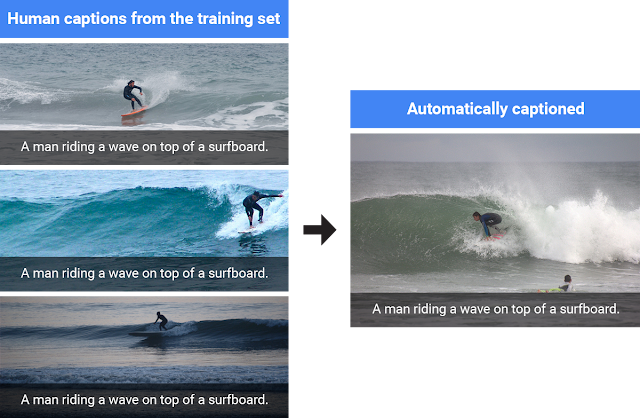
Automatically captioned by our system.
So what’s new?

Our 2014 system used the Inception V1 image classification model to initialize the image encoder, which produces the encodings that are useful for recognizing different objects in the images. This was the best image model available at the time, achieving 89.6% top-5 accuracy on the benchmark ImageNet 2012 image classification task. We replaced this in 2015 with the newer Inception V2 image classification model, which achieves 91.8% accuracy on the same task. The improved vision component gave our captioning system an accuracy boost of 2 points in the BLEU-4 metric (which is commonly used in machine translation to evaluate the quality of generated sentences) and was an important factor of its success in the captioning challenge.

Today’s code release initializes the image encoder using the Inception V3 model, which achieves 93.9% accuracy on the ImageNet classification task. Initializing the image encoder with a better vision model gives the image captioning system a better ability to recognize different objects in the images, allowing it to generate more detailed and accurate descriptions. This gives an additional 2 points of improvement in the BLEU-4 metric over the system used in the captioning challenge.

Another key improvement to the vision component comes from fine-tuning the image model. This step addresses the problem that the image encoder is initialized by a model trained to classify objects in images, whereas the goal of the captioning system is to describe the objects in images using the encodings produced by the image model. For example, an image classification model will tell you that a dog, grass and a frisbee are in the image, but a natural description should also tell you the color of the grass and how the dog relates to the frisbee.

In the fine-tuning phase, the captioning system is improved by jointly training its vision and language components on human generated captions. This allows the captioning system to transfer information from the image that is specifically useful for generating descriptive captions, but which was not necessary for classifying objects. In particular, after fine-tuning it becomes better at correctly describing the colors of objects. Importantly, the fine-tuning phase must occur after the language component has already learned to generate captions - otherwise, the noisiness of the randomly initialized language component causes irreversible corruption to the vision component. For more details, read the full paper here.
Left: the better image model allows the captioning model to generate more detailed and accurate descriptions. Right: after fine-tuning the image model, the image captioning system is more likely to describe the colors of objects correctly.
Until recently our image captioning system was implemented in the DistBelief software framework. The TensorFlow implementation released today achieves the same level of accuracy with significantly faster performance: time per training step is just 0.7 seconds in TensorFlow compared to 3 seconds in DistBelief on an Nvidia K20 GPU, meaning that total training time is just 25% of the time previously required.

A natural question is whether our captioning system can generate novel descriptions of previously unseen contexts and interactions. The system is trained by showing it hundreds of thousands of images that were captioned manually by humans, and it often re-uses human captions when presented with scenes similar to what it’s seen before.
When the model is presented with scenes similar to what it’s seen before, it will often re-use human generated captions.
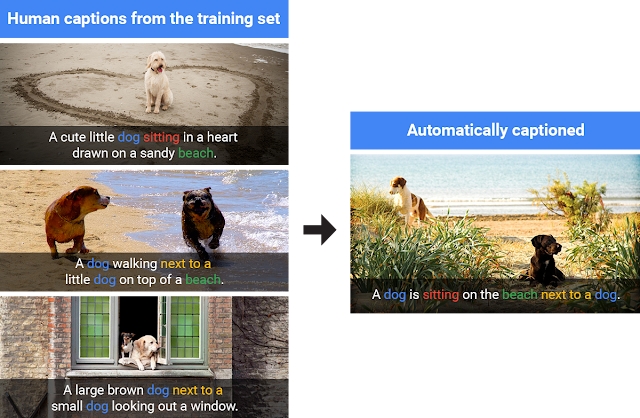
So does it really understand the objects and their interactions in each image? Or does it always regurgitate descriptions from the training data? Excitingly, our model does indeed develop the ability to generate accurate new captions when presented with completely new scenes, indicating a deeper understanding of the objects and context in the images. Moreover, it learns how to express that knowledge in natural-sounding English phrases despite receiving no additional language training other than reading the human captions.
Our model generates a completely new caption using concepts learned from similar scenes in the training set.
We hope that sharing this model in TensorFlow will help push forward image captioning research and applications, and will also allow interested people to learn and have fun. To get started training your own image captioning system, and for more details on the neural network architecture, navigate to the model’s home-page here. While our system uses the Inception V3 image classification model, you could even try training our system with the recently released Inception-ResNet-v2 model to see if it can do even better!

Google Consumer Surveys Launches Weekly U.S. Election Poll in Google Data Studio

September 21st, 2016  |  Published in Google Analytics

With the U.S. presidential election less than 50 days away, the candidates are running full force to capture as many votes as possible. Worldwide, people are waiting anxiously to see whom the American people will pick as the 45th president. Now more than ever, the media is turning to polls to make sense of all the campaign activity.

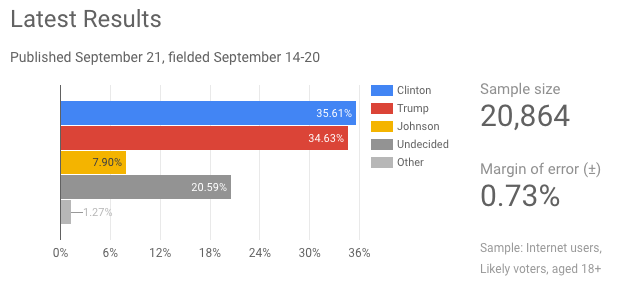
Google Consumer Surveys — named as one of the “most accurate [polling] firms” by FiveThirtyEight in the 2012 election — has recently launched its 2016 U.S. Election Poll.


The 2016 election poll surveys more than 20,000 respondents each week from across the United States, demonstrating how Google Consumer Surveys can quickly collect thousands of representative responses. (Find out more about the poll methodology on page 3 of the polling report.)

Google Consumer Surveys, an online market research solution used to gain insights to inform important business decisions, has recently grown its footprint in politics with usage from groups such as NY Times Upshot, IJ Review, and Echelon Insights. Google’s survey platform and other online polling tools have gained popularity due to their accuracy, scalability, quick results, and low costs.

The election poll results from Google Consumer Surveys are displayed in an interactive data visualization in Google Data Studio, and voter preferences are updated weekly. This customized dashboard and report allows users to filter results by state, gender, and candidate to see different cuts of the data — and the report can easily be shared.

Check out the Google Consumer Surveys U.S. Election Poll for weekly updates as the American public gets closer to choosing its next president. Whether in politics or business, surveys are a powerful tool to get the public’s opinion. And spur lively discussions.

Happy Surveying!


More on Google Consumer Surveys

Many users, from small businesses to Fortune 500 companies, use Google Consumer Surveys today to run studies on consumer research, brand tracking, and ad effectiveness. Google also offers an enterprise survey solution with advanced targeting features such as user list and zip code targeting. 

Respondents answer questions on 1,000+ publisher sites to gain access to premium content. The publishers make money each time someone answers a question on their site. Google Consumer Surveys also has an app, Google Opinion Rewards, where people can answer survey questions for Google Play credit. There are over 10M potential respondents available to survey everyday.

Posted by Justin Cohen, Product Marketing Manager, Google Consumer Surveys

Previously


Dec 28, 2016
Open source down under: Linux.conf.au 2017

by Open Source Programs Office | Read | No Comments

It’s a new year and open source enthusiasts from around the globe are preparing to gather at the edge of the world for Linux.conf.au 2017. Among those preparing are Googlers, including some of us from the Open Source Programs Office.

This year Linux.conf.au is returning to Hobart, the riverside capital of Tasmania, home of Australia’s famous Tasmanian devils, running five days between January 16 and 20.

Circle_DevilTuz.png
Tuz, a Tasmanian devil sporting a penguin beak, is the Linux.conf.au mascot.
(Artwork by Tania Walker licensed under CC BY-SA.)

The conference, which began in 1999 and is community organized, is well equipped to explore the theme, “the Future of Open Source,” which is reflected in the program schedule and miniconfs.

You’ll find Googlers speaking throughout the week (listed below), as well as participating in the hallway track. Don’t miss our Birds of a Feather session if you’re a student, educator, project maintainer, or otherwise interested in talking about outreach and student programs like Google Summer of Code and Google Code-in.

Monday, January 16th
12:20pm The Sound of Silencing by Julien Goodwin
4:35pm   Year of the Linux Desktop? by Jessica Frazelle

Tuesday, January 17th
All day    Community Leadership Summit X at LCA

Wednesday, January 18th
2:15pm   Community Building Beyond the Black Stump by Josh Simmons
4:35pm   Contributing to and Maintaining Large Scale Open Source Projects by Jessica Frazelle

Thursday, January 19th
4:35pm   Using Python for creating hardware to record FOSS conferences! by Tim Ansell

Friday, January 20th
1:20pm   Linux meets Kubernetes by Vishnu Kannan

Not able to make it to the conference? Keynotes and sessions will be livestreamed, and you can always find the session recordings online after the event.

We’ll see you there!

By Josh Simmons, Open Source Programs Office


Dec 23, 2016
Taking the pulse of Google Code-in 2016

by Open Source Programs Office | Read | No Comments

GCI official horizontal_1372x448dp.png

Today is the official midpoint of this year’s Google Code-in contest and we are delighted to announce this is our most popular year ever! 930 teenagers from 60 countries have completed 3,503 tasks with 17 open source organizations. The number of students successfully completing tasks has almost met the total number of students from the 2015 contest already.

Tasks that the students have completed include:

  • writing test suites
  • improving mobile UI 
  • writing documentation and creating videos to help new users 
  • working on internationalization efforts
  • fixing and finding bugs in the organization’s’ software 

Participants from all over the world
In total, over 2,800 students from 87 countries have registered for the contest and we look forward to seeing great work from these (and more!) students over the next few weeks. 2016 has also seen a huge increase in student participation in places such as Indonesia, Vietnam and the Philippines.

Google Code-in participants by country
Please welcome two new countries to the GCI family: Mauritius and Moldova! Mauritius made a very strong debut to the contest and currently has 13 registered students who have completed 31 tasks.

The top five countries with the most completed tasks are:

  1. India: 982
  2. United States: 801
  3. Singapore: 202
  4. Vietnam: 119
  5. Canada: 117

Students, there is still plenty of time to get started with Google Code-in. New tasks are being added daily to the contest site — there are over 1,500 tasks available for students to choose from right now! If you don’t see something that interests you today, check back again every couple of days for new tasks.

The last day to register for the contest and claim a task is Friday, January 13, 2017 with all work being due on Monday, January 16, 2017 at 9:00 am PT.

Good luck to all of the students participating this year in Google Code-in!

By Stephanie Taylor, Google Code-in Program Manager

All numbers reported as of 8:00 PM Pacific Time, December 22, 2016.


Dec 21, 2016
Introducing the ExifInterface Support Library

by Android Developers | Read | No Comments

With the release of the 25.1.0 Support Library, there’s a new entry in the family: the ExifInterface Support Library. With significant improvements introduced in Android 7.1 to the framework’s ExifInterface, it only made sense to make those available t…


Dec 21, 2016
Geolocation and Firebase for the Internet of Things

by Maps Devel | Read | No Comments

Posted by Ken Nevarez, Industry Solutions Lead at Google

GPS is the workhorse of location based services, but there are use cases where you may want to avoid the cost and power consumption of GPS hardware or locate devices in places where GPS lacks accuracy, such as in urban environments or buildings.

We’ve seen recent growth in Internet of Things (IoT) applications using the Google Maps Geolocation API instead of GPS for asset tracking, theft prevention, usage optimization, asset servicing, and more. As part of my 20 percent project at Industry Solutions, I created a prototype IoT device that can locate itself using surrounding WiFi networks and the Google Maps Geolocation API. In this post, I’ll discuss some interesting implementation features and outline how you can create the prototype yourself.

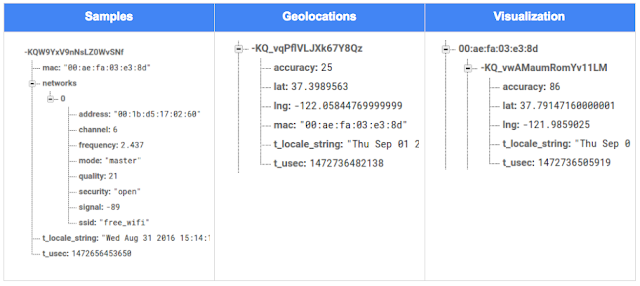
I built a device that scans for local WiFi and writes results (WiFi hotspots and their signal strength) to a Firebase Realtime Database. A back-end service then reads this data and uses the Google Maps Geolocation API to turn this into a real-world location, which can be plotted on a map.


Set up the Device & Write Locally

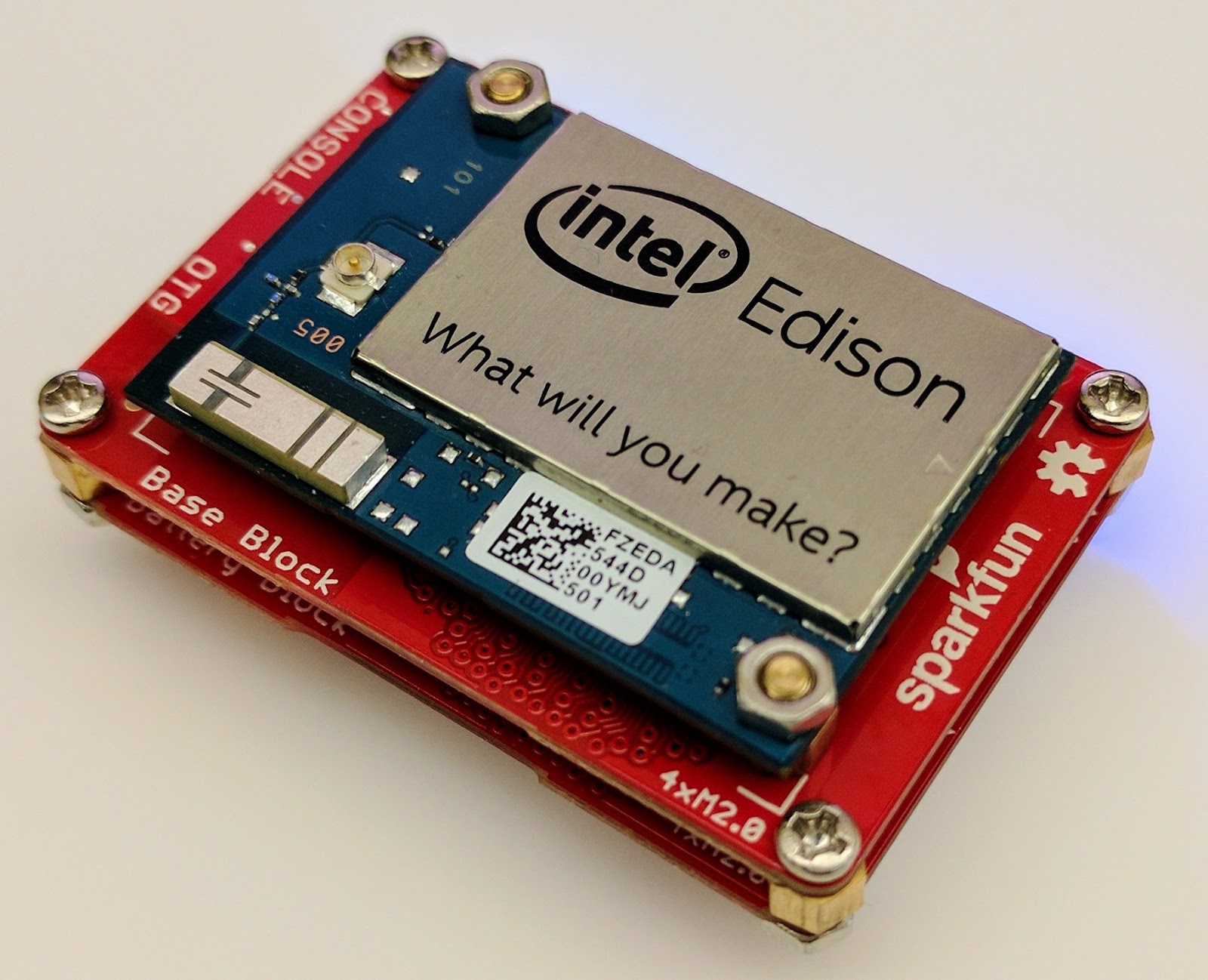
For this proof of concept, I used the Intel Edison as a Linux-based computing platform and augmented it with Sparkfun’s Edison Blocks. To build the device, you will need an Intel Edison, a Base Block, a Battery Block and a Hardware pack.


Developing for the Edison is straightforward using the Intel XDK IDE. We will be creating a simple Node.js application in JavaScript. I relied on 3 libraries: Firebase for the database connection, wireless-tools/iwlist to capture WiFi networks, and macaddress to capture the device MAC. Installation instructions can be found on the linked pages.

Step 1: get the device MAC address and connect to Firebase:

function initialize() {
    macaddress.one('wlan0', function (err, mac) {
        mac_address = mac;
        if (mac === null) {
            console.log('exiting due to null mac Address');
            process.exit(1);
        }
        firebase.initializeApp({
            serviceAccount: '/node_app_slot/.json',
            databaseURL: 'https://.firebaseio.com/'
        });
        var db = firebase.database();
        ref_samples = db.ref('/samples');
        locationSample();
    });
}

The above code contains two placeholders:

  1. The service-account-key is a private key you create in the Firebase Console. Follow the gear icon in the upper left of console, select “settings”, and click Generate New Private Key. Place this key on your Edison in the directory /node_app_slot/. See this Firebase documentation for more information.
  2. The project-id in the database URL is found in the Firebase console database page after you have linked your Google project with Firebase.

Step 2: scan for WiFi networks every 10 seconds and write locally:

function locationSample() {
    var t = new Date();
    iwlist.scan('wlan0', function(err, networks) {
        if(err === null) {
            ref_samples.push({
                mac: mac_address,
                t_usec: t.getTime(),
                t_locale_string: t.toLocaleString(),
                networks: networks,
            });
        } else {
            console.log(err);
        }        
    });
    setTimeout(locationSample, 10000);
}

Write to the cloud

The locationSample() function above writes detectable WiFi networks to a Firebase database that syncs to the cloud when connected to a network.

Caveat: To configure access rights and authentication to Firebase, I set up the device as a “server”. Instructions for this configuration are on the Firebase website. For this proof of concept, I made the assumption that the device was secure enough to house our credentials. If this is not the case for your implementation you should instead follow the instructions for setting up the client JavaScript SDK.

The database uses 3 queues to manage workload: a WiFi samples queue, a geolocation results queue and a visualization data queue. The workflow will be: samples from the device go into a samples queue, which gets consumed to produce geolocations that are put into a geolocations queue. Geolocations are consumed and formatted for presentation, organized by device, and the output is stored in a visualizations bucket for use by our front end website.

Below is an example of a sample, a geolocation, and our visualization data written by the device and seen in the Firebase Database Console.

Processing the Data with Google App Engine

To execute the processing of the sample data I used a long running Google App Engine Backend Module and a custom version of the Java Client for Google Maps Services.

Caveat: To use Firebase with App Engine, you must use manual scaling. Firebase uses background threads to listen for changes and App Engine only allows long-lived background threads on manually scaled backend instances.

The Java Client for Google Maps Services takes care of a lot of the communications code required to use the Maps APIs and follows our published best practices for error handling and retry strategies that respect rate limits. The GeolocateWifiSample() function below is registered as an event listener with Firebase. It loops over each network reported by the device and incorporates it into the geolocation request.

private void GeolocateWifiSample(DataSnapshot sample,  Firebase db_geolocations, Firebase db_errors) {
    // initalize the context and request
    GeoApiContext context = new GeoApiContext(new GaeRequestHandler()).setApiKey("");
    GeolocationApiRequest request = GeolocationApi.newRequest(context)
            .ConsiderIp(false);
    // for every network that was reported in this sample...
    for (DataSnapshot wap : sample.child("networks").getChildren()) {
        // extract the network data from the database so it’s easier to work with
        String wapMac = wap.child("address").getValue(String.class);
        int wapSignalToNoise = wap.child("quality").getValue(int.class);
        int wapStrength = wap.child("signal").getValue(int.class);
        // include this network in our request
        request.AddWifiAccessPoint(new WifiAccessPoint.WifiAccessPointBuilder()
                .MacAddress(wapMac)
                .SignalStrength(wapStrength)
                .SignalToNoiseRatio(wapSignalToNoise)
                .createWifiAccessPoint());
    }
    ...
    try {
        // call the api
        GeolocationResult result = request.CreatePayload().await();
        ...
        // write results to the database and remove the original sample
    } catch (final NotFoundException e) {
        ...
    } catch (final Throwable e) {
        ...
    }
}

Register the GeolocateWifiSample() function as an event handler. The other listeners that process geolocation results and create the visualization data are built in a similar pattern.

ChildEventListener samplesListener = new ChildEventListener() {
    @Override
    public void onChildAdded(DataSnapshot dataSnapshot, String previousChildName) {
        // geolocate and write to new location
        GeolocateWifiSample(dataSnapshot, db_geolocations, db_errors);
    }
    ...
};
db_samples.addChildEventListener(samplesListener);

Visualize the Data

To visualize the device locations I used Google App Engine to serve stored data from Firebase and the Google Maps JavaScript API to create a simple web page that displays the results. The index.html page contains an empty

with id “map”. I initialized this
to contain the Google Map object. I also added “child_added” and “child_removed” event handlers to update the map as the data changes over time.
function initMap() {
    // attach listeners
    firebase.database().ref('/visualization').on('child_added', function(data) {
        ...
        data.ref.on('child_added', function(vizData) {
            circles[vizData.key]= new CircleRoyale(map,
                                vizData.val().lat,
                                vizData.val().lng,
                                vizData.val().accuracy,
                                color);
          set_latest_position(data.key, vizData.val().lat, vizData.val().lng);
        });
        data.ref.on('child_removed', function(data) {
            circles[data.key].removeFromMap();
        });
    });
    // create the map
    map = new google.maps.Map(document.getElementById('map'), {
      center: get_next_device(),
      zoom: 20,
      scaleControl: true,
    });
    ...
}

Since the API returns not only a location but also an indication of accuracy, I’ve created a custom marker that has a pulsing radius to indicate the accuracy component.

Two devices (red and blue) and their last five known positions


What’s next?

In this post I’ve outlined how you can build an IoT device that uses Google Maps Geolocation API to track any internet-connected device – from robotics to wearables. The App Engine processing module can be expanded to use other Google Maps APIs Web Services providing geographic data such as directions, elevation, place or time zone information. Happy building!

As an alternative, you can achieve a similar solution using Google Cloud Platform as a replacement for Firebase—this article shows you how.

author image
About Ken: Ken is a Lead on the Industry Solutions team. He works with customers to bring innovative solutions to market.

Dec 21, 2016
Google Summer of Code 2016 wrap-up: Public Lab

by Open Source Programs Office | Read | No Comments

This post is part of our series of guest posts from students, mentors and organization administrators who participated in Google Summer of Code 2016.


How we made this our best Google Summer of Code ever

This was our fourth year doing Google Summer of Code (GSoC), and it was our best year ever by a wide margin! We had five hard-working students who contributed over 17,000 new lines of (very useful) code to our high-priority projects.

Students voluntarily started coding early and hit the ground running, with full development environments and a working knowledge of GitHub Flow-style pull request process. They communicated with one another and provided peer support. They wrote tests. Hundreds of them! They blogged about their work as they went, and chatted with other community members about how to design features.

All of that was amazing, and it was made better by the fact that we were accepting pull requests with new code twice weekly. Tuesdays and Fridays, I went through new submissions, provided feedback, and pulled new code into our master branch, usually publishing it to our production site once a week.

I don’t know how other projects do things, but this was very new for us, and it’s revolutionized how we work together. In past years, students would work on their forks, slowly building up features. Then in a mad dash at the end, we’d try to merge them into trunk, with lots of conflicts and many hours (weeks!) of work on the part of project maintainers.

Screenshot_2016-08-26_at_11.44.16_AM.png

What made this year so good?

Many things aligned to make this summer great, and basically none of them are our ideas. I’m sure plenty of you are cringing at how we used to do things, but I also don’t think that it’s that unusual for projects not “born” in the fast-paced world of modern code collaboration.

We used ideas and learned from Nicolas Bevacqua, author of JavaScript Application Design and of the woofmark and horsey libraries which I’ve contributed to. We’ve also learned a great deal from the Hoodie community, particularly Gregor Martynus, who we ran into at a BostonJS meetup. Lastly, we learned from SpinachCon, organized by Shauna Gordon McKeon and Deb Nicholson, where people refine their install process by actually going through the process while sitting next to each other.

Broadly, our strategies were:

  • Good documentation for newcomers (duh)
  • Short and sweet install process that you’ve tried yourself (thanks, SpinachCon!)
  • Predictable, regular merge schedule
  • Thorough test suite, and requiring tests with each pull request
  • Modularity, insisting that projects be broken into small, independently testable parts and merged as they’re written

Installation and pull requests

Most of the above sound kind of obvious or trivial, but we saw a lot of changes when we put it all together. Having a really fast install process, and guidance on getting it running in a completely consistent environment like the virtualized Cloud9 service, meant that many students were able to get the code running the same day they found the project. We aimed for an install time of 15 minutes max, and supplied a video of this for one of our codebases.

We also asked students to make a small change (even just add a space to a file) and walk through the GitHub Flow pull request (PR) submission process. We had clear step-by-step guidance for this, and we took it as a good sign when students were able to read through it and do this.

Importantly, we really tried to make each step welcoming, not demanding or dismissive, of folks who weren’t familiar with this process. This ultimately meant that all five students already knew the PR process when they began coding.

Twice-weekly merge schedule

We were concerned that, in past years, students only tried merging a few times and typically towards the end of the summer. This meant really big conflicts (with each other, often) and frustration.

This year we decided that, even though we’re a tiny organization with just one staff coder, we’d try merging on Tuesday and Friday mornings, and we mostly succeeded. Any code that wasn’t clearly presented, commits squashed, passing tests, and submitting new tests, was reviewed and I left friendly comments and requests so it could be merged the following week.

At first I felt bad rejecting PRs, but we had such great students that they got used to the strictness. They got really good at separating out features, demonstrating their features through clear tests, and some began submitting more than two PRs per week – always rebasing on top of the latest master to ensure a linear commit history. Sweet!

Wrap-up and next steps

The last thing we did was to ask each student, essentially as their documentation, to write a series of new issues which clearly described the problem and/or desired behavior, leave suggestions and links to specific lines of code or example code, and mark them with the special “help-wanted” tag which was so helpful to them when they first started out. We asked each to also make one extra-welcoming “first-timers-only” issue which walks a new contributor through every step of making a commit and even provides suggested code to be inserted.

This final requirement was key. While I personally made each of the initial set of “help-wanted” and “first-timers-only” issues before GSoC, now five students were offloading their unfinished to-dos as very readable and inviting issues for others. The effect was immediate, in part because these special tags are syndicated on some sites. Newcomers began picking them up within hours and our students were very helpful in guiding them through their first contributions to open source.

I want to thank everyone who made this past summer so great, from our champion mentors and community members, to our stellar students, to all our inspirations in this new process, to the dozen or so new contributors we’ve attracted since the end of August.

By Jeff Warren, Organization Administrator for PublicLab.org


Dec 20, 2016
Get the guide to finding success in new markets on Google Play

by Android Developers | Read | No Comments

Posted by Lily Sheringham, Developer Marketing at Google Play

With just a few clicks, you can publish an app to Google Play and access a
global audience of more than 1 billion 30 days active users. Finding success in
global markets means considering how each market differs, planning for high
quality localization, and tailoring your activity to the local audience. The new
Going
Global Playbook provides best practices and tips, with advice from
developers who’ve successfully gone global.

This guide includes advice to help you plan your approach to going global,
prepare your app for new markets, take your app to market, and also include data
and insights for key countries and other useful resources.

This ebook joins others that we’ve recently published including The
Building for Billions Playbook and The
News Publisher Playbook. All of our ebooks are promoted in the Playbook for Developers app, which is
where you can stay up to date with all the news and best practices you need to
find success on Google Play.

How useful did you find this blogpost?


★ ★ ★ ★ ★
What is Google Data?

Google Data is the only site where you can get news from 60+ official Google blogs all in one place. We have published 24,235 official posts since January 2005.


Categories

  • Gmail (Google Mail) (436)
  • Google Adsense (1,013)
  • Google Adsense Feeds (46)
  • Google Adwords (1,224)
  • Google Adwords API (366)
  • Google Affiliate Network (141)
  • Google Ajax API (121)
  • Google Analytics (961)
  • Google Android (654)
  • Google App Engine (332)
  • Google Apps (1,865)
  • Google Blog (1,650)
  • Google Blogger Buzz (527)
  • Google Books (300)
  • Google Checkout (162)
  • Google Chrome (312)
  • Google Code (828)
  • Google Conversions (137)
  • Google CPG (198)
  • Google Custom Search (129)
  • Google Desktop (144)
  • Google Desktop API (175)
  • Google Docs (717)
  • Google DoubleClick (730)
  • Google Earth (1,006)
  • Google Enterprise (1,278)
  • Google Finance (88)
  • Google Gadgets (31)
  • Google Gears (60)
  • Google Grants (285)
  • Google Mac Blog (149)
  • Google Maps (736)
  • Google Merchant (219)
  • Google Mobile (386)
  • Google News (152)
  • Google Notebook (20)
  • Google Online Security (221)
  • Google Open Source (929)
  • Google OpenSocial (197)
  • Google Orkut (381)
  • Google Photos (Picasa) (109)
  • Google Product Ideas (23)
  • Google Public Policy (675)
  • Google Reader (124)
  • Google RechargeIT (29)
  • Google Research (423)
  • Google SketchUp (692)
  • Google Student Blog (848)
  • Google Talk (107)
  • Google Testing (326)
  • Google Translate (98)
  • Google TV Ads Blog (163)
  • Google Video (293)
  • Google Voice (86)
  • Google Wave (38)
  • Google Webmaster Central (376)
  • Google Website Optimizer (101)
  • Google.org (183)
  • iGoogle (87)
  • Uncategorized (1,262)
  • Youtube (779)
  • Youtube API (173)

Tags

adsense adsense google advertisers advertising adwords adwords google adwords tips analytics analytics google android gmail for domains Google Adsense Google Adwords google adwords help Google Analytics google analytics ga.js Google Android Google Apps google apps enterprise google apps free google apps gmail google apps standard google apps sync Google Blog google calendar google chat google culture Google Docs Google Earth Google Enterprise google insights google lat-long Google Mobile Google News google products google statistics google student google updates official google blog open source publishers students website analytics website statistics website stats

Archives

  • December 2016 (58)
  • November 2016 (83)
  • October 2016 (97)
  • September 2016 (113)
  • August 2016 (90)
  • July 2016 (87)
  • June 2016 (100)
  • May 2016 (112)
  • April 2016 (101)
  • March 2016 (116)
  • February 2016 (93)
  • January 2016 (66)
  • December 2015 (111)
  • November 2015 (105)
  • October 2015 (105)
  • September 2015 (116)
  • August 2015 (98)
  • July 2015 (106)
  • June 2015 (149)
  • May 2015 (94)
  • April 2015 (107)
  • March 2015 (124)
  • February 2015 (109)
  • January 2015 (69)
  • December 2014 (123)
  • November 2014 (107)
  • October 2014 (134)
  • September 2014 (132)
  • August 2014 (110)
  • July 2014 (118)
  • June 2014 (142)
  • May 2014 (129)
  • April 2014 (99)
  • March 2014 (125)
  • February 2014 (112)
  • January 2014 (88)
  • December 2013 (104)
  • November 2013 (147)
  • October 2013 (152)
  • September 2013 (114)
  • August 2013 (119)
  • July 2013 (136)
  • June 2013 (173)
  • May 2013 (213)
  • April 2013 (168)
  • March 2013 (167)
  • February 2013 (145)
  • January 2013 (132)
  • December 2012 (156)
  • November 2012 (151)
  • October 2012 (203)
  • September 2012 (168)
  • August 2012 (190)
  • July 2012 (151)
  • June 2012 (169)
  • May 2012 (169)
  • April 2012 (193)
  • March 2012 (227)
  • February 2012 (195)
  • January 2012 (191)
  • December 2011 (243)
  • November 2011 (248)
  • October 2011 (282)
  • September 2011 (271)
  • August 2011 (261)
  • July 2011 (275)
  • June 2011 (259)
  • May 2011 (148)
  • April 2011 (83)
  • March 2011 (92)
  • February 2011 (109)
  • January 2011 (253)
  • December 2010 (397)
  • November 2010 (322)
  • October 2010 (328)
  • September 2010 (402)
  • August 2010 (305)
  • July 2010 (293)
  • June 2010 (362)
  • May 2010 (367)
  • April 2010 (355)
  • March 2010 (363)
  • February 2010 (294)
  • January 2010 (267)
  • December 2009 (321)
  • November 2009 (308)
  • October 2009 (380)
  • September 2009 (344)
  • August 2009 (302)
  • July 2009 (347)
  • June 2009 (357)
  • May 2009 (352)
  • April 2009 (353)
  • March 2009 (351)
  • February 2009 (296)
  • January 2009 (239)
  • December 2008 (253)
  • November 2008 (273)
  • October 2008 (357)
  • September 2008 (316)
  • August 2008 (239)
  • July 2008 (241)
  • June 2008 (250)
  • May 2008 (247)
  • April 2008 (263)
  • March 2008 (251)
  • February 2008 (187)
  • January 2008 (172)
  • December 2007 (179)
  • November 2007 (177)
  • October 2007 (195)
  • September 2007 (148)
  • August 2007 (161)
  • July 2007 (182)
  • June 2007 (152)
  • May 2007 (109)
  • April 2007 (98)
  • March 2007 (93)
  • February 2007 (75)
  • January 2007 (75)
  • December 2006 (82)
  • November 2006 (122)
  • October 2006 (115)
  • September 2006 (106)
  • August 2006 (120)
  • July 2006 (69)
  • June 2006 (61)
  • May 2006 (51)
  • April 2006 (46)
  • March 2006 (48)
  • February 2006 (45)
  • January 2006 (46)
  • December 2005 (51)
  • November 2005 (50)
  • October 2005 (23)
  • September 2005 (39)
  • August 2005 (28)
  • July 2005 (15)
  • June 2005 (25)
  • May 2005 (27)
  • April 2005 (31)
  • March 2005 (31)
  • February 2005 (3)
  • January 2005 (1)

Recent Posts

  • Other sites are using my ad code. What should I do?
  • Open source down under: Linux.conf.au 2017
  • Taking the pulse of Google Code-in 2016
  • Introducing the ExifInterface Support Library
  • Geolocation and Firebase for the Internet of Things
  • Google Summer of Code 2016 wrap-up: Public Lab
  • Get the guide to finding success in new markets on Google Play
  • Start building Actions on Google
  • Best practices to improve app engagement
  • Project Wycheproof
January 2017
M T W T F S S
« Dec    
  1
2 3 4 5 6 7 8
9 10 11 12 13 14 15
16 17 18 19 20 21 22
23 24 25 26 27 28 29
30 31  

Page 19 of 1,615« First«...10...1718192021...304050...»Last »


Copyright © 2017 GoogleData.org, All Rights Reserved.
This site is not operated by, sponsored by, endorsed by, or affiliated with Google Inc. in any way.
Rss Feed Tweeter button Facebook button Technorati button Reddit button Myspace button Linkedin button Delicious button Digg button Stumbleupon button Newsvine button