Google Data

  • Home
  • Everything Google
    • Gmail (Google Mail)
    • Google Adsense
    • Google Adsense Feeds
    • Google Adwords
    • Google Adwords API
    • Google Affiliate Network
    • Google Ajax API
    • Google Analytics
    • Google Android
    • Google App Engine
    • Google Apps
    • Google Blog
    • Google Blogger Buzz
    • Google Books
    • Google Checkout
    • Google Chrome
    • Google Code
    • Google Conversions
    • Google CPG
    • Google Custom Search
    • Google Desktop
    • Google Desktop API
    • Google Docs
    • Google DoubleClick
    • Google Earth
    • Google Enterprise
    • Google Finance
    • Google Gadgets
    • Google Gears
    • Google Grants
    • Google Mac Blog
    • Google Maps
    • Google Merchant
    • Google Mobile
    • Google News
    • Google Notebook
    • Google Online Security
    • Google Open Source
    • Google OpenSocial
    • Google Orkut
    • Google Photos (Picasa)
    • Google Product Ideas
    • Google Public Policy
    • Google Reader
    • Google RechargeIT
    • Google Research
    • Google SketchUp
    • Google Student Blog
    • Google Talk
    • Google Testing
    • Google Translate
    • Google TV Ads Blog
    • Google Video
    • Google Voice
    • Google Wave
    • Google Webmaster Central
    • Google Website Optimizer
    • Google.org
    • iGoogle
    • Uncategorized
    • Youtube
    • Youtube API
  • Resources
    • Google Products & Services
    • Google Twitter Directory
    • Google Trademarks
    • Google Data Site Map
  • About
  • Contact
  • Subscribe via RSS

Spam, APIs and Whitelisting

October 27th, 2005  |  Published in Google Blogger Buzz

We've pushed some additional changes this week to make it more difficult for spam to be created using our API and other tools (this includes Hello/Picasa, Flickr, w.bloggar, ecto and many others).

The downside to the API changes is that those users whose blogs have been improperly classified as spammy have been unable to post outside of the blogger.com interface. For these users, we've pushed a change so that posts will be set to draft if created through the API. This way no content will be lost and users can go to blogger.com to solve the CAPTCHA and post their content.

We've also introduced a way for users who have been improperly classified to let us know that their blog is in need of manual review. More information on that can be found in the Help.

Updating your Shared AdWords Logins

October 24th, 2005  |  Published in Google Adwords API

As you may have heard, we're updating our AdWords login system to Google Accounts. Starting in early November, you and your clients will be invited to update your account(s).

By updating your account, you will be able to establish multiple logins for your AdWords accounts, leverage change history to gain visibility into what changes users are making, and address the security risks and management hassles associated with shared logins.

Since you share access to your AdWords account with your clients, we wanted to pass along some best practices for updating shared accounts.

In early November, you will be asked to begin the update process (you have until January 15, 2006 to do so). In order to ensure a smooth process that provides uninterrupted access for you and your clients, we recommend that you and your clients review the following information.

Best Practices – Updating shared AdWords logins

  • Be sure to select “No. I might manage this AdWords account with others” during the first step of the update process

  • Create a new username and password that is different from the current AdWords username and password

  • Please advise your client to go through this same process (separate from you), and advise them to:

    • Choose a *different* username/password than you have

    • Avoid using their personal email address as their Google Account, but rather use their business or another professional email account as their login

  • Update your API headers as soon as possible to ensure that future API requests use your new Google Accounts login

    • Note: if you are accessing a client’s account via a My Client Center (MCC) account, be sure to also request that your client provide you with their new username so you can update your API headers accordingly.

  • Complete this update as soon as possible. While all AdWords users will not be required to update their account(s) for the next few months, we strongly suggest that you complete the process in early November, especially with the busy holiday season ahead of us.


While we are changing the AdWords login system, you will not need to re-code your existing applications. In most cases (as noted above), you will have to update your API headers to route future API requests to your new Google Accounts usernames and passwords.

While you and your clients will still be able to use your old account logins for the next several months (provided neither of you disable the old login), the old logins will be disabled automatically in early 2006. If for some reason you are still using the old login at that time, we will send you an email alert several weeks before we disable the login.

Best Practices Web Seminars

Finally, in order to ensure that you and your client account teams are well educated on the update process, we have scheduled two best practices web seminars. If you would like to learn more about these best practices and the overall update process, please join us for one of these two events:

Thursday, October 27 at 10am PDT [GMT-8]
Login: https://google-training.webex.com/google-training/j.php?ED=86142637&UID=32253927
Password: adwords1
US Dial up #: 888.392.1013
Int'l Dial up #: 706.679.8097
Conference Code: 650.623.6412

Friday, October 28 at 10am PDT [GMT-8]
Login: https://google-training.webex.com/google-training/j.php?ED=86142642&UID=32253942
Password: adwords1
US Dial up #: 888.392.1013
Int'l Dial up #: 706.679.8097
Conference Code: 650.623.6412

We hope you find this best practices guide helpful. Feel free to visit the AdWords API Developer Forum to share your experiences and questions with fellow API developers during the update process. And as always, we’ll also post any relevant information on the Forum and the AdWords API blog.

Thank you for your continued support of Google AdWords and the AdWords API.

Sincerely,
The Google AdWords Team

Greasemonkey Scripts

October 21st, 2005  |  Published in Google Reader

I've written my share of Greasemonkey scripts. I'm therefore very glad that in turn other people are writing their own scripts for Google Reader. We make no guarantees that we won't (inadvertedly) break them, but we'll certainly be looking at them for inspiration as to what our users want out of the application.

Get Google Reader scripts and more at the Userscripts.org repository. To learn more about Greasemonkey and learn how to install scripts, check out the excellent Dive Into Greasemonkey.

Google Reader: Two weeks

October 21st, 2005  |  Published in Google Reader

First post! Everyone from the Google Reader team would like to say hello. (Say hello, everyone.)

(Everyone looks up while still typing.) "Hello, internet."

I'm lucky I got their attention - the last two weeks have been a whirlwind. Most products at Google see incredible attention whenever they're released and Reader followed this now familiar pattern:

  1. Speculation
  2. Deluge
  3. Feature requests

Given that some servers survived their newfound celebrity and that all of the team members are still breathing (just checked again) I'm willing to call this a remarkable success. Especially for a Labs launch of this scope and for an actual beta-level project. I'd like a recap now - which is as much for my benefit as yours since we've been heads-down for a bit.

Bellweather, labs

A small Labs effort can be used to gauge the amount of interest in Google helping in some area. Since Reader accounts number in the hundreds of thousands in only our first two weeks of being out there it seems fair to say that there is some. Demonstrated need drives development - so we think we can go ahead with many of our plans which have included more interfaces (the lens is just one of several planned approaches), better ways of recommending new things to you and performance bolstering.

Big kitchen? Big table.

Every few seconds or so there's a bit more of everything on the internet. Feeds reliably so. Reader is using Google's BigTable in order to create a haven for what is likely to be a massive trove of items. BigTable is a system for storing and managing very large amounts of structured data and Jeff Dean just gave a talk about it at the University of Washington and Andrew Hitchcock was nice enough to make a summary for those interested in an overview.

With a little help from the internet

Like many geeks, we love people tweaking, twisting, pushing a technology to be more useful in the ways that suit them best. Here's some recent favorites:
  • How to use Google Reader, a Flash tutorial by Andy Wibbels
  • Holizz' favelets list
  • Godsmoon's bookmarklet
  • Chris Nolan's Reader badges, buttons, and chicklets

If you develop anything Reader-related . We'd be happy to post about it here. We're excited to be making Reader - most of us slept overnight at the office during launch week. It's been an amazing experience.

We're curious about one thing, though, and maybe the developers of other feed reader projects can tell us about their experience when testing their products...

How do you stop from being distracted by, well, the whole internet? It's an endless divertimento - I mean, seriously, it just keeps coming...

Blog Book Deal

October 20th, 2005  |  Published in Google Blogger Buzz

Sounds like cooking blog Chocolate & Zucchini just scored a book deal:
"Life changes? Yes, indeed: today seems like the perfect day to announce that I have just signed a book deal with a NYC publisher, that I have quit my dayjob and that I now live the happy life of a full-time writer, working on the book and a miscellany of other projects. Excited, thrilled, gleeful and proud is how I feel -- but most delightful of all, free. There is no price tag on that."
I wonder if she read Biz's essay?

[via Baking Fairy]

Spam Barriers (Redux)

October 20th, 2005  |  Published in Google Blogger Buzz

Today we are posting a revised version of the word verification system we released yesterday. With this version we have resolved a number of the problems from the initial launch - the most important of which was the inability of some users to solve the CAPTCHAs presented.

There should also be fewer false positives. However, as I mentioned earlier, with any automatic classification of spam there will be some legitimate content that gets classified incorrectly.

It's important to know that if you are prompted to solve the CAPTCHA, it doesn't mean that there is anything wrong with your blog. Because of the number of variables our classifier uses, there's no easy way for us to pinpoint why your blog may have tripped the word verification (publicizing this information also serves to defeat the classifier).

The number of false positives will affect only a small percentage of the overall Blogger community. However, I know that for those of you asked to answer the word verification that this is a true inconvenience and for that I apologize.

We will be continually improving the classifier to reduce the number of false positives. We're also working on ways so that once a blog with word verification has been established as legitimate, the blogger will no longer need to solve the CAPTCHA.

It's important that we find ways to put reasonable barriers in place to further prevent the automated creation of spam content. This is not just to prevent the contamination of search indexes with spammy search results, but to ensure the quality of Blogger's service for everyone.

System Maintenance – October 21

October 19th, 2005  |  Published in Google Adwords API

We will be performing routine AdWords system maintenance from 9pm to 11pm PDT on Friday, October 21, 2005. While all AdWords advertisements will continue to run as normal, you will not be able to perform any API operations during this maintenance period.

We apologize for any inconvenience.

--Patrick Chanezon, AdWords API evangelist

Spam Barriers

October 18th, 2005  |  Published in Google Blogger Buzz

One of the ideas I mentioned yesterday was making it more difficult for would-be spammers to post. Earlier today we pushed out a change that will prompt some users to solve a CAPTCHA if our spam classifier identifies the blog as spammy.

We plan to quickly iterate on this approach a bit (as well as extend it to posts created via the API). So far, we have observed a slight decrease in the amount spam being created. There's clearly more to do.

Update: Some users are having trouble solving the new CAPTCHAs and are seeing CAPTCHAs when they shouldn't be. We'll be pushing out a fix for that shortly.

Update: This should now be resolved.

New error code coming this week

October 17th, 2005  |  Published in Google Adwords API

Later this week we will be adding a new error code to the API: error code 86, Account_Blocked. This error code indicates that the account you are trying to access has been blocked due to suspicious activity.

We are in the process of adding this new information to the Developer Guide. In the meantime, if you would like to learn more about account blocking and error code 86, please refer to the FAQ entry "What is Error Code 86 (Account_Blocked)?".

Please note, there have been no changes made to the WSDL as a result of this addition.

--Patrick Chanezon, AdWords API evangelist

On Spam

October 17th, 2005  |  Published in Google Blogger Buzz

Spam is a tricky problem. Or as Matt Haughey says "spam bloggers sure are resourceful little bastards."

For a while now, the Blogger team has been contending with spam on Blog*Spot through mechanisms like Flag as Objectionable and comment/blog creation CAPTCHAs. The spam classifier that Pal described has also dramatically reduced the amount of spam that folks experience when browsing NextBlog.

However, spam is still being created and, as was widely noted, Blogger was especially targeted this weekend.

One group of folks who are particularly affected by blog spam are those who use blog search services and those who subscribe to feeds of results from those services. When spam goes up, it directly affects the quality of those results. I'm exceedingly sympathetic with these folks because, well, we run one of those services ourselves.

So given that the problems is hard, what more are we doing? One thing we can do is improve the quality of the Recently Updated information we publish.

Recently Updated lists like the one Blogger publishes are used by search services to determine what to crawl and index. A big goal in deploying the filtered NextBlog and Flag as Objectionable was to improve our spam classifiers. As we improve these algorithms, we plan to pass the filtered information along automatically. Just as a first step, we're publishing a list of deleted subdomains that were created this weekend during the spamalanche.

Greg from Blogdigger (one of the folks who consumes blog data) points out that "ultimately the responsibility for providing a quality service rests on the shoulders of the individual services themselves, not Google and/or Blogger." However, we think by sharing what we've learned about spam on Blogger we can hopefully improve the situation for everyone.

We can also make it more difficult for suspected spammers to create content. This includes placing challenges in front of would-be spammers to deter automation.

Of course, false positives are an unavoidable risk with automatic classifiers. And it's important to remember that the majority of content being posted on Blog*Spot is not spam (we know this from the ongoing manual reviews used to train the spam classifier).

Some have suggested that we go a step farther and place CAPTCHA challenges in front of all users before posting. I don't believe this is an acceptable solution.

First off, CAPTCHAs represent a burden for all users (the majority of whom are legit), an impossible barrier for some, and are incompatible with API access to Blogger.

But, most importantly, wrong-doers are already breaking CAPTCHAs on a daily basis. And not through clever algorithmic means but via the old-fashioned human-powered way. We've actually been able to observe when human-powered CAPTCHA solvers come on-line by analyzing our logs. You can even use the timestamps to determine from whence this CAPTCHA-solving originates.

One thing we've learned from Blog Search, is that even if spam were completely solved on Blog*Spot, there would still be a problem. As others have concluded, we've realized that this is going to be an on-going challenge for Blogger, Google and all of us who are interested in making it easier for people to create and share content online.

Weblog Usability

October 17th, 2005  |  Published in Google Blogger Buzz

Jacob Nielsen has a new Alertbox column: Weblog Usability: The Top Ten Design Mistakes. He has some good tips and points worth considering, though issue #4 does conflict with my love of Suck-style linking.

(Also, I take offense to #10. My Geocities website, at TimesSquare #2334, was awesome. It kicked ass. It even got mentioned in an issue of The Duelist. Hell, yeah! The one with Xena on the cover. I bet Jakob Nielsen’s deck sucks, anyway. It probably uses four colors and has no land. Of course, my site isn’t there any more, so I guess Nielsen gets the last laugh. Meh. Don’t worry, though; We don’t get rid of Blogspot blogs, even if you do leave them languishing for years.)

If you want to play along on Blogger, here are some help articles to get you started: Profiles (#1, #2); Create a title for your post (#3); Do more with links (#4); Edit your link list (#5); Vote for feature requests (#6); Create a new blog (#8); What to do if your mom discovers your blog (#9, sorta); Using Blogger to FTP (#10, also known as Robb’s Law).

Photolightning

October 13th, 2005  |  Published in Google Blogger Buzz

Our friends at Photolightning just released their latest version, which incorporates some nifty Blogger functionality — it can post photos to blogs, which can then be purchased at ClubPhoto. Here's an example blog with some Photolightning posts.

Blogging in the Early Republic

October 10th, 2005  |  Published in Google Blogger Buzz

Indeed, blogging demonstrates the persistence of a key truth in the history of reading … that readers, in a culture of abundant reading material, regularly seek out other readers, either by becoming writers themselves or by sharing their records of reading with others.
There have been a ton of comparisons made between bloggers and pamphleteers like Thomas Paine, but an article from Common-Place.org argues that the better historical anology is to “journalizing,” a practice of journal writing and sharing that developed after the proliferation of newspapers in antebellum America.
Surrounded by ephemeral print, many began to make references in their journals to what they had been reading—the rough equivalent of what bloggers do by linking to a Web page. During the Revolution, for instance, Christopher Marshall, a Philadelphian radical and friend of Thomas Paine, peppered his journal with references to the papers, often with brief comments on the news.
In other words, we don’t all have the audience of a Thomas Paine or George Orwell, but we may still use our blogs to, like Christopher Marshall or reformer Henry Clarke Wright, “mix quotidian reflections about life together with records of [our] reading.”

[via PB]

Introducing Backlinks

October 7th, 2005  |  Published in Google Blogger Buzz

Interested in finding out who's linking to your posts? We've just introduced a new feature called Backlinks that makes it easy to find out.

By turning on Backlinks, we include a "Links to this post" section on your post pages. This section is populated by links to that post that have been made from other blogs across the web. For example, check out this post from Blogger Buzz a couple days ago.

Also, as the author of the blog, you have the ability to hide any links to your posts that you might not want to display. You can turn on Backlinks by going to the Settings | Comments tab for your blog. More information can be found in the help article.

Google Reader in the Wild

October 7th, 2005  |  Published in Google Blogger Buzz

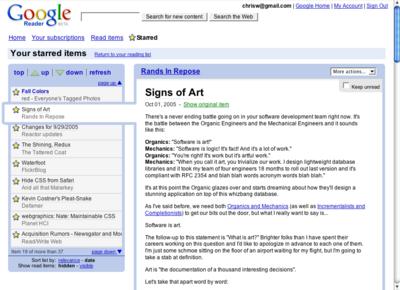
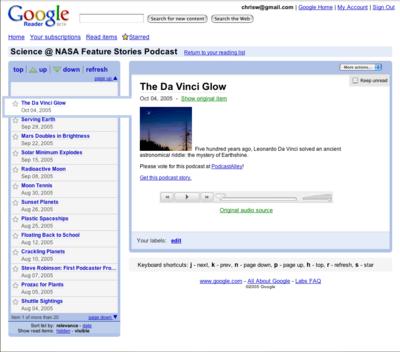
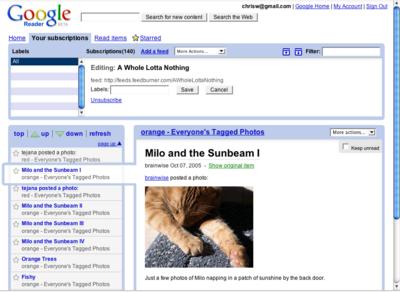
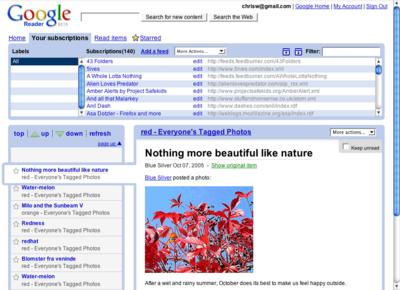
So we (Google) have launched a service called Reader as an experiment on Google Labs. Reader has been the fascination of a group of developers who were interested in building feed readers and I'm just happy to have been involved so please bear with the occasional confessional-letter cadence since "I never thought these letters were real until...'" can sound silly to anyone who isn't actually the surprised person in question.

Screenshots of Google Reader. You probably know the drill, click to enlarge.

The main window:


Your starred items:


A podcast showing the audio player:


With the drawer open and editing a feed:


With the drawer open, browsing subscriptions and labels.


The gist? It's clear that there's value in keeping up with web content by subscribing to feeds. But the promise of this technology seems greater than, say, the attention paid to its admittedly excellent ability to manage news updates and it's been clear that developers who have been working with RSS, Atom, and microformats have understood that syndication can perhaps be compared favorably, and superficially, to bricks-and-mortar efforts like bridge, dam or canal
building. (For additional metaphoric conflation I'd been considering mentioning the Yangtse River's Three Gorges Dam project to highlight engineering designs for managing floods. Aren't you glad I didn't?)

The web is always been poised to grow. (Duh.) And as a second order effect the amount of information available through feeds seems likely to overwhelm the casual onlooker despite its being potentially useful for them. A (currently) smallish cross-vendor community has been adept at making tools for managing this incredible volume of data available for everyone for years and at Google we're interested in helping out with the resources available to us.

More later. There's a little bit of digital soup being thrown at the newborn. So many people... so many people at the same time...

Previously


Dec 28, 2016
Open source down under: Linux.conf.au 2017

by Open Source Programs Office | Read | No Comments

It’s a new year and open source enthusiasts from around the globe are preparing to gather at the edge of the world for Linux.conf.au 2017. Among those preparing are Googlers, including some of us from the Open Source Programs Office.

This year Linux.conf.au is returning to Hobart, the riverside capital of Tasmania, home of Australia’s famous Tasmanian devils, running five days between January 16 and 20.

Circle_DevilTuz.png
Tuz, a Tasmanian devil sporting a penguin beak, is the Linux.conf.au mascot.
(Artwork by Tania Walker licensed under CC BY-SA.)

The conference, which began in 1999 and is community organized, is well equipped to explore the theme, “the Future of Open Source,” which is reflected in the program schedule and miniconfs.

You’ll find Googlers speaking throughout the week (listed below), as well as participating in the hallway track. Don’t miss our Birds of a Feather session if you’re a student, educator, project maintainer, or otherwise interested in talking about outreach and student programs like Google Summer of Code and Google Code-in.

Monday, January 16th
12:20pm The Sound of Silencing by Julien Goodwin
4:35pm   Year of the Linux Desktop? by Jessica Frazelle

Tuesday, January 17th
All day    Community Leadership Summit X at LCA

Wednesday, January 18th
2:15pm   Community Building Beyond the Black Stump by Josh Simmons
4:35pm   Contributing to and Maintaining Large Scale Open Source Projects by Jessica Frazelle

Thursday, January 19th
4:35pm   Using Python for creating hardware to record FOSS conferences! by Tim Ansell

Friday, January 20th
1:20pm   Linux meets Kubernetes by Vishnu Kannan

Not able to make it to the conference? Keynotes and sessions will be livestreamed, and you can always find the session recordings online after the event.

We’ll see you there!

By Josh Simmons, Open Source Programs Office


Dec 23, 2016
Taking the pulse of Google Code-in 2016

by Open Source Programs Office | Read | No Comments

GCI official horizontal_1372x448dp.png

Today is the official midpoint of this year’s Google Code-in contest and we are delighted to announce this is our most popular year ever! 930 teenagers from 60 countries have completed 3,503 tasks with 17 open source organizations. The number of students successfully completing tasks has almost met the total number of students from the 2015 contest already.

Tasks that the students have completed include:

  • writing test suites
  • improving mobile UI 
  • writing documentation and creating videos to help new users 
  • working on internationalization efforts
  • fixing and finding bugs in the organization’s’ software 

Participants from all over the world
In total, over 2,800 students from 87 countries have registered for the contest and we look forward to seeing great work from these (and more!) students over the next few weeks. 2016 has also seen a huge increase in student participation in places such as Indonesia, Vietnam and the Philippines.

Google Code-in participants by country
Please welcome two new countries to the GCI family: Mauritius and Moldova! Mauritius made a very strong debut to the contest and currently has 13 registered students who have completed 31 tasks.

The top five countries with the most completed tasks are:

  1. India: 982
  2. United States: 801
  3. Singapore: 202
  4. Vietnam: 119
  5. Canada: 117

Students, there is still plenty of time to get started with Google Code-in. New tasks are being added daily to the contest site — there are over 1,500 tasks available for students to choose from right now! If you don’t see something that interests you today, check back again every couple of days for new tasks.

The last day to register for the contest and claim a task is Friday, January 13, 2017 with all work being due on Monday, January 16, 2017 at 9:00 am PT.

Good luck to all of the students participating this year in Google Code-in!

By Stephanie Taylor, Google Code-in Program Manager

All numbers reported as of 8:00 PM Pacific Time, December 22, 2016.


Dec 21, 2016
Introducing the ExifInterface Support Library

by Android Developers | Read | No Comments

With the release of the 25.1.0 Support Library, there’s a new entry in the family: the ExifInterface Support Library. With significant improvements introduced in Android 7.1 to the framework’s ExifInterface, it only made sense to make those available t…


Dec 21, 2016
Geolocation and Firebase for the Internet of Things

by Maps Devel | Read | No Comments

Posted by Ken Nevarez, Industry Solutions Lead at Google

GPS is the workhorse of location based services, but there are use cases where you may want to avoid the cost and power consumption of GPS hardware or locate devices in places where GPS lacks accuracy, such as in urban environments or buildings.

We’ve seen recent growth in Internet of Things (IoT) applications using the Google Maps Geolocation API instead of GPS for asset tracking, theft prevention, usage optimization, asset servicing, and more. As part of my 20 percent project at Industry Solutions, I created a prototype IoT device that can locate itself using surrounding WiFi networks and the Google Maps Geolocation API. In this post, I’ll discuss some interesting implementation features and outline how you can create the prototype yourself.

I built a device that scans for local WiFi and writes results (WiFi hotspots and their signal strength) to a Firebase Realtime Database. A back-end service then reads this data and uses the Google Maps Geolocation API to turn this into a real-world location, which can be plotted on a map.


Set up the Device & Write Locally

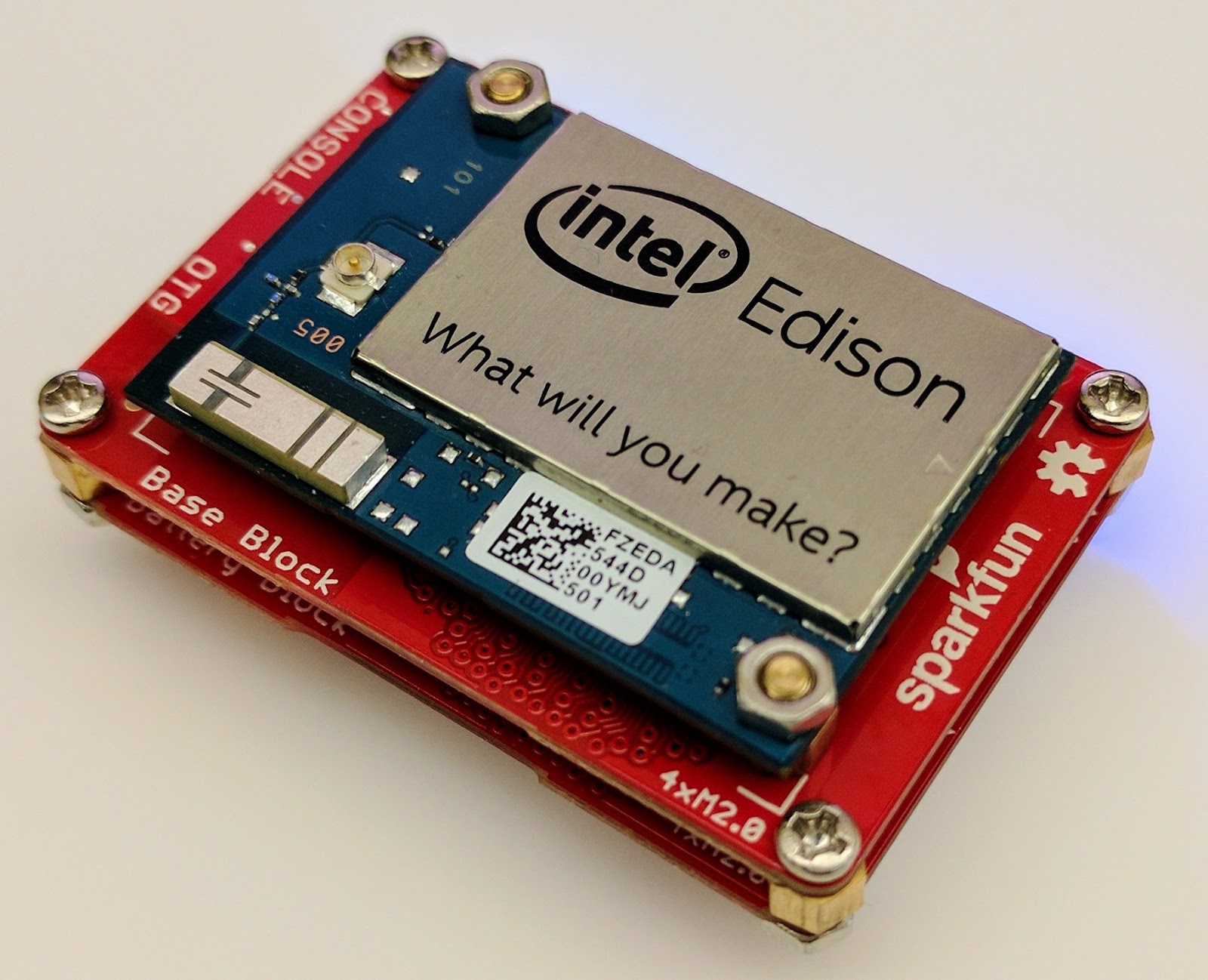
For this proof of concept, I used the Intel Edison as a Linux-based computing platform and augmented it with Sparkfun’s Edison Blocks. To build the device, you will need an Intel Edison, a Base Block, a Battery Block and a Hardware pack.


Developing for the Edison is straightforward using the Intel XDK IDE. We will be creating a simple Node.js application in JavaScript. I relied on 3 libraries: Firebase for the database connection, wireless-tools/iwlist to capture WiFi networks, and macaddress to capture the device MAC. Installation instructions can be found on the linked pages.

Step 1: get the device MAC address and connect to Firebase:

function initialize() {
    macaddress.one('wlan0', function (err, mac) {
        mac_address = mac;
        if (mac === null) {
            console.log('exiting due to null mac Address');
            process.exit(1);
        }
        firebase.initializeApp({
            serviceAccount: '/node_app_slot/.json',
            databaseURL: 'https://.firebaseio.com/'
        });
        var db = firebase.database();
        ref_samples = db.ref('/samples');
        locationSample();
    });
}

The above code contains two placeholders:

  1. The service-account-key is a private key you create in the Firebase Console. Follow the gear icon in the upper left of console, select “settings”, and click Generate New Private Key. Place this key on your Edison in the directory /node_app_slot/. See this Firebase documentation for more information.
  2. The project-id in the database URL is found in the Firebase console database page after you have linked your Google project with Firebase.

Step 2: scan for WiFi networks every 10 seconds and write locally:

function locationSample() {
    var t = new Date();
    iwlist.scan('wlan0', function(err, networks) {
        if(err === null) {
            ref_samples.push({
                mac: mac_address,
                t_usec: t.getTime(),
                t_locale_string: t.toLocaleString(),
                networks: networks,
            });
        } else {
            console.log(err);
        }        
    });
    setTimeout(locationSample, 10000);
}

Write to the cloud

The locationSample() function above writes detectable WiFi networks to a Firebase database that syncs to the cloud when connected to a network.

Caveat: To configure access rights and authentication to Firebase, I set up the device as a “server”. Instructions for this configuration are on the Firebase website. For this proof of concept, I made the assumption that the device was secure enough to house our credentials. If this is not the case for your implementation you should instead follow the instructions for setting up the client JavaScript SDK.

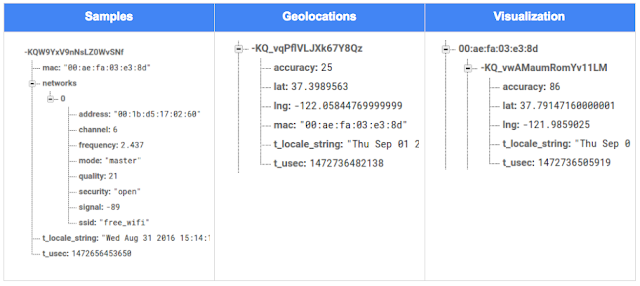
The database uses 3 queues to manage workload: a WiFi samples queue, a geolocation results queue and a visualization data queue. The workflow will be: samples from the device go into a samples queue, which gets consumed to produce geolocations that are put into a geolocations queue. Geolocations are consumed and formatted for presentation, organized by device, and the output is stored in a visualizations bucket for use by our front end website.

Below is an example of a sample, a geolocation, and our visualization data written by the device and seen in the Firebase Database Console.

Processing the Data with Google App Engine

To execute the processing of the sample data I used a long running Google App Engine Backend Module and a custom version of the Java Client for Google Maps Services.

Caveat: To use Firebase with App Engine, you must use manual scaling. Firebase uses background threads to listen for changes and App Engine only allows long-lived background threads on manually scaled backend instances.

The Java Client for Google Maps Services takes care of a lot of the communications code required to use the Maps APIs and follows our published best practices for error handling and retry strategies that respect rate limits. The GeolocateWifiSample() function below is registered as an event listener with Firebase. It loops over each network reported by the device and incorporates it into the geolocation request.

private void GeolocateWifiSample(DataSnapshot sample,  Firebase db_geolocations, Firebase db_errors) {
    // initalize the context and request
    GeoApiContext context = new GeoApiContext(new GaeRequestHandler()).setApiKey("");
    GeolocationApiRequest request = GeolocationApi.newRequest(context)
            .ConsiderIp(false);
    // for every network that was reported in this sample...
    for (DataSnapshot wap : sample.child("networks").getChildren()) {
        // extract the network data from the database so it’s easier to work with
        String wapMac = wap.child("address").getValue(String.class);
        int wapSignalToNoise = wap.child("quality").getValue(int.class);
        int wapStrength = wap.child("signal").getValue(int.class);
        // include this network in our request
        request.AddWifiAccessPoint(new WifiAccessPoint.WifiAccessPointBuilder()
                .MacAddress(wapMac)
                .SignalStrength(wapStrength)
                .SignalToNoiseRatio(wapSignalToNoise)
                .createWifiAccessPoint());
    }
    ...
    try {
        // call the api
        GeolocationResult result = request.CreatePayload().await();
        ...
        // write results to the database and remove the original sample
    } catch (final NotFoundException e) {
        ...
    } catch (final Throwable e) {
        ...
    }
}

Register the GeolocateWifiSample() function as an event handler. The other listeners that process geolocation results and create the visualization data are built in a similar pattern.

ChildEventListener samplesListener = new ChildEventListener() {
    @Override
    public void onChildAdded(DataSnapshot dataSnapshot, String previousChildName) {
        // geolocate and write to new location
        GeolocateWifiSample(dataSnapshot, db_geolocations, db_errors);
    }
    ...
};
db_samples.addChildEventListener(samplesListener);

Visualize the Data

To visualize the device locations I used Google App Engine to serve stored data from Firebase and the Google Maps JavaScript API to create a simple web page that displays the results. The index.html page contains an empty

with id “map”. I initialized this
to contain the Google Map object. I also added “child_added” and “child_removed” event handlers to update the map as the data changes over time.
function initMap() {
    // attach listeners
    firebase.database().ref('/visualization').on('child_added', function(data) {
        ...
        data.ref.on('child_added', function(vizData) {
            circles[vizData.key]= new CircleRoyale(map,
                                vizData.val().lat,
                                vizData.val().lng,
                                vizData.val().accuracy,
                                color);
          set_latest_position(data.key, vizData.val().lat, vizData.val().lng);
        });
        data.ref.on('child_removed', function(data) {
            circles[data.key].removeFromMap();
        });
    });
    // create the map
    map = new google.maps.Map(document.getElementById('map'), {
      center: get_next_device(),
      zoom: 20,
      scaleControl: true,
    });
    ...
}

Since the API returns not only a location but also an indication of accuracy, I’ve created a custom marker that has a pulsing radius to indicate the accuracy component.

Two devices (red and blue) and their last five known positions


What’s next?

In this post I’ve outlined how you can build an IoT device that uses Google Maps Geolocation API to track any internet-connected device – from robotics to wearables. The App Engine processing module can be expanded to use other Google Maps APIs Web Services providing geographic data such as directions, elevation, place or time zone information. Happy building!

As an alternative, you can achieve a similar solution using Google Cloud Platform as a replacement for Firebase—this article shows you how.

author image
About Ken: Ken is a Lead on the Industry Solutions team. He works with customers to bring innovative solutions to market.

Dec 21, 2016
Google Summer of Code 2016 wrap-up: Public Lab

by Open Source Programs Office | Read | No Comments

This post is part of our series of guest posts from students, mentors and organization administrators who participated in Google Summer of Code 2016.


How we made this our best Google Summer of Code ever

This was our fourth year doing Google Summer of Code (GSoC), and it was our best year ever by a wide margin! We had five hard-working students who contributed over 17,000 new lines of (very useful) code to our high-priority projects.

Students voluntarily started coding early and hit the ground running, with full development environments and a working knowledge of GitHub Flow-style pull request process. They communicated with one another and provided peer support. They wrote tests. Hundreds of them! They blogged about their work as they went, and chatted with other community members about how to design features.

All of that was amazing, and it was made better by the fact that we were accepting pull requests with new code twice weekly. Tuesdays and Fridays, I went through new submissions, provided feedback, and pulled new code into our master branch, usually publishing it to our production site once a week.

I don’t know how other projects do things, but this was very new for us, and it’s revolutionized how we work together. In past years, students would work on their forks, slowly building up features. Then in a mad dash at the end, we’d try to merge them into trunk, with lots of conflicts and many hours (weeks!) of work on the part of project maintainers.

Screenshot_2016-08-26_at_11.44.16_AM.png

What made this year so good?

Many things aligned to make this summer great, and basically none of them are our ideas. I’m sure plenty of you are cringing at how we used to do things, but I also don’t think that it’s that unusual for projects not “born” in the fast-paced world of modern code collaboration.

We used ideas and learned from Nicolas Bevacqua, author of JavaScript Application Design and of the woofmark and horsey libraries which I’ve contributed to. We’ve also learned a great deal from the Hoodie community, particularly Gregor Martynus, who we ran into at a BostonJS meetup. Lastly, we learned from SpinachCon, organized by Shauna Gordon McKeon and Deb Nicholson, where people refine their install process by actually going through the process while sitting next to each other.

Broadly, our strategies were:

  • Good documentation for newcomers (duh)
  • Short and sweet install process that you’ve tried yourself (thanks, SpinachCon!)
  • Predictable, regular merge schedule
  • Thorough test suite, and requiring tests with each pull request
  • Modularity, insisting that projects be broken into small, independently testable parts and merged as they’re written

Installation and pull requests

Most of the above sound kind of obvious or trivial, but we saw a lot of changes when we put it all together. Having a really fast install process, and guidance on getting it running in a completely consistent environment like the virtualized Cloud9 service, meant that many students were able to get the code running the same day they found the project. We aimed for an install time of 15 minutes max, and supplied a video of this for one of our codebases.

We also asked students to make a small change (even just add a space to a file) and walk through the GitHub Flow pull request (PR) submission process. We had clear step-by-step guidance for this, and we took it as a good sign when students were able to read through it and do this.

Importantly, we really tried to make each step welcoming, not demanding or dismissive, of folks who weren’t familiar with this process. This ultimately meant that all five students already knew the PR process when they began coding.

Twice-weekly merge schedule

We were concerned that, in past years, students only tried merging a few times and typically towards the end of the summer. This meant really big conflicts (with each other, often) and frustration.

This year we decided that, even though we’re a tiny organization with just one staff coder, we’d try merging on Tuesday and Friday mornings, and we mostly succeeded. Any code that wasn’t clearly presented, commits squashed, passing tests, and submitting new tests, was reviewed and I left friendly comments and requests so it could be merged the following week.

At first I felt bad rejecting PRs, but we had such great students that they got used to the strictness. They got really good at separating out features, demonstrating their features through clear tests, and some began submitting more than two PRs per week – always rebasing on top of the latest master to ensure a linear commit history. Sweet!

Wrap-up and next steps

The last thing we did was to ask each student, essentially as their documentation, to write a series of new issues which clearly described the problem and/or desired behavior, leave suggestions and links to specific lines of code or example code, and mark them with the special “help-wanted” tag which was so helpful to them when they first started out. We asked each to also make one extra-welcoming “first-timers-only” issue which walks a new contributor through every step of making a commit and even provides suggested code to be inserted.

This final requirement was key. While I personally made each of the initial set of “help-wanted” and “first-timers-only” issues before GSoC, now five students were offloading their unfinished to-dos as very readable and inviting issues for others. The effect was immediate, in part because these special tags are syndicated on some sites. Newcomers began picking them up within hours and our students were very helpful in guiding them through their first contributions to open source.

I want to thank everyone who made this past summer so great, from our champion mentors and community members, to our stellar students, to all our inspirations in this new process, to the dozen or so new contributors we’ve attracted since the end of August.

By Jeff Warren, Organization Administrator for PublicLab.org

Dec 20, 2016
Get the guide to finding success in new markets on Google Play

by Android Developers | Read | No Comments

Posted by Lily Sheringham, Developer Marketing at Google Play

With just a few clicks, you can publish an app to Google Play and access a
global audience of more than 1 billion 30 days active users. Finding success in
global markets means considering how each market differs, planning for high
quality localization, and tailoring your activity to the local audience. The new
Going
Global Playbook provides best practices and tips, with advice from
developers who’ve successfully gone global.

This guide includes advice to help you plan your approach to going global,
prepare your app for new markets, take your app to market, and also include data
and insights for key countries and other useful resources.

This ebook joins others that we’ve recently published including The
Building for Billions Playbook and The
News Publisher Playbook. All of our ebooks are promoted in the Playbook for Developers app, which is
where you can stay up to date with all the news and best practices you need to
find success on Google Play.

How useful did you find this blogpost?


★ ★ ★ ★ ★
What is Google Data?

Google Data is the only site where you can get news from 60+ official Google blogs all in one place. We have published 24,235 official posts since January 2005.


Categories

  • Gmail (Google Mail) (436)
  • Google Adsense (1,013)
  • Google Adsense Feeds (46)
  • Google Adwords (1,224)
  • Google Adwords API (366)
  • Google Affiliate Network (141)
  • Google Ajax API (121)
  • Google Analytics (961)
  • Google Android (654)
  • Google App Engine (332)
  • Google Apps (1,865)
  • Google Blog (1,650)
  • Google Blogger Buzz (527)
  • Google Books (300)
  • Google Checkout (162)
  • Google Chrome (312)
  • Google Code (828)
  • Google Conversions (137)
  • Google CPG (198)
  • Google Custom Search (129)
  • Google Desktop (144)
  • Google Desktop API (175)
  • Google Docs (717)
  • Google DoubleClick (730)
  • Google Earth (1,006)
  • Google Enterprise (1,278)
  • Google Finance (88)
  • Google Gadgets (31)
  • Google Gears (60)
  • Google Grants (285)
  • Google Mac Blog (149)
  • Google Maps (736)
  • Google Merchant (219)
  • Google Mobile (386)
  • Google News (152)
  • Google Notebook (20)
  • Google Online Security (221)
  • Google Open Source (929)
  • Google OpenSocial (197)
  • Google Orkut (381)
  • Google Photos (Picasa) (109)
  • Google Product Ideas (23)
  • Google Public Policy (675)
  • Google Reader (124)
  • Google RechargeIT (29)
  • Google Research (423)
  • Google SketchUp (692)
  • Google Student Blog (848)
  • Google Talk (107)
  • Google Testing (326)
  • Google Translate (98)
  • Google TV Ads Blog (163)
  • Google Video (293)
  • Google Voice (86)
  • Google Wave (38)
  • Google Webmaster Central (376)
  • Google Website Optimizer (101)
  • Google.org (183)
  • iGoogle (87)
  • Uncategorized (1,262)
  • Youtube (779)
  • Youtube API (173)

Tags

adsense adsense google advertisers advertising adwords adwords google adwords tips analytics analytics google android gmail for domains Google Adsense Google Adwords google adwords help Google Analytics google analytics ga.js Google Android Google Apps google apps enterprise google apps free google apps gmail google apps standard google apps sync Google Blog google calendar google chat google culture Google Docs Google Earth Google Enterprise google insights google lat-long Google Mobile Google News google products google statistics google student google updates official google blog open source publishers students website analytics website statistics website stats

Archives

  • December 2016 (58)
  • November 2016 (83)
  • October 2016 (97)
  • September 2016 (113)
  • August 2016 (90)
  • July 2016 (87)
  • June 2016 (100)
  • May 2016 (112)
  • April 2016 (101)
  • March 2016 (116)
  • February 2016 (93)
  • January 2016 (66)
  • December 2015 (111)
  • November 2015 (105)
  • October 2015 (105)
  • September 2015 (116)
  • August 2015 (98)
  • July 2015 (106)
  • June 2015 (149)
  • May 2015 (94)
  • April 2015 (107)
  • March 2015 (124)
  • February 2015 (109)
  • January 2015 (69)
  • December 2014 (123)
  • November 2014 (107)
  • October 2014 (134)
  • September 2014 (132)
  • August 2014 (110)
  • July 2014 (118)
  • June 2014 (142)
  • May 2014 (129)
  • April 2014 (99)
  • March 2014 (125)
  • February 2014 (112)
  • January 2014 (88)
  • December 2013 (104)
  • November 2013 (147)
  • October 2013 (152)
  • September 2013 (114)
  • August 2013 (119)
  • July 2013 (136)
  • June 2013 (173)
  • May 2013 (213)
  • April 2013 (168)
  • March 2013 (167)
  • February 2013 (145)
  • January 2013 (132)
  • December 2012 (156)
  • November 2012 (151)
  • October 2012 (203)
  • September 2012 (168)
  • August 2012 (190)
  • July 2012 (151)
  • June 2012 (169)
  • May 2012 (169)
  • April 2012 (193)
  • March 2012 (227)
  • February 2012 (195)
  • January 2012 (191)
  • December 2011 (243)
  • November 2011 (248)
  • October 2011 (282)
  • September 2011 (271)
  • August 2011 (261)
  • July 2011 (275)
  • June 2011 (259)
  • May 2011 (148)
  • April 2011 (83)
  • March 2011 (92)
  • February 2011 (109)
  • January 2011 (253)
  • December 2010 (397)
  • November 2010 (322)
  • October 2010 (328)
  • September 2010 (402)
  • August 2010 (305)
  • July 2010 (293)
  • June 2010 (362)
  • May 2010 (367)
  • April 2010 (355)
  • March 2010 (363)
  • February 2010 (294)
  • January 2010 (267)
  • December 2009 (321)
  • November 2009 (308)
  • October 2009 (380)
  • September 2009 (344)
  • August 2009 (302)
  • July 2009 (347)
  • June 2009 (357)
  • May 2009 (352)
  • April 2009 (353)
  • March 2009 (351)
  • February 2009 (296)
  • January 2009 (239)
  • December 2008 (253)
  • November 2008 (273)
  • October 2008 (357)
  • September 2008 (316)
  • August 2008 (239)
  • July 2008 (241)
  • June 2008 (250)
  • May 2008 (247)
  • April 2008 (263)
  • March 2008 (251)
  • February 2008 (187)
  • January 2008 (172)
  • December 2007 (179)
  • November 2007 (177)
  • October 2007 (195)
  • September 2007 (148)
  • August 2007 (161)
  • July 2007 (182)
  • June 2007 (152)
  • May 2007 (109)
  • April 2007 (98)
  • March 2007 (93)
  • February 2007 (75)
  • January 2007 (75)
  • December 2006 (82)
  • November 2006 (122)
  • October 2006 (115)
  • September 2006 (106)
  • August 2006 (120)
  • July 2006 (69)
  • June 2006 (61)
  • May 2006 (51)
  • April 2006 (46)
  • March 2006 (48)
  • February 2006 (45)
  • January 2006 (46)
  • December 2005 (51)
  • November 2005 (50)
  • October 2005 (23)
  • September 2005 (39)
  • August 2005 (28)
  • July 2005 (15)
  • June 2005 (25)
  • May 2005 (27)
  • April 2005 (31)
  • March 2005 (31)
  • February 2005 (3)
  • January 2005 (1)

Recent Posts

  • Other sites are using my ad code. What should I do?
  • Open source down under: Linux.conf.au 2017
  • Taking the pulse of Google Code-in 2016
  • Introducing the ExifInterface Support Library
  • Geolocation and Firebase for the Internet of Things
  • Google Summer of Code 2016 wrap-up: Public Lab
  • Get the guide to finding success in new markets on Google Play
  • Start building Actions on Google
  • Best practices to improve app engagement
  • Project Wycheproof
January 2017
M T W T F S S
« Dec    
  1
2 3 4 5 6 7 8
9 10 11 12 13 14 15
16 17 18 19 20 21 22
23 24 25 26 27 28 29
30 31  

Page 1,601 of 1,615« First«...102030...1,5991,6001,6011,6021,603...1,610...»Last »


Copyright © 2017 GoogleData.org, All Rights Reserved.
This site is not operated by, sponsored by, endorsed by, or affiliated with Google Inc. in any way.
Rss Feed Tweeter button Facebook button Technorati button Reddit button Myspace button Linkedin button Delicious button Digg button Stumbleupon button Newsvine button