Google Data

  • Home
  • Everything Google
    • Gmail (Google Mail)
    • Google Adsense
    • Google Adsense Feeds
    • Google Adwords
    • Google Adwords API
    • Google Affiliate Network
    • Google Ajax API
    • Google Analytics
    • Google Android
    • Google App Engine
    • Google Apps
    • Google Blog
    • Google Blogger Buzz
    • Google Books
    • Google Checkout
    • Google Chrome
    • Google Code
    • Google Conversions
    • Google CPG
    • Google Custom Search
    • Google Desktop
    • Google Desktop API
    • Google Docs
    • Google DoubleClick
    • Google Earth
    • Google Enterprise
    • Google Finance
    • Google Gadgets
    • Google Gears
    • Google Grants
    • Google Mac Blog
    • Google Maps
    • Google Merchant
    • Google Mobile
    • Google News
    • Google Notebook
    • Google Online Security
    • Google Open Source
    • Google OpenSocial
    • Google Orkut
    • Google Photos (Picasa)
    • Google Product Ideas
    • Google Public Policy
    • Google Reader
    • Google RechargeIT
    • Google Research
    • Google SketchUp
    • Google Student Blog
    • Google Talk
    • Google Testing
    • Google Translate
    • Google TV Ads Blog
    • Google Video
    • Google Voice
    • Google Wave
    • Google Webmaster Central
    • Google Website Optimizer
    • Google.org
    • iGoogle
    • Uncategorized
    • Youtube
    • Youtube API
  • Resources
    • Google Products & Services
    • Google Twitter Directory
    • Google Trademarks
    • Google Data Site Map
  • About
  • Contact
  • Subscribe via RSS

Get polling place and ballot information quickly and easily

October 28th, 2016  |  Published in Google Blog

Voting matters — and history proves it. In 1839, the Massachusetts gubernatorial election was decided by just two votes out of 102,066. The same was the case in a 1974 New Hampshire Senate race — out of 233,363 votes, only two made the difference. And in 2008, an Alaskan State House race was decided by a single vote.

With Election Day just 25 days away, it’s time to make your vote count. Throughout the summer, we’ve helped voters find information about how to register and how to vote, in both English and Spanish. Now, as you prepare to head to the polls, we want to make sure you know where to vote and who’s on your ballot when you get there.


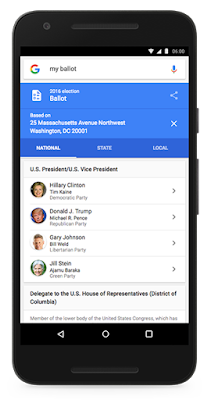
From President and Vice President, to Congressperson and County Commissioner, a simple search for “who’s on my ballot” will help you find info on the candidates, as well as detailed information on your state’s referenda. You can tap on a candidate’s name from your ballot to find information about them, including their party and website.


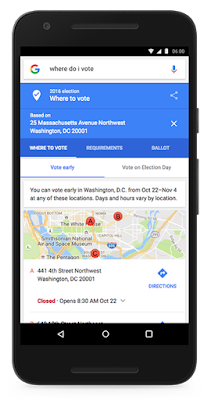
The final step: showing up! With various polling places popping up across your hometown, we want to make sure you find the info you need from state to state. Starting today and as we continue to add data from each state over the next couple of weeks, whether you’re planning to vote early or in person on November 8, just search “where to vote” and Google will display a polling place location finder as well as voting ID requirements.


While people can find this crucial information right in Google Search, we’re also opening this data up to other organizations for free. From technology companies like Uber, Twitter, Expedia and Hotels.com to nonprofits like Pew Charitable Trusts’ The Voting Information Project, and Democracy Works’ TurboVote Challenge, organizations of all shapes and sizes can use our products and the Google Civic Information API to create tools that get this information into the hands of as many voters possible.

We hope these features will help you get the information you need, when you need it. Your vote matters, so make it count.

Posted by Jacob Schonberg, Product Manager and Kate Sokolov, Program Manager, Politics & Elections https://2.bp.blogspot.com/-S5agzUF3-1o/WBORxVPGR2I/AAAAAAAATKk/v-xJYKa3kxA9RdUkee9fXZbkyqar376vgCLcB/s1600/Google_Vote.jpg Jacob Schonberg Product Manager Google

“Stranger Things” are happening in Google Allo

October 28th, 2016  |  Published in Google Blog

Mind Control. Demogorgons. Barb. This Halloween, there’s no question we’ll see people out in costume as characters from this summer’s addictive Netflix original series, “Stranger Things.” To help bring you back into the ‘80s supernatural mindset, we’re partnering with Netflix to bring the Upside Down right to your chats in Google Allo, our smart messaging app for Android and iOS.

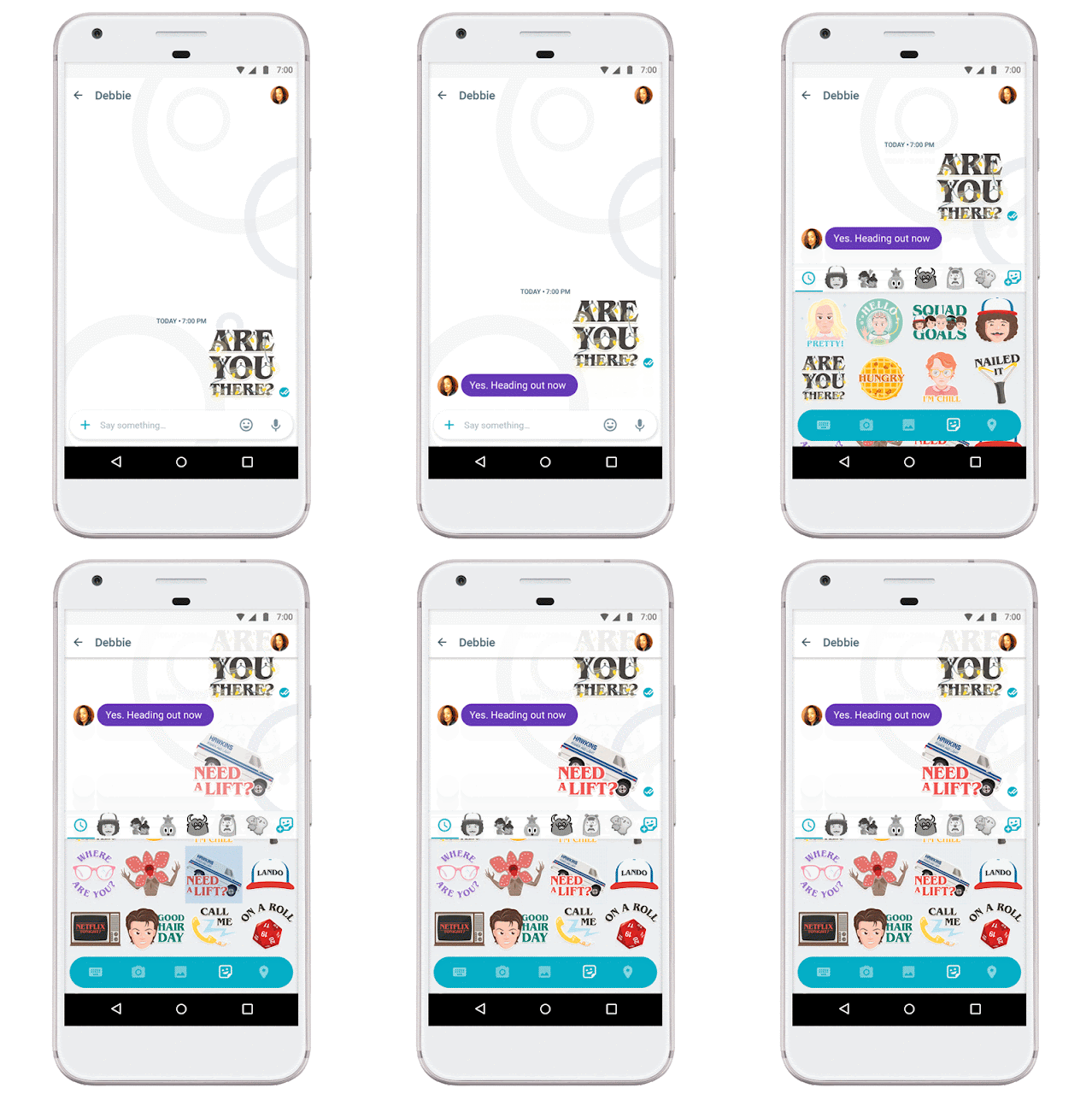
A new “Stranger Things” sticker pack is now available for download in Google Allo, featuring exclusive artwork inspired by the show. So whether you’re researching how to create a DIY Eleven costume with friends or debating whether Barb will reappear in season two, we got you covered.


These stickers aren’t the only new thing in Google Allo this week. You can now reply to messages directly from your notifications on Android and iOS. So if you’re cooking up a French Onion Barb, you don’t have to stop what you’re doing to reply back to friends.


We’ve also added support for Android N so you can take advantage of its features. With split-screen mode you can now chat with friends and rewatch season one at the same time. App shortcuts help you quickly start a new conversation from the home screen. And for iOS users, we’ve brought the ability to doodle on your photos to iOS, so you can craft a masterpiece before sharing in Google Allo.

Beware the flickering lights, and have a safe and happy Halloween!

P.S. Google Allo will help you unlock your powers today in New York City. Stay tuned to Google on Twitter for a hint on where the drop-off from Hawkins National Laboratories will take place.

Posted by Amit Fulay, Group Product Manager https://4.bp.blogspot.com/-qATCBx-54JA/WBOkX0dnQmI/AAAAAAAATNA/9wi6VW6mSTYfiXC6a5LzA2GWCf_otJlcACLcB/s1600/Stranger%2BThings%2BAllo%2BStickers_Hero.jpg Amit Fulay Group Product Manager Google

Live the Day of the Dead

October 28th, 2016  |  Published in Google Blog

Mexican poet Octavio Paz once wrote, "Our cult of death is also our cult of life." Those words capture the spirit with which Mexicans celebrate Día de Muertos. On November 1 and 2, families in Mexico honor those who have departed, setting up colorful altars at home and in public places with the images of loved ones. These ancestors are greeted with their favorite foods, drinks, sugar skulls, colored paper, marigold flowers, candles and incense. It’s a true celebration of culture and family — and has even been declared “Intangible Cultural Heritage” by UNESCO.


Today, we want to invite everyone to experience Mexico’s tradition of paying tribute to life, through the Day of the Dead exhibition on Google Arts & Culture. The content is curated by 10 cultural organizations from Mexico, Peru and the United States and explores the Pre-Columbian roots of this festivity, its many transformations through history and its contemporary manifestations as told by pieces of archaeology, folk art, prints, paintings, sculptures, street art and many other artforms. The collection includes over 500 artworks and artifacts, 20 exhibits, 11 Street View virtual tours through cemeteries and museums and two guided tours that users can experience with a Cardboard viewer. A Google Expedition also allows teachers around the world to take their classes on a virtual field trip through the history of the Day of the Dead.

Without Hope (1945) by Frida Kahlo at Museo Dolores Olmedo

Colossal Skulls from James Bond movie (2015) by Colectivo Última Hora at Museo de Arte Popular

Catrina (2015) by D*Face at All City Canvas

Cráneo by Vicente Barroco Reyes at Museo de Arte Popular

La Catrina (1910/1913) by José Guadalupe Posada at the Smithsonian Latino Center

Besitos a mamá (2011) by Felipe Mendiola Velázques at Museo Mexicano del Diseño

Start the exhibition online at g.co/diademuertos or download the Google Arts & Culture app for iOS or Android to dive into the ancient roots of the Day of the Dead through codices and sculptures. You can explore the different representations of death in folk art pieces from all over the country; savor the paintings of Diego Rivera and Frida Kahlo, and learn about Jose Guadalupe Posada, Mexico's most famous illustrator and father of the iconic Catrina.

If you’re new to this tradition, get to know the elements that make up an Offering; enjoy the calaveras crafted by the legendary family Linares, visit the colossal skulls made by Mexican artisans for the 2015 James Bond movie, Spectre and even take a stroll through the San Andrés Mixquic’s cemetery during Día de Muertos.

Whichever route you choose, we invite you to explore death as a celebration of life.


Posted by Lucy Schwartz, Program Manager, Google Cultural Institute https://2.bp.blogspot.com/-vZzAiPVEzbU/WBOjhvzldoI/AAAAAAAATM4/kr9bDwJyYLcVsy1yMtLhuZhR3_gwtTaIwCLcB/s1600/LiveDayoftheDead_Hero.jpg Lucy Schwartz Program Manager Google Cultural Institute

Google Drive desktop app ending support for Windows XP and Vista

October 27th, 2016  |  Published in Google Apps

Today, we’re announcing that on January 1, 2017 we will discontinue support for the Google Drive desktop app on Windows XP and Vista since these platforms are no longer actively supported by Microsoft. The Google Drive desktop app (officially: "Google Drive for Mac/PC") will continue to function on these platforms, but will not be actively tested and maintained. If you are still on one of these unsupported platforms, we encourage you to move to a newer version of Windows to continue using Google Drive desktop app.

Release track:
Launching to both Rapid release and Scheduled release on January 1, 2017


Launch release calendar
Launch detail categories
Get these product update alerts by email
Subscribe to the RSS feed of these updates

Readfeed graduates from Google Play’s Early Access beta program & offers some learnings

October 26th, 2016  |  Published in Google Android

Guest post by Rajiev Timal, Founder of Readfeed

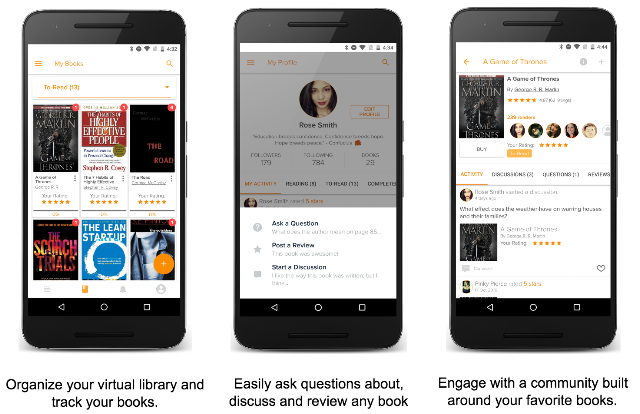
Readfeed was created to help book lovers around the world share and discuss their favorite reads with each other more easily. Today, we are excited to officially launch the Readfeed app on Google Play. As one of the first online book clubs available only on Android devices, Readfeed lets you create your virtual bookshelf by adding books to custom lists, track and share your reading progress with community members, and see what books others are reading and talking about.

Readfeed has come a long way since we first released the app as beta in Google Play's Early Access program. As one of the first graduates of the beta program, we were able to solicit feature requests, identify bugs, locate new and optimize existing target markets, as well as build a sizable reader community. This allowed Readfeed to deliver the best possible experience right out of the gate.

As a guest on this blog, we thought it would be helpful to share some important best practices that we learned from the Early Access program to improve your products and scale your user base.

Harnessing Feedback Loops

One of the core principles underlying the construction of any successful product is setting up an effective feedback loop between users and product creators. Google Play Early access does this automatically. Users show up (sometimes seemingly out of nowhere), install the app, and leave feedback in the Beta Feedback section of the developer console. We can then reply in that section or take the conversation into an email, address the issue, and email users when it's addressed. Many improvements to Readfeed have been made as a direct result of this process.

Identifying New Target Markets

One major benefit of Early Access was that it gave us immediate access to a worldwide audience of readers. We were able to quickly assess the different book-related markets that existed based on user feedback and interviews done through email. Since launched in beta, over 1000 people have asked to read free books. Apparently this need exists in third-world countries and we plan to add this functionality in a future release.

Identifying Bugs

Bugs plague any app in its early stages. Because of the variety of devices that Early Access users have, ranging from Android 4.2 rooted devices to the latest Nexus phones, we were able to identify bugs very quickly. For instance, on Android 4.2 there was a recurrent crash which was tough for me to identify with my own devices. After one user emailed me about it, I was able to gather enough information to resolve the issue and put out an update immediately.

Identifying New Features

Google Play Early Access made it a lot easier to determine what to do next. When about 10 people request a feature, we know it's immediately important and put it in the app. One feature that came directly from Early Access feedback was the ability to rate books without leaving a review.

Community Building

Early Access has allowed us to start building a community. For instance, a Software tester from the UK who likes books sent me a detailed analysis of all of Readfeed's bugs. Also, we've witnessed many people take the initiative and answer others' questions about the app. Because of the critical mass that Google Play Early Access helps you build, it's easy for communities to form and start sharing information with each other.

A/B Testing

We now have enough users to A/B test certain parts of the app and get statistically significant results. This is something that usually takes a long time to achieve.

There are many other ways Google Play Early Access have helped us, and we're thankful that Readfeed has had the opportunity to be a part of the program. I can say without reservation that our current and future product would be in a very different place had it not been for our inclusion in Early Access.

Get Involved
If you are a developer getting ready to launch on Google Play, you can nominate your app or game to be part of Early Access. Learn more here.

Do more with ads on AMP

October 26th, 2016  |  Published in Google DoubleClick

Cross-posted from the Accelerated Mobile Pages (AMP) Blog

Over a year has passed since the AMP Project first launched with the vision of making mobile web experiences faster and better for everybody. From the very beginning, we’ve maintained that the AMP project would support publishers’ existing business models while creating new monetization opportunities. With regards to advertising, this meant giving publishers the flexibility to use the current technology and systems they’re used to, and evolving user-first mobile web initiatives like AMP for Ads (A4A).

With a growing number of publishers embracing the speed of AMP, today we’re addressing some of the ways in which we’re helping you do more with ads on AMP.

Serve ads from more than 70+ ad tech providers

Keeping with the open source nature of the project, more than 70+ advertising technology providers have already integrated with AMP. And that list is only growing. Existing tags that are delivered via a supported ad server also work in AMP. So, you can serve ads from both directly-sold campaigns as well as third-party ad networks and exchanges so long as they have support for AMP.

Keep 100% of the ad revenue

AMP is an open source project. It does not take a revenue share. AMP is not an advertising service provider or intermediary, and publishers can monetize AMP pages the same way you monetize HTML pages, keeping 100% of the revenue you earn based on negotiated rates with ad providers.

Choose the advertising experience on your pages

You can choose to serve any number of ads per page to serve in locations that works best for your content, including the first viewport. Just remember that regular ads in AMP load after the primary content. So, unless you’re loading the lightning fast A4A ads, we recommend placing the first ad below the first viewpoint to optimize for viewability and user experience.

Take advantage of video ad support

AMP currently supports 13 different video players, ranging from Brightcove to Teads, all of which can serve video ads. If you want to use a video player that is not currently supported in AMP, place the video player inside amp-iframe. Learn more.

Differentiate yourself with rich and custom ad formats

AMP accommodates a large variety of ad formats by default, ranging from publisher custom ad units to IAB standard outstream video and in-feed native ads. We value publisher choice and support efforts to create proprietary ad formats. For example, with responsive layouts in AMP, you can offer advertisers custom ads that can dynamically span the entire width of the mobile device. Learn more about how you can adapt your ads strategy for AMP.

Maximize revenue with interchangeable ad slots

In September 2016, both YieldMo and DoubleClick announced support for multi-size ad requests on AMP pages. With this launch, you can optimize yield by allowing multiple ad creative sizes to compete for each ad slot, capturing the most advertiser demand possible on AMP pages while still protecting the user’s experience.

Plan ahead with a view into AMP’s roadmap

Transparency is important to the success of any open source project and is a key value for AMP. Accordingly, we started publishing the AMP roadmap publicly nearly 6 months ago, including milestones for ads. These roadmaps are accompanied with bi-quarterly status updates and you can also see all AMP releases .

Over 700,000 domains have published AMP pages and a good many are monetizing them with ads. Early studies suggest that ads on AMP are more viewable and engaging than ads on non-AMP mobile pages. That’s because with AMP, you don’t have to choose between good user experiences and monetization opportunities. When balanced and optimized, you can have both.

Reach out — we’re eager to hear your suggestions and feedback to make sure that AMP pays off for everyone.

Posted by Vamsee Jasti
Product Manager, AMP Project

Supercharging Style Transfer

October 26th, 2016  |  Published in Google Research

Posted by Vincent Dumoulin*, Jonathon Shlens and Manjunath Kudlur, Google Brain Team

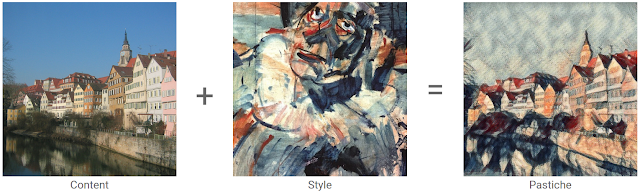
Pastiche. A French word, it designates a work of art that imitates the style of another one (not to be confused with its more humorous Greek cousin, parody). Although it has been used for a long time in visual art, music and literature, pastiche has been getting mass attention lately with online forums dedicated to images that have been modified to be in the style of famous paintings. Using a technique known as style transfer, these images are generated by phone or web apps that allow a user to render their favorite picture in the style of a well known work of art.

Although users have already produced gorgeous pastiches using the current technology, we feel that it could be made even more engaging. Right now, each painting is its own island, so to speak: the user provides a content image, selects an artistic style and gets a pastiche back. But what if one could combine many different styles, exploring unique mixtures of well known artists to create an entirely unique pastiche?

Learning a representation for artistic style

In our recent paper titled “A Learned Representation for Artistic Style”, we introduce a simple method to allow a single deep convolutional style transfer network to learn multiple styles at the same time. The network, having learned multiple styles, is able to do style interpolation, where the pastiche varies smoothly from one style to another. Our method enables style interpolation in real-time as well, allowing this to be applied not only to static images, but also videos.
Credit: awesome dog role played by Google Brain team office dog Picabo.
In the video above, multiple styles are combined in real-time and the resulting style is applied using a single style transfer network. The user is provided with a set of 13 different painting styles and adjusts their relative strengths in the final style via sliders. In this demonstration, the user is an active participant in producing the pastiche.

A Quick History of Style Transfer

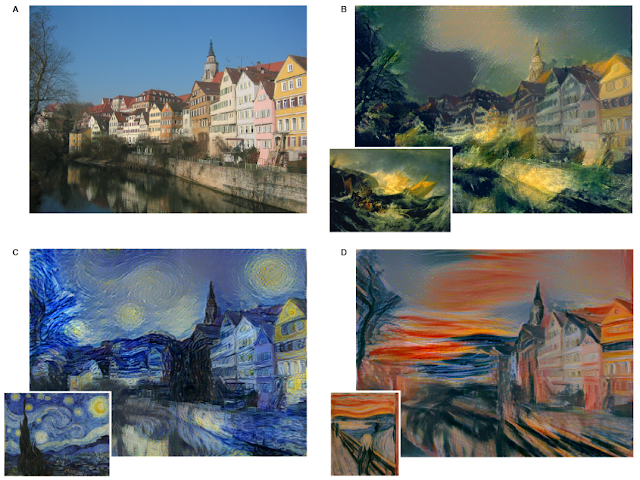
While transferring the style of one image to another has existed for nearly 15 years [1] [2], leveraging neural networks to accomplish it is both very recent and very fascinating. In “A Neural Algorithm of Artistic Style” [3], researchers Gatys, Ecker & Bethge introduced a method that uses deep convolutional neural network (CNN) classifiers. The pastiche image is found via optimization: the algorithm looks for an image which elicits the same kind of activations in the CNN’s lower layers - which capture the overall rough aesthetic of the style input (broad brushstrokes, cubist patterns, etc.) - yet produces activations in the higher layers - which capture the things that make the subject recognizable - that are close to those produced by the content image. From some starting point (e.g. random noise, or the content image itself), the pastiche image is progressively refined until these requirements are met.
Content image: The Tübingen Neckarfront by Andreas Praefcke, Style painting: “Head of a Clown”, by Georges Rouault.
The pastiches produced via this algorithm look spectacular:
Figure adapted from L. Gatys et al. "A Neural Algorithm of Artistic Style" (2015). 
This work is considered a breakthrough in the field of deep learning research because it provided the first proof of concept for neural network-based style transfer. Unfortunately this method for stylizing an individual image is computationally demanding. For instance, in the first demos available on the web, one would upload a photo to a server, and then still have plenty of time to go grab a cup of coffee before a result was available.

This process was sped up significantly by subsequent research [4, 5] that recognized that this optimization problem may be recast as an image transformation problem, where one wishes to apply a single, fixed painting style to an arbitrary content image (e.g. a photograph). The problem can then be solved by teaching a feed-forward, deep convolutional neural network to alter a corpus of content images to match the style of a painting. The goal of the trained network is two-fold: maintain the content of the original image while matching the visual style of the painting.

The end result of this was that what once took a few minutes for a single static image, could now be run real time (e.g. applying style transfer to a live video). However, the increase in speed that allowed real-time style transfer came with a cost - a given style transfer network is tied to the style of a single painting, losing some flexibility of the original algorithm, which was not tied to any one style. This means that to build a style transfer system capable of modeling 100 paintings, one has to train and store 100 separate style transfer networks.

Our Contribution: Learning and Combining Multiple Styles

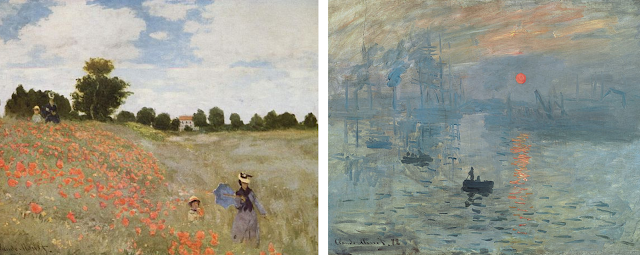
We started from the observation that many artists from the impressionist period employ similar brush stroke techniques and color palettes. Furthermore, painting by say, Monet, are even more visually similar.
Poppy Field (left) and Impression, Sunrise (right) by Claude Monet. Images from Wikipedia
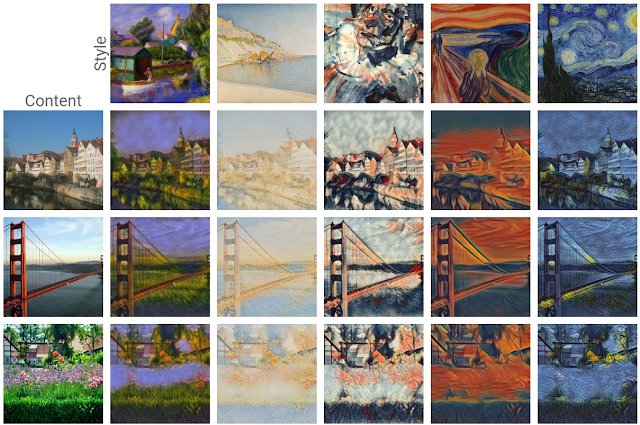
We leveraged this observation in our training of a machine learning system. That is, we trained a single system that is able to capture and generalize across many Monet paintings or even a diverse array of artists across genres. The pastiches produced are qualitatively comparable to those produced in previous work, while originating from the same style transfer network.
Pastiches produced by our single network, trained on 32 varied styles. These pastiches are qualitatively equivalent to those created by single-style networks: Image Credit: (from top to bottom) content photographs by Andreas Praefcke, Rich Niewiroski Jr. and J.-H. Janßen, (from left to right) style paintings by William Glackens, Paul Signac, Georges Rouault, Edvard Munch and Vincent van Gogh.
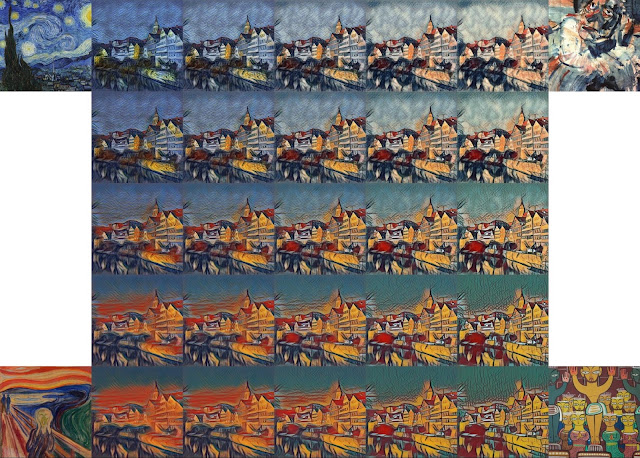
The technique we developed is simple to implement and is not memory intensive. Furthermore, our network, trained on several artistic styles, permits arbitrary combining multiple painting styles in real-time, as shown in the video above. Here are four styles being combined in different proportions on a photograph of Tübingen:
Unlike previous approaches to fast style transfer, we feel that this method of modeling multiple styles at the same time opens the door to exciting new ways for users to interact with style transfer algorithms, not only allowing the freedom to create new styles based on the mixture of several others, but to do it in real-time. Stay tuned for a future post on the Magenta blog, in which we will describe the algorithm in more detail and release the TensorFlow source code to run this model and demo yourself. We also recommend that you check out Nat & Lo’s fantastic video explanation on the subject of style transfer.

References

[1] Efros, Alexei A., and William T. Freeman. Image quilting for texture synthesis and transfer (2001).

[2] Hertzmann, Aaron, Charles E. Jacobs, Nuria Oliver, Brian Curless, and David H. Salesin. Image analogies (2001).

[3] Gatys, Leon A., Alexander S. Ecker, and Matthias Bethge. A Neural Algorithm of Artistic Style (2015).

[4] Ulyanov, Dmitry, Vadim Lebedev, Andrea Vedaldi, and Victor Lempitsky. Texture Networks: Feed-forward Synthesis of Textures and Stylized Images (2016).

[5] Johnson, Justin, Alexandre Alahi, and Li Fei-Fei. Perceptual Losses for Real-Time Style Transfer and Super-Resolution (2016).


* This work was done during an internship with the Google Brain Team. Vincent is currently a Ph.D. candidate at MILA, Université de Montréal.↩


Do more with Ads on AMP

October 26th, 2016  |  Published in Google Adsense

Cross-posted from the Accelerated Mobile Pages (AMP) Blog

Over a year has passed since the AMP Project first launched with the vision of making mobile web experiences faster and better for everybody. From the very beginning, we’ve maintained that the AMP project would support publishers’ existing business models while creating new monetization opportunities. With regards to advertising, this meant giving publishers the flexibility to use the current technology and systems they’re used to, and evolving user-first mobile web initiatives like AMP for Ads (A4A).

With a growing number of publishers embracing the speed of AMP, today we’re addressing some of the ways in which we’re helping you do more with ads on AMP.

Serve ads from more than 70+ ad tech providers

Keeping with the open source nature of the project, more than 70+ advertising technology providers have already integrated with AMP. And that list is only growing. Existing tags that are delivered via a supported ad server also work in AMP. So, you can serve ads from both directly-sold campaigns as well as third-party ad networks and exchanges so long as they have support for AMP.

Keep 100% of the ad revenue

AMP is an open source project. It does not take a revenue share. AMP is not an advertising service provider or intermediary, and publishers can monetize AMP pages the same way you monetize HTML pages, keeping 100% of the revenue you earn based on negotiated rates with ad providers.

Choose the advertising experience on your pages

You can choose to serve any number of ads per page to serve in locations that works best for your content, including the first viewport. Just remember that regular ads in AMP load after the primary content. So, unless you’re loading the lightning fast A4A ads, we recommend placing the first ad below the first viewpoint to optimize for viewability and user experience.

Take advantage of video ad support

AMP currently supports 13 different video players, ranging from Brightcove to Teads, all of which can serve video ads. If you want to use a video player that is not currently supported in AMP, place the video player inside amp-iframe. Learn more.

Differentiate yourself with rich and custom ad formats

AMP accommodates a large variety of ad formats by default, ranging from publisher custom ad units to IAB standard outstream video and in-feed native ads. We value publisher choice and support efforts to create proprietary ad formats. For example, with responsive layouts in AMP, you can offer advertisers custom ads that can dynamically span the entire width of the mobile device. Learn more about how you can adapt your ads strategy for AMP.

Maximize revenue with interchangeable ad slots

In September 2016, both YieldMo and DoubleClick announced support for multi-size ad requests on AMP pages. With this launch, you can optimize yield by allowing multiple ad creative sizes to compete for each ad slot, capturing the most advertiser demand possible on AMP pages while still protecting the user’s experience.

Plan ahead with a view into AMP’s roadmap

Transparency is important to the success of any open source project and is a key value for AMP. Accordingly, we started publishing the AMP roadmap publicly nearly 6 months ago, including milestones for ads. These roadmaps are accompanied with bi-quarterly status updates and you can also see all AMP releases here.

Over 700,000 domains have published AMP pages and a good many are monetizing them with ads. Early studies suggest that ads on AMP are more viewable and engaging than ads on non-AMP mobile pages. That’s because with AMP, you don’t have to choose between good user experiences and monetization opportunities. When balanced and optimized, you can have both.

Reach out -- we’re eager to hear your suggestions and feedback to make sure that AMP pays off for everyone.

Posted by Vamsee Jasti, Product Manager, AMP Project

Did You Receive A Policy Violation Warning?

October 26th, 2016  |  Published in Google Adsense

Have you received an email from with a warning that you’ve violated the AdSense policies? These warnings are usually issued in instances of mild violations that we believe can be fixed quickly.


In addition to an email, you’ll receive a notification in your AdSense account under the “Status” tab. Both the email and notification will explain where your violation occurred and how to fix it and by clicking the link provided, you’ll be sent to the page where the violation has occurred. To resolve the issue, you can either fix the content that violates AdSense policies across your site or remove the AdSense code.

Remember, your site must be compliant in order to participate in the AdSense program. When you’ve made all the necessary changes to your site, check “Resolved” on the site level violation notification in the “Status” tab of your AdSense account. You don’t need to notify us when you’ve fixed the violation; however, you do need to resolve it in a timely manner. 

There are cases where ads stop appearing on your site altogether. This can happen when a publisher fails to respond to policy violation warnings, receives multiple warnings, or displays egregious violations across their site(s). Violations are categorized as egregious when we believe they can cause significant harm to advertisers, Google, users, or the overall ads ecosystem. 

In these cases you’ll receive an email and a notification in your AdSense account under the “Status” tab to notify you of this change. A link will also be included to show you where the violation appears. You can resolve it by either removing the content in question or by removing the AdSense code from the affected page. It’s important to note that a very small percentage of sites have their ads disabled after receiving a policy violation warning. 

Once you’ve corrected the violations across your entire site, you can submit an appeal from the “Status” tab in your AdSense account or by using the AdSense policy troubleshooter. Please bear in mind that we can only review appeals from sites that have AdSense code enabled.


Stay tuned for some best practices to help you avoid a policy violation.

Posted by: Anastasia Almiasheva from the AdSense team

Dart in 2017 and beyond

October 26th, 2016  |  Published in Google Open Source

We’re here at the Dart Developer Summit in Munich, Germany. Over 250 developers from more than 50 companies from all over the world just finished watching the keynote.

This is a summary of the topics we covered:

Dart is the fastest growing programming language at Google, with a 3.5x increase in lines of code since last year. We like to think that this is because of our focus on developer productivity: teams report 25% to 100% increase in speed of development. Google has bet its biggest business on Dart — the web apps built on Dart bring over $70B per year.

Google AdSense recently launched a ground-up redesign of their web app, built with Dart. Earlier this year, we announced that the next generation of AdWords is built with Dart. There are more exciting Dart products at Google that we’re looking forward to reveal. Outside Google, companies such as Wrike, Workiva, Soundtrap, Blossom, DG Logic, Sonar Design have all been using and enjoying Dart for years.

Our five year investment in this language is reaping fruit. But we’re not finished.

We learned that people who use Dart love its terse and readable syntax. So we’re keeping that.

We have also learned that Dart developers really enjoy the language’s powerful static analysis. So we’re making it better. With strong mode, Dart’s type system becomes sound (meaning that it rejects all incorrect programs). We’re also introducing support for generic methods.

We have validated that the programming language itself is just a part of the puzzle. Dart comes with ‘batteries included.’ Developers really like Dart’s core libraries — we will keep them tight, efficient and comprehensive. We will also continue to invest in tooling such as pub (our integrated packaging system), dartfmt (our automatic formatter) and, of course, the analyzer.

On the web, we have arrived at a framework that is an excellent fit for Dart: AngularDart. All the Google web apps mentioned above use it. It has been in production at Google since February. AngularDart is designed for Dart, and it’s getting better every week. In the past 4 months, AngularDart’s output has gotten 40% smaller, and our AngularDart web apps got 15% faster.

Today, we’re launching AngularDart 2.0 final. Tune in to the next session.

With that, we’re also releasing — as a developer preview — the AngularDart components that Google uses for its major web apps. These Material Design widgets are being developed by hundreds of Google engineers and are thoroughly tested. They are written purely in Dart.

We’re also making Dart easier to use with existing JavaScript libraries. For example, you will be able to use our tool to convert TypeScript .d.ts declarations into Dart libraries.

We’re making the development cycle much faster. Thanks to Dart Dev Compiler, compilation to JavaScript will take less than a second across all modern browsers.

We believe all this makes Dart an even better choice for web development than before. Dart has been here for a long time and it’s not going anywhere. It’s cohesive and dependable, which is what a lot of web developers want.

We’re also very excited about Flutter — a project to help developers build high-performance, high-fidelity, mobile apps for iOS and Android from a single codebase in Dart. More on that tomorrow.

We hope you’ll enjoy these coming two days. Tune in on the live stream or follow #dartsummit on Twitter.

By Filip Hracek, Developer Relations Program Manager

3 Exercises To Get Your Fitness App In Shape

October 25th, 2016  |  Published in Google Android

By: Mary Liz McCurdy, Health & Fitness Lead, Google Play

(Originally published on Android Central)

It's an exciting time to be a health & fitness app developer. With people shelling out on fitness more than ever before, we're seeing record high levels of gym memberships and attendance, the rise of boutique fitness, and an emphasis on connected devices.

Paramount to this growth is the integration of smart technology. Whether it be through streaming video, wearables, or mobile apps, technology empowers us with instant access to high quality workouts, sensor biofeedback, and endless on-demand inspiration. At Google Play, we've seen this growth reflected by the incredible popularity of health & fitness apps. In fact, this is one of Google Play's fastest growing app categories, boasting the most engaged 30d active users.

As the resident health & fitness expert on Google Play, I had the opportunity to speak about what's driving the category's growth at the recent Wearables Technology Show. Here are the top three recommendations I shared with the audience to help coach developers towards building more valuable app experiences:

Lose it!

#1: Be invisible

We all know how painful manually logging activity and biometrics is- be it calorie tracking, workouts, moods, or hormone cycles. Manual logging is actually the number one reason users drop off.

What you should do: Minimize distraction with automation wherever possible while maximizing value at the appropriate moments. Remember that you are in all likelihood a companion experience to the main event.

Lose It! makes food tracking easier by using your phone's camera and image recognition technology to identify foods and their nutritional information. Goodbye manual calorie counting!

Strava uses auto pause detection, recognizing when you are resting during exercise so you don't need to fiddle with your device and can stay safe and in the zone.

Freeletics

#2: Be personal

Investing in robust personalization has been the driving factor in improving app engagement and buyer conversion among many of our top developers.

What you should do: Personalize the experience for each user or distinct user cohorts by leveraging technology like the Awareness API, Fit API, Google Sign In, and Facebook Login to intelligently pull in relevant user data. Think about your first-time users, power users, high value users, etc. and treat them uniquely.

Freeletics personalizes onboarding and the overall app experience based on gender and fitness level leading to a 58% increase in weekly active sessions.

Workout Trainer by Skimble increased user engagement by 30% through personalizing training programs based on user fitness assessments, goals, and workout patterns.

Glow

#3: Be assistive

The rise of smartphones, wearables and IoT have left us swimming in data and dashboards and left many consumers wondering, so what?

What you should do: Offer insights and suggestions, not just raw data. Users are not engineers and generally do not want to process complex data or dashboards. In most cases, they want you to tell them what to do in the moment or provide digestible summaries after the fact. Keep it simple.

Glow provides personalized insights that leverage user-inputted data and third party data from Google Fit to help couples achieve their fertility goals.

Beddit gives personalized daily tips to improve your sleep and wellness by analyzing sleep cycles, resting heart rate, respiration, room temperature, and more.

At the end of the day, changing health and fitness habits is hard. Make it easier for your users by seamlessly guiding them on what they personally need to do to achieve their goal. It's that simple ;) We encourage you to experiment with these exercises to get your app fit for the millions of Android users looking to live a healthier, happier life.

The AdSense Guide to Audience Engagement is Now Available in More Languages!

October 25th, 2016  |  Published in Google Adsense

Thank you for your feedback on our recently launched The AdSense Guide to Audience Engagement and letting us know how it has helped you grow your online business. Now you can download the guide in 2 additional languages: Portuguese and Spanish.

Download the guide today, and like thousands of other AdSense publishers, learn how to engage with your users like never before. The guide contains useful advice and best practices that will help you drive engagement on your site, including:
  1. Tips to help your audience become familiar with your brand 
  2. Best practices to design delightful user journeys 
  3. Ideas on how to develop content that resonates with your audience 
  4. Ways to make your content easy to consume 
  5. Reasons why you should share the love with other sites by referring to good sources.
Ready? Download your free copy of the #AdSenseGuide now in any of the following languages:
Guia do Google AdSense para engajamento com o público-alvo

La guía de AdSense para interactuar con la audiencia

Enjoy the guide and we’d love to hear your feedback on Google+ and Twitter using #AdSenseGuide.

Posted by: Jay Castro from the AdSense team

Google Summer of Code 2016 wrap-up: GNU Radio

October 25th, 2016  |  Published in Google Open Source

This post is the third installment in our series of wrap-up posts reflecting on Google Summer of Code 2016. Check out the first and second posts in the series.

Originally posted on GNU Radio Blog

The summer has come to an end -- along with the Summer of Code for GNU Radio. It was a great season in terms of student participation, and as the students are preparing their last commits, this seems a good time to summarize their efforts.

All students presented their work (either in person, or via poster) at this year’s GNU Radio Conference in Boulder, Colorado.

gr-inspector

With gr-inspector, GNU Radio now has its own out-of-tree module, which serves as a repository for signal analysis algorithms, but also as a collection of fantastic examples. This module was created and worked on by Sebastian Müller, who was funded by Google Summer of Code (GSoC), and Christopher Richardson, who participated as a Summer of Code in Space (SOCIS) student funded by the European Space Agency. Sebastian also created a video demonstrating some of the features:


Both Sebastian and Chris have written up their efforts on their own blogs.

PyBOMBS GUI

Ravi Sharan was our other GSoC student, primarily working on a GUI for PyBOMBS, our installation helper tool. Ravi also worked on a bunch of other things, and has summarized his efforts as well.

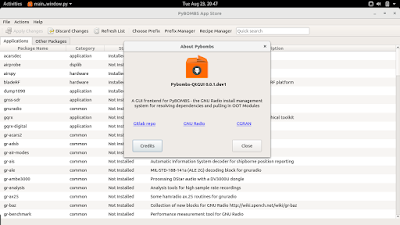
The PyBOMBS GUI is written in Qt, and is a nice extension to our out-of-tree module ecosystem:


While some developers prefer the comfort of their command line environments, we hope that the PyBOMBS GUI will ease the entry for more new developers. The GUI ties in nicely with CGRAN, and with the correct setup, users can directly launch installation of out-of-tree modules from their browser.

Want to participate? Have ideas?

We will definitely apply for GSoC and SOCIS again next year! If you want to participate as a student, it helps a lot to get involved with the community early on. We also recommend you sign up for the mailing list, and get involved with GNU Radio by using it, reporting and fixing issues, or even publishing your own out-of-tree module. For more ideas, take a look at our summer of code wiki pages.

If you simply have ideas for future projects, those are welcome too! Suggest those on the mailing list, or simply edit the wiki page.

By Martin Braun, Organization Administrator for GNU Radio

Jamboard — the whiteboard, reimagined for collaboration in the cloud

October 25th, 2016  |  Published in Google Apps

(Cross-posted from The Keyword)

Posted by TJ Varghese, Product Manager, Jamboard

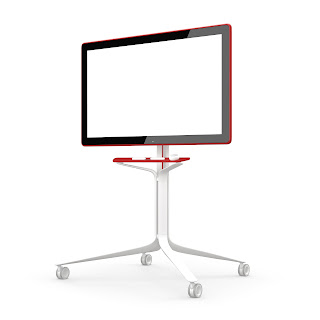
Bringing the right team together for a meeting or brainstorm can take an idea from being good to great. When we tap into ideas from teams across the globe, our work becomes more collaborative and productive. It doesn’t feel like...well, work. At Google, we’ve set out to redefine meetings. So today, we’re introducing Jamboard — a collaborative, digital whiteboard that makes it easy for your team to share ideas in real-time and create without boundaries. We’re moving the whiteboard to the cloud.


Your team’s collaborative, cloud-first whiteboard
Jamboard raises the bar on collaborative creativity, bringing the same real-time collaboration found in G Suite, combined with the best of the web, to your team’s brainstorms and meetings. You can work with teammates from across the world on other Jamboards or remotely use the smartphone or tablet companion app.

Jamboard makes it easy to enrich your brainstorm with the power of Google Search and your team’s work in G Suite. Grab images and content from the web and bring them straight into your “jam.” Pull in work from Docs, Sheets and Slides, or add photos stored in Drive. To capture your ideas clearly, Jamboard is packed with tools like sticky notes and stencils as well as intelligent features like handwriting and shape recognition.
It’s a hassle when you use a whiteboard, reach the end of your meeting and have to quickly scramble to snap a picture of your work. How many times have you scribbled “do not erase” above your idea? Jamboard lets you take your work with you. When you “jam” with your colleagues, it lives in the cloud in Google Drive, so you can easily share what you’ve created or come back to iterate at anytime. Your brainstorm doesn’t have to end when the meeting does.
Designed for precision and ease
Jamboard is intelligently designed to speed up collaboration among your teams with a 55-inch 4k display that features a best-in-class touch response time. Combine this with a built-in HD camera, speakers and Wi-Fi, and you’re set up to collaborate and broadcast your work globally with Hangouts.
Jamboard’s touchscreen was built for precision drawing. It automatically recognizes the difference between using the stylus to sketch or the eraser to start over, and neither require batteries or pairing. Jamboard can also sense when you’re using your finger to wipe work off of the screen, just like a classic whiteboard (except you won’t get ink on your hand). The intuitive, single-cable setup makes it easy to start creating quickly with Jamboard — just wheel it in, turn it on and start brainstorming.

Time to jam 
We want to help teams get back to the heart of what they love to do: create new ideas. That’s why we’ve worked closely with G Suite customers like Instrument, Netflix, and Spotify to refine the blend of hardware and software that drives Jamboard. We're also partnering with BenQ to tap into its network of channels and resellers to help bring Jamboard to market.

While touch displays have traditionally been expensive, at under $6,000 USD, Jamboard is a competitively-priced way to transform your team’s meetings and will be available for purchase in 2017. As we “jam” on the final product details, we're ready to partner with a broader set of G Suite customers to perfect Jamboard through an Early Adopter Program. If you're interested, submit the form on the Jamboard website to receive more information about eligibility.


Launch release calendar
Launch detail categories
Get these product update alerts by email
Subscribe to the RSS feed of these updates

Google Tag Manager: Giving Mobile Tagging a Little Extra Love

October 24th, 2016  |  Published in Google Analytics

Over the last several months, we have talked about Google Tag Manager’s improvements to enterprise workflows, enhanced our security features, and made great strides to bring more partners into our Vendor Tag Template Program. Tag Manager also launched a new mobile SDK at Google I/O in May that builds on the power of Firebase, Google’s mobile app developer platform. Today, we’re excited to announce our latest efforts to make mobile tagging easier than ever with Google Tag Manager.

Welcoming AMP to the Tag Manager family


We are excited to launch support for ⚡ Accelerated Mobile Pages (AMP) in Google Tag Manager! AMP is an open-sourced initiative to make the mobile experience better for everyone. Early data shows that AMP pages load 4x faster and use 10x less data than equivalent non AMP pages. Starting today, you can start using Google Tag Manager to simplify your tag deployment on AMP sites.


While implementing measurement solutions on AMP pages has already been possible, it can be confusing and cumbersome for folks who are new to AMP or who have tagging needs beyond tracking a basic page view. That’s why, in addition to Google Analytics, AMP containers in Tag Manager provide support across Google’s ad platforms including AdWords and DoubleClick. You will find more than 20 tag types available out of the box including a variety of 3rd party vendor tags. We also made sure that firing your tags is a breeze with great coverage of AMP’s triggers as readily available built-in Tag Manager triggers:


When setting up tags, it’s common to want to collect additional values such as how far the user has scrolled down the page or the page’s title. AMP Analytics’ variables serve this purpose and are available in Google Tag Manager as built-in variables ready to be integrated into your tags. You can head over to our support pages for a full list of supported tags and information on how to use built-in variables.


Getting started is as easy as it sounds:

  1. Create a new container for your AMP site
  2. Drop the Tag Manager snippet on your AMP pages
  3. Create your first tags
  4. Preview & Publish

AMP containers are built with the familiarity and flexibility that existing Google Tag Manager users already depend on. As with our other solutions in Tag Manager, AMP containers “just work” out of the box.

Improving Tag Manager for mobile apps 

When we announced Google Tag Manager’s new SDK at Google I/O, we brought an integration method to Android and iOS apps that builds on the power of Firebase. This integration makes it easier than ever for developers and marketers to manage where their app data is sent, both within Google and to our supported Tag Template Vendors.


New triggers for events Firebase automatically detects


Today, we are making our mobile app containers even more intuitive and easy to use by tapping into the events that Firebase detects automatically. Now, when you are in a Firebase mobile container, you will see several new options when setting up triggers. Whether your container targets Android or iOS, you will see a new section called “Firebase Automatic Events” which contains the supported automatically detected events for the respective platforms. You can also find built-in variables for each of those events’ parameters, so setting up your tags should be a cinch.

Find parameters when you need them

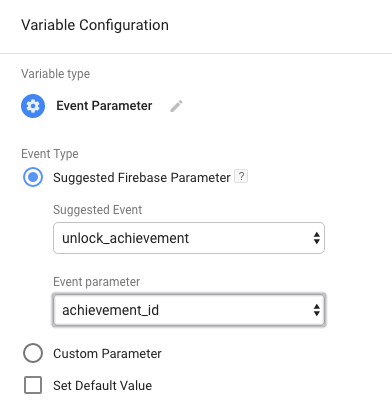
In addition to the events Firebase can detect automatically, developers are encouraged to implement general events for all apps as well as suggested events by app type to help them fully take advantage of Firebase features. Once implemented, you’re able to use the parameters from these events in your tags: just create a new user-defined variable and select “Event Parameter.” With this new feature, you no longer have to remember which parameters are available for which events. Select the event you’re working with, and you get a list of available parameters.


We are dedicated to providing you with best-in-class tag management.  As consumers shift to mobile, our priorities include developing simple, easy-to-use solutions for the latest mobile technologies.

Whether you are building mobile apps or adopting the AMP platform, we’ve got you covered.

Posted by Ben Gram, Product Manager, Google Tag Manager

Previously


Dec 28, 2016
Open source down under: Linux.conf.au 2017

by Open Source Programs Office | Read | No Comments

It’s a new year and open source enthusiasts from around the globe are preparing to gather at the edge of the world for Linux.conf.au 2017. Among those preparing are Googlers, including some of us from the Open Source Programs Office.

This year Linux.conf.au is returning to Hobart, the riverside capital of Tasmania, home of Australia’s famous Tasmanian devils, running five days between January 16 and 20.

Circle_DevilTuz.png
Tuz, a Tasmanian devil sporting a penguin beak, is the Linux.conf.au mascot.
(Artwork by Tania Walker licensed under CC BY-SA.)

The conference, which began in 1999 and is community organized, is well equipped to explore the theme, “the Future of Open Source,” which is reflected in the program schedule and miniconfs.

You’ll find Googlers speaking throughout the week (listed below), as well as participating in the hallway track. Don’t miss our Birds of a Feather session if you’re a student, educator, project maintainer, or otherwise interested in talking about outreach and student programs like Google Summer of Code and Google Code-in.

Monday, January 16th
12:20pm The Sound of Silencing by Julien Goodwin
4:35pm   Year of the Linux Desktop? by Jessica Frazelle

Tuesday, January 17th
All day    Community Leadership Summit X at LCA

Wednesday, January 18th
2:15pm   Community Building Beyond the Black Stump by Josh Simmons
4:35pm   Contributing to and Maintaining Large Scale Open Source Projects by Jessica Frazelle

Thursday, January 19th
4:35pm   Using Python for creating hardware to record FOSS conferences! by Tim Ansell

Friday, January 20th
1:20pm   Linux meets Kubernetes by Vishnu Kannan

Not able to make it to the conference? Keynotes and sessions will be livestreamed, and you can always find the session recordings online after the event.

We’ll see you there!

By Josh Simmons, Open Source Programs Office


Dec 23, 2016
Taking the pulse of Google Code-in 2016

by Open Source Programs Office | Read | No Comments

GCI official horizontal_1372x448dp.png

Today is the official midpoint of this year’s Google Code-in contest and we are delighted to announce this is our most popular year ever! 930 teenagers from 60 countries have completed 3,503 tasks with 17 open source organizations. The number of students successfully completing tasks has almost met the total number of students from the 2015 contest already.

Tasks that the students have completed include:

  • writing test suites
  • improving mobile UI 
  • writing documentation and creating videos to help new users 
  • working on internationalization efforts
  • fixing and finding bugs in the organization’s’ software 

Participants from all over the world
In total, over 2,800 students from 87 countries have registered for the contest and we look forward to seeing great work from these (and more!) students over the next few weeks. 2016 has also seen a huge increase in student participation in places such as Indonesia, Vietnam and the Philippines.

Google Code-in participants by country
Please welcome two new countries to the GCI family: Mauritius and Moldova! Mauritius made a very strong debut to the contest and currently has 13 registered students who have completed 31 tasks.

The top five countries with the most completed tasks are:

  1. India: 982
  2. United States: 801
  3. Singapore: 202
  4. Vietnam: 119
  5. Canada: 117

Students, there is still plenty of time to get started with Google Code-in. New tasks are being added daily to the contest site — there are over 1,500 tasks available for students to choose from right now! If you don’t see something that interests you today, check back again every couple of days for new tasks.

The last day to register for the contest and claim a task is Friday, January 13, 2017 with all work being due on Monday, January 16, 2017 at 9:00 am PT.

Good luck to all of the students participating this year in Google Code-in!

By Stephanie Taylor, Google Code-in Program Manager

All numbers reported as of 8:00 PM Pacific Time, December 22, 2016.


Dec 21, 2016
Introducing the ExifInterface Support Library

by Android Developers | Read | No Comments

With the release of the 25.1.0 Support Library, there’s a new entry in the family: the ExifInterface Support Library. With significant improvements introduced in Android 7.1 to the framework’s ExifInterface, it only made sense to make those available t…


Dec 21, 2016
Geolocation and Firebase for the Internet of Things

by Maps Devel | Read | No Comments

Posted by Ken Nevarez, Industry Solutions Lead at Google

GPS is the workhorse of location based services, but there are use cases where you may want to avoid the cost and power consumption of GPS hardware or locate devices in places where GPS lacks accuracy, such as in urban environments or buildings.

We’ve seen recent growth in Internet of Things (IoT) applications using the Google Maps Geolocation API instead of GPS for asset tracking, theft prevention, usage optimization, asset servicing, and more. As part of my 20 percent project at Industry Solutions, I created a prototype IoT device that can locate itself using surrounding WiFi networks and the Google Maps Geolocation API. In this post, I’ll discuss some interesting implementation features and outline how you can create the prototype yourself.

I built a device that scans for local WiFi and writes results (WiFi hotspots and their signal strength) to a Firebase Realtime Database. A back-end service then reads this data and uses the Google Maps Geolocation API to turn this into a real-world location, which can be plotted on a map.


Set up the Device & Write Locally

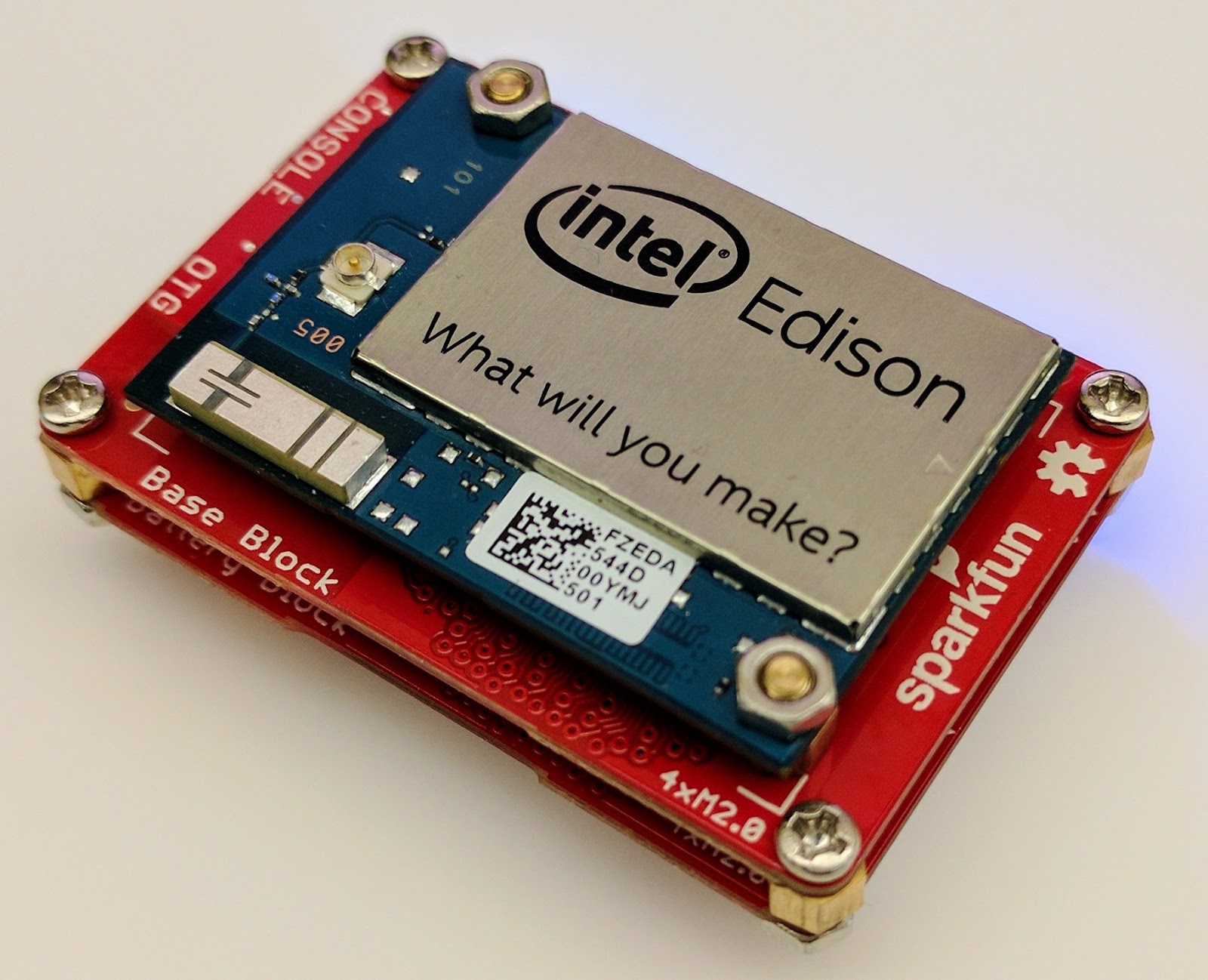
For this proof of concept, I used the Intel Edison as a Linux-based computing platform and augmented it with Sparkfun’s Edison Blocks. To build the device, you will need an Intel Edison, a Base Block, a Battery Block and a Hardware pack.


Developing for the Edison is straightforward using the Intel XDK IDE. We will be creating a simple Node.js application in JavaScript. I relied on 3 libraries: Firebase for the database connection, wireless-tools/iwlist to capture WiFi networks, and macaddress to capture the device MAC. Installation instructions can be found on the linked pages.

Step 1: get the device MAC address and connect to Firebase:

function initialize() {
    macaddress.one('wlan0', function (err, mac) {
        mac_address = mac;
        if (mac === null) {
            console.log('exiting due to null mac Address');
            process.exit(1);
        }
        firebase.initializeApp({
            serviceAccount: '/node_app_slot/.json',
            databaseURL: 'https://.firebaseio.com/'
        });
        var db = firebase.database();
        ref_samples = db.ref('/samples');
        locationSample();
    });
}

The above code contains two placeholders:

  1. The service-account-key is a private key you create in the Firebase Console. Follow the gear icon in the upper left of console, select “settings”, and click Generate New Private Key. Place this key on your Edison in the directory /node_app_slot/. See this Firebase documentation for more information.
  2. The project-id in the database URL is found in the Firebase console database page after you have linked your Google project with Firebase.

Step 2: scan for WiFi networks every 10 seconds and write locally:

function locationSample() {
    var t = new Date();
    iwlist.scan('wlan0', function(err, networks) {
        if(err === null) {
            ref_samples.push({
                mac: mac_address,
                t_usec: t.getTime(),
                t_locale_string: t.toLocaleString(),
                networks: networks,
            });
        } else {
            console.log(err);
        }        
    });
    setTimeout(locationSample, 10000);
}

Write to the cloud

The locationSample() function above writes detectable WiFi networks to a Firebase database that syncs to the cloud when connected to a network.

Caveat: To configure access rights and authentication to Firebase, I set up the device as a “server”. Instructions for this configuration are on the Firebase website. For this proof of concept, I made the assumption that the device was secure enough to house our credentials. If this is not the case for your implementation you should instead follow the instructions for setting up the client JavaScript SDK.

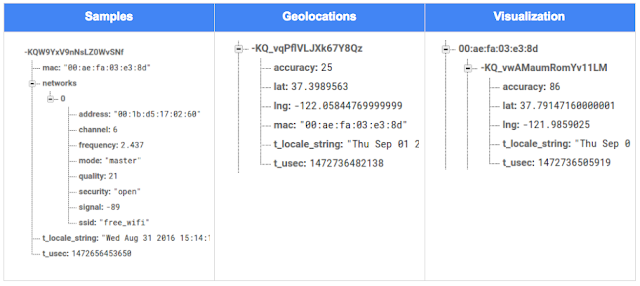
The database uses 3 queues to manage workload: a WiFi samples queue, a geolocation results queue and a visualization data queue. The workflow will be: samples from the device go into a samples queue, which gets consumed to produce geolocations that are put into a geolocations queue. Geolocations are consumed and formatted for presentation, organized by device, and the output is stored in a visualizations bucket for use by our front end website.

Below is an example of a sample, a geolocation, and our visualization data written by the device and seen in the Firebase Database Console.

Processing the Data with Google App Engine

To execute the processing of the sample data I used a long running Google App Engine Backend Module and a custom version of the Java Client for Google Maps Services.

Caveat: To use Firebase with App Engine, you must use manual scaling. Firebase uses background threads to listen for changes and App Engine only allows long-lived background threads on manually scaled backend instances.

The Java Client for Google Maps Services takes care of a lot of the communications code required to use the Maps APIs and follows our published best practices for error handling and retry strategies that respect rate limits. The GeolocateWifiSample() function below is registered as an event listener with Firebase. It loops over each network reported by the device and incorporates it into the geolocation request.

private void GeolocateWifiSample(DataSnapshot sample,  Firebase db_geolocations, Firebase db_errors) {
    // initalize the context and request
    GeoApiContext context = new GeoApiContext(new GaeRequestHandler()).setApiKey("");
    GeolocationApiRequest request = GeolocationApi.newRequest(context)
            .ConsiderIp(false);
    // for every network that was reported in this sample...
    for (DataSnapshot wap : sample.child("networks").getChildren()) {
        // extract the network data from the database so it’s easier to work with
        String wapMac = wap.child("address").getValue(String.class);
        int wapSignalToNoise = wap.child("quality").getValue(int.class);
        int wapStrength = wap.child("signal").getValue(int.class);
        // include this network in our request
        request.AddWifiAccessPoint(new WifiAccessPoint.WifiAccessPointBuilder()
                .MacAddress(wapMac)
                .SignalStrength(wapStrength)
                .SignalToNoiseRatio(wapSignalToNoise)
                .createWifiAccessPoint());
    }
    ...
    try {
        // call the api
        GeolocationResult result = request.CreatePayload().await();
        ...
        // write results to the database and remove the original sample
    } catch (final NotFoundException e) {
        ...
    } catch (final Throwable e) {
        ...
    }
}

Register the GeolocateWifiSample() function as an event handler. The other listeners that process geolocation results and create the visualization data are built in a similar pattern.

ChildEventListener samplesListener = new ChildEventListener() {
    @Override
    public void onChildAdded(DataSnapshot dataSnapshot, String previousChildName) {
        // geolocate and write to new location
        GeolocateWifiSample(dataSnapshot, db_geolocations, db_errors);
    }
    ...
};
db_samples.addChildEventListener(samplesListener);

Visualize the Data

To visualize the device locations I used Google App Engine to serve stored data from Firebase and the Google Maps JavaScript API to create a simple web page that displays the results. The index.html page contains an empty

with id “map”. I initialized this
to contain the Google Map object. I also added “child_added” and “child_removed” event handlers to update the map as the data changes over time.
function initMap() {
    // attach listeners
    firebase.database().ref('/visualization').on('child_added', function(data) {
        ...
        data.ref.on('child_added', function(vizData) {
            circles[vizData.key]= new CircleRoyale(map,
                                vizData.val().lat,
                                vizData.val().lng,
                                vizData.val().accuracy,
                                color);
          set_latest_position(data.key, vizData.val().lat, vizData.val().lng);
        });
        data.ref.on('child_removed', function(data) {
            circles[data.key].removeFromMap();
        });
    });
    // create the map
    map = new google.maps.Map(document.getElementById('map'), {
      center: get_next_device(),
      zoom: 20,
      scaleControl: true,
    });
    ...
}

Since the API returns not only a location but also an indication of accuracy, I’ve created a custom marker that has a pulsing radius to indicate the accuracy component.

Two devices (red and blue) and their last five known positions


What’s next?

In this post I’ve outlined how you can build an IoT device that uses Google Maps Geolocation API to track any internet-connected device – from robotics to wearables. The App Engine processing module can be expanded to use other Google Maps APIs Web Services providing geographic data such as directions, elevation, place or time zone information. Happy building!

As an alternative, you can achieve a similar solution using Google Cloud Platform as a replacement for Firebase—this article shows you how.

author image
About Ken: Ken is a Lead on the Industry Solutions team. He works with customers to bring innovative solutions to market.

Dec 21, 2016
Google Summer of Code 2016 wrap-up: Public Lab

by Open Source Programs Office | Read | No Comments

This post is part of our series of guest posts from students, mentors and organization administrators who participated in Google Summer of Code 2016.


How we made this our best Google Summer of Code ever

This was our fourth year doing Google Summer of Code (GSoC), and it was our best year ever by a wide margin! We had five hard-working students who contributed over 17,000 new lines of (very useful) code to our high-priority projects.

Students voluntarily started coding early and hit the ground running, with full development environments and a working knowledge of GitHub Flow-style pull request process. They communicated with one another and provided peer support. They wrote tests. Hundreds of them! They blogged about their work as they went, and chatted with other community members about how to design features.

All of that was amazing, and it was made better by the fact that we were accepting pull requests with new code twice weekly. Tuesdays and Fridays, I went through new submissions, provided feedback, and pulled new code into our master branch, usually publishing it to our production site once a week.

I don’t know how other projects do things, but this was very new for us, and it’s revolutionized how we work together. In past years, students would work on their forks, slowly building up features. Then in a mad dash at the end, we’d try to merge them into trunk, with lots of conflicts and many hours (weeks!) of work on the part of project maintainers.

Screenshot_2016-08-26_at_11.44.16_AM.png

What made this year so good?

Many things aligned to make this summer great, and basically none of them are our ideas. I’m sure plenty of you are cringing at how we used to do things, but I also don’t think that it’s that unusual for projects not “born” in the fast-paced world of modern code collaboration.

We used ideas and learned from Nicolas Bevacqua, author of JavaScript Application Design and of the woofmark and horsey libraries which I’ve contributed to. We’ve also learned a great deal from the Hoodie community, particularly Gregor Martynus, who we ran into at a BostonJS meetup. Lastly, we learned from SpinachCon, organized by Shauna Gordon McKeon and Deb Nicholson, where people refine their install process by actually going through the process while sitting next to each other.

Broadly, our strategies were:

  • Good documentation for newcomers (duh)
  • Short and sweet install process that you’ve tried yourself (thanks, SpinachCon!)
  • Predictable, regular merge schedule
  • Thorough test suite, and requiring tests with each pull request
  • Modularity, insisting that projects be broken into small, independently testable parts and merged as they’re written

Installation and pull requests

Most of the above sound kind of obvious or trivial, but we saw a lot of changes when we put it all together. Having a really fast install process, and guidance on getting it running in a completely consistent environment like the virtualized Cloud9 service, meant that many students were able to get the code running the same day they found the project. We aimed for an install time of 15 minutes max, and supplied a video of this for one of our codebases.

We also asked students to make a small change (even just add a space to a file) and walk through the GitHub Flow pull request (PR) submission process. We had clear step-by-step guidance for this, and we took it as a good sign when students were able to read through it and do this.

Importantly, we really tried to make each step welcoming, not demanding or dismissive, of folks who weren’t familiar with this process. This ultimately meant that all five students already knew the PR process when they began coding.

Twice-weekly merge schedule

We were concerned that, in past years, students only tried merging a few times and typically towards the end of the summer. This meant really big conflicts (with each other, often) and frustration.

This year we decided that, even though we’re a tiny organization with just one staff coder, we’d try merging on Tuesday and Friday mornings, and we mostly succeeded. Any code that wasn’t clearly presented, commits squashed, passing tests, and submitting new tests, was reviewed and I left friendly comments and requests so it could be merged the following week.

At first I felt bad rejecting PRs, but we had such great students that they got used to the strictness. They got really good at separating out features, demonstrating their features through clear tests, and some began submitting more than two PRs per week – always rebasing on top of the latest master to ensure a linear commit history. Sweet!

Wrap-up and next steps

The last thing we did was to ask each student, essentially as their documentation, to write a series of new issues which clearly described the problem and/or desired behavior, leave suggestions and links to specific lines of code or example code, and mark them with the special “help-wanted” tag which was so helpful to them when they first started out. We asked each to also make one extra-welcoming “first-timers-only” issue which walks a new contributor through every step of making a commit and even provides suggested code to be inserted.

This final requirement was key. While I personally made each of the initial set of “help-wanted” and “first-timers-only” issues before GSoC, now five students were offloading their unfinished to-dos as very readable and inviting issues for others. The effect was immediate, in part because these special tags are syndicated on some sites. Newcomers began picking them up within hours and our students were very helpful in guiding them through their first contributions to open source.

I want to thank everyone who made this past summer so great, from our champion mentors and community members, to our stellar students, to all our inspirations in this new process, to the dozen or so new contributors we’ve attracted since the end of August.

By Jeff Warren, Organization Administrator for PublicLab.org

Dec 20, 2016
Get the guide to finding success in new markets on Google Play

by Android Developers | Read | No Comments

Posted by Lily Sheringham, Developer Marketing at Google Play

With just a few clicks, you can publish an app to Google Play and access a
global audience of more than 1 billion 30 days active users. Finding success in
global markets means considering how each market differs, planning for high
quality localization, and tailoring your activity to the local audience. The new
Going
Global Playbook provides best practices and tips, with advice from
developers who’ve successfully gone global.

This guide includes advice to help you plan your approach to going global,
prepare your app for new markets, take your app to market, and also include data
and insights for key countries and other useful resources.

This ebook joins others that we’ve recently published including The
Building for Billions Playbook and The
News Publisher Playbook. All of our ebooks are promoted in the Playbook for Developers app, which is
where you can stay up to date with all the news and best practices you need to
find success on Google Play.

How useful did you find this blogpost?


★ ★ ★ ★ ★
What is Google Data?

Google Data is the only site where you can get news from 60+ official Google blogs all in one place. We have published 24,235 official posts since January 2005.


Categories

  • Gmail (Google Mail) (436)
  • Google Adsense (1,013)
  • Google Adsense Feeds (46)
  • Google Adwords (1,224)
  • Google Adwords API (366)
  • Google Affiliate Network (141)
  • Google Ajax API (121)
  • Google Analytics (961)
  • Google Android (654)
  • Google App Engine (332)
  • Google Apps (1,865)
  • Google Blog (1,650)
  • Google Blogger Buzz (527)
  • Google Books (300)
  • Google Checkout (162)
  • Google Chrome (312)
  • Google Code (828)
  • Google Conversions (137)
  • Google CPG (198)
  • Google Custom Search (129)
  • Google Desktop (144)
  • Google Desktop API (175)
  • Google Docs (717)
  • Google DoubleClick (730)
  • Google Earth (1,006)
  • Google Enterprise (1,278)
  • Google Finance (88)
  • Google Gadgets (31)
  • Google Gears (60)
  • Google Grants (285)
  • Google Mac Blog (149)
  • Google Maps (736)
  • Google Merchant (219)
  • Google Mobile (386)
  • Google News (152)
  • Google Notebook (20)
  • Google Online Security (221)
  • Google Open Source (929)
  • Google OpenSocial (197)
  • Google Orkut (381)
  • Google Photos (Picasa) (109)
  • Google Product Ideas (23)
  • Google Public Policy (675)
  • Google Reader (124)
  • Google RechargeIT (29)
  • Google Research (423)
  • Google SketchUp (692)
  • Google Student Blog (848)
  • Google Talk (107)
  • Google Testing (326)
  • Google Translate (98)
  • Google TV Ads Blog (163)
  • Google Video (293)
  • Google Voice (86)
  • Google Wave (38)
  • Google Webmaster Central (376)
  • Google Website Optimizer (101)
  • Google.org (183)
  • iGoogle (87)
  • Uncategorized (1,262)
  • Youtube (779)
  • Youtube API (173)

Tags

adsense adsense google advertisers advertising adwords adwords google adwords tips analytics analytics google android gmail for domains Google Adsense Google Adwords google adwords help Google Analytics google analytics ga.js Google Android Google Apps google apps enterprise google apps free google apps gmail google apps standard google apps sync Google Blog google calendar google chat google culture Google Docs Google Earth Google Enterprise google insights google lat-long Google Mobile Google News google products google statistics google student google updates official google blog open source publishers students website analytics website statistics website stats

Archives

  • December 2016 (58)
  • November 2016 (83)
  • October 2016 (97)
  • September 2016 (113)
  • August 2016 (90)
  • July 2016 (87)
  • June 2016 (100)
  • May 2016 (112)
  • April 2016 (101)
  • March 2016 (116)
  • February 2016 (93)
  • January 2016 (66)
  • December 2015 (111)
  • November 2015 (105)
  • October 2015 (105)
  • September 2015 (116)
  • August 2015 (98)
  • July 2015 (106)
  • June 2015 (149)
  • May 2015 (94)
  • April 2015 (107)
  • March 2015 (124)
  • February 2015 (109)
  • January 2015 (69)
  • December 2014 (123)
  • November 2014 (107)
  • October 2014 (134)
  • September 2014 (132)
  • August 2014 (110)
  • July 2014 (118)
  • June 2014 (142)
  • May 2014 (129)
  • April 2014 (99)
  • March 2014 (125)
  • February 2014 (112)
  • January 2014 (88)
  • December 2013 (104)
  • November 2013 (147)
  • October 2013 (152)
  • September 2013 (114)
  • August 2013 (119)
  • July 2013 (136)
  • June 2013 (173)
  • May 2013 (213)
  • April 2013 (168)
  • March 2013 (167)
  • February 2013 (145)
  • January 2013 (132)
  • December 2012 (156)
  • November 2012 (151)
  • October 2012 (203)
  • September 2012 (168)
  • August 2012 (190)
  • July 2012 (151)
  • June 2012 (169)
  • May 2012 (169)
  • April 2012 (193)
  • March 2012 (227)
  • February 2012 (195)
  • January 2012 (191)
  • December 2011 (243)
  • November 2011 (248)
  • October 2011 (282)
  • September 2011 (271)
  • August 2011 (261)
  • July 2011 (275)
  • June 2011 (259)
  • May 2011 (148)
  • April 2011 (83)
  • March 2011 (92)
  • February 2011 (109)
  • January 2011 (253)
  • December 2010 (397)
  • November 2010 (322)
  • October 2010 (328)
  • September 2010 (402)
  • August 2010 (305)
  • July 2010 (293)
  • June 2010 (362)
  • May 2010 (367)
  • April 2010 (355)
  • March 2010 (363)
  • February 2010 (294)
  • January 2010 (267)
  • December 2009 (321)
  • November 2009 (308)
  • October 2009 (380)
  • September 2009 (344)
  • August 2009 (302)
  • July 2009 (347)
  • June 2009 (357)
  • May 2009 (352)
  • April 2009 (353)
  • March 2009 (351)
  • February 2009 (296)
  • January 2009 (239)
  • December 2008 (253)
  • November 2008 (273)
  • October 2008 (357)
  • September 2008 (316)
  • August 2008 (239)
  • July 2008 (241)
  • June 2008 (250)
  • May 2008 (247)
  • April 2008 (263)
  • March 2008 (251)
  • February 2008 (187)
  • January 2008 (172)
  • December 2007 (179)
  • November 2007 (177)
  • October 2007 (195)
  • September 2007 (148)
  • August 2007 (161)
  • July 2007 (182)
  • June 2007 (152)
  • May 2007 (109)
  • April 2007 (98)
  • March 2007 (93)
  • February 2007 (75)
  • January 2007 (75)
  • December 2006 (82)
  • November 2006 (122)
  • October 2006 (115)
  • September 2006 (106)
  • August 2006 (120)
  • July 2006 (69)
  • June 2006 (61)
  • May 2006 (51)
  • April 2006 (46)
  • March 2006 (48)
  • February 2006 (45)
  • January 2006 (46)
  • December 2005 (51)
  • November 2005 (50)
  • October 2005 (23)
  • September 2005 (39)
  • August 2005 (28)
  • July 2005 (15)
  • June 2005 (25)
  • May 2005 (27)
  • April 2005 (31)
  • March 2005 (31)
  • February 2005 (3)
  • January 2005 (1)

Recent Posts

  • Other sites are using my ad code. What should I do?
  • Open source down under: Linux.conf.au 2017
  • Taking the pulse of Google Code-in 2016
  • Introducing the ExifInterface Support Library
  • Geolocation and Firebase for the Internet of Things
  • Google Summer of Code 2016 wrap-up: Public Lab
  • Get the guide to finding success in new markets on Google Play
  • Start building Actions on Google
  • Best practices to improve app engagement
  • Project Wycheproof
January 2017
M T W T F S S
« Dec    
  1
2 3 4 5 6 7 8
9 10 11 12 13 14 15
16 17 18 19 20 21 22
23 24 25 26 27 28 29
30 31  

Page 11 of 1,615« First«...910111213...203040...»Last »


Copyright © 2017 GoogleData.org, All Rights Reserved.
This site is not operated by, sponsored by, endorsed by, or affiliated with Google Inc. in any way.
Rss Feed Tweeter button Facebook button Technorati button Reddit button Myspace button Linkedin button Delicious button Digg button Stumbleupon button Newsvine button