We have some good news to share with respect to 3D buildings and Google Earth imagery.
A common challenge for geo-modelers are imagery updates that occur after a building model has been published to Google Earth. In some updates models were unaffected, but in others, models became misaligned (some significantly).
We appreciate the fact that our enthusiastic geo-modeling community prefers to spend their time creating buildings instead of chasing imagery around. Our engineers have been hard at work solving this problem.
Very shortly we'll be running a program that identifies models that have been affected by imagery shifts, and automatically adjust them. The earth is an imperfect place so it’s possible, that not every building will adjust perfectly. However, our testing suggests that this new system of tracking imagery updates should help immensely. This new feature will work both retroactively and into the future. You can be rest assured that we’ll be trying to keep your models aligned properly going forward as our imagery is updated.
If your model was affected by this process you'll see a notification on your model details page. The notification will indicate whether we were able to automatically adjust the model or not.
In either case, we encourage you to review your models in the Google 3D Warehouse to see whether any action is required by you. We apologize for the inconvenience that this issue has caused and hope that this system improvement will be met with much user-happiness.
When it comes to mobile search, we strive to not only give you the same comprehensiveness and relevance as when searching with Google on your computer, but also a consistent look, feel, and overall user experience. So today, as we roll out a new look for Google Search results on your computer, we are happy to announce similar changes to Google Search results for mobile.
When you go to Google.com in the US on your iPhone or Android-powered device, and enter a search, you can now tap on the button to the left of the search box on the results page to see a new search options menu. Then, selecting any item in the menu will refine your search. For example, if you are looking for recent results for "Mother's day gift", simply tap the "Past week" option.
You may notice that when the menu expands, the search results slide off screen to the right. Note that you can still interact with them and see them in full just by panning to the right. Also, there are some additional menu options, like "News" and "Products". In the weeks to come, we will be supporting more devices and locales, and expanding the number of options available.
Updateon 5/7 @ 9:20 am: Note that Palm webOS is now supported as well -- as some of you have noticed.
Posted by Reza Ziaei and Mike Buchanan, Google Mobile Engineering Team
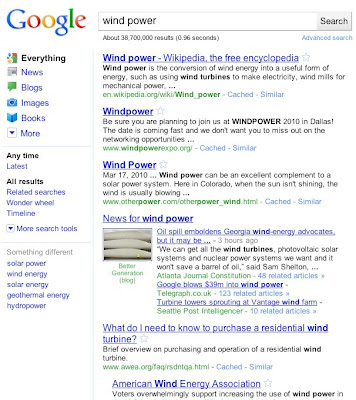
Using Google today, you may have noticed that something feels slightly different — the look and feel of our search results have changed! Today’s metamorphosis responds to the increasing richness of the web and the increasing power of search — revealing search tools on the left and updating the visual look and feel throughout. While we are constantly rolling out small changes and updates, today’s changes showcase the latest evolutions in our search technology, making it easier than ever to find exactly what you're looking for.
The new Google look, with simple left-hand navigation.
What’s new and what’s changed?
We’ve added contextually relevant, left-hand navigation to the page. This new side panel highlights the most relevant search tools and refinements for your query. Over the past three years, we've launched Universal Search, the Search Options panel and Google Squared, and it’s those three technologies that power the left-hand panel.
Universal Search helps you find the most relevant types of results for your search. The top section of the new left-hand panel builds on Universal Search by suggesting the most relevant genres of results for your query and letting you seamlessly switch to these different types of results. The “Everything” option remains our essential search experience with different types of results integrated into the main results, but now you can also easily switch to just the particular type of results you are looking for.
Our expandable Search Options panel launched last spring brought many rich slice-and-dice tools to search. The new left-hand navigation showcases these tools and enables you to get a different view of your results. Perhaps you’d like to see images from each of the results or just the newest information? These options are all on the left, and our technology will suggest the tools that are most relevant and helpful to your query.
Google Squared (available on Google Labs) helps you find and compare entities. Our “Something different” feature builds on the technology in Google Squared to find other entities that are related to your query, so you can easily explore not only the results for your current query but other related topics.
In addition to the left-hand side changes, we’ve updated our look and feel in terms of our color palette and our logo. These changes are slight, keeping our page minimalist and whimsical, but make our overall look more modern.
The new design refreshes and streamlines the look, feel and functionality of Google, making it easier to pinpoint what you’re looking for. It’s powerful, yet simple. Today’s changes are the latest in our continuing efforts to evolve and improve Google. We've been testing these changes with users over the past few months, and what we're launching today reflects the feedback we've received.. We want to ensure that the Google you use today is better than the one you used yesterday, and these latest changes open up many possibilities for future features and enhancements.
To hear more about our new design, check out this video:
Our new interface begins rolling out today globally across 37 languages. We are also launching the mobile version concurrently for English interfaces in the United States. Search on!
Posted by Marissa Mayer, VP Search Products & User Experience
A few weeks ago we introduced a new version of the spreadsheet editor in Google Docs.
Today, we’re adding the ability to copy a sheet from one spreadsheet to another in the new version. To start, simply click on the sheet tab at the bottom of the page and select “Copy to...”.
You’ll see a pop-up dialog box where you can search for the destination spreadsheet. You can choose any spreadsheet you own or have editing access to:
Once you’ve selected a spreadsheet, you can open it to find that the sheet has been copied.
To give the new spreadsheet editor a try, click the New version link in the top right corner of any spreadsheet. There’s more info about this feature in the help center and let us know what you think in the forums.
Yesterday, we released a new beta for Chrome, and teamed up with a few creative minds to bring Chrome’s speed to life with an early preview of a series of fun, unconventional speed tests for the browser. As promised in my blogpost, here’s a follow-up video of the full results!
(Watching web pages load at 2700 frames per second reveals unexpected artifacts. If you're interested in the technical details, read on in the video's description drop-down in YouTube).
Ben and Jerry turned a $5 correspondence class in ice cream making into a multi-million dollar business. Phil Knight, the founder of Nike, sold sneakers out of the trunk of his car at track meets. And, like many silicon valley startups, Google got its start, literally, in a garage.
Every business starts small and sometimes, with a little luck, they catch on. One way to make sure your business has the best possible chance of success is to make sure it has a strong web presence. A new generation of tools geared especially for even the smallest businesses make this easier than ever. They are easy, low-cost and often completely free and they can ensure that consumers can find you online and learn about what you do.
These tools are great for small business and for our economy and that's why we've teamed with the U.S. Small Business Administration to create a website featuring video testimonials by small business owners who are using online tools to attract more customers. The goal of the partnership between Google and the SBA is to help small businesses understand the tools and resources available to them online and learn savvy tips from other small business owners.
Establish your online presence. One out of five searches on Google are related to local information. Massive numbers of consumers are using the Internet to search for everything from taekwondo classes on the south side of town to a trusted vet for the family pet. Small and large businesses can easily create a rich online presence using tools like Google Places and, for businesses that want to take the plunge and create a full-blown website, ready-made site templates and free hosting services like Google Sites make creating one painless and fast.
Use free marketing to reach customers. You can build a fan base for your business with free services like YouTube, Facebook and Twitter that will keep your customers in-the-know about new products and special promotions. These services are great "word of mouth" platforms that make it easy for a customer following your business to tell their friends about it.
Understand your customers. Online tools can make you smarter about your customers by analyzing the search terms they use to find you and the pages they visit on your site. This data can help you tune your offers and site to what's truly popular and can be used to help you select terms for online search advertising such as Google AdWords.
In addition to the videos, Google also produced a “Tools for Online Success” booklet that will be in nearly 1,000 SBA, SCORE, and Women's Development Centers nationwide. The booklet offers online tips and tricks for businesses of any size.
Posted by John Hanke, Vice President of Product Management
Yesterday we announced a new set of AdWords reports in Google Analytics which allow you to see detailed information on what happens after a visitor clicks on one of your AdWords ads.
Over the coming weeks this new set of AdWords reports will become available in your Google Analytics account, under the ‘Traffic Sources’ section. These new reports will allow you to break out your AdWords traffic by actual search query, match type, distribution network and many other AdWords attributes. We’ve also added reports for day parting, placements, and destination URLs to allow you to make informed changes in your AdWords account to improve performance.
To avail of these reports you must first link Google Analytics to your AdWords account and enable auto-tagging. Find out how to do this here.
You should also check out this short YouTube video to see our new AdWords reports in action:
We’ll have a follow up post in the next few weeks to show you how you can use these new Google Analytics reports to optimise your AdWords performance.
Administrators now have the ability to remove individual users from appearing in contact sharing when that option is enabled. Contact sharing is also sometimes referred to as the global address list.
Editions included:
Premier and Education Editions
Languages included:
US English
How to access what's new:
- In the Google Apps control panel, click the ‘Users and groups’ tab, then click on the individual user’s name to access the user’s settings.
- Under ‘Contact sharing’, disable/enable the checkbox to remove/include the user from appearing in contact sharing.
- If contact sharing is enabled, then the user’s contact information is shared by default.
- If contact sharing has not been enabled, then this new option will not be visible.
Note: The control panel needs to be the ‘Next generation’ version.
For more information:
http://www.google.com/support/a/bin/answer.py?hl=en&answer=60218
Get these product update alerts by email Subscribe to the RSS feed of these updates
Hi, my name is Björn Brala. In the last two years, I've been working on GeoStart, a framework based on the Google Maps API. In that time, the developer community has been an invaluable source of information and help.
When the Google Maps API V3 was released, we were asked to port V2 utility libraries over to work with V3. Since I enjoy challenges, I decided to port over the MarkerManager library. After some rigorous testing and help from Daniel Lee, one of Google's Developer Programs Engineers supporting Geo APIs, I succeeded!
For those who are not familiar with MarkerManager, it's a class originally created by Doug Ricket that manages the additions and removals of many markers when the viewport changes.
Since real code can sometimes speak a thousand words, here's a basic Weather Map example which uses the MarkerManager class. This map creates a random collection of weather markers. When you zoom in, more weather markers are displayed to show more detailed local weather.
If you want to see more examples coupled with detailed explanations on how to use the code, visit the examplespage and the reference guide, which are both hosted in the Google Maps Utility Library V3 project.
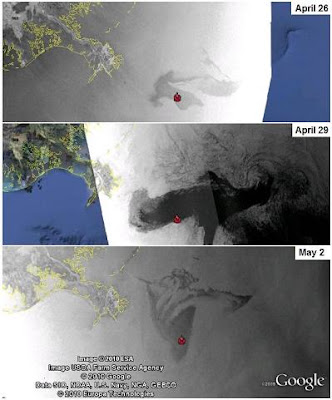
Two weeks ago, there was a fatal explosion on the offshore oil rig Deepwater Horizon in the Gulf of Mexico. The rig sank shortly afterwards, and since then the well has been leaking crude oil into the Gulf, spreading an oil slick towards the U.S. Gulf Coast. This spill is pouring as many as 5,000 barrels (210,000 gallons) of oil a day into the Gulf and poses a serious threat to coastal industries, sensitive habitats and wildlife, including numerous species along the coastal areas of Louisiana, Mississippi, Alabama and Florida. Many government agencies and other organizations have made data publicly available, which we’ve compiled on our crisis response site dedicated to the spill.
Last week we made imagery from NASA’s MODIS available as an overlay for Google Earth, which currently shows the extent of the oil spill through April 29, and we’ll continue to add more imagery as it becomes available. We’ve also made radar images from ESA’s ENVISAT available through this KML file. Below, you can see the progression of the spill over time.
To view this imagery and other datasets in Google Earth, turn on the “Places of Interest” layer in the Layers panel on the left-hand side of Google Earth, then navigate to the Gulf of Mexico and click on the red icon.
In addition to this imagery, our site contains maps of the locations of the oil, fishing closures and affected areas, the ability to upload videos directly to YouTube, and a link to a site where people in the area can contribute their observations. We hope these resources are useful to those affected by the spill, those responding to it and those learning about its devastating effects on the people and environment of the Gulf Coast.
Posted by Christiaan Adams, Google Crisis Response team
100,000 language pairs and advanced features in Translator Toolkit
Last week, we launched a variety of features on Google Translator Toolkit, Google’s easy-to-use translation aid.
100,000 language pairs. Now you can translate from 345 source languages into 345 target languages in Translator Toolkit. For example, you can translate from Welsh into Spanish or Māori into Chinese.
Open translation as a Google document. When you’ve completed your translation, you can publish your translation into Google Docs. From Docs, you can invite other users to edit or view the translation, or you can publish your translation as a web page.
Spell check. Translator Toolkit now supports spell check, so you can verify the spelling of your translations.
Colored segments. To help you translate even faster, you can now customize your translation view so that, for example, machine-translated text is red, ‘high-fuzzy’ match (or near-perfect) translations are orange, and human translations are black. By customizing your view, you can quickly spot the text that needs the most work.
Translation statistics. When you create a new translation, we now calculate translation scope, which shows the number of untranslated words, machine translated words, ‘high-fuzzy’ match words, and perfect translation memory words in your translation. Translation statistics can help you figure out how much work you’ll need to do to create the perfect translation even before you get started.
Split and merge segments. Sometimes one sentence in one language translates to two sentences in another language. For example, the English sentence,
Jen is a huge Dalí fan and she wanted to hit both Figueras and Cadaqués, two must-sees on her itinerary.
translates into two sentences in Chinese:
简是一个超级的达利爱好者。
她想去Figueras和Cadaqués,两个她行程中的必经之地。
By splitting the segment, advanced users can improve leverage in their translation memories. Similarly, we also allow users to merge segments, so advanced users can rearrange sentences to create the perfect translation.
Check out these latest features in Translator Toolkit and let us know what you think.
AdWords provides several ways for you to track the performance of your ads– most of which focus on clicks. Sometimes, however, understanding what happens after people click on your ads is just as important for measuring your AdWords performance. Today at the eMetrics conference in San Jose, we announced a new set of AdWords reports in Google Analytics to help you do exactly that.
The new AdWords reports in Google Analytics give you more insight into what happens after the click. For example, suppose you wanted to see if potential customers searching for your exact matched keywords were more engaged with your site’s content than those who were searching on broader terms. Using the new reports, you can view all the visits from clicks on exact matched ads for any keyword, ad group, or campaign in your account. You can also see how many pages that group visited and the average time spent on site. If you use the funnel reports in Google Analytics, you can even see the specific step where visitors tend to drop off when trying to make a purchase.
Want to see other ways you can use the new reports? Check out this short video:
If you’re ready to use the new reports, you just need to have a linked Google Analytics account with destination URL auto-tagging turned on. This is easy to set up; you can start by clicking on the Reporting tab, and then selecting Google Analytics in your AdWords account.
We’re rolling these new AdWords reports out gradually over the next several weeks, so you may not see them right away. You’ll know when the new reports have been added to your account when you see the AdWords section in your Traffic Sources reports in Google Analytics.
(click for full-size image
We hope these reports make it easier for you to measure the success of your AdWords campaigns!
We'll be performing routine system maintenance on Saturday, May 8th from approximately 10:00am to 2:00pm PDT. You won't be able to access AdWords or the API during this time frame, but your ads will continue to run as normal.
We’ve been talking with the Federal Trade Commission for the past six months about our planned acquisition of mobile advertising start-up AdMob, which we believe will bring new innovation and competition to mobile advertising. We’ve told the FTC about how new and highly competitive the mobile advertising space is, and the FTC has been talking to others in the industry about their views as well.
Some of those folks are sharing what they told the FTC. The developers of a mobile app called Wertago said they told the FTC that:
The internet and mobile technology sectors right now are perhaps the most (or among the most) competitive and fast-moving industries EVER TO EXIST. The web and mobile spaces have remarkably low barriers to entry. [...] And we think Google’s AdMob acquisition will have little if any effect on the competitiveness of the mobile advertising market space.
Wertago also talked about both the low entry barriers and non-existing switching costs in mobile advertising:
The crucial point here is 1) the marginal advertiser and the marginal developer, not the average or typical advertiser and developer, are who drive the competition, and there will always be a fight for them, especially because of the “long-tail” where lots of niche opportunities exist, and 2) the cost of switching ad networks in a mobile app is close to zero, and the cost of developing an ad network is not terribly high and easily bankrolled.
Industry analyst Greg Sterling also met with the FTC, and said that he told them:
I didn’t believe competition would be affected adversely and that advertising prices were not likely to go up. Indeed, mobile CPM prices have been falling in mobile. In short I said, yes Google becomes more powerful and effective but the deal doesn’t stifle competition. The market is dynamic and highly competitive, I told the FTC.
And:
I’m no laissez-faire capitalist but I think the mobile ad market is both very young and highly dynamic. It’s evolving quickly and definitely very competitive. If the objective of anti-trust law is to protect competition in the market then it is simply unnecessary for the FTC to intervene at this stage by blocking the AdMob deal.
Other analysts and observers have been weighing in too:
Ad Age: Google Wins Industry Support for AdMob Deal
eConsultancy: In case the FTC hasn't noticed, the mobile ad market is still anyone's game
Paid Content: Why the FTC Should Allow the Google-AdMob Merger
Wired: FTC Blocking of Google Mobile Ad Acquisition Would be Misguided
Motley Fool: Why the FTC Should Keep Its Hands Off Google
Tom Lenard, Technology Policy Institute: Google-AdMob: A Bad Precedent
Ryan Radia, Competitive Enterprise Institute: FTC Should Green Light Google-AdMob Deal
Silicon Alley Insider: The Real Reason Why the FTC Must Approve the Google-AdMob Deal Immediately
With Google and AdMob facing strong competition every day from businesses like Apple, JumpTap, Millennial Media, Microsoft, inMobi, Greystripe, Mobclix and many more, we agree that there’s vibrant competition in this space.
Update (5/5): Dow Jones asked a few players in the mobile industry yesterday what they thought about the deal:
Two of these people said the FTC staff didn't appear to be taking into account other companies like Millennial Media Inc., Greystripe Inc. and Jumptap Inc., all of which operate in-application advertising networks. By a broader definition, the mobile advertising market also includes corporate behemoths such as Yahoo Inc. (YHOO) and Microsoft Corp. (MSFT), which serve ads displayed on mobile websites.[...]
Industry insiders and analysts said an FTC antitrust challenge would be problematic for a number of reasons. One industry source argued that it was a "flawed theory" to distinguish between ads that appear within mobile-phone applications and those displayed on mobile websites. This person said the mobile-advertising market is at such an early stage that it is impossible to predict which companies will emerge on top.
Michael Chang, chief executive at Greystripe, acknowledged that the combination of Google and AdMob would create a stronger rival, but he agreed that the market is too new and too dynamic to predict how it will evolve.
"It definitely creates a stronger competitor, but we're in the second inning and it's going to be a long game," said Chang.
In the second part of our ‘Additional Publisher Resources’ video series, Deborah Chang will explain how website owners can use Google’s Webmaster Tools to ensure that their site is properly indexed in Google’s search engine. Webmaster Tools is a powerful tool where publishers can gather information on what sites on the web link to them, under what keywords they’re site is likely to be found, and how they can improve their sites’ load times.
Posted by Matthew Carpenter-Arevalo - Inside AdSense team
[This post is by Eric Chu, Android Developer Ecosystem. —Tim Bray]Providing users with more information about applications on Android Market has been a top request from Android users. Starting in a few weeks, we will be showing content ratings for a…
Editor’s note: We recently launched an improvement that makes over 60 additional Google services available to Google Apps users. This series showcases what’s new and how your organization can benefit.Welcome to Google FinanceFinancial market data i…
Nearly a year in the making, kernel.org has announced four new machines coming online in November of 2010. This is quite the change in infrastructure, covering two new “heavy lifting machines” and two new backend machines to round out kernel.org’s inf…
My name is Yoichiro Tanaka, I am in charge of the architect of mixi Platform. mixi is the most popular social networking service in Japan. We are happy to announce that a smart-phone platform has been launched on mixi Platform.mixi Platform supports Op…
Chef John Mitzewich is the voice behind YouTube’s most subscribed cooking channel, Food Wishes. Chef John today posted his 500th video to YouTube, and he recently took time out to answer a few questions about how he makes his videos and the trends h…
Nov 23, 2010
The Lost Archives of the Google Geo Developers Series
Back in December of 2009, five leading scientists from the American Geophysical Union trekked
to the remote Google office in downtown San Francisco. Lost until now, the video of their
presentations have resurfaced. So, for the first time ever, we…
About Google Data
Google organizes the worlds data, we organize theirs. Everything Google: News, Products, Services, Content, Culture
Artician Artician Pro Browse Artician Explore Artician Community Artician Discussion Search ArticianArtician Web Development Studios Artician ClientsPath Expert - Pathology Software Reporting and Management System for Medical Laboratories and Hospitals Path Experts Key Features and Benefits Contact Path Expert ry Path Expert DemoGoogleData.org



 Once you’ve selected a spreadsheet, you can open it to find that the sheet has been copied.