Google Data

  • Home
  • Everything Google
    • Gmail (Google Mail)
    • Google Adsense
    • Google Adsense Feeds
    • Google Adwords
    • Google Adwords API
    • Google Affiliate Network
    • Google Ajax API
    • Google Analytics
    • Google Android
    • Google App Engine
    • Google Apps
    • Google Blog
    • Google Blogger Buzz
    • Google Books
    • Google Checkout
    • Google Chrome
    • Google Code
    • Google Conversions
    • Google CPG
    • Google Custom Search
    • Google Desktop
    • Google Desktop API
    • Google Docs
    • Google DoubleClick
    • Google Earth
    • Google Enterprise
    • Google Finance
    • Google Gadgets
    • Google Gears
    • Google Grants
    • Google Mac Blog
    • Google Maps
    • Google Merchant
    • Google Mobile
    • Google News
    • Google Notebook
    • Google Online Security
    • Google Open Source
    • Google OpenSocial
    • Google Orkut
    • Google Photos (Picasa)
    • Google Product Ideas
    • Google Public Policy
    • Google Reader
    • Google RechargeIT
    • Google Research
    • Google SketchUp
    • Google Student Blog
    • Google Talk
    • Google Testing
    • Google Translate
    • Google TV Ads Blog
    • Google Video
    • Google Voice
    • Google Wave
    • Google Webmaster Central
    • Google Website Optimizer
    • Google.org
    • iGoogle
    • Uncategorized
    • Youtube
    • Youtube API
  • Resources
    • Google Products & Services
    • Google Twitter Directory
    • Google Trademarks
    • Google Data Site Map
  • About
  • Contact
  • Subscribe via RSS

Webmaster tips for creating accessible, crawlable sites

April 14th, 2008  |  Published in Google Webmaster Central
Written by T.V. Raman, Research Scientist
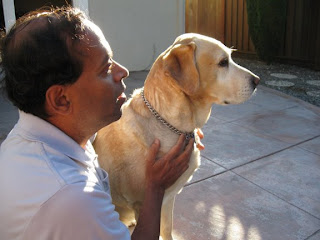
Raman and Hubbell at home
Hubbell and I enjoying the day at our home in California. Please feel free to view my earlier post about accessibility for webmasters, as well as additional articles I've written for the Official Google blog.

One of the most frequently asked questions about Accessible Search is: What can I do to make my site rank well on Accessible Search? At the same time, webmasters often ask a similar but broader question: What can I do to rank high on Google Search?

Well I'm pleased to tell you that you can kill two birds with one stone: critical site features such as site navigation can be created to work for all users, including our own Googlebot. Below are a few tips for you to consider.

Ensure that all critical content is reachable

To access content, it needs to be reachable. Users and web crawlers reach content by navigating through hyperlinks, so as a critical first step, ensure that all content on your site is reachable via plain HTML hyperlinks, and avoid hiding critical portions of your site behind technologies such as JavaScript or Flash.

Plain hyperlinks are hyperlinks created via an HTML anchor element . Next, ensure that the target of all hyperlinks i.e. elements are real URLs, rather than using an empty hyperlink while deferring hyperlink behavior to an onclick handler.

In short, avoid hyperlinks of the form:
Product Catalog

In preference of simpler links, such as:
Product Catalog

Ensure that content is readable

To be useful, content needs to be readable by everyone. Ensure that all important content on your site is present within the text of HTML documents. Content needs to be available without needing to evaluate scripts on a page. Content hidden behind Flash animations or text generated within the browser by executable JavaScript remains opaque to the Googlebot, as well as to most blind users.

Ensure that content is available in reading order

Having discovered and arrived at your readable content, a user needs to be able to follow the content you've put together in its logical reading order. If you are using a complex, multi-column layout for most of the content on your site, you might wish to step back and analyze how you are achieving the desired effect. For example, using deeply-nested HTML tables makes it difficult to link together related pieces of text in a logical manner.

The same effect can often be achieved using CSS and logically organized
elements in HTML. As an added bonus, you will find that your site renders much faster as a result.

Supplement all visual content--don't be afraid of redundancy!

Making information accessible to all does not mean that you need to 'dumb down' your site to simple text. Making your content maximally redundant is critical in ensuring that your content is maximally useful to everyone. Here are a few simple tips:
  • Ensure that content communicated via images is available when those images are missing. This goes further than adding appropriate alt attributes to relevant images. Ensure that the text surrounding the image does an adequate job of setting the context for why the image is being used, as well as detailing the conclusions you expect a person seeing the image to draw. In short, if you want to make sure everyone knows it's a picture of a bridge, wrap that text around the image.

  • Add relevant summaries and captions to tables so that the reader can gain a high-level appreciation for the information being conveyed before delving into the details contained within.

  • Accompany visual animations such as data displays with a detailed textual summary.
Following these simple tips greatly increases the quality of your landing pages for everyone. As a positive side-effect, you'll most likely discover that your site gets better indexed!

Leave a Response

Categories

  • Gmail (Google Mail) (413)
  • Google Adsense (897)
  • Google Adsense Feeds (46)
  • Google Adwords (1,100)
  • Google Adwords API (366)
  • Google Affiliate Network (141)
  • Google Ajax API (121)
  • Google Analytics (842)
  • Google Android (436)
  • Google App Engine (331)
  • Google Apps (1,571)
  • Google Blog (1,475)
  • Google Blogger Buzz (518)
  • Google Books (300)
  • Google Checkout (162)
  • Google Chrome (286)
  • Google Code (828)
  • Google Conversions (137)
  • Google CPG (198)
  • Google Custom Search (129)
  • Google Desktop (144)
  • Google Desktop API (175)
  • Google Docs (646)
  • Google DoubleClick (592)
  • Google Earth (926)
  • Google Enterprise (1,278)
  • Google Finance (88)
  • Google Gadgets (31)
  • Google Gears (60)
  • Google Grants (285)
  • Google Mac Blog (149)
  • Google Maps (667)
  • Google Merchant (215)
  • Google Mobile (386)
  • Google News (148)
  • Google Notebook (20)
  • Google Online Security (158)
  • Google Open Source (811)
  • Google OpenSocial (197)
  • Google Orkut (381)
  • Google Photos (Picasa) (108)
  • Google Product Ideas (23)
  • Google Public Policy (648)
  • Google Reader (124)
  • Google RechargeIT (29)
  • Google Research (318)
  • Google SketchUp (692)
  • Google Student Blog (792)
  • Google Talk (107)
  • Google Testing (305)
  • Google Translate (82)
  • Google TV Ads Blog (163)
  • Google Video (293)
  • Google Voice (86)
  • Google Wave (38)
  • Google Webmaster Central (376)
  • Google Website Optimizer (101)
  • Google.org (175)
  • iGoogle (87)
  • Uncategorized (1,262)
  • Youtube (764)
  • Youtube API (173)

Tags

adsense adsense google advertisers advertising adwords adwords google adwords tips analytics analytics google android gmail for domains Google Adsense Google Adwords google adwords help Google Analytics google analytics ga.js Google Android Google Apps google apps enterprise google apps free google apps gmail google apps standard google apps sync Google Blog google calendar google chat google culture Google Docs Google Earth Google Enterprise google insights google lat-long Google Mobile Google News google products google statistics google student google updates official google blog open source publishers students website analytics website statistics website stats

Page 1 of 11


Copyright © 2015 GoogleData.org, All Rights Reserved.
This site is not operated by, sponsored by, endorsed by, or affiliated with Google Inc. in any way.
Rss Feed Tweeter button Facebook button Technorati button Reddit button Myspace button Linkedin button Delicious button Digg button Stumbleupon button Newsvine button